

Most ERP delays start the same way: nobody clearly owns the decision. When that happens, scope drifts, testing slips, training gets pushed back, and go-live gets riskier. That matters because ERP failure rates can reach 70%–75%, and only 13% of projects fully hit planned scope, schedule, and business results.
If I had to sum up the article in one line, it’s this: name the right leaders early, give each one clear decision rights, and lock that down before system setup starts.
Here’s the short version of who needs to own what:
- Executive Sponsor: budget, top-level direction, deadlock calls
- Finance Lead: chart of accounts, revenue rules, reporting, close targets
- Project Lead: schedule, scope control, risks, day-to-day coordination
- IT Lead: integrations, data migration, security, system setup
- Operations Lead: workflows, process rules, field execution fit
- Branch Leader: local readiness, branch data, training support, cutover sign-off
- Change Lead: communication, training, user readiness, post-go-live support
A few numbers stand out:
- Projects with very effective sponsors hit goals 79% of the time, versus 27% with poor sponsorship
- Poor data migration shows up in 38% of ERP failures
- Scope creep drives about 26% of failures
- Over-customization drives about 23%
- 55% of ERP projects go over budget, with average overruns reaching 178%
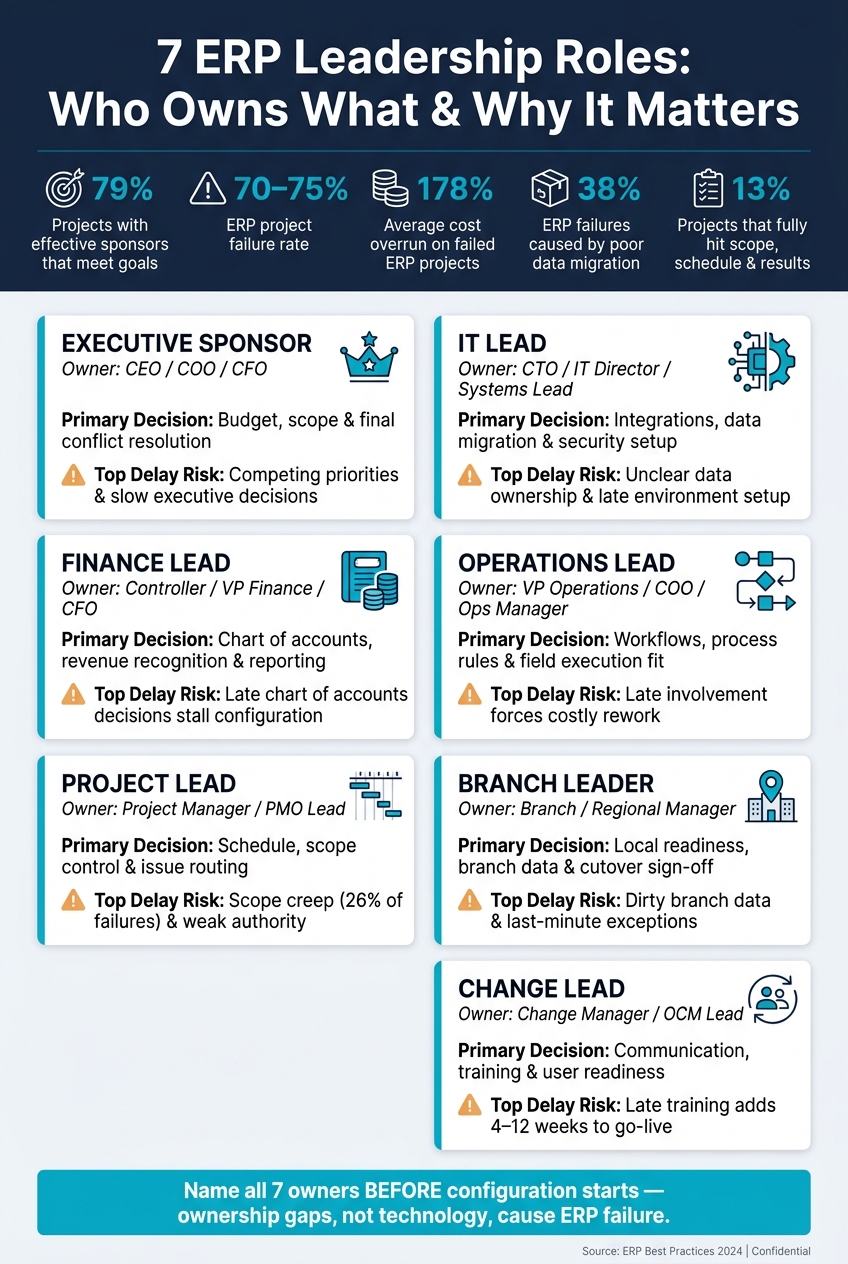
Quick Comparison
| Role | Main Call They Own | What Usually Slows Things Down |
|---|---|---|
| Executive Sponsor | Budget, scope, final issue resolution | Slow top-level decisions, mixed priorities |
| Finance Lead | Accounting structure and revenue treatment | Late finance sign-off, bad master data |
| Project Lead | Timeline, resources, issue routing | Weak authority, open change requests |
| IT Lead | [Integrations], migration, access setup | Late environments, unclear data ownership |
| Operations Lead | Day-to-day workflows | Late process input, weak field involvement |
| Branch Leader | Local rollout readiness | Dirty branch data, last-minute exceptions |
| Change Lead | Training and communication | Late training, uneven messaging, low readiness |
The core point is simple: ERP software does not fix weak ownership. People do. When each of these seven roles has a named owner before configuration begins, as part of a structured [NetSuite implementation] approach, the project has a much better shot at staying on track.
Why Leadership Structure Matters Before ERP Configuration Starts
Before you assign the seven roles below, decide who owns each call. That step matters more than many teams expect. ERP delays often begin with a simple problem: no one is clearly in charge of a decision.
Set this up before configuration starts. Name the person who approves, the person who owns the work, and the person who shares changes with the right people. If those lines stay fuzzy, the project slows down fast.
ERP projects still put a lot of money into technical work while giving too little attention to the people side that drives adoption.
Each role covers one part of the project:
- Authority: who can approve or reject
- Accountability: who answers for missed deadlines or stalled work
- Communication: who keeps the right people informed
When one of those pieces is missing, the cracks show up fast. Questions sit unanswered for days or even weeks. Consultants pause while waiting for approvals. Configuration gets built on bad assumptions, and that creates trouble later.
Clear roles speed up decisions. Unclear roles create delays.
| With Clear Leadership | Without Clear Leadership |
|---|---|
| Faster approvals and issue resolution | Slow approvals and decision bottlenecks |
| Aligned scope and priorities | Conflicting priorities and scope drift |
| Requirements finalized before configuration | Late requirements and costly rework |
| Consistent adoption across branches | Uneven rollout and weak user readiness |
That gap is exactly why every role needs a named owner. First up is the executive sponsor, who sets the decision path for the project.
1. Executive Sponsor
The Executive Sponsor is usually the CEO, COO, or CFO. This person owns the business case, the strategic vision, and the final calls. They set the business outcomes the ERP system must deliver, guard the budget, and step in when leadership teams hit a deadlock. In a implementing solar ERP software across multiple branches, this role keeps headquarters and field teams moving in the same direction around standard processes.
Prosci found that projects with extremely effective sponsors met or exceeded their objectives 79% of the time, compared with 27% when sponsorship was extremely ineffective. It also reports that active, visible executive sponsorship makes projects six times more likely to meet or exceed objectives.
Decisions, Deliverables, and Delays
The sponsor makes the calls no one else can make. That includes approving budget and ROI, setting phase-one scope, deciding where to standardize across U.S. locations, and setting go/no-go criteria. Those choices shape configuration, testing, training, and adoption.
This role also owns the business case, success metrics, steering committee charter, and resource commitments needed to secure support from finance, operations, and IT.
Delays usually start when cross-functional disputes sit too long without a firm decision. Maybe finance and operations disagree on approval workflows. Maybe headquarters and branch teams clash over data standards. Either way, stalled approvals, late scope calls, and slow go-live readiness add time and cost.
When IT needs more time for integrations than business leaders expect, the sponsor has to balance those timelines. When branch leaders push back on standardized workflows, the sponsor decides what must stay consistent across the company and what can remain local.
Once the sponsor sets the direction, the finance lead turns that direction into cost, cash flow, and ROI decisions.
2. Finance Lead
The Finance Lead is usually the Controller, VP of Finance, CFO, or Head of Accounting. This person owns the ERP’s financial structure, accounting rules, and reporting needs. Once finance decisions are set, the project lead can turn those choices into a working schedule.
If those decisions stay open, the whole project starts to drag. Configuration slows down. Testing gets stuck. Training becomes harder to plan.
Decisions and Deliverables
The Finance Lead signs off on the chart of accounts, revenue recognition policy, approval limits, cost allocation rules, and tax setup across entities. They also make GAAP calls, including ASC 606 revenue recognition. That matters a lot in solar and construction, where revenue may be recognized at installation, inspection, or interconnection.
They also approve finance requirements, data migration, UAT, and opening balances. On top of that, they define go-live success measures, like closing the books in five business days and keeping error rates below target.
Typical Delay Triggers
Finance delays usually come from four issues:
- Late chart of accounts decisions, which stall configuration
- Unresolved revenue recognition policies, which block order-to-cash design
- Slow review cycles when the Finance Lead is stretched too thin
- Failure to own clean vendor, customer, project, and account data
Data migration is another common blocker. If finance doesn’t take charge of data cleansing, migration cycles tend to fail and cutover gets pushed out. Research shows poor data migration is a root cause in 38% of ERP project failures.
Key Cross-Functional Dependencies
The Finance Lead relies on the Project Lead to keep finance milestones on the critical path. They rely on the IT Lead to set up integrations like bank feeds, payroll, and field service tools based on finance-defined requirements. And they rely on the Operations Lead to make sure field activity – time entry, purchase approvals, and project milestones – flows into accurate financial postings.
Those choices shape the IT Lead’s work on integrations, reporting, and controls.
3. Project Lead
The Project Lead runs the ERP rollout day to day. This person owns the schedule, scope, resourcing, risk tracking, and the small but constant decisions that keep the project moving. Without a clear owner here, approvals slow down and workstreams start to drift. Once Finance sets the business direction, the Project Lead turns it into an actual plan people can follow.
Primary Decisions Owned
This role makes trade-offs fast while keeping scope under control. That includes operational calls like phase sequencing, resource use across workstreams, and whether a requirement should be configured now or pushed to a later phase. If a decision affects budget, finance process, or system architecture, the Project Lead sends it to the right owner instead of making side decisions that break governance.
Core ERP Deliverables
The Project Lead is accountable for the project charter, the detailed master project schedule, the Business Requirements Document (BRD), integrated test plans, defect tracking, and the cutover plan with go/no-go criteria. The BRD should spell out scope, requirements, owners, and deadlines.
This role also owns the RAID log – Risks, Assumptions, Issues, and Dependencies – and handles status reporting for the steering committee. The charter, schedule, and RAID log need to reflect actual decisions, not old versions sitting in a folder.
Typical Delay Triggers
Scope creep drives about 26% of ERP implementation failures, and over-customization drives about 23%. Both problems point back to weak project oversight. When the role lacks clear authority, scope starts to spread, milestones slide, issues sit too long, and branch launches become uneven.
In multi-branch companies, this gets messier fast. Teams in different departments often follow different processes, which makes reporting harder and rollout sequencing tougher to manage.
Key Cross-Functional Dependencies
The Project Lead coordinates every cross-functional dependency. That means keeping Finance, IT, Operations, Branch Leaders, and the Change Lead aligned so technical readiness and user readiness move together.
4. IT Lead
Once the project plan is in place, the IT Lead turns business needs into a technical design the team can build and run. This role owns ERP tech choices, integrations, data migration, security, and go-live prep. The Project Lead drives the rollout. The IT Lead owns the technical side of the design.
That doesn’t mean making business calls alone. It means making sure each technical choice ties back to a business result.
Primary Decisions Owned
The IT Lead has final say on the integration approach, customizations, security and access models, and how changes move from build to test to production. This role also decides how legacy applications fit into the future ERP setup.
A RACI matrix set early helps avoid a common mess: vendors or business leads making one-off technical calls that clash with the rest of the architecture.
Core ERP Deliverables
The IT Lead is accountable for:
- The solution architecture document
- Integration design and build
- Data migration from legacy systems
- Configuration and customization inventory
- Security and access framework
- Environment and release plan
- Post-go-live support plan
When systems don’t connect, teams end up doing manual work. The IT Lead needs to remove that through sound integration design.
Typical Delay Triggers
Most IT delays come from a few familiar problems: unclear ownership of data cleansing, unresolved integration choices, or late environment setup. If the IT Lead doesn’t have the authority to make calls, those problems stack up fast.
When test or UAT environments aren’t ready on time, testing slips. When integration endpoints aren’t approved, vendors sit and wait.
Data migration is one of the biggest risk areas. Data migration and transformation can become a significant bottleneck during ERP implementation, especially when cleansing and mapping work doesn’t start early. Late data work is one of the most common causes of schedule slippage.
Key Cross-Functional Dependencies
The IT Lead turns finance controls into permissions, operations workflows into system design, and project risks into schedule inputs. In multi-branch organizations, this role also needs to understand local differences in data capture or connectivity before designing solutions that need to work the same way across locations.
With the Change Lead, the IT Lead aligns system changes with training, access, and day-to-day user workflows.
With the technical design locked, Operations can define how teams will use the system in the field.
5. Operations Lead
Once the technical design is locked in, the Operations Lead sets the rules for how people will use the ERP in day-to-day work. This role owns how the system supports execution across production, scheduling, inventory, field service, logistics, and fulfillment. In plain English, they make sure the system fits the way work actually happens.
That matters more than it may seem. If no one clearly owns operations, process design tends to drift into IT-led assumptions. On paper, that can look fine. In practice, it often leads to rework later.
Primary Decisions Owned
The Operations Lead decides which workflows should be the same across sites and which should stay flexible at the local level. That includes work-order flow, inventory policy, and approval paths that can either slow work down or keep it moving.
This role should also sign off on any configuration that changes how work moves through the business. If that call gets pushed to IT or finance by default, operations usually pays for it later.
Core ERP Deliverables
The Operations Lead owns the to-be process maps for:
- order fulfillment
- scheduling
- field execution
- inventory
This role also owns test scenarios for partial deliveries, rework, weather delays, and backorders. Those edge cases are where weak process design tends to show up.
In solar and construction, the scope goes further. The Operations Lead also owns standard project templates, installation milestones, and the workflow that ties job-site activity back to office data.
Typical Delay Triggers
Delays often start when field leaders skip design sessions, when testing ignores actual job conditions, or when branches and headquarters pull in different directions on standard processes.
Late involvement is another big problem. When operations comes in after IT and finance have already shaped the configuration, rework is usually unavoidable. At that point, the team is often trying to fix workflow issues after the system has already taken shape.
Key Cross-Functional Dependencies
Operations doesn’t work in a vacuum. After process decisions are made, this role passes them into Finance, IT, and Change so the setup matches day-to-day work.
With the Finance Lead, the Operations Lead defines when operational events trigger postings. With the IT Lead, this role points out the field steps the system must automate or connect. With the Change Lead, this role lines up training and SOPs with how teams will use the system in the field.
6. Branch Leader
At the branch level, rollout stops being a big-picture planning exercise and turns into a people problem: staffing, training, and day-to-day use.
The Branch Leader owns rollout decisions for one site, region, or business unit. In a multi-branch ERP project, this person takes company-wide standards and makes them work at the local level. Put simply, they are the local rollout owner who makes sure central decisions hold up in the field.
Gallup’s work on engagement shows that managers account for about 70% of the variance in team engagement. That gives the Branch Leader a big hand in local adoption.
Primary Decisions Owned
The Branch Leader decides when the branch is ready to go live, which employees can be pulled into testing and training without hurting daily operations, and where a documented local exception makes sense.
They also decide which branch metrics must be live on day one. That might include install cycle time, branch gross margin in USD, or change order frequency. Those choices depend on local market needs, such as sales practices, construction codes, and state compliance.
Core ERP Deliverables
The Branch Leader is accountable for:
- Validated local process maps
- Validated branch data, including customers, job history, and price lists
- Defined ERP role assignments for branch staff
- Go-live readiness sign-off for testing, data reconciliation, and cutover readiness
They also build a group of branch super users who can help frontline staff after go-live and send issues up to the project team when needed.
Typical Delay Triggers
Delays usually start in pretty familiar ways. No one owns branch data cleanup. Local process conflicts sit unresolved. Training slips. Staff keep falling back to spreadsheets and legacy tools after go-live.
Late discovery is another repeat issue. A branch may surface a state-specific compliance report or a one-off billing setup right before cutover. When that happens, the team has to make last-minute configuration changes, and that can push the timeline for the whole program.
Key Cross-Functional Dependencies
The Branch Leader has to stay aligned across several teams.
With Finance, the focus is job costing, revenue timing, discounting, and invoicing. With IT, it’s devices, user access, and integrations before go-live. With Operations, the branch needs to confirm that scheduling, installation, service, inventory, and time tracking all work as expected locally. And with the Project Lead and Change Lead, the Branch Leader needs to stay in sync on timelines, testing scope, communication, and training.
Once the branch is ready, the Change Lead helps drive adoption through communication and training.
7. Change Lead
Once branch readiness is in place, the Change Lead turns rollout into actual adoption across the company.
Most leadership roles stay focused on one function. The Change Lead is different. This person owns the people side of ERP adoption. The Project Lead owns schedule and scope. The Change Lead makes sure employees know what’s changing, what they need to do, how they’ll be trained, and what “ready” looks like in their day-to-day work.
Primary Decisions Owned
The Change Lead decides how communications and training roll out across the program: who gets which message, and when. They set the minimum training bar for each role, whether that’s a finance analyst, operations supervisor, or field staff member. They also define people-readiness criteria before cutover.
Just as important, they own adoption-based go/no-go criteria, not only technical readiness. In plain terms, that means setting thresholds like 95% training completion for operations supervisors or an average proficiency score of 80% or higher on key transaction flows before cutover gets approved.
Core ERP Deliverables
The Change Lead owns a set of deliverables that runs alongside the technical project plan:
- Change impact assessments for tasks, approvals, and KPIs
- Stakeholder and user mapping that identifies affected roles, locations, and change risk levels
- Communication plan and content, including FAQs, email templates, and branch meeting materials shaped for each audience
- Role-based training curriculum, schedules, and a cross-branch super-user network to help frontline staff after go-live
- Adoption dashboards for training completion, usage, and ticket volume
- Post-go-live support structure, including an extended hypercare period, issue triage, and reinforcement activities
Typical Delay Triggers
When the Change Lead role is missing or loosely defined, the same problems tend to show up again and again. Training gets pushed too close to go-live. Then it turns generic instead of role-based. The result? Teams have to run make-up training after cutover, right when people are already under pressure.
Communication usually slips too. Messages become uneven, rumors fill the empty space, and resistance starts building quietly before anyone spots it.
Another pattern is easy to miss at first: the project team and IT say the system is technically ready, while business leaders look at the organization and see a workforce that isn’t prepared. That gap can add 4–12 weeks to a mid-sized ERP implementation, depending on how much of the operation and branch network it touches.
Key Cross-Functional Dependencies
The Change Lead needs visible executive sponsorship. Without it, employees often read the silence as a sign that the project isn’t a top priority, and they start to tune out.
This role also depends on tight coordination with other leaders. With the Project Lead, change milestones like impact assessments, communication launches, and training completion need to sit inside the master project plan, not off to the side as “extra” work. With the Operations and Finance Leads, the Change Lead works through process updates and makes sure role-based training matches how people will actually work. With Branch Leaders, they lean on local champions to spot resistance early and adjust messaging and training to what each branch is dealing with.
When this role is absent, delays usually show up first in communication, training, and cutover readiness.
Where ERP Delays Start When Roles Are Unclear
ERP delays usually start with one simple problem: no one owns the call.
When ownership is fuzzy, every role tends to fail at the same point. One team waits for another. Then the hold-up spreads from design to testing, from training to cutover. What starts as a small pause can turn into a chain reaction.
The trouble often starts at the top. One recent compilation found that 55% of ERP implementations exceed budget, with the average cost overrun reaching 178% of the original estimate. When sponsors hesitate or avoid making tough calls, scope starts to drift and costs follow.
Finance is another common choke point. Late decisions in finance can force teams to redesign workflows, retest setups, and patch issues by hand across billing, revenue, and close.
Integration issues can sit quietly for months, then hit all at once during UAT. That’s when gaps between ERP and tools like CRM, payroll, or field-service systems become hard to ignore. And at that stage, fixes are slower, more expensive, and more disruptive.
Operations can also become a late-stage blocker. If that team joins only at UAT, it may push back on workflows that look fine on paper but don’t work in the field. In multi-branch construction rollouts, weak local ownership often leads to uneven training, messy cutovers, and branch-level workarounds that chip away at consistency.
Change management causes its own set of delays when it starts too late. Hypercare drags on. Users slip back into spreadsheets. Supervisors keep old processes alive. Support teams end up swamped with tickets that could have been avoided, instead of helping steady the system. That helps explain why only 13% of ERP projects fully deliver on their planned scope, schedule, and benefits.
Use the quick ownership reference below to see who should own each call.
A Quick Ownership Reference for Faster Decisions
Use this table when a decision gets stuck and no one is sure who owns it. It shows who makes the call, who needs to approve it, and the point in the project when it should happen.
If ownership is fuzzy, use this reference to route the decision fast.
| Role | Primary Decisions Owned | Required Approvals | Key Milestones | Likely Delay Points |
|---|---|---|---|---|
| Executive Sponsor | Budget, scope, conflict resolution | Budget changes, scope shifts, go-live risk acceptance | Charter approval, steering reviews, go/no-go decision | Competing priorities, slow executive decisions, scope drift |
| Finance Lead | Chart of accounts, revenue recognition, cost tracking, financial reporting | Financial design sign-off, invoicing scenarios, first-close readiness | Design workshop sign-off, UAT completion, mock close | Reconciliation gaps, disagreements on solar incentive treatment or construction retainage, reporting rework |
| Project Lead | Schedule, resource assignments, scope change handling | Phase gate approvals, issue triage, change request routing | Requirements freeze, configuration sign-off, UAT schedule lock, go-live readiness confirmation | Unowned change requests, slow responses from functional leads, weak authority to enforce cut-off dates |
| IT Lead | Environment strategy, integration architecture, data migration, security roles | Integration endpoints, data mapping rules, API access, technical feasibility | Technical design complete, integration build and testing, data migration trial runs, performance testing | Unclear integration ownership, late IT engagement, security role definitions postponed for branch users |
| Operations Lead | Standard operating procedures, workflow steps, branch process standardization | Process flow changes, workflow automation, branch process standardization | Process maps finalized, standard workflows agreed upon, operational UAT sign-off | No consensus on a standardized process, late operational changes, insufficient participation in design workshops |
| Branch Leader | Local data validation, branch-specific role permissions, local process variations | Branch go-live readiness, local training plans, branch-specific deviations from standard model | Branch data cleanup complete, branch-level UAT participation, go-live confirmation | Incomplete branch data, slow testing participation, last-minute customization requests |
| Change Lead | Communication strategy, training curriculum, stakeholder segmentation | Messaging sign-off with Executive Sponsor, training plan confirmation with functional leads, people-readiness sign-off | Stakeholder impact assessment, communication plan approval, training delivery complete, post-go-live support plan | Under-resourced change team, slow sign-off on communications, field staff training delays across remote sites |
Keep this table in steering committee packs and use it to assign every unresolved decision before work moves on. If a decision is not listed, name an owner before the next review.
Unassigned issues don’t just sit there. They turn into hidden delays.
Conclusion
When you name the seven leadership roles early and write down each role’s decision rights, the project tends to move with less drag. Design workshops lead to decisions. UAT leads to sign-offs. Go-live leads to adoption.
That’s why ownership matters more than project activity by itself. Prosci links effective executive sponsorship to stronger business outcomes, while 2026 ERP research found inadequate change management and weak sponsorship behind many failures. Those are ownership problems, not technology problems.
The fix is simple, and it starts before configuration. Name the Executive Sponsor, Finance Lead, Project Lead, IT Lead, Operations Lead, Branch Leader, and Change Lead. Then document each approval right. Define who owns what before the first screen is configured – not after delays cost you weeks.
FAQs
How do we assign ERP decision rights before kickoff?
Before kickoff, set up a steering committee with senior leaders from finance, sales, operations, and IT. This group should oversee major decisions, scope changes, and timelines.
Use a RACI matrix to spell out who is responsible, accountable, consulted, and informed. Set escalation paths early so people know where decisions go before issues pop up.
- Functional leads approve minor configuration changes.
- The steering committee handles cross-functional process shifts.
- The executive sponsor approves changes to scope, budget, or timeline.
What happens if a leadership role is missing?
If a leadership role is missing during an ERP transition, the project is more likely to run into confusion, pushback, and day-to-day slowdowns.
When no one has clear ownership or a solid governance setup, teams start to drift. Communication slips, alignment gets harder, disputes take longer to sort out, and priorities are tougher to enforce. Before long, the implementation can lose momentum.
Which ERP role matters most in a multi-branch rollout?
In a multi-branch rollout, the executive sponsor is the key player. This is often the CFO or COO. They set the goals, keep teams focused on the right priorities, and step in when branches clash across functions.
They also help secure funding and keep the organization moving in the same direction, which matters a lot when operations are spread out. Steering committees and branch leaders back up that governance work and help keep things consistent from one location to the next.
