
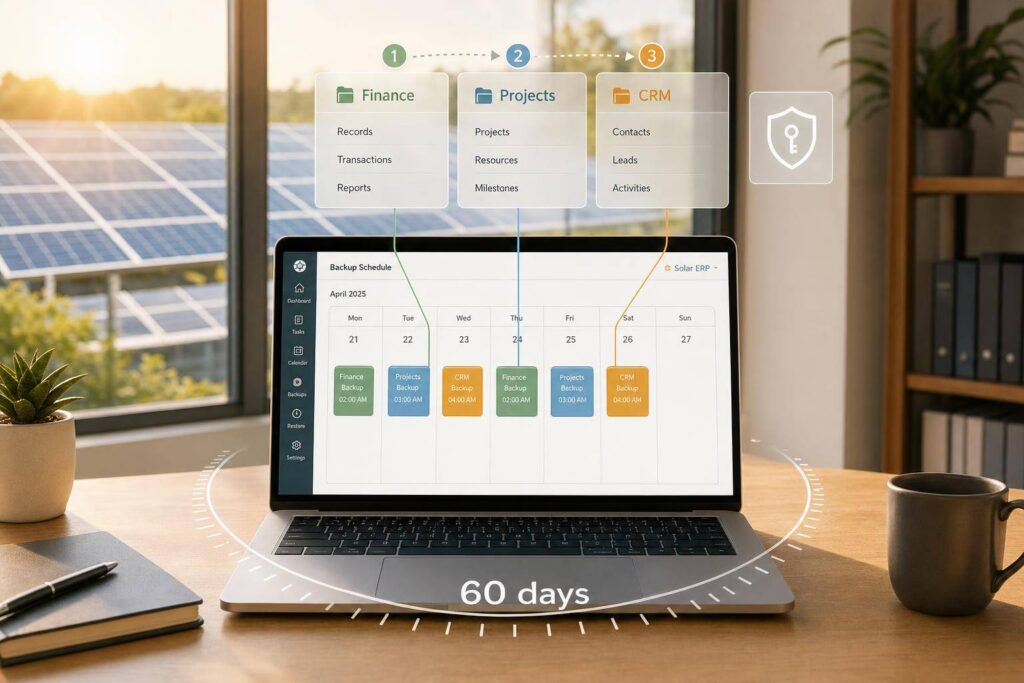
If one bad record hits NetSuite, it can stop billing, purchasing, project work, and customer updates at the same time. That is why I would set a backup schedule around four things: when jobs run, how often restore points are available, who can control backup-related scripts, and which records come back first after a restore.
Here’s the short version:
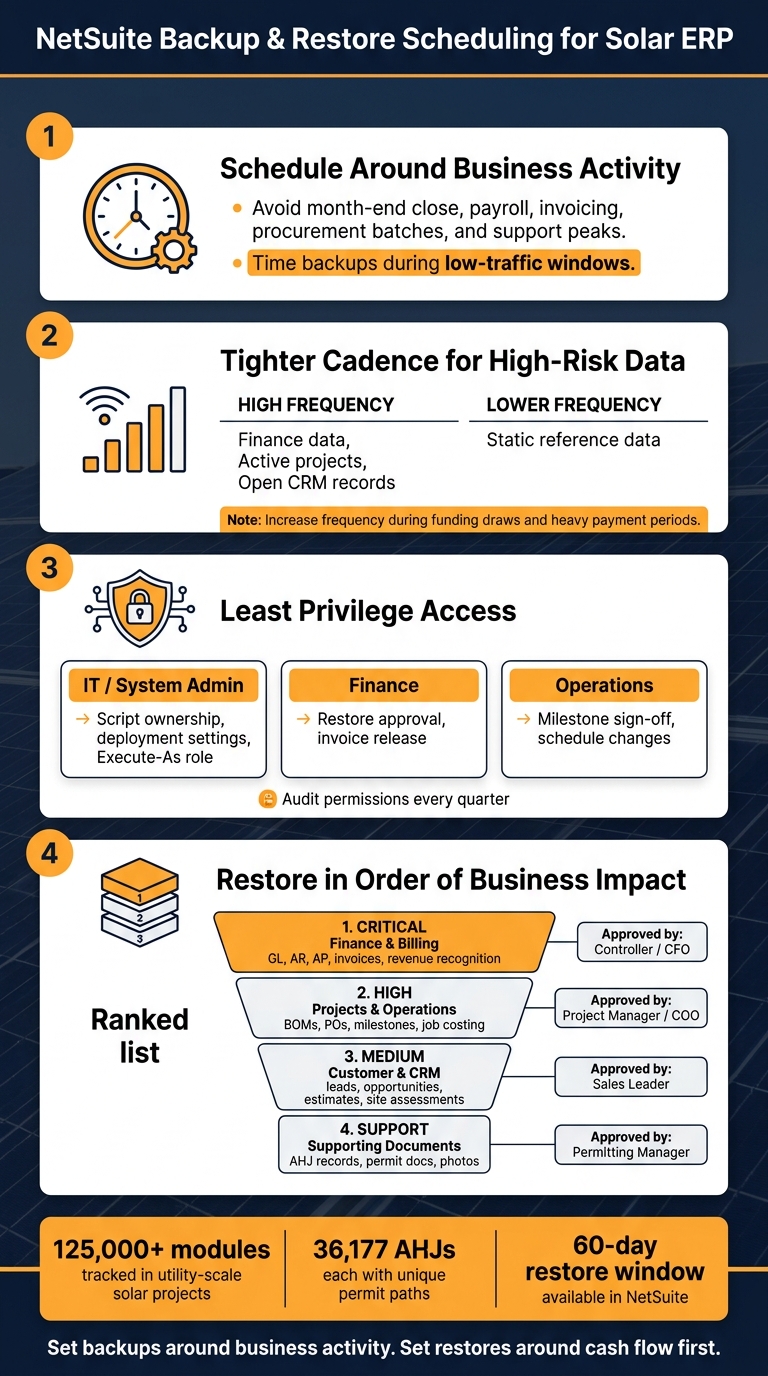
- Run backup-related work during low-traffic periods so it stays out of month-end close, payroll, invoicing, procurement batches, and support rushes.
- Set frequency by risk and change rate. Finance, active projects, and open CRM records need tighter coverage than static reference data.
- Limit job control by role. IT handles script settings, finance approves restores tied to money, and ops checks project milestone data.
- Use NetSuite’s 60-day restore window as the base and extend internal retention only where tax, audit, lender, or partner rules call for it.
- Restore in order of business impact: finance first, projects next, CRM after that, then supporting files like permit and AHJ records.
- Test restores after role, workflow, or integration changes, not just on a fixed calendar.
A few numbers show why this matters. Utility-scale solar work can involve 125,000+ modules and project costs above $100 million. U.S. teams may also track 36,177 AHJs, each with its own permit path and inspection rules. And NetSuite allows user-started restores from archival backups for up to 60 days. That means the restore plan matters just as much as the backup schedule.
If I were putting this into one plain rule, it would be this: set backups around business activity, and set restores around cash flow first. The rest of the article explains how to do that without turning it into an IT-only process.
Step 1: Set Backup Timing Around Solar Business Activity
Backup timing is a business choice, not just an IT task. Set backup jobs so they don’t get in the way of month-end close, payroll runs, invoicing, procurement work, or busy support hours.
Choose Low-Impact Windows for Finance, Projects, and CRM
The best backup windows are the ones that stay out of your busiest operating periods. In a solar ERP, that usually means avoiding finance close work, payroll, invoicing, procurement batches, and support peaks.
Billing-linked milestones like Contract Signed, Install Complete, and PTO can trigger deposit, progress, and final billing. Plan around those moments so backup jobs don’t overlap with records and transactions that are changing fast. That helps keep backups away from the busiest billing and project-update windows.
Match Frequency to Data Change Rate and Business Risk
Your backup schedule should match two things: how often the data changes and how much it would hurt to lose a restore point.
Use a tighter backup cadence for:
- Finance data
- Active projects
- Open CRM records
Use a lighter cadence only for static reference data. Then increase frequency during procurement runs, funding draws, and heavy payment periods. In plain English, when money is moving and records are shifting fast, backups should run more often so restore points stay current.
Once timing and frequency are set, lock down who can run the backup-related jobs.
Step 2: Control Who Can Schedule and Run Backup-Related Jobs
Once backup timing is set, the next step is deciding who can manage those jobs. In NetSuite, backup jobs often live or die based on access control. If the wrong roles can edit, trigger, or turn off scheduled scripts, deployment settings, or Execute-As role assignments, you lose reliability and your audit trail gets messy.
Define Roles for IT, Finance, and Operations
Use least privilege. Also keep data entry separate from backup approval. In plain English: don’t let one group do everything.
A simple way to handle this is to split duties across three groups tied to the article’s main data areas – finance, project, and customer records:
| Role | Data Ownership | Control Point |
|---|---|---|
| IT / System Admin | Script ownership, deployment settings, Execute-As role | Run scheduled jobs |
| Finance | Financial data integrity, audit trail review | Restore approval, invoice release |
| Operations | Milestone accuracy (Install Complete, PTO Granted), field data validation | Milestone sign-off, schedule changes |
Audit permissions every quarter.
Check Script Ownership, Deployment Audience, and Execute-As Role
Before implementing solar ERP backup-related scripts, verify three things:
- Who owns the script
- Which roles appear in the assigned roles list
- What role the script runs as
Treat script ownership, assigned roles, and Execute-As role as go-live checks.
Once job access is locked down, the next move is setting how long backups stay recoverable and which data gets restored first.
Step 3: Set Retention Rules and Restore Priorities
Next, decide how long backups should stay recoverable and which data comes back first.
Use the 60-Day Restore Window as a Baseline
After access is locked down, set a clear retention policy. Use NetSuite’s 60-day restore window as your starting point for internal retention, and extend that window for audit, partner, investor, or tax equity records. Write down what must be kept, how long it stays recoverable, and who can approve a restore before anything goes wrong.
That last part matters more than it may seem. If no one knows who can greenlight a restore, teams can lose time at the worst possible moment.
Prioritize Finance First, Then Project and Customer Data
Restore data based on business impact: finance first, project and operations next, customer and CRM data third, and supporting documents last.
A clear restore order helps teams move fast when finance, project, and customer records need to come back quickly. Set that sequence before an incident so no one has to make the call under pressure.
Use this restore order to line up recovery speed with business impact:
| Restore Order | Data Category | Primary Records | Approval Owner |
|---|---|---|---|
| 1 – Critical | Finance & Billing | GL, AR, AP, invoices, revenue recognition | Controller / CFO |
| 2 – High | Projects & Operations | BOMs, purchase orders, milestones, job costing | Project Manager / COO |
| 3 – Medium | Customer & CRM | Leads, opportunities, estimates, site assessments | Sales Leader |
| 4 – Support | Supporting Documents | AHJ records, permit docs, photos | Permitting Manager |
Finance protects cash flow. Project data keeps field work moving. CRM data helps keep the pipeline intact.
Step 4: Build and Test a Restore Plan for Solar ERP Operations
A backup schedule isn’t enough on its own. You also need a written restore plan. Once you’ve set restore priorities, put them into a step-by-step plan your team can follow under pressure.
Document the Restore Workflow Before a Restore Is Needed
Your restore plan should spell out who starts the request, who approves it, and who checks the results before the restore is marked done. Use the finance-first recovery order from the prior step to assign approval and validation owners.
| Post-Restore Check | Record to Validate | Responsible Role |
|---|---|---|
| Financials | 3-way matching (PO, Receipt, Bill) | Controller / Finance |
| Projects | Milestone triggers (Install Complete, PTO) | Project Manager |
| Permissions | Role access and approval limits | IT Administrator |
| Integrations | API connectivity with suppliers and monitoring tools | IT Administrator |
| Compliance | AHJ registry and permit documentation | Permitting Team |
Write down each approval step so the right owner signs off before the restore closes. That way, no one is left guessing who has the final say.
Test Restores and Update the Schedule as the Business Changes
Run test restores outside month-end close, active project work, and peak support hours. In plain English: don’t test during the worst possible moment.
You should also run test restores after major changes to roles, integrations, or record structures. If roles, integrations, or project workflows change, retest. A restore plan that worked six months ago can fall out of date fast.
Conclusion: A Practical Backup Schedule for NetSuite Solar ERP
These four choices shape a backup schedule that works in day-to-day use: timing, frequency, access, and restore priority.
Time backups during low-activity periods to cut disruption across finance, projects, and customer-facing work. Set backup frequency based on how often data changes and how much loss your team can accept. Limit backup controls by role so the right people manage access without slowing everyone else down.
Use the 60-day restore window as your starting point, and extend it only when retention rules call for more. In any recovery sequence, finance records come first, including general ledger, accounts receivable, and revenue recognition. After that, restore project and customer data, including permitting records and AHJ documentation.
When finance, project, and CRM data live in one database, restore order and workflow need to be set before anything goes wrong. In a unified NetSuite solar ERP, recovery planning sits inside operational control. It isn’t a separate IT task.
FAQs
How do I choose the right backup frequency for each record type?
Match your backup schedule to how fast your data changes and how your team works day to day. Fast-moving records like customer interactions, financial transactions, and project milestones usually need frequent backups, or even real-time backup in some cases. More static reference data often does fine with periodic snapshots.
Process documentation helps you pin down the main source for each record type and how often that record tends to change. That gives you a clearer way to set backup timing instead of guessing. During peak installation months, check system performance more often to see if backup volume is pushing you to adjust the schedule.
Who should be allowed to approve and run restores in NetSuite?
Only authorized personnel should be allowed to approve and run restores in NetSuite. That follows the principle of least privilege: give people only the access they need, and no more.
In practice, this means using role-based access control so only selected roles with clearly defined permissions can perform restores. That setup also helps keep separation of duties in place, makes accountability clearer, and supports audit trails through system notes.
What should I validate first after a restore is completed?
First, validate data integrity by reviewing audit trails, system logs, and system notes. The goal is to confirm that records, configuration changes, and financial data were restored accurately.
Then look for discrepancies in project milestones, billing schedules, and customer records. Also confirm that automated workflows and real-time sync processes are active before you resume normal operations.
