

If your ERP audit trail has gaps, you may not be able to prove what happened. And that can turn into audit trouble, fraud risk, or a failed review. One 2025 SEC case ended with a $35 million fine tied to weak recordkeeping and poor audit trail support.
If I had to boil this article down, I’d say this: you need to log the right events, lock those logs down, review them on a set schedule, and keep them long enough to produce them when asked. That means showing who made the change, what changed, when it happened, and where it happened in the ERP.
Here are the main points in plain English:
- Log all high-risk ERP activity by default
- Store logs in append-only, immutable storage
- Use the same field names and UTC timestamps across systems
- Tie logs to document revisions and approvals
- Set alerts for risky events like vendor bank changes and privilege changes
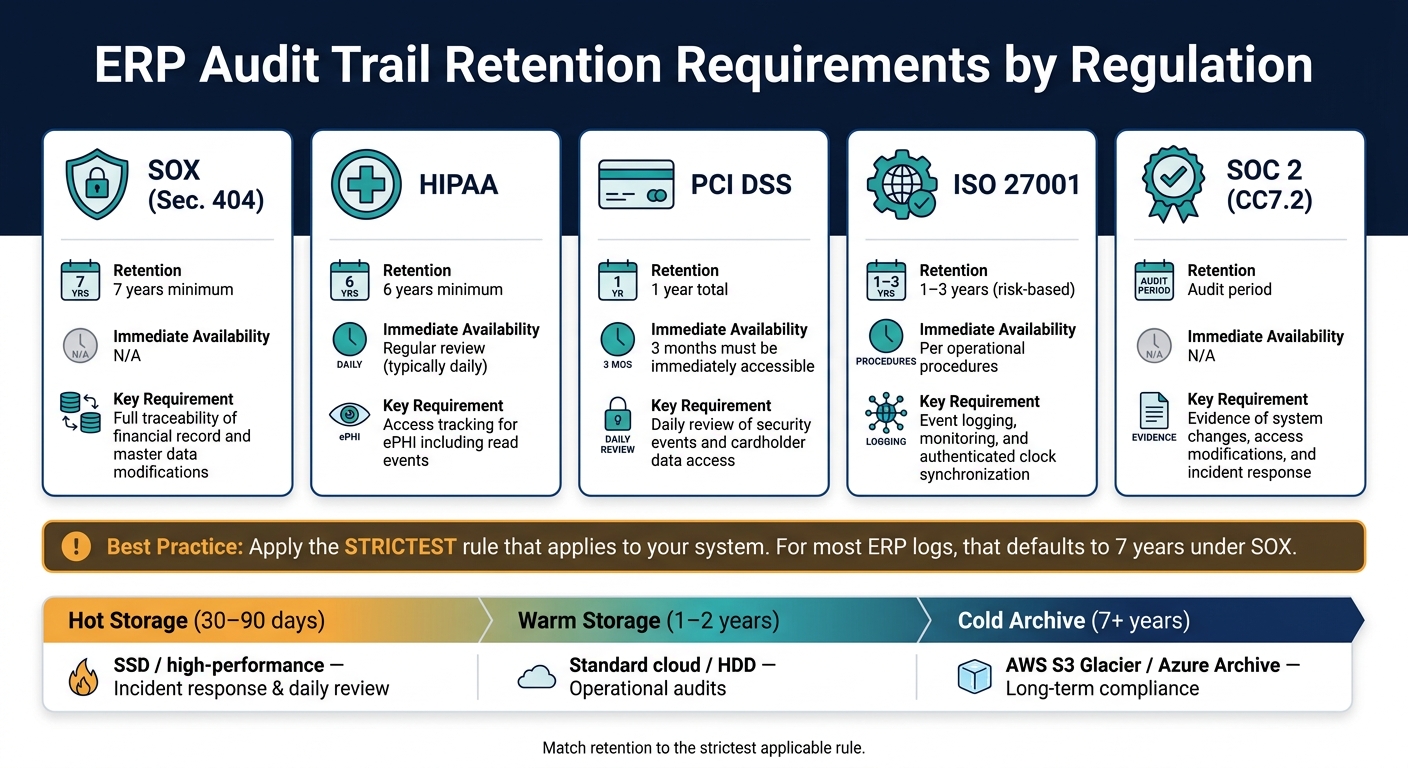
- Match retention to the strictest rule that applies
- Test restore, time sync, and log integrity on a set schedule as part of your NetSuite implementation strategy.
A few numbers stand out:
- 34% of 2025 breaches targeted enterprise apps
- PCI DSS requires 1 year of log retention, with 3 months ready to access
- SOX often drives a 7-year retention period
- Critical security events should be reviewed within 24 hours
- Time drift across systems should stay under 1 second
| Area | What I’d focus on |
|---|---|
| Log content | User, action, record ID, before/after values, UTC timestamp, source |
| High-risk workflows | Finance, master data, access changes, procurement/sales, imports/exports |
| Protection | RBAC, MFA, append-only storage, hash checks, separate log storage |
| Review | Real-time alerts, daily automated review, scheduled human review |
| Retention | Keep logs based on the toughest rule that applies |
| Testing | Restore drills, chain checks, storage alerts, clock sync checks |
In short, a good ERP audit trail is not just a history log. It is a control that helps you trace changes, review approvals, and produce records when someone asks for them.
Why Audit Trails Matter in Modern ERP Systems
An audit trail is the evidence that an ERP record is reliable.
In a well-built ERP, each log entry should answer four basic questions: Who did it, What changed, When it happened, and Where it happened in the system. That means the trail should show the user, the before-and-after values, the UTC timestamp, and the exact place in the ERP where the action took place. That level of detail is what makes the record useful during audits and investigations.
Audit trails also sit at the center of internal controls. Under SOX Section 404, management has to state that internal controls over financial reporting are working as intended, and audit logs are key evidence for that claim. The same idea shows up in ISO 27001, which calls for event logging, monitoring, and clock synchronization around approvals, postings, and record changes. PCI DSS Requirement 10 also follows this pattern by requiring logs for all access to cardholder data. And under PCI DSS v4.x, automated log review for critical systems became required after March 31, 2025.
When a payment, vendor record, or journal entry goes sideways, a complete trail shows exactly what happened. It can also discourage unauthorized actions. Different frameworks phrase the rule in different ways, but the pattern stays the same: log activity, review it, and keep it long enough to prove what took place.
| Regulation | Key Audit Trail Requirement |
|---|---|
| SOX (Sec. 404) | Evidence of internal control effectiveness over financial reporting |
| PCI DSS v4.0 | Logging all access to cardholder data; daily automated log reviews |
| ISO 27001 (A.12.4) | Event logging, monitoring, and clock synchronization |
| HIPAA | Audit controls for systems containing electronic Protected Health Information (ePHI) |
Audit trails make ERP data defensible in audits, investigations, and regulatory reviews. Maintaining these logs often requires dedicated NetSuite support to ensure system configurations remain compliant.
1. Design Full Audit Trail Coverage
Once the goal is clear, the next step is simple: define full log coverage.
Every meaningful ERP action should create a log entry. That includes authentication, authorization, data changes, system events, and financial activity. The goal is no material gaps.
Traceability fields captured
Each log entry should record the details you’d need to piece together what happened later. Capture the user ID, role, source IP, UTC timestamp, module or API endpoint, action type, record ID, and before/after values. Include the request source too, whether it came from the UI, API, or a batch job.
For high-risk areas like Finance and Procurement, go deeper with field-level tracking. Don’t just log that a record changed. Log the exact field that changed. Add a unique event ID and store before/after JSON snapshots. If key metadata is missing, forensic review gets a lot harder.
Log integrity protections
Audit logs should be append-only. Enforce that at the storage layer with Write Once Read Many (WORM) options such as AWS S3 Object Lock or Azure Immutable Blob Storage.
It also helps to use hash chaining. In plain English, each log record stores a cryptographic hash of the one before it. If someone tries to alter a record, the chain breaks and the tampering stands out right away.
Store logs in separate immutable storage and write them asynchronously so logging doesn’t slow down transactions.
Clock synchronization
Use UTC across the board and sync clocks with NTP or PTP. Even small clock drift can throw off the audit timeline and make logs much harder to use during a compliance review.
After coverage is in place, enable logging by default for high-risk workflows.
2. Turn On Logging by Default for High-Risk ERP Workflows
Not every ERP action carries the same level of risk. Some workflows touch money, user access, or system connections. Those should log by default, every time, with no user choice involved.
Enterprise applications were targeted in 34% of breaches in 2025, up from 22% in 2022. That shift makes default-on logging a basic control for ERP. If a workflow can affect financial results, change a vendor or customer record, or expose sensitive data, it should log automatically.
Use the same log standard as Section 1, then apply it by default across five high-risk workflow groups:
- Finance: GL postings, journal entry edits and reversals, revenue recognition changes
- Master Data: Vendor bank detail changes, customer credit term changes, tax configuration changes
- Access and authorization: RBAC modifications, privilege escalations, MFA enrollment
- Procurement and sales: Invoice or purchase order revisions, approval workflow overrides
- System and data operations: Bulk imports and exports, API or integration calls, backup restores
This matters because these workflows can quietly change the numbers, reroute payments, or open paths into other systems. Manual logging is too easy to skip, whether by mistake or on purpose.
Once those events are logged by default, the next step is simple: alert fast when something looks off.
Logging alone doesn’t help much if no one checks the events that matter most. For the highest-risk activity, such as changes to vendor bank details or off-hours access from an unusual IP, real-time alerts should trigger right away. Waiting for a weekly review is too slow when a single change can lead to fraud or data loss. High-risk logs should sit inside a regular review process, with PCI DSS requiring daily review of security events, not handled ad hoc.
3. Protect Audit Logs with Access Controls and Immutability
Once high-risk workflows are set to log by default, the next step is simple: limit access hard.
Not everyone should be able to view, export, or manage audit logs. Use role-based access control and least privilege so each person gets only the access they need to do their job. Also, keep ERP administration separate from audit-log administration.
Audit logs should stay append-only. In plain English, that means entries can be added, but not edited or deleted. Store those logs in separate immutable storage or in a SIEM.
Log access and meta-auditing
The audit trail needs its own trail.
Log every view, export, and admin action tied to the audit log itself. That kind of meta-auditing matters when regulators ask a basic but serious question: Who touched the records, and when? In 2025, the SEC fined a major financial institution $35 million for weak record-keeping and for failing to produce a reliable audit trail during a compliance inquiry.
Here’s a practical way to split roles:
| Audit Role | Permissions | Purpose |
|---|---|---|
| System Auditor | View, Export | Full oversight for compliance and forensic review |
| ERP Admin | Configure Logging | Manage system settings through NetSuite customizations without access to modify log data |
| Department Manager | View Scoped Logs | Monitor operational changes within a specific scope |
| Compliance Officer | View, Review Access Logs | Verify that audit logs themselves haven’t been tampered with |
Require MFA for all audit-log access and admin changes.
Next, standardize metadata so logged events stay searchable and comparable across modules.
4. Centralize Audit Trails Across ERP Modules and Connected Systems
Siloed logs slow investigations and create blind spots. If Finance, Sales, and connected systems each keep their own records, you don’t get one clear story. You get scattered pieces. For an audit trail to help, related events need to stay connected across every module and integration.
Add a correlation ID
Assign each transaction a correlation ID so related events stay linked across modules and integrations.
What to centralize
Use one central trail to keep transaction context intact across both native ERP modules and connected systems.
| System Category | Specific Feeds to Centralize | Key Audit Events to Capture |
|---|---|---|
| Core ERP Modules | Finance, Sales, Procurement, Inventory, HR, Manufacturing, Projects | Journal entries, invoice revisions, PO overrides, stock level changes, payroll edits |
| Connected Systems | CRM, eCommerce platforms, WMS, POS Terminals, External APIs | Customer master data changes, NetSuite for Retail storefront orders, shipping ETA updates, terminal overrides |
| Master Data | Vendor/Customer lists, Item catalogs, Tax configurations, Employee records | Bank detail updates, credit limit changes, role/permission assignments, price overrides |
| Infrastructure | Database, Operating System, Network, Authentication services | Row-level CRUD activity, privilege escalations, firewall decisions, MFA enrollment |
Once all events feed into one trail, reviews get sharper and alerts become more accurate. It’s the difference between sorting through loose papers and opening one file with the full timeline already in place.
Log integrity protections
Keep centralized logs immutable and limited to read-only access. They should carry the same storage and access restrictions used at the module level.
Review and alert coverage
A centralized system gives you the strongest base for automated review. Under PCI DSS v4.x, automated log review for critical systems is moving from a recommended step to a requirement.
Use your SIEM to flag issues like backdated postings and unauthorized privilege escalations in real time, instead of finding them much later during a manual review cycle.
Centralization also makes reviews and investigations faster.
5. Standardize Log Metadata, Timestamps, and Naming Conventions
A central audit trail only works if every source speaks the same language. If one module logs userId and another logs user_id, search and correlation start to fall apart fast. Instead of making things easier, central logs can turn into a mess that’s harder to work with than separate ones.
Canonical fields
Use one field naming standard across every log source so search, filtering, and correlation work the same way everywhere. Fields such as user_id, entity_id, action_type, and before_state/after_state should follow one naming pattern across all modules and integrations.
Three fields need extra attention:
| Field | What to Capture | Recommended Format |
|---|---|---|
| event_id | Unique identifier per log entry | UUID v7 (time-ordered) |
| source_system | Where the request originated | UI, API, batch job, integration |
| workflow_step | Approval stage or delegation info | Step name, authority or role used |
Use JSON as the standard format across ERP modules and connected systems. It’s machine-readable, easy to parse, and helps keep field names consistent across log sources.
For approvals and overrides, the workflow_step field should include the exact step name, the authority or role used, and any exception reason or comment. This is one of those spots where consistency pays off. When the same schema is used across ERP modules, integrations, and approval workflows, cross-module correlation still works even when events come from different systems.
Store timestamps in UTC only. Generate them on the server side, and sync all system clocks through NTP or PTP.
Consistent metadata also makes it easier to link each log entry to the exact document version it changed.
6. Link Audit Trails to Document Version Control
Once log metadata is standardized, the next step is to connect every entry to the exact document revision it touched. Each audit entry should point to the specific revision it created, updated, approved, or released. That gives you a clear path from the first change request all the way to the final version.
With that setup, the audit trail does more than record activity. It shows what changed, who approved it, and which version became the system of record. In plain terms, a basic change log becomes a version history people can actually use.
Revision trace fields
Capture document_version_id, revision_number, entity_id, action_type, timestamp_utc, source_system, user_id, and change_reason, along with before/after snapshots. In solar ERP workflows, that means a contract, permit, or change order can be traced through each revision and approval step back to the version that became the final baseline.
Those fields only help if no one can go back and rewrite the revision record.
Protect version-linked logs
Store version-linked audit logs in append-only, immutable storage. That keeps each revision verifiable and preserves the link between the audit entry and its document version.
7. Set Risk-Based Review Schedules, Alerts, and Exception Monitoring
Once logs are centralized and standardized, set your review cadence based on risk.
Not every ERP transaction carries the same level of risk. A failed login attempt is one thing. A vendor bank detail change is another. That’s why review timing should match the risk of the activity, not follow a one-size-fits-all schedule.
| Review Frequency | Target Workflow / Transaction Type | Regulatory Driver |
|---|---|---|
| Daily (Automated) | Security events, failed logins, access to cardholder data or ePHI | PCI DSS, HIPAA |
| Weekly (Human) | Exception logs, vendor bank detail changes, new user roles | SOC 2, ISO 27001 |
| Monthly | financial journal entries, procurement changes, and serialized records | GMP, DSCSA |
| Quarterly | User access rights, dormant account cleanup | SOX, Internal Policy |
| Annual | Broad financial control audits, SOP updates | SOX |
For high-risk systems, use a monthly cadence with a 7-day buffer. That gives teams a little room to schedule reviews without letting them drift past the deadline.
Exception monitoring helps you focus on the events that matter most instead of combing through every log line by hand. Set real-time alerts for:
- Vendor bank detail or routing number changes
- Privilege escalations to admin or finance roles
- Bulk exports over 1,000 records in a single session
- Failed login attempts over five tries within 10 minutes
- Off-hours access from non-corporate IP addresses
Send high-priority alerts to an active team channel so they’re seen while action still matters.
Review duties should sit with someone independent of the workflow owner. That separation matters. If the same person runs the process and reviews it, problems can slip by unnoticed. When a discrepancy shows up, investigate the root cause with analytics and put corrective and preventive actions (CAPA) in place.
After review cadence is set, define how long each log class must be retained.
8. Match Retention Policies to Regulatory and Business Requirements
Once you’ve set a review cadence, the next step is simple: decide how long each log class needs to stay available. A team may check logs every day or every week, but that doesn’t answer the retention question. You still need a clear time window for each type of log.
The safest approach is to use the strictest rule that applies to each system. For many ERP logs, that default ends up being 7 years under SOX. If more than one rule applies, don’t split the difference. Go with the toughest one.
| Regulation | Minimum Retention | Immediate Availability |
|---|---|---|
| SOX | 7 years | N/A |
| HIPAA | 6 years | Regular review (typically daily) |
| PCI DSS | 1 year | 3 months must be immediately available |
| ISO 27001 | 1–3 years | Per operational procedures |
Archive storage and restore tests
A retention policy also needs to spell out where archived logs are stored and how fast they can be brought back. That part matters more than people think. A log that exists but takes forever to restore isn’t much help during an audit or incident.
A common setup looks like this:
- Keep the most recent 30–90 days on fast SSD storage
- Move logs to warm storage for 1–2 years
- Send the rest to cold archive storage for long-term retention
Archived logs should also live in separate immutable storage such as AWS S3 Object Lock, so they stay recoverable for the full retention period. On top of that, run quarterly restore drills to confirm the logs can be restored and that the chain of custody stays intact.
9. Train Users and Maintain Auditability Through Change Management
Train users, approvers, and admins so audit trails stay intact during day-to-day work and system updates. When change management gets sloppy, auditability tends to fall apart fast.
Train users to record complete change details
Users should know exactly what to record when they make a change. That means entering the required reason codes for deletions, overrides, and emergency edits, then linking each action to the change ticket.
If that step gets skipped, the audit trail can look incomplete even when the work itself was allowed. During an audit, that kind of gap creates confusion you just don’t need.
Train admins on immutability and separation of duties
Admins need clear rules around read-only log access, separation of duties, and immutable storage. Put simply: admin rights should never include the ability to edit or delete source audit records.
Keeping those roles apart removes a single point of failure. If one person can both make changes and alter the record of those changes, the whole trail becomes hard to trust.
Reconcile logs with approved changes
Every ERP change should appear in the audit trail and connect back to the related change ticket. Undocumented tweaks are a common reason audits get messy or fail.
Match system audit logs against approved change tickets to confirm that each modification was authorized. For high-sensitivity settings, export logs to a SIEM so teams can spot changes made outside approved maintenance windows.
| Review Type | Frequency | Target Area |
|---|---|---|
| Automated Alerting | Real-time | Unauthorized config changes, unauthorized access attempts, privilege escalations |
| Assurance Attestation | Quarterly | Change ticket reconciliation verification |
Track missed fields, unauthorized changes, and reconciliation exceptions so training gaps show up fast.
10. Test, Measure, and Improve Audit Trail Effectiveness Over Time
Once controls are in place, don’t just assume they’re fine; NetSuite professional services can help validate your configuration. Keep testing them. Audit trails can fail in simple ways: fields disappear, hash chains snap, or archived logs won’t restore when you need them most.
You also need to measure how those controls hold up under actual ERP load, not just in a clean test setup.
Traceability metrics
Start with the Four W’s: Who, What, When, and Where. You want full coverage here, with 100% before-and-after capture for every transaction. If your field-completeness rate drops below 100%, treat it as a defect, not a minor issue.
Integrity checks
Automate hash-chain verification and deletion checks. The goal is simple: zero broken chains and zero unauthorized deletions.
Time also matters more than people think. If system clocks drift, the audit trail gets messy fast. Keep drift under one second across modules by using authenticated NTP or PTP.
Review KPIs
For critical security events, the target is 100% review within 24 hours. SIEM automation can help you get there and keep review coverage at 100%.
For admin overrides, aim for a response time of under 4 hours.
Recovery KPIs
Run quarterly restore drills to make sure archived logs can be rehydrated and searched from cold storage. If recovery fails during a drill, that’s a warning sign. Your log recovery success rate should be 100%.
Storage is another thing to watch closely. NIST AU-5 recommends automated alerts when storage hits 80% to 90% capacity so logging doesn’t fail silently.
Use the table below as a quick operational scorecard.
| KPI Category | Specific Metric | Target |
|---|---|---|
| Traceability | Field completeness rate | 100% capture of the Four W’s and before/after values |
| Integrity | Hash chain integrity check | 100% – zero broken chains or deletions |
| Review | Critical event review coverage | 100% within 24 hours |
| Alerting | Response time | <4 hours for admin overrides |
| Recovery | Log recovery success rate | 100% in quarterly drill restores |
| Clock Sync | Time drift variance | <1 second across all ERP modules and connected systems |
Quick-Reference Tables for Audit Trail Management
Use these tables as a fast reference for ERP audit controls, retention, and document traceability. You can pair them with the scorecard from the previous section to turn these controls into a simple setup checklist.
Integrity Safeguards at a Glance
Each safeguard handles a different risk. Put them together, because no single control can do the whole job on its own.
| Safeguard | Function | When to Apply |
|---|---|---|
| WORM Storage | Prevents changes after write | When storage-level immutability is required for regulated records |
| Hash Chaining | Detects tampering across entries | Across audit tables to catch historical modification |
| Digital Signatures | Verifies authenticity | High-stakes transactions where non-repudiation matters |
| RBAC | Limits access by role | To enforce separation of duties across ERP modules |
| Append-Only Architecture | Blocks UPDATE and DELETE | As a base requirement for audit log databases |
| Out-of-Process Logging | Keeps logs outside the app | To reduce the risk of application-level compromise altering log data |
Retention Tiers
Tiered storage helps keep compliance costs under control without slowing investigations. The retention windows below come from the source material.
| Tier | Time Window | Storage Type | Primary Purpose |
|---|---|---|---|
| Hot | 30–90 days | SSD / high-performance database | Incident response, daily review |
| Warm | 1–2 years | Standard cloud storage / HDD | Operational audits |
| Cold | 7+ years | Archive storage such as AWS S3 Glacier or Azure Archive | Long-term compliance |
Storage needs grow with transaction volume and compression. A low-volume ERP system may get by with a modest footprint, while a busy multi-entity setup can eat through storage much faster.
Recommended Audit Fields by Document Type
These fields fit document-heavy ERP workflows where chain of custody and change history matter most.
| Document Type | Document-Specific Audit Fields | Key Event Triggers |
|---|---|---|
| Contracts / Invoices | Status/amount, old value, new value, approval ID | Creation, price overrides, signature status changes |
| Permits / Approvals | Approver ID, approval level, override flag, issuing authority ID | Submission, approval/rejection, renewal alerts |
| Engineering Drawings | Version ID, file hash, change description, workflow override | New version upload, design approval, metadata edits |
| Inspection Reports | Inspector ID, GPS/IP source, field-level results, signature hash | Report submission, failed check overrides, photo attachments |
This is the kind of detail that makes an audit trail useful instead of just noisy. If someone changes an invoice amount or uploads a new drawing version, you want the record to show what changed, who did it, and when it happened.
Regulatory Drivers Mapped to Audit Expectations
Match retention and logging to the strictest rule that applies.
| Regulation | Retention Requirement | Key Audit Expectation |
|---|---|---|
| SOX (Sec. 404) | 7 years minimum | Full traceability of financial record and master data modifications |
| HIPAA | 6 years minimum | Access tracking for ePHI, including read events |
| PCI DSS | 1 year total, 3 months hot | Daily review of security events and cardholder data access |
| SOC 2 (CC7.2) | Audit period | Evidence of system changes, access modifications, and incident response |
| ISO 27001 | 1–3 years, risk-based | Event logging, monitoring, and authenticated clock synchronization |
Use these references to set up controls fast; the next section covers the mistakes that break them.
Common Audit Trail Mistakes to Avoid
Most audit trail failures come down to a few plain issues: missing data, too much noise, logs that can be changed, and gaps in system-to-system activity.
When teams log too little, they leave holes in the record. And once those gaps exist, you usually can’t piece them back together later. This tends to happen when audit trails get treated like a side task instead of part of the core system design.
Too much logging causes a different mess. If every low-level system event gets dumped into the trail with no filtering or ranking, the events that matter most can get buried under routine activity. It’s a bit like trying to spot one bad charge on a bank statement packed with junk entries.
Logs also need to stay unchanged. If someone can edit or delete them, the trail stops being dependable. A log that can be rewritten is a poor record, especially during an audit or security review.
Another mistake is leaving automated activity out. API service accounts and integration keys often change vendor records, inventory data, and other business data without a human clicking a button. Those actions need the same level of logging as user-driven changes. If not, you end up with blind spots in places where a lot of work happens.
Archived logs can cause trouble too. Some teams assume that because logs were stored, they can be pulled back when needed. That’s a risky bet. If restore steps were never tested, those archives may be useless during an audit or incident.
Here’s the short version:
| Mistake | Why It Hurts |
|---|---|
| Mutable logs | Allows attackers or fraudulent users to erase evidence of their own actions |
| Missing before/after values | Prevents auditors from reconstructing exactly how data changed |
| Logging without prioritization | Buries critical events under irrelevant operational noise |
| Ignoring API and integration logs | Creates blind spots where automated changes go undetected |
| Unverified restore tests | Logs may exist, but they can’t be produced when needed |
Conclusion
Good ERP audit trail management isn’t a one-and-done setup. It’s part of the day-to-day work.
At its core, this comes down to a few basics: full coverage for every meaningful action, tamper-resistant storage, standardized metadata that makes logs easy to search, and a steady review process that helps teams catch issues before they pile up. In document-heavy ERP environments, it also means tying audit trails to version control and related records.
Audit trails build trust because they make ERP activity traceable, reviewable, and defensible. When audit trails and document version control work side by side, every change has a clear owner, timestamp, and record state. The teams that get the most out of audit trails don’t treat them as a box to check at year-end. They use them to spot process slowdowns and act on exceptions while there’s still time to fix them.
For solar and construction companies handling contracts, change orders, and compliance demands across long project lifecycles, Blu Banyan’s SolarSuccess and bluDocs help keep ERP records and documents connected so every change stays traceable. For solar and construction teams, connected ERP records and documents keep every change traceable from start to finish.
FAQs
What ERP events should we log first?
Start with the events that affect day-to-day operations or change financial records.
Focus first on authentication and authorization activity. That includes successful and failed logins, password resets, and any change to user roles or permissions. These events show who got access, who tried and failed, and who had their level of access changed.
Then log transactions and master data changes. This covers things like journal entries, invoice creation, inventory adjustments, and updates to vendor or customer records. If a record can change how the business runs or how the books look, it should be logged.
For every event, capture who, what, when, and where. In plain terms: who took the action, what changed, when it happened, and where the action came from, such as the system, device, or IP address.
How can we prove audit logs were not altered?
Use safeguards that make logs immutable. The best way to do that is append-only logging, which blocks updates and deletes.
You can also check log integrity with cryptographic hashing, use write-once storage (WORM), or send logs to a separate immutable external system. Writing logs to both your application database and an external store gives you an authoritative record you can use for validation.
How long should ERP audit logs be kept?
Retention rules depend on the regulations your business follows.
A common baseline is seven years, especially for SOX. But the exact timeline can change by standard. For example, PCI-DSS may call for one year, while HIPAA can require six years.
For day-to-day management, it often makes sense to keep about three months in hot storage so teams can get to it fast. After that, move older data to cold or archive storage.
Your retention policy should match both your legal duties and the rules of your industry.
