

Which is better for supplier quality tracking: ERP systems or manual methods? Here’s the short answer: ERP systems outperform manual tracking in efficiency, accuracy, and scalability. While manual methods like spreadsheets and emails may work for small operations, they struggle with delays, human errors, and lack of real-time visibility. ERP systems centralize data, automate processes, and provide real-time insights, making them the superior choice for businesses managing complex supply chains.
Key Differences:
- Manual Tracking: Relies on spreadsheets, emails, and paper records. Prone to errors, delays, and inefficiencies.
- ERP Systems: Integrate data into one platform, automate tasks, and provide real-time updates, reducing errors and improving compliance.
Quick Comparison:
| Feature | Manual Tracking | ERP-Based Tracking |
|---|---|---|
| Data Accuracy | High risk of errors | Automated, accurate |
| Visibility | Delayed updates | Real-time dashboards |
| Efficiency | Time-consuming | Automated workflows |
| Scalability | Limited | Easily handles growth |
| Compliance | Fragmented records | Automatic tracking |
Switching to an ERP system is a smart move for businesses aiming to improve supplier quality tracking, avoid disruptions, and maintain compliance standards. Are you ready to leave spreadsheets behind?
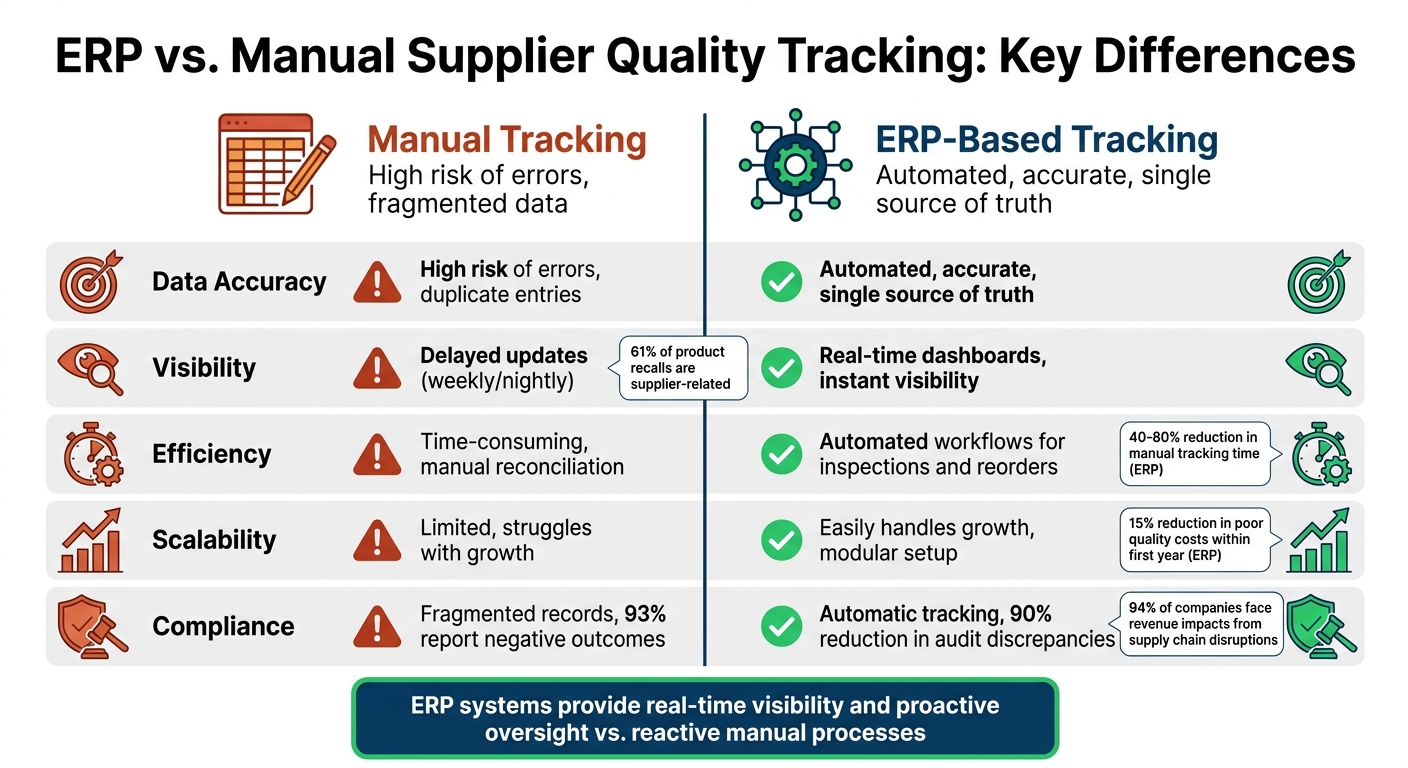
ERP vs Manual Supplier Quality Tracking Comparison Chart
ERP-Based Supplier Quality Tracking
What ERP Systems Offer
ERP systems have transformed supplier quality tracking by consolidating all relevant data into a single platform. Instead of juggling fragmented data sources, these systems provide what experts refer to as a "single source of truth" for tracking product defects, evaluating supplier performance, and addressing compliance issues. This centralized approach eliminates the inefficiencies caused by data silos often seen in manual processes.
Automation is another game-changer. ERP systems handle routine quality tasks like inspection checklists, audit trails, and CAPA (Corrective and Preventive Actions) with ease. For example, if a supplier’s defect rate exceeds 1,000 Parts Per Million (PPM) for two consecutive months, the system can automatically generate a Supplier Corrective Action Request (SCAR). This proactive measure replaces the reactive, often time-consuming processes of manual tracking.
Many ERP platforms also feature supplier portals where vendors can upload certifications, respond to SCARs, and track their performance scorecards in real time. These portals significantly reduce the need for endless email chains and follow-ups. For industries like solar energy, which face strict compliance requirements such as REACH and RoHS, these portals help ensure certifications stay up to date. Tools like Blu Banyan’s SolarSuccess ERP integrate these capabilities, offering solar companies real-time visibility and improved operational workflows. By streamlining these processes, ERP systems not only enhance supplier quality tracking but also deliver practical operational benefits.
Advantages of Using ERP for Supplier Quality
One of the standout benefits of ERP systems is their ability to shift from periodic audits to continuous monitoring. QT9 QMS Software describes this evolution as:
"Supplier Quality 2.0 represents a new era of proactive oversight where automation, real-time risk assessments and smart scorecards converge to help organizations reduce supplier risk, ensure product consistency and maintain regulatory compliance." – QT9 QMS Software
This proactive approach is critical, especially since supplier-related issues account for 61% of product recalls. By using live dashboards to monitor delivery performance and nonconformance trends, ERP systems can identify and address declining supplier performance before it disrupts production.
Another key advantage is improved data accuracy. Automated data collection and integration reduce the risk of manual entry errors. Companies that fully integrate quality management across their supply chain often see a 15% reduction in costs related to poor quality within the first year. For solar companies managing intricate supply chains, these savings can directly impact profitability.
Lastly, ERP systems are highly scalable. Whether managing 10 suppliers or 100, the same automated workflows remain effective. Features like risk weighting allow companies to focus their resources on high-risk suppliers – such as single-source vendors for critical solar components – while applying lighter oversight to lower-risk partners. This targeted approach ensures that monitoring efforts are both efficient and impactful.
sbb-itb-2560759
Manual Supplier Quality Tracking
How Manual Tracking Works
Many companies still rely on manual processes to track supplier quality, using tools like spreadsheets, emails, and even paper files to manage critical information. For example, Excel is often used to log inspection results, monitor defect rates, and keep supplier lists up to date. When issues arise, quality teams send corrective action requests through email, using long email threads to request compliance documents and follow up on unresolved problems.
Physical audits are a key part of this process. Teams conduct on-site or virtual inspections, using printed or digital checklists to evaluate manufacturing processes, raw material storage, and finished goods inspections. Before working with new suppliers, teams manually send out RFIs (Requests for Information) to gather details about the supplier’s history, production capacity, and quality control measures. For product quality, physical sample testing is a common practice, where samples are assessed for durability, craftsmanship, and color accuracy.
Some organizations attempt to streamline supplier evaluations by using weighted scorecards in spreadsheets. These scorecards grade suppliers on factors like quality, cost, and delivery performance. However, since the data is often scattered across multiple departments, it’s tough to get a clear, centralized view of supplier performance. This fragmented approach often leads to delays and errors, which can disrupt production.
Problems with Manual Tracking
One major drawback of manual tracking is the delay between when a problem occurs and when it’s detected. Teams often review spreadsheets weekly, meaning outdated data can turn small problems into major crises. For instance, a 12-week delay in a critical component might go unnoticed until it halts production entirely.
Human error is another unavoidable issue. With manual data entry, mistakes are common, and version control becomes a headache when multiple team members update the same spreadsheet. Important email trails can also get lost, making it difficult to track progress or resolve disputes. In fact, 93% of procurement leaders report negative outcomes caused by poor or inaccurate supplier information. Additionally, 94% of companies face revenue impacts from supply chain disruptions, yet only 6% have full visibility into their supplier networks.
Manual systems also struggle to handle scale. For example, tracking 200+ SKUs across 40 suppliers often relies heavily on memory, which increases the risk of supply chain issues. Critical knowledge about supplier reliability is often stored in the minds of individual team members rather than in a centralized system. When employees leave, this "tribal knowledge" disappears, leaving new team members in the dark about why certain suppliers are trusted or preferred.
ERP vs. Manual Tracking: Side-by-Side Comparison
Efficiency and Accuracy Differences
Using spreadsheets for manual data entry often results in errors, duplicate entries, and lengthy reconciliation processes. ERP systems address these problems by centralizing all operational and transactional data into one database, creating a unified source of truth.
Time plays a crucial role here. Manual updates are typically delayed by days, whereas ERP systems provide real-time insights. Jignesh Vaghasiya, COO at Silent Infotech, highlights the importance of timing:
"A business that knows about a supplier delay three weeks before the production window it affects has options. A business that knows the day before does not".
ERP systems not only replace outdated weekly updates but also deliver instant access to critical information.
| Feature | Manual Tracking (Spreadsheets/Paper) | ERP-Based Tracking |
|---|---|---|
| Data Accuracy | High risk of human error and duplicate entries | Automated data capture; single source of truth |
| Visibility | Delayed; relies on weekly or nightly updates | Real-time dashboards; instant visibility |
| Efficiency | Time-intensive reconciliation and reporting | Automated workflows for tasks like inspections and reorders |
| Supplier Evaluation | Relies on memory or intuition | Data-driven; uses automated scorecards and KPIs |
This shift from intuition-based decisions to data-backed insights revolutionizes supplier management. Instead of relying on memory to assess vendor performance, ERP systems track metrics like delivery reliability, lead time consistency, and rejection rates. This is critical, as 93% of procurement leaders report negative outcomes from poor supplier data. The difference becomes even more pronounced as businesses grow.
Handling Growth and Real-Time Data
Scaling operations highlights the limitations of manual systems. Managing hundreds of SKUs across dozens of suppliers can quickly overwhelm spreadsheets. The issue isn’t just the sheer volume – manual methods can surpass the cognitive limits of even the most skilled staff. Cloud-based ERP systems, however, provide modular setups that can scale effortlessly as supplier networks grow.
Real-time data is another game-changer. Manual batch updates can delay critical disruption alerts by hours. For solar companies juggling complex installations and tight deadlines, these delays can lead to missed commitments and costly setbacks. ERP systems act as a control tower for the supply chain, offering a network-wide view that helps businesses respond to issues faster.
Meeting Compliance Requirements
Real-time monitoring doesn’t just improve response times – it also strengthens compliance efforts, reducing both operational and regulatory risks. Compliance today is more than just passing audits; it’s about safeguarding businesses from financial and reputational harm. Subhayan Mukhopadhyay puts it succinctly:
"Compliance is no longer a checkbox – it’s a strategic workflow to keep business safe from financial and reputational hazards".
Manual methods make compliance a nightmare, with fragmented records, lost files, and weeks of document hunting to prove adherence. ERP systems simplify this process by automatically logging every action – whether it’s a data entry, modification, or deletion – complete with user IDs and timestamps. These tamper-proof records are invaluable during audits. Additionally, ERP systems can enforce compliance by halting production or shipping until required checkpoints are met. This proactive approach significantly outperforms the reactive scramble of manual tracking, reducing audit discrepancies by as much as 90%.
The cost of poor compliance tracking can be devastating. For instance, Hyundai Motors USA faced up to $140 million in penalties in 2020 for delayed defect reporting to the NHTSA – an issue that automated compliance alerts could have prevented. Similarly, Honeywell International paid $13 million for misclassifying items under ITAR regulations. For solar companies operating in tightly regulated environments, ERP systems provide forward and backward traceability, enabling quick identification of affected customers when defective components are discovered.
Moving to ERP: What Solar Companies Should Know
Choosing an ERP Solution
Switching to an ERP system can bring significant improvements, but it all starts with a solid migration plan. Begin by auditing your current workflows to pinpoint problem areas like data bottlenecks, reliance on spreadsheets, and information getting lost in endless email threads. These are the exact issues your ERP system should resolve.
For solar companies, it’s crucial to choose an ERP solution that’s tailored to the unique needs of the industry. Platforms like Blu Banyan‘s SolarSuccess are designed specifically for solar operations, offering tools that align with project schedules and ensure component traceability. Keep in mind that implementation timelines vary: smaller companies might need 3 to 6 months, while larger businesses with intricate supplier networks could take 6 to 12 months or more.
Before diving into migration, make sure your data is clean and standardized. For example, standardizing lot numbers by combining supplier and date codes ensures consistent traceability. To test the system’s readiness, simulate a defect scenario using real data to confirm that you can trace a component’s journey from supplier to customer.
Once the system is technically ready, the next step is preparing your team for the change.
Training Staff and Managing Change
Getting your team on board is often more challenging – and more important – than the technical setup itself. A phased rollout can make this process smoother. Start by implementing the system in one region or business unit, refine the process based on real-world feedback, and then expand gradually. This approach prevents overwhelming your staff and helps build confidence.
Training should go beyond just teaching employees how to use the system. Focus on explaining why it’s necessary. For instance, tasks like scanning lot numbers or entering quality data aren’t just busywork – they’re essential for the system to operate effectively. As AIM Computer Solutions puts it:
"The goal isn’t more data entry – it’s fewer manual workarounds".
When employees see firsthand how the ERP system can reduce the time spent on manual tasks like updating purchase orders by 40–80% , they’re more likely to embrace it. Highlight that automation eliminates repetitive tracking tasks, freeing up time for more strategic work and better customer service. With this structured approach, the benefits of the ERP system can seamlessly integrate into daily operations.
Conclusion
When it comes to tracking and visibility, ERP systems offer a clear edge over manual methods. Spreadsheets and similar tools often rely on periodic updates – nightly or even weekly. This delay means companies are forced to react to problems only after they’ve already disrupted operations. In contrast, ERP systems provide live data, enabling teams to identify and resolve issues before they spiral out of control.
But the benefits don’t stop at speed. Automation plays a key role in streamlining processes like purchase order generation, approvals, and invoice matching. By removing manual handoffs, ERP systems help eliminate bottlenecks and keep operations running smoothly.
If you’re still relying on spreadsheets for quality tracking, it might be time to reconsider. Can your current system handle your growth and operational demands? Industry-specific solutions like Blu Banyan’s SolarSuccess are designed for solar operations, offering tools tailored to address challenges in supplier quality management.
The evidence speaks for itself: ERP systems are more efficient and scalable than manual tracking methods. Consider whether your current approach is holding you back. Moving to ERP-based quality tracking isn’t just about upgrading technology – it’s about positioning your business for long-term success.
FAQs
When should we switch from spreadsheets to an ERP for supplier quality?
Switching to an ERP system for supplier quality becomes crucial when managing data with spreadsheets starts slowing you down or leading to errors. If you’re noticing delays in getting insights, inconsistent quality checks, or a higher risk of supply chain issues, it’s time to consider a change. An ERP consolidates all your data in one place, automates quality control processes, and enables real-time decisions – key features for keeping up with today’s fast-moving supply chains and staying ahead of potential risks.
What supplier quality metrics should an ERP track automatically?
An ERP system is designed to automatically monitor key supplier quality metrics such as supplier risk levels, compliance status, and delivery performance. It also keeps tabs on the quality of incoming materials to ensure they meet required standards. By automating these processes, businesses can reduce the need for manual checks, improve accuracy, and respond swiftly to potential issues that might disrupt production or drive up project costs.
How hard is it to migrate our supplier quality data into an ERP?
Migrating supplier quality data into an ERP system can feel like a daunting task, but with the right strategy, it’s entirely manageable. The process starts with ensuring data accuracy – clean, reliable data is the backbone of any successful migration. Next, tackle any non-standardized formats; aligning these ensures consistency across the system.
Another critical step is thorough data mapping. This helps prevent redundancies or errors that might disrupt operations. A well-structured plan that includes careful assessment, detailed planning, and rigorous testing is essential. This approach minimizes risks, preserves data integrity, and ensures a seamless transition, all while enabling smoother supplier management processes.
