

If your solar team does not use one clear lead-to-billing flow, jobs slow down, billing slips, and margin gets hit. I’d sum up the article this way: map every stage in NetSuite, tie each handoff to a record and approval, and use milestone-based billing so finance only invoices when the job is ready.
Here’s the core idea in plain English:
- I move the job through one set path: lead, design, proposal, contract, project setup, procurement, install, inspection, PTO, and collections
- I make each team hand off the job only when required data is complete
- I tie billing to milestones like contract signed, install complete, and PTO granted
- I track a small set of numbers that show where time, cash, and margin are slipping
- I use one system because solar projects already have enough moving parts, especially with 36,177 AHJs and soft costs that can reach 65% of install cost
What matters most is not more software screens or more admin work. It’s making sure sales, project teams, field crews, purchasing, and finance all work from the same record so a signed deal can turn into a scheduled job, an install can turn into an invoice, and an invoice can turn into cash without side spreadsheets.
If I were reading the full piece for one answer, it would be this: use NetSuite to control handoffs, milestone timing, and billing triggers from first lead through final payment.
The End-to-End Solar Lifecycle in NetSuite
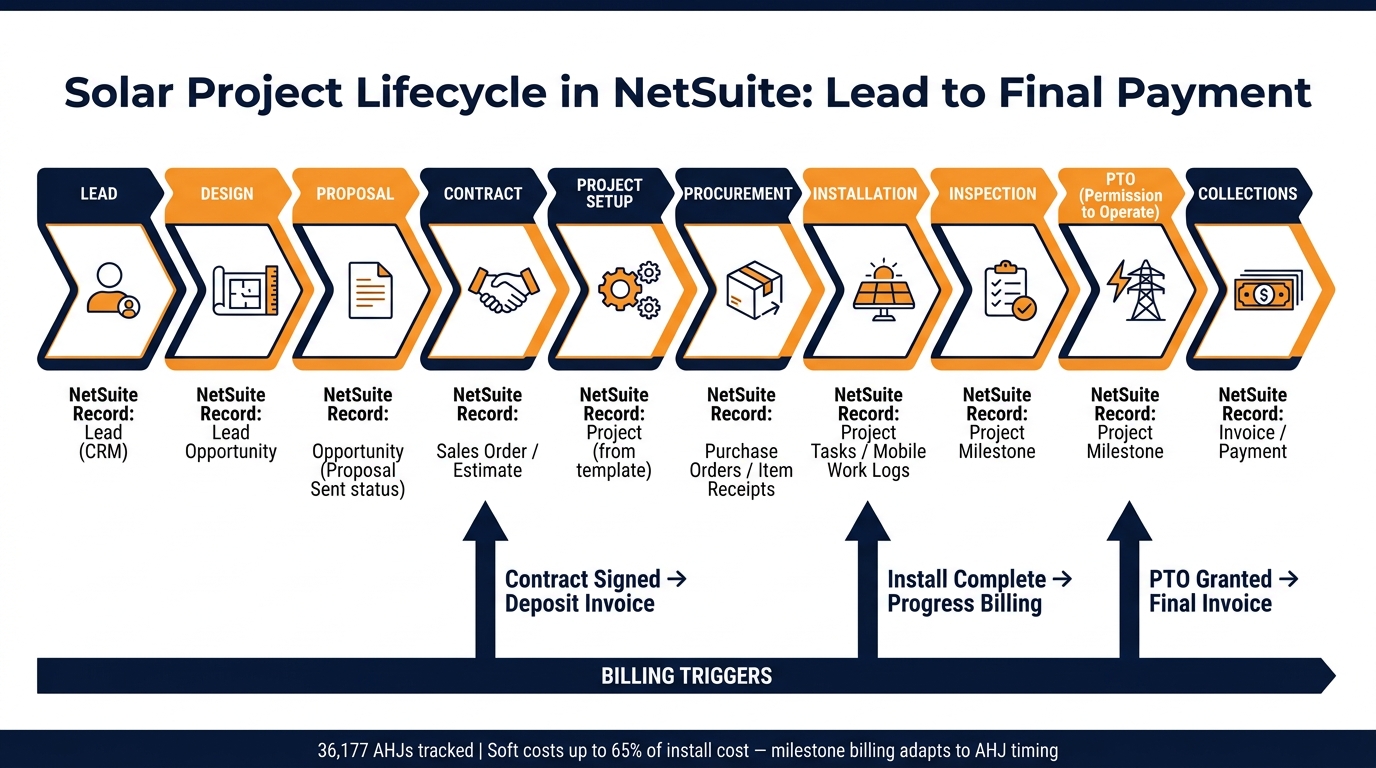
A solar project should move through a fixed NetSuite sequence: lead intake, design, proposal, contract execution, project setup, procurement, installation, inspection, PTO, and billing. NetSuite ties each stage together through linked records across CRM, projects, purchasing, and accounting [1][3]. In plain English, one record hands the job to the next team, so work keeps moving instead of getting stuck in email threads or spreadsheets.
Lead, Design, Proposal, and Contract Execution
The process starts with a Lead record in NetSuite CRM. Once the lead is qualified, it moves into an Opportunity record. That’s where the team logs site assessment details, design inputs, and proposal information.
From there, the deal moves through a fixed status flow: Qualified > Site Assessment > Proposal Sent > Financing Approved > Contract Signed. That set path matters. It gives sales, design, and ops a shared view of where the job stands and what needs to happen next.
At contract execution, the BOM syncs to the Sales Order and Estimate, and the job is ready for the handoff to operations [1][3].
Project Setup, Procurement, and Installation Execution
After contract execution, the sold job is created as a Project, often from a standard template that includes tasks and milestones [3]. This gives the team a repeatable way to launch each job without rebuilding the project from scratch.
The approved BOM then kicks off procurement and install prep. Purchasing flows from the BOM into Purchase Orders and Item Receipts, which gives teams a clear view of equipment demand and inventory status [1][3]. If panels, inverters, or racking are delayed, that shows up in the record flow instead of becoming a last-minute surprise.
Action queues send the next task to the right role, and mobile updates let field teams mark statuses like Ready to Schedule and Install Complete in real time [2]. Once that happens, the record flow is in place for the next handoff: inspection, PTO, and billing.
Inspection, PTO, Billing, and Collections
Post-install billing is usually milestone-based. Teams track Inspection Passed and PTO (Permission to Operate) before final billing goes out. Common billing triggers include:
| Milestone | NetSuite Record / Transaction | Billing Trigger |
|---|---|---|
| Contract Signed | Sales Order / Estimate | Deposit |
| Install Complete | Project Task / Milestone | Progress billing |
| PTO (Permission to Operate) | Project Milestone | Final billing |
This approach works better than calendar billing because inspection timing can shift based on the AHJ permitting process. If final invoicing depends on PTO, billing by milestone gives the team a more dependable way to bill at the right time [1][3]. Collections then continue through Invoice and Payment records.
The next step is defining who owns each handoff and which approvals keep the job moving.
Standard Workflows, Handoffs, and Internal Controls
Clear handoffs are the difference between a solar company that scales and one that gets stuck. If each team receives the full data set before work moves to the next stage, delays shrink and rework drops. NetSuite supports this with milestone workflows and alerts that show what must be done before the next step can begin.
Put simply, these controls spell out who owns each handoff and what has to be finished before the project moves on.
Department Handoffs at Each Project Milestone
Every solar handoff should send a defined set of data to the next team. With integrated ERP and inventory workflows, sales, design, permitting, and finance all work from the same record set instead of chasing updates across email threads and spreadsheets.
Sales shouldn’t pass a job to design until there’s a signed contract and customer credit approval. Design shouldn’t release work to permitting until the BOM is final and site survey data is in place. Permitting shouldn’t hand off to procurement until permit documents are approved and AHJ-specific requirements are confirmed.
That pattern keeps going through installation, inspection, PTO, and billing.
NetSuite’s stage-gate setup makes required data visible before the next team takes over. That matters in day-to-day operations. If the BOM isn’t final before procurement starts, teams can over-order. If permits aren’t confirmed before scheduling, field crews can end up at jobs that aren’t ready.
Role-Based Permissions and Approval Rules
Once each handoff is mapped, approval rights need to sit with the right role. In NetSuite, role-based access limits what each person can see and do based on their job.
A sales rep can create and update Opportunities, but can’t release an Invoice. A field supervisor can mark installation tasks complete on the Project, but can’t change the project budget. A controller has approval authority for Invoice release and budget changes.
This setup matters most for POs, budget edits, and invoice release. Those are the spots where bad edits can chip away at margin and slow cash collection. Keeping approvals inside NetSuite also cuts out spreadsheet workarounds.
Workflow Design Reference Tables
Use the tables below as the control matrix for roles and handoffs.
Role Ownership and Approval Authority
| Role | Primary NetSuite Records | Approval Authority |
|---|---|---|
| Sales Rep | Opportunity, Estimate, Sales Order | Proposal release |
| Project Manager | Project, Milestones, Tasks | Schedule changes, milestone sign-off |
| Procurement Team | Purchase Orders, Item Receipts | PO approval up to set threshold |
| Field Supervisor | Project Tasks, Mobile Work Logs | Install complete, inspection ready |
| Controller | Invoices, Budget Records, Revenue Recognition | Invoice release, budget changes |
| Finance Analyst | Revenue Recognition, Collections | Payment application, collections review |
Manual vs. Workflow-Gated Handoffs
| Factor | Manual Handoff | Workflow-Gated Handoff |
|---|---|---|
| Error Risk | High – data gaps often surface after handoff | Low – required fields are checked before handoff clears |
| Cycle Time | Slow – relies on email follow-up and spreadsheet checks | Fast – automated alerts notify the next owner immediately |
| Visibility | Siloed – each team tracks its own status separately | Unified – all teams see the same real-time project status |
| Auditability | Weak – changes are harder to trace across systems | Strong – workflows create a clearer audit trail for changes and approvals |
These controls feed the dashboards and KPI definitions in the next section.
Dashboards and KPIs That Support Scale
After handoffs and approvals are set, dashboards show if the process is doing its job. That’s the part that matters. NetSuite’s unified data model ties each dashboard back to the same records, so teams aren’t arguing over whose numbers are right. The tables below turn that shared visibility into role-based action and tighter control at each milestone.
Executive, Sales, Operations, and Finance Dashboards
Each leader needs a different lens. A CEO tracking pipeline health is looking for something very different from a CFO watching days sales outstanding (DSO) or a COO managing crew utilization. Here’s how those views connect to day-to-day decisions.
| User Role | Primary KPIs | Data Sources | Process Decisions Supported |
|---|---|---|---|
| CEO | Pipeline health, company-wide profitability, cash flow | Unified ERP (Accounting + CRM) | Strategic growth and investment decisions by stage |
| CFO | Gross margin by project, AR aging, cash flow forecasting, DSO | Accounting + Project Milestones | Revenue recognition timing and working capital at billing milestones |
| COO | Install throughput, crew utilization, permit cycle time | Project Management + Field Service | Resource leveling from permit approval through install complete |
| Sales Leader | Sales pipeline, commission reports, customer acquisition cost | CRM + Sales Orders | Sales strategy adjustments and partner performance from lead to contract |
| Project Manager | Project Action Queue, cost vs. budget, weather portlet | Project Management + Field Service | Daily task prioritization from permit approval through PTO |
One dashboard feature that helps in the field is a weather portlet for project managers. It can cut wasted truck rolls and help keep installs on schedule.
Solar KPIs and Standard Milestone Definitions
Once each role has its view, the next step is making sure everyone tracks the same milestones in the same way. At scale, the right KPIs protect margin and throughput. These are the metrics that hit both.
- Soft Cost %: Non-hardware costs, such as permitting, acquisition, and labor, as a percentage of total project cost. This helps guide pricing strategy and overhead cuts.
- Project Margin: Revenue minus actual costs, including labor, parts, and miles. It helps spot high-cost regions or crews that are draining profit.
- Installation Cycle Time: Total days from contract execution to PTO. This supports cash flow forecasting and resource planning.
- First-Time Fix Rate: Percentage of installations or service calls finished without a return visit. This helps improve crew training and inventory accuracy.
- Days Sales Outstanding (DSO): Average time to collect payment after PTO or milestone billing. This supports working capital management.
- Change-Order Rate: How often the original BOM gets modified. This helps tighten sales accuracy and design precision.
- Permit Cycle Time: Days from permit filing to AHJ approval. With 36,177 individual Authorities Having Jurisdiction (AHJs) across the U.S. [1], this metric can swing a lot by market and needs close tracking.
Standard milestone definitions keep departments in sync. When Install Complete means the exact same thing to field supervisors, finance, and project managers, billing moves faster and revenue recognition gets cleaner.
| Milestone | Trigger | Departmental Impact |
|---|---|---|
| Contract Executed | Signed agreement verified | Sales earns commission; Ops begins project setup |
| Permit Approved | AHJ approval documented in NetSuite | Ops schedules install; Procurement releases materials |
| Install Complete | Field tech submits final work order via mobile tool | Finance initiates milestone billing; Ops schedules inspection |
| Inspection Passed | AHJ sign-off received | Finance recognizes revenue; Ops submits PTO application |
| PTO Granted | Utility PTO received | Finance issues final invoice; Collections begin |
Dashboard and KPI Reference Tables
These KPIs only mean something if the workflow underneath them is set up to trigger them the same way every time. The table below shows how core operating elements affect speed, accuracy, and compliance.
| Scalable Operating Element | Dashboard/Workflow Impact | Effect on Accuracy & Speed |
|---|---|---|
| Project Action Queue | Delivers role-filtered, ready-to-start tasks automatically | Eliminates manual status chasing; increases throughput |
| Milestone Triggers | Automatically initiates invoicing and accounting events | Reduces billing lag and improves revenue recognition accuracy |
| Integrated BOM | Syncs sales orders with inventory in real time | Prevents procurement errors and project delays |
| AHJ Registry | Automates jurisdiction identification during permitting | Speeds up permit submissions and reduces inspection failures |
| Dashboard Alerts | Flags project delays, cost overruns, and subcontractor exceptions | Surfaces issues before they affect margin |
Titan Solar Power’s rollout showed how unified dashboards and workflows can reduce manual labor and improve real-time project visibility [1].
Conclusion: Build a Scalable Solar Operating Model in NetSuite
A process map works only when every handoff stays connected. And it works only when NetSuite enforces each handoff, trigger, and approval.
Titan Solar Power’s experience shows why that kind of discipline matters. Their takeaway was simple: one connected system beats patching holes with extra labor. Scale comes from one system, not extra labor. Standardized milestones, handoffs, and approvals help protect margin as volume grows.
Blu Banyan‘s SolarSuccess brings that same discipline into NetSuite. It extends NetSuite with in-record communication, controlled document management, financier integrations, and labor tracking. Each piece ties straight to the mapped workflow, so handoffs stay clean and billing moves faster.
That is the operating model this guide points to: map the flow, enforce it in NetSuite, and let your team focus on execution.
FAQs
How do I start mapping our solar workflow in NetSuite?
Start by documenting your current end-to-end process for quotes, project schedules, procurement, and billing. Then identify 5–10 key workflows, such as lead-to-cash or project-to-billing, and assign a process owner to each.
Map out who handles each step, which tools they use, and where handoffs happen. If it helps, Blu Banyan’s SolarSuccess offers solar-specific templates that can connect CRM, project management, and accounting.
Which milestones should trigger billing in a solar project?
Billing should be tied to key construction and regulatory milestones, so invoices match the work that’s been done on the project.
Common triggers include permitting completion, equipment delivery and installation, inspection, and final interconnection. In NetSuite, SolarSuccess by Blu Banyan can connect these milestones to automated invoicing. That helps keep billing accurate and gives teams better control over cash flow.
What KPIs matter most for scaling solar operations?
The most important KPIs span financial, operational, and resource performance.
Key financial metrics include:
- Cash flow
- Accounts receivable
- Project costs
- Profitability
Operational and resource KPIs cover permit approval timelines, installation labor efficiency, interconnection completion rates, inspection pass/fail ratios, team utilization, inventory levels, and supply chain performance.
With SolarSuccess dashboards, teams can track these in real time and spot bottlenecks fast.
