

If job costs, revenue, inventory, and subcontractor bills do not hit the same project record, your solar margin numbers can be off.
I’d sum up the article like this: NetSuite helps finance teams track profit per installation by tying job setup, cost posting, revenue timing, inventory usage, committed spend, and reporting into one system. That matters because solar projects include hard costs and soft costs, and even small misses in permitting, labor, or change orders can cut margin fast.
Here’s the short version:
- I need each install set up as a project with phases and cost codes
- I need labor, materials, permits, and subcontractor costs tagged to that job
- I need revenue recognized by milestone or progress, not just when I send an invoice
- I need purchase orders to show committed spend before bills arrive
- I need returns, damage, and warranty replacements tied back to the original job
- I need dashboards that show project margin, WIP, billed vs. earned revenue, open commitments, and cost by phase
A few points stand out. Soft costs can make up much of a solar system’s cost base, so a delay or scope change can hit profit fast. For many residential jobs, milestone-based revenue recognition fits better. For longer commercial work, progress-based recognition often fits better. And if reports are not built from project-linked transactions, finance teams can end up working from mixed numbers.
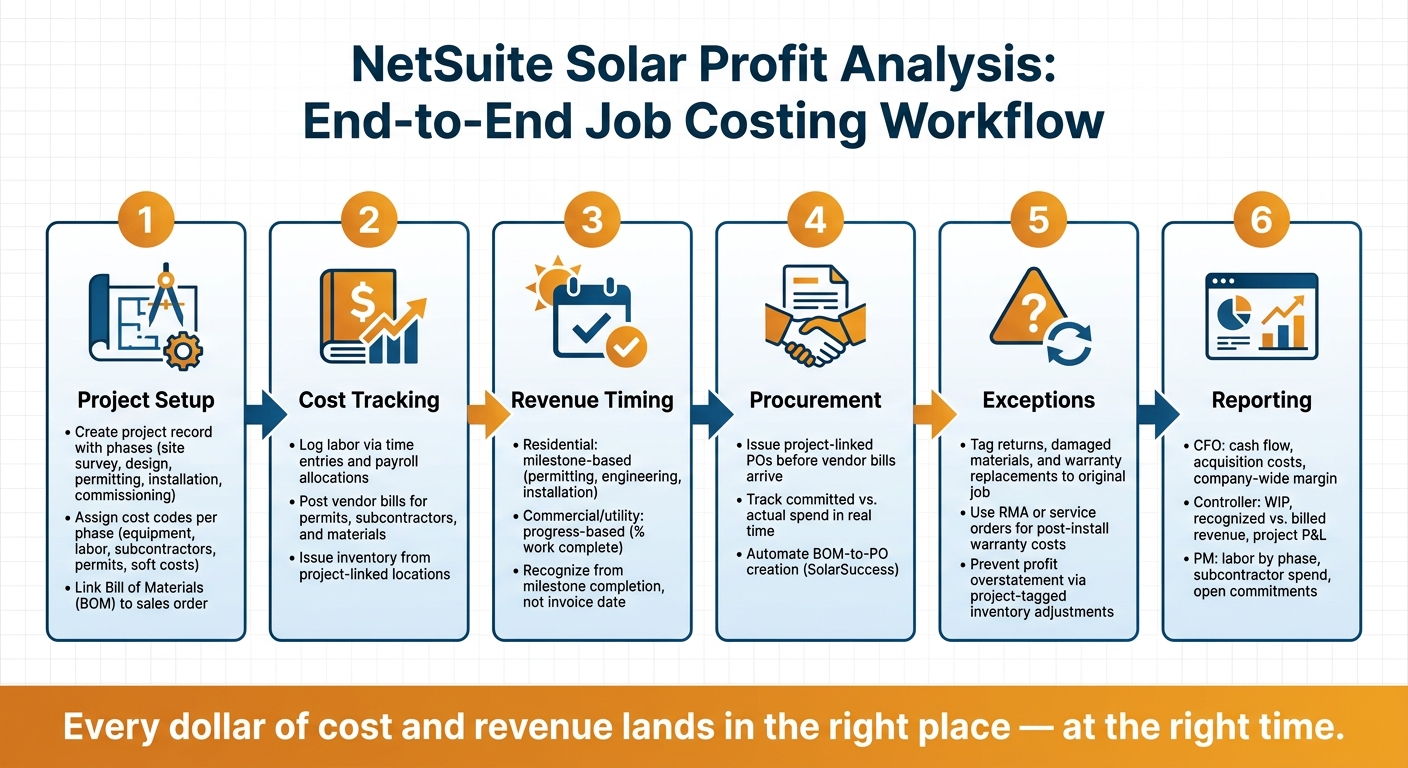
This piece is, at its core, about one thing: I want every dollar of cost and revenue to land in the right place at the right time so project P&L reports stay usable.
| Area | What I need in NetSuite | Why it matters |
|---|---|---|
| Project setup | Phases, tasks, cost codes, BOM link | Keeps job costs sorted from day one |
| Cost tracking | Labor, inventory, vendor bills, permits | Shows true installed cost |
| Revenue timing | Milestones or progress schedules | Keeps margin by period from getting distorted |
| Procurement | Project-linked POs and receipts | Shows committed and actual spend |
| Exceptions | Returns, write-offs, warranty work | Stops profit from looking better than it is |
| Reporting | Project P&L, WIP, open commitments | Gives finance and PMs one shared view |
If I were reading this to get the answer fast, that would be it: set up the project cleanly, post every cost to the job, separate billed from earned revenue, and report from one source of truth.
Project Setup and Job Costing for Solar Installations
Accurate job costing starts before the crew shows up on-site. If the setup is clean from day one, project activity turns into margin data finance can rely on. That means NetSuite needs to send each cost to the right phase and cost code.
Structure Projects by Phase, Cost Category, and Budget
Set up each solar installation as its own project record in NetSuite. Then split that record into phases like site survey, design, permitting, installation, and commissioning. Inside each phase, use clear cost codes for major equipment, direct labor, subcontractors, permitting, and other soft costs. That separation matters. If soft costs get mixed in with everything else, project margin gets blurry fast.
It also helps to link the project’s bill of materials (BOM) straight to the sales order. That way, the materials sold at the start become the baseline for procurement and job costing later.
Once that structure is in place, you can start posting actual labor, material, and subcontractor costs against it.
Track Actual Labor, Materials, and Overhead Against Each Job
After the project record is built, every cost needs a clean route into it. In NetSuite, each transaction type handles a different cost bucket:
| Cost Category | NetSuite Transaction Type | Effect on Project Margin |
|---|---|---|
| Major Equipment (Panels, Inverters, Racking) | Purchase orders linked to project BOM | Posts equipment cost to the job as inventory is issued or billed |
| Direct Labor | Time entries and payroll allocations tied to project tasks | Posts direct labor to the job and lowers project margin |
| Subcontractor Fees | Vendor bills and purchase orders tied to specific project milestones | Tracks committed and actual subcontractor spend against the job |
| Permitting & Fees | Vendor bills tied to project phase | Posts permit and fee costs to the correct phase |
| Balance-of-System Materials | Real-time inventory management and warehouse tracking | Minimizes write-offs and improves material cost accuracy |
For teams using SolarSuccess, NetSuite can automate equipment job costing and create purchase orders straight from the project’s BOM. That cuts out manual entry and helps teams log committed equipment spend earlier. When inbound goods are linked to project inventory locations, it also supports just-in-time equipment ordering and keeps committed spend visible in real time. [4]
“Because QuickBooks doesn’t ‘talk’ to Salesforce.com – and because Salesforce.com isn’t integrated with job-costing tools – an installer’s procurement, accounting and sales teams are literally working from different playbooks.” – Blu Banyan [3]
That gap is exactly what a well-set-up NetSuite project record is meant to fix.
When SolarSuccess by Blu Banyan Fits Solar Job Costing

Once actual costs are flowing into the job, the next call is pretty simple: does a solar-focused SuiteApp give you enough control to make it worth adding?
Use SolarSuccess when you need BOM-to-PO automation, project inventory locations, and solar-focused job-cost templates inside NetSuite.
Revenue Recognition and Margin Timing
Once job costing is set up, the next thing that shapes margin is revenue timing. Costs may be posted to the right job, but you still need to decide when revenue should hit the books.
Choose the Right Revenue Recognition Method for Each Contract
Pick the revenue recognition method based on the contract type and how long the project runs.
Residential solar jobs tend to move fast, so milestone-based recognition is often the best match. Revenue is recognized when a set stage is done, like permitting, engineering, or installation. Longer commercial or utility projects usually fit progress-based recognition better because revenue tracks how much work is actually finished.
Set up NetSuite so revenue is recognized from milestone completion, not invoice dates. [3]
Align Recognized Revenue with Project Costs for Clearer Margin Reporting
Margin distortion usually shows up when costs land in one period and revenue lands in another. Front-loaded soft costs can make early margins look worse than they are.
The fix is pretty simple in theory, even if it takes discipline in practice: keep billing schedules, project progress updates, and cost postings in sync. That way, recognized revenue lines up with incurred costs in each reporting period.
| Recognition Approach | Best Fit | Margin Visibility | Work-in-Progress Impact |
|---|---|---|---|
| Milestone-Based | Residential, fixed-price projects | High; clear margin by phase | Simpler work-in-progress tracking |
| Progress-Based | Commercial or utility projects | Requires steady progress updates | Ongoing work-in-progress tracking |
Handle Progress Billing, Retainage, and Change Orders Correctly
For billed-on-progress contracts, keep invoicing separate from earned revenue. That distinction matters. On commercial projects, progress billing means invoices go out in stages, but billed revenue and recognized revenue are not the same thing.
Finance teams need a clean view of:
- what has been billed
- what has been earned
- what still needs to move through the project record
Change orders need the same level of attention. When scope shifts, those updates should hit the job record and project accounting at the same time so profit reports stay current. [1] Post change orders to the job right away so billed and earned revenue stay up to date.
With revenue timing lined up, the next control is tying procurement and subcontractor costs to that same project record.
Inventory, Procurement, and Subcontractor Cost Visibility
Once revenue timing is set, margin accuracy comes down to one thing: getting equipment, labor, and subcontractor costs into the same project record.
Link Panels, Inverters, Racking, and Batteries to the Right Project
Start with the project BOM. That should drive procurement.
When hardware arrives, item receipts update inventory. When crews use those materials, item fulfillments move the cost into the project P&L. The result is simple: finance teams can see material cost at the job level without jumping between separate systems.
“The only way to make that happen [reducing soft costs] is with an integrated application suite that provides reliable data and a common interface across all functions.” – Jan Rippingale, CEO, Blu Banyan
Capture Committed Costs and Subcontractor Spend Before the Job Closes
One of the biggest sources of margin leakage is late cost visibility. A job looks done, then new costs show up after the fact.
That’s why purchase orders should be treated as committed costs, not just admin paperwork. When a PO is issued against a project, it signals expected spend before the vendor bill arrives. That gives finance teams a way to compare committed costs with actual costs during the project, instead of waiting until close.
SolarSuccess by Blu Banyan keeps subcontractor charges inside the project workflow. So installed labor and subcontractor labor costs stay visible in one project view.
Account for Write-Offs, Returns, and Warranty Replacements
Damaged panels, returned inverters, and warranty replacements all change project margin. A common mistake is posting them as generic inventory adjustments instead of tying them to the job. That makes profit look better than it is.
Inventory adjustments only matter if they hit the project record. That’s what keeps profit reporting honest. If a material movement belongs to a specific job, tag it to that job.
| Scenario | NetSuite Record | Impact on Project P&L |
|---|---|---|
| Committed equipment spend | Purchase Order (project-linked) | Shows expected cost before billing |
| Hardware received on-site | Item Receipt | Updates inventory; records actual material cost |
| Materials consumed during install | Item Fulfillment / BOM Sync | Moves cost from inventory to project expense |
| Subcontractor labor | Vendor Bill (tagged to project) | Reflects subcontractor labor in true installed cost |
| Damaged materials on-site | Inventory Adjustment (project-tagged) | Increases actual cost; prevents profit overstatement |
| Return to vendor | Vendor Return Authorization / Credit | Reduces actual cost; improves margin accuracy |
| Warranty replacement | service order or RMA | Tracks post-install cost separately from original job cost |
Warranty work needs extra care. If a panel or inverter fails after installation, the replacement cost should run through a service order or RMA linked to the original project. It should not be dumped into a new job or written off as a general expense. That keeps the original project’s financial history intact and shows the warranty cost as its own event.
These entries feed the job-level dashboards and margin reports finance teams use next.
Dashboards, Reports, and Key Takeaways
Build Role-Based Dashboards for CFOs, Controllers, and Project Managers
Once project costs and revenue connect to NetSuite, dashboards turn raw numbers into day-to-day margin control.
The key is simple: different people need different views. A CFO is looking at cash flow, acquisition costs, and company-wide profitability. A controller is focused on margin by project, WIP, and recognized revenue versus billed revenue. A project manager needs a much more job-level view, like labor cost by phase, subcontractor spend, and project status.
SolarSuccess adds solar-focused portlets, including gross margin per watt and project status. That gives teams a direct way to spot where margin is slipping, whether the issue is labor overruns, material waste, or change orders. [3][5]
Set Up the Core Reports and Saved Searches Finance Teams Use
From there, finance teams usually need a short list of reports tied straight to project-linked transactions.
For solar profitability, the core reports are pretty direct: project P&L, budget vs. actual, WIP, open commitments, subcontractor spend, and cost by phase. Every report should pull from project-linked transactions. If it doesn’t, the numbers can drift fast.
| KPI / Metric | NetSuite Data Source | Best View |
|---|---|---|
| Project Gross Margin % | Project Profitability Report | CFO/Controller Dashboard |
| Gross Margin per Watt | SolarSuccess Performance Dashboard | Project Manager Dashboard |
| Budget vs. Actual | Job Costing / Project Records | Project Performance Report |
| Labor Cost by Phase | Timesheet Entries linked to Project Tasks | Saved Search: Labor Variance |
| Committed Costs | Open Purchase Orders / Subcontractor Contracts | Open Commitments Report |
| WIP | Unbilled Costs / Deferred Revenue | WIP Report / Balance Sheet |
| Recognized vs. Billed Revenue | Revenue Recognition Schedules / Invoices | Revenue Summary Dashboard |
Conclusion: The Core Controls That Improve Solar Margin Analysis
NetSuite solar profit analysis works best when dashboards, project-linked reports, and milestone-triggered billing keep labor, materials, subcontractors, and change orders visible in real time.
