

Soft costs can make up 64% of a new residential solar system’s total cost. If I can’t tie labor, permit fees, design time, sales effort, and overhead to one job, my margin report can look fine while the job is losing money.
Here’s the short version:
- I set standard cost codes for labor, permitting, sales, design, and overhead.
- I require project, branch, crew, and phase tags on every time entry, bill, expense, and journal.
- I post costs as they happen, not at month-end.
- I review budget vs. actual by job, branch, crew, and phase.
- I fix miscoded entries before closeout so the next bid uses clean job data.
In plain terms: if soft costs sit in accounting and finance software accounts, I can’t see where profit slips. But when each cost is tied to the right job and phase, I can spot labor drift, fee overruns, design creep, and overhead gaps early.
A few points matter most:
- Labor should hit the right phase, like site survey, install, commissioning, or punch list.
- Permit and vendor charges should post straight to the job instead of shared expense buckets.
- Overhead should follow one fixed monthly rule, such as labor hours, revenue, or project count.
- Pre-close review should catch missing tags and wrong codes before the books close.
| Area | What I track | Why it matters |
|---|---|---|
| Labor | Hours by phase and crew | Shows overtime and labor drift |
| Permits & bills | Job-tagged outside costs | Shows fee overruns fast |
| Design & sales | Time and effort by job | Shows scope creep and acquisition cost |
| Overhead | Monthly allocated indirect cost | Shows true job margin |
So the core idea is simple: tag every soft cost to the right project from day one, then review the data before closeout. That is how solar firms get a cleaner read on job profit and tighten future bids.
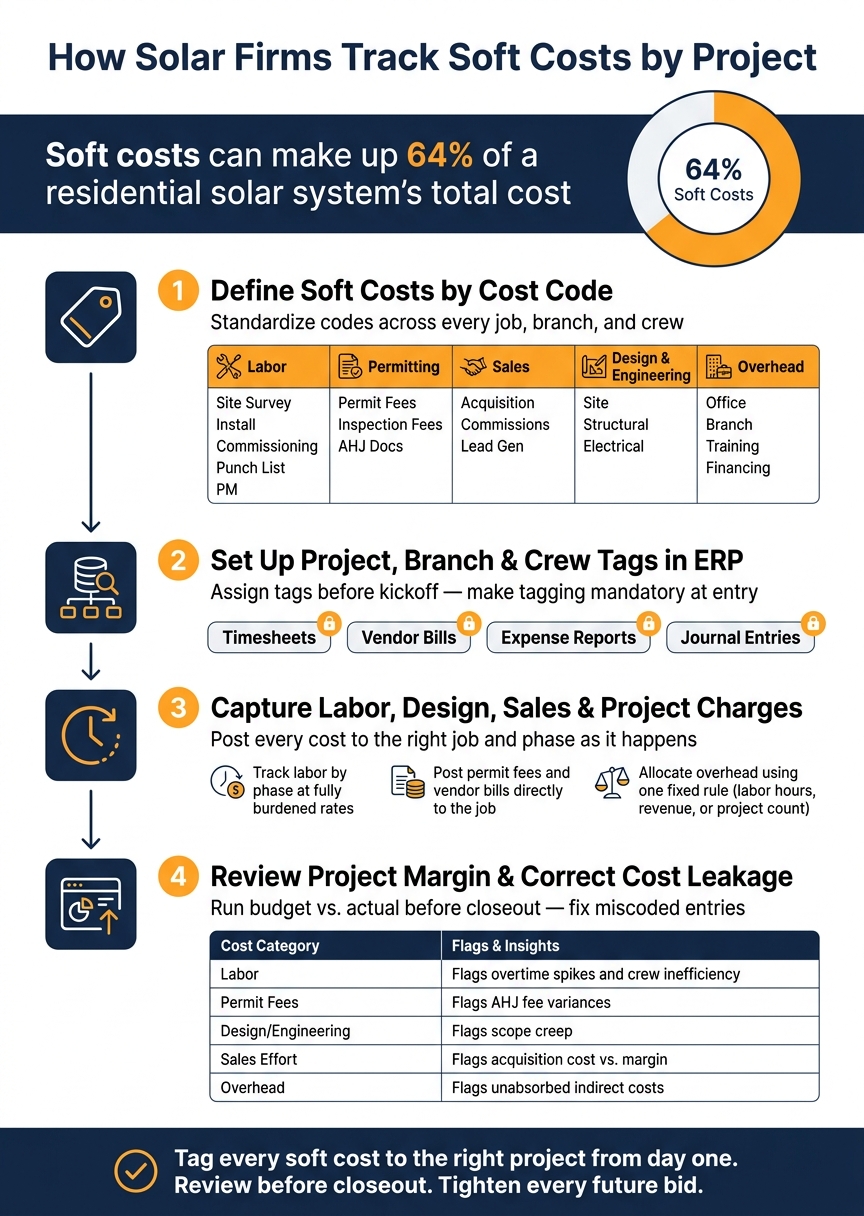
1. Define Soft Costs by Cost Code
A cost code is the ERP label that sends soft costs to the right job. Clear, standard codes keep labor, permits, sales, design, and overhead out of messy catch-all accounts. Once you’ve defined your soft costs, the next move is simple: code them the same way every time in your ERP.
The aim is straightforward. Every soft cost should flow into a job-level report on its own.
Create standard cost codes for labor, permits, sales, design, and overhead
Use one code structure across every job, branch, and crew. That way, the numbers mean the same thing no matter who enters them or where the work happens.
Use these core soft-cost codes:
| Soft-Cost Category | Cost Code Breakdown |
|---|---|
| Labor | Site Survey, Installation, Commissioning, Punch List, Project Management |
| Permitting | Permit Fees, Inspection Fees, AHJ Documentation |
| Sales | Customer Acquisition, Sales Commissions, Lead Generation |
| Design & Engineering | Site Design, Structural Engineering, Electrical Engineering |
| Overhead | Office Support, Branch Overhead, Staff Training, Financing Costs |
Phase-level labor codes help you spot where overspending begins, not just the final total. That matters because labor can drift little by little across a job, and broad codes tend to hide the problem until it’s too late.
“Solar teams need labor costs to hit the right project phase so the numbers match how jobs are actually run.” – Jan Rippingale, CEO, Blu Banyan Inc. [1]
Map each cost code to project, branch, and crew reporting
Defining the codes is only the first step. The next step is making sure each code posts to three reporting levels: job, branch, and crew. That setup gives managers a clean way to compare performance without digging through unrelated charges.
Set up the mapping from day one so closeout reporting stays clean. If a code can’t tie back to a job, branch, and crew, it’s too broad and will cause trouble later.
With codes in place, the next step is tagging each entry to the right job, branch, and crew.
2. Set Up Project, Branch, and Crew Tags in ERP
Once your cost codes are in place, set up the project record before kickoff with the project number, branch code, crew ID, and phase IDs. That way, once the job record is live, every cost can be tied to it at the moment of entry.
Assign project numbers, branch codes, and crew IDs before kickoff
Project numbers, branch codes, and crew IDs make sure labor, permit fees, sales costs, and design hours land on the correct job. It also helps to break each job into phases – site survey, installation, permitting, commissioning, and punch list – so costs hit the right stage before the first permit fee ever gets entered.
Use posting rules that require tags on time, bills, and journals
The simplest way to stop unassigned costs is to make tagging mandatory at entry. In plain English: your ERP should not let a transaction post unless the right project fields are filled in.
| Transaction Type | Required Tags |
|---|---|
| Timesheets | Project Number, Phase ID, Crew ID, Cost Code |
| Vendor Bills / Permit Fees | Project Number, Branch Code, Cost Code |
| Expense Reports | Project Number, Employee ID, Cost Code |
| Journal Entries | Project Number, Branch Code, Cost Code |
This keeps job, branch, crew, and cost code reporting lined up before close. It also blocks miscoded entries before month-end.
Connect the workflow in a solar-specific ERP environment
Use one project record across accounting, operations, and field teams. Titan Solar Power implemented Blu Banyan’s SolarSuccess on the NetSuite platform to replace siloed systems that required significant manual effort to connect data across departments. [2] For more guidance on optimizing your operations, explore our business management resources.
With an integrated setup like SolarSuccess, firms can also use bluTime for timekeeping so labor entries flow straight into the project record with the right phase and crew tags. For finance teams, that means cleaner labor data and less cleanup at month-end.
With tags enforced at entry, the next step is capturing labor, design time, and job charges in the right phase.
3. Capture Labor, Design, Sales Time, and Project Charges
Once your tags are set up, post every labor hour, bill, and overhead charge to the right job and phase as it happens. That’s the whole idea here: record costs in the moment, not at close.
Track labor and design time by phase, not just by day
Track hours by phase so site survey, design, permitting, installation, commissioning, and punch list costs stay visible for each job. Field labor, design work, and sales time should all be entered against a specific phase using fully burdened labor rates.
That matters because the hours then post at fully burdened cost – including taxes and benefits – instead of showing only a base wage. You get a much clearer view of what each phase is actually costing.
In February 2026, Blu Banyan and LumberFi launched a SolarSuccess integration on Oracle NetSuite that posts payroll results to project phases automatically. [1]
“By working together, we’re connecting Lumber’s time, payroll, and compliance data directly into SolarSuccess so customers get accurate, job-level labor costs while staying aligned with certified payroll and multi-state requirements.” – Girish Ramachandra, Head of Partnerships, LumberFi [1]
Post permit fees, vendor bills, and subcontractor charges directly to the job
Every outside cost – permit fees, vendor bills, and subcontractor charges – should be coded to the project the moment it is committed or invoiced. If a permit fee comes in, it should post straight to the project number, branch code, and cost code for permitting, not to a general expense account.
Why? Because job-level postings are what feed the margin review in the next step. If charges land in the wrong place, the margin picture gets blurry fast.
Allocate overhead with clear rules
Shared overhead – general and administrative expenses, office support, fleet administration, and branch supervision – still hits every job’s margin. So use one clear allocation basis each month, whether that’s:
- labor hours consumed
- project revenue
- project count across a branch
Then automate that rule inside your ERP so it doesn’t drift from one period to the next.
When labor, fees, and overhead are posted this way, margin review turns into a quick check for leakage.
4. Review Project Margin and Correct Cost Leakage
Once costs hit the job, the next step is simple: use the dashboard to catch variance before closeout.
When costs are tagged by project and phase, margin review turns into a straight budget-vs.-actual check. You’re looking at labor, permit fees, sales, design, and overhead against what was planned by project, branch, crew, and phase. That makes it much easier to see where margin is slipping and why.
Compare budget vs. actual soft costs by job, branch, and crew
A solar ERP dashboard shows budget vs. actual by job, branch, crew, and phase. That matters because not every overrun points to the same fix. A permit overrun tells one story. A labor overrun tells another.
| Soft Cost Category | Tracking Method | What It Flags |
|---|---|---|
| Labor (Direct) | Auto-posted by phase (Install, Commissioning, etc.) | Overtime spikes and crew inefficiency |
| Permit Fees | Vendor bills posted directly to job | AHJ fee variances vs. budget |
| Design/Engineering | Time tracked by project task | Scope creep or excessive revisions |
| Sales Effort | CRM-to-ERP sync | Customer acquisition cost vs. actual margin |
| Overhead (Indirect) | Automated allocation rules | Whether indirect costs are fully absorbed |
That view should feed a pre-close review of any uncoded or misposted costs.
Fix miscoded transactions before project closeout
The biggest margin leaks usually come from miscoded costs. It’s the small stuff that adds up fast: labor charged to the project instead of a specific phase, overhead that never got allocated, or a permit fee that ended up in a general expense account.
Those errors can chip away at margin without setting off any alerts.
A pre-close review helps catch that. Flag any transaction missing a phase tag or cost code, then reclassify it before closeout. Real-time ERP dashboards make this a lot faster. When managers can see overtime spikes right after time is entered instead of weeks later, they still have a chance to step in. [1] Fixing those entries before closeout keeps margin data clean for the next bid.
Conclusion: Build a Repeatable Soft-Cost Tracking Process
When these tags and codes are in place and people actually use them, margin review turns into a fast check instead of a messy cleanup job. Set one standard for cost codes, require project and crew tags on every posting, track labor by phase, and assign overhead with fixed rules.
With that discipline, an integrated ERP keeps time, payroll, and accounting tied to the same project structure. That makes it easier for leaders to spot leakage before closeout and use clean soft-cost data to tighten the next bid through project management excellence. Close each job with complete soft-cost data, and the next bid starts from a better baseline.
FAQs
What counts as a soft cost in solar projects?
In solar projects, soft costs are the non-hardware expenses tied to selling, approving, designing, and finishing a project. They can account for a large share of total project costs.
These costs include customer acquisition, financing, design work, permitting, labor, overhead, and sales-related expenses. Tracking them with care matters because they have a direct effect on project profitability.
How should overhead be allocated to each job?
Allocate overhead to each job in a unified, cloud-based ERP that automates expense distribution. That means no more manual spreadsheets and no more after-the-fact reconciliations. Instead, operational data flows straight into project accounting.
Blu Banyan’s SolarSuccess, built on Oracle NetSuite, brings overhead, labor, and materials into one system. The result is real-time visibility into profitability at the project, branch, and crew levels.
What tags are required on every ERP entry?
Every ERP entry should carry a project tag. That’s the core rule if you want clean tracking for labor, overhead, and other soft costs.
When each entry is tied to a specific project, every transaction connects back to the general ledger. You also get near real-time visibility into the financial health of jobs, branches, and crews.
You can track other data too, like system size (kW) or financing type. But the non-negotiable field is the project tag.
