
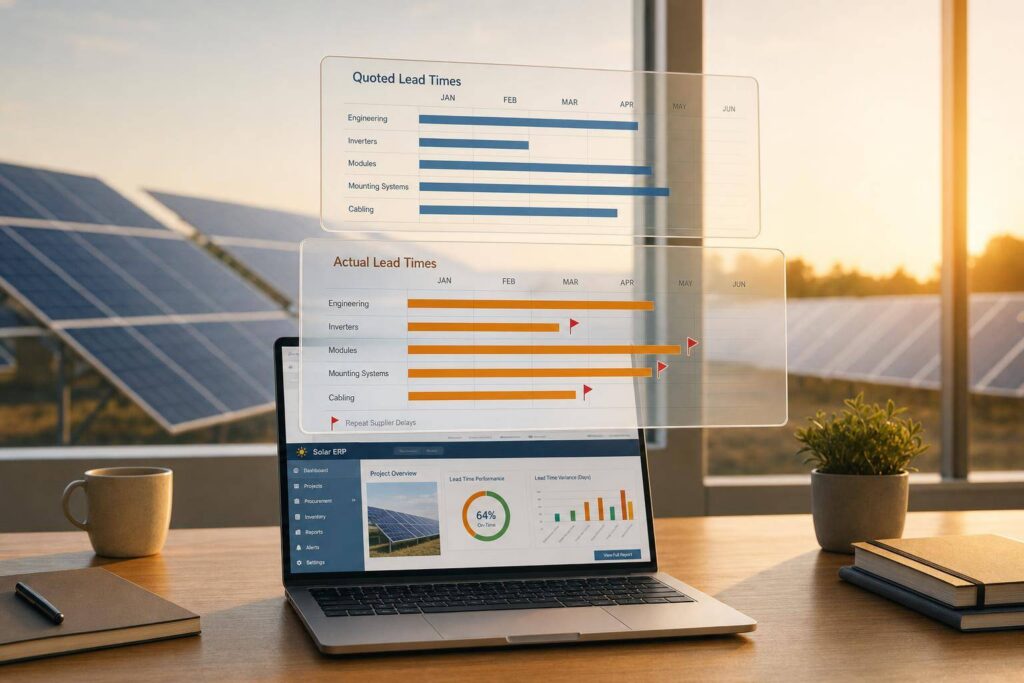
If your ERP only shows the latest supplier promise date, you can miss the pattern that causes delays. I’d sum it up like this: solar ERP should track quoted lead time, actual lead time, and every change in between so buyers, project teams, and finance can react before a late shipment hits the job.
Here’s the short version:
- I need the ERP to log both the supplier’s promised timing and the days it took in fact.
- I need lead times tracked by item, vendor, and location, not just by item alone.
- I need the system to spot repeat delay patterns, not just show an average.
- I need lead-time changes to flow into PO dates, inventory plans, and project milestones.
- I need manual overrides with notes and approval when recent receipt data gives a false picture.
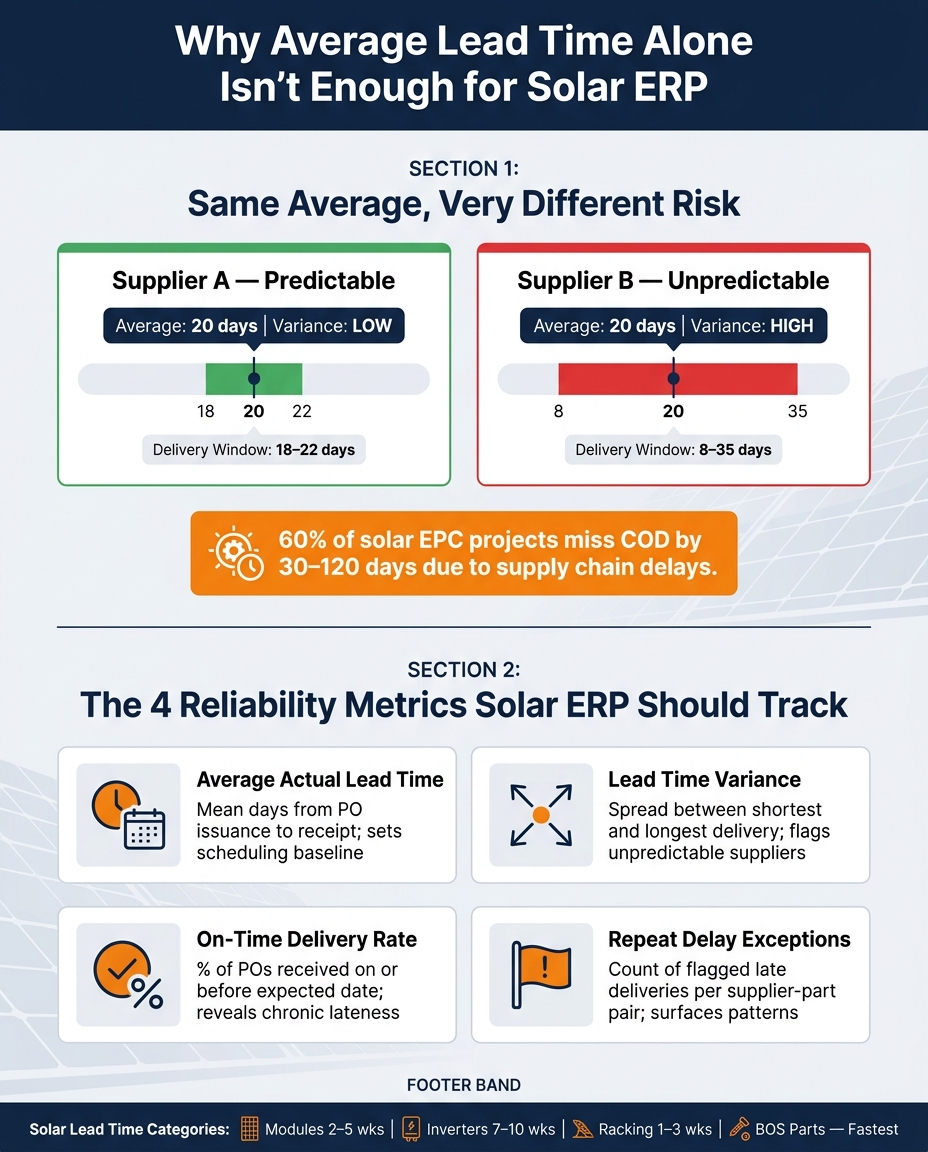
That matters because solar jobs depend on sequence. If one part slips, the whole plan can move. The article points to one stark number: 60% of solar EPC projects miss COD by 30 to 120 days due to supply chain delays. It also notes common lead-time ranges such as modules at 2–5 weeks, racking at 1–3 weeks, and some string inverters at 7–10 weeks.
What I take from this is simple: average lead time alone is not enough. A vendor with an average of 20 days can still cause trouble if deliveries swing from 8 to 35 days. That’s why ERP should track:
- Average actual lead time
- On-time delivery rate
- Days late
- Lead time variance
- Repeat delay exceptions
A small example makes this clear. If a PO is created on 09/01/2026 and the item record shows a 21-day lead time, the ERP sets the expected receipt date to 09/22/2026. But if recent receipts keep coming in late, the system should update that baseline and warn the team before the next order goes out.
I also see a process point here: modules and inverters should be reviewed monthly, while racking and BOS parts can be reviewed quarterly unless delay flags start piling up. That keeps item records tied to what suppliers are doing now, not what they did last quarter.
In short, this article is about using ERP as an early warning system for solar purchasing and scheduling, not just as a place to store dates.
How Solar ERP Records and Updates Lead Times
Lead time tracking starts in the item master. The ERP stores lead time there and uses it to set the expected receipt date for each SKU. Say a racking PO is dated 09/01/2026 and the item carries a 21-day lead time. The system lands on a receipt date of 09/22/2026. That date then flows into inventory planning and streamlining project schedules.
But those baseline dates only help if the ERP can tell the difference between a one-off delay and a real shift in supplier behavior.
Item Records for Modules, Inverters, Racking, and BOS Parts
One lead time value per item doesn’t cut it. Solar ERPs store lead time at the SKU, vendor, and warehouse levels. That way, one late part doesn’t hide risk across other suppliers or receiving sites.
Each category moves a bit differently:
- Modules are tied to freight and trade conditions.
- Inverters are linked to semiconductor supply.
- Racking depends on steel and fabrication capacity.
- BOS parts usually move the fastest.
That item-level detail is what helps the ERP update lead times based on actual receipt history.
Auto-Calculated Lead Times vs. Manual Review
Some ERPs recalculate lead time from recent fully received POs and write that number back to the item record. In plain English, the system uses what happened, not just what a supplier quoted months ago.
At the same time, buyers or planners should step in and override the value when the data is likely to mislead. Common cases include:
- Supplier commits to a fixed ship date.
- A one-time disruption skews recent receipts.
- A new SKU doesn’t have enough completed receipts.
When that happens, planners should set the lead time by hand, note the reason, and flag the record for review once normal data comes back. Planning-manager approval should be required for overrides so the record stays auditable. Once those records are up to date, the ERP can compare promised dates with actual receipts and flag suppliers that start to drift.
How ERP Flags Delay Patterns and Supplier Variability
Once lead times are updated, the ERP starts doing something much more useful: it checks whether suppliers are actually sticking to the plan.
It takes receipt gaps and turns them into vendor-level trends. A single late shipment might just be a one-off. But when late deliveries keep showing up, that’s no longer random noise. It’s a supplier issue.
Dashboards and Exception Reports for Late or Inconsistent Vendors
A good dashboard should surface the numbers buyers and planners need fast: average actual lead time, on-time delivery rate, average days late, lead time variance, and repeat exceptions. And it should break those metrics down by supplier-part pair for modules, inverters, racking, and BOS parts.
That level of detail matters. An inverter supplier might be late again and again. A racking supplier might hit the date sometimes, then miss badly the next time. Both situations create risk, but they call for different action.
Exception reports make this even more useful by narrowing attention to the worst patterns. The best ones flag supplier-part pairs with repeat delays, such as:
- A specific inverter model delivered more than 12 days late on the last four POs
- A BOS item that missed its expected receipt date by more than 7 days three times within a quarter
Those patterns give buyers a clear signal to follow up, expedite, or re-sequence work before an active job gets hit. In plain terms, the flags show when to expedite, re-sequence, or switch priorities.
Why Average Lead Time Alone Is Not Enough
Average lead time can look neat on paper and still tell the wrong story.
One supplier may deliver within a steady 18- to 22-day window. Another may swing from 8 to 35 days depending on the order. If both land on the same average, the numbers can fool you. The second supplier is far more likely to throw off the project schedule.
This matters most for long-lead components like inverters or specialty racking. One late shipment can push back commissioning, delay crew scheduling, or stall downstream BOS installation. That’s why reliability metrics matter so much. Lead time variance, on-time delivery rate, and repeat exception counts show whether a supplier is predictable, not just whether the quoted lead time looks competitive.
Comparison Table: Average Lead Time vs. Reliability Metrics
| Metric | What It Measures | Why It Matters for Solar |
|---|---|---|
| Average Actual Lead Time | Mean days from PO issuance to item receipt | Sets baseline scheduling for modules, inverters, and racking |
| Lead Time Variance | Spread between shortest and longest delivery times | Identifies suppliers with wide swings that disrupt project timelines |
| On-Time Delivery Rate | % of POs received on or before the expected date | Reveals chronic lateness even when the average looks acceptable |
| Repeat Delay Exceptions | Count of flagged late deliveries per supplier-part pair | Surfaces patterns like an inverter model trending 12+ days late across multiple POs |
Average lead time by itself hides risk. Variance and on-time delivery rate give a much clearer view of which suppliers are safe to depend on for items on the critical path, and which ones need extra buffer, a backup source, or tighter monitoring. Those alerts then feed straight into purchasing choices and project scheduling.
How Lead Time Changes Connect to Purchasing and Project Schedules
Once ERP flags a lead-time change, it needs to ripple that update through purchasing dates and project schedules. When lead time shifts, the system updates purchase orders and project timelines. So if a BOS component that used to arrive in 10 days now needs 18, the buyer sees that change the moment the PO is created.
That kind of visibility leads to direct action. On a near-term rooftop install, an 8-day delay on wire management clips or conduit can push electrical work past the planned crew window. ERP brings that conflict to the surface early enough for the team to respond. They can place the order sooner, split the shipment, or push the supplier for faster delivery.
Each solar component affects a different project milestone, which is why this matters so much. A longer lead time doesn’t just change a date on a screen. It moves the build schedule.
- Modules, inverters, racking, and BOS parts each drive a different phase of the build.
- Racking delays can stop installation even if the modules are already on-site.
- One missing BOS item can stall electrical work after the array has already been mounted.
When each item is tied to the milestone it controls, the team can see what’s on the critical path and what can wait.
When those dates move, every team needs the same updated picture. An integrated ERP keeps purchasing, operations, finance, and projects aligned around one set of dates. Purchasing sees the revised receipt estimate. Operations sees the inventory effect. Finance sees how committed spend and cash timing shift, especially if a delayed module shipment pushes an invoice into a later accounting period.
Blu Banyan‘s SolarSuccess connects procurement, inventory, job costs, and project plans in one ERP view, so every team is working from the same updated record. That’s where solar-specific ERP workflows do some of their best work.
ERP Tools That Support Lead Time Tracking in Solar
Once teams can see the same data, the next move is automation. That’s where ERP starts to matter.
A solar ERP does more than store lead times. It pushes lead-time changes into the places where teams actually work: purchasing and project schedules. In solar-focused setups, item records connect to job schedules and supplier exceptions. That link ties procurement data to auto-created POs, milestone-based inbound goods, and schedule updates.
Blu Banyan’s SolarSuccess, built on the NetSuite platform, is a cloud-based ERP made for solar companies, with tools for lead time visibility, item management, and cross-team reporting in one system [2].
When Solar-Specific ERP Workflows Add Value
The main test is simple: if a lead time changes, does the job plan change with it?
That’s where many standard platforms fall short. They may show that an inverter’s lead time changed. But they often don’t show what that means for electrical rough-in or commissioning dates on a given job.
In SolarSuccess, purchase orders can be generated automatically from a project’s bill of materials. So modules, inverters, racking, and BOS parts are tied to the job from day one [2]. When lead time shifts, the ERP can update the project schedule sooner.
The clearest upside is speed. The ERP takes supplier data and turns it into job-level decisions without making teams chase the same update across different systems.
| Workflow Area | Basic Item Record Approach | Solar-Specific ERP (e.g., SolarSuccess) |
|---|---|---|
| PO Creation | Manual | Auto-generated from project BOM |
| Vendor Visibility | Manual checks | Live vendor stock visibility |
| Project Alignment | Inventory and schedule stay linked | Inbound goods linked directly to project milestones |
| Job Costing | Manual equipment cost calculation | Automatic solar job costing |
| Supply Planning | Based only on current inventory | Uses CRM and opportunity data before project start |
When each component is tied to both a supplier record and a project milestone, linked records give teams a heads-up sooner when suppliers change something. In practice, that turns the ERP into an early-warning system for both purchasing and project teams.
Conclusion: Keeping Lead Time Data Accurate Over Time
Lead time data gets old fast. A supplier that hit every date last quarter might need extra time this quarter. So this work can’t be treated like a one-time cleanup. It needs to be part of the normal process.
Log promised and actual receipt dates on every PO line. Then recalculate lead times based on recent receipts and review the results on a set schedule, because supplier performance changes over time. Automated recalculation only works when receiving data is complete and up to date.
When exception reports start showing the same delays again and again, one person should own the review and update cycle. Assign one procurement or supply chain owner to check item records and supplier metrics on a fixed cadence. Review modules and inverters monthly. Review racking and BOS parts quarterly unless exception reports show delays starting to climb.
Current lead time data keeps PO dates realistic and project milestones tied to actual material availability. Blu Banyan’s SolarSuccess can centralize these workflows, while bluChat and bluDocs help teams discuss delays and store supporting supplier records. Accurate lead times keep purchasing, operations, finance, and projects working from the same schedule.
FAQs
How does ERP calculate supplier lead time?
An ERP system figures out supplier lead time by tracking how each vendor performs inside the platform. It records communication timestamps, checks actual delivery dates against scheduled ones, and builds a supplier performance score.
Then it combines that data with real-time distributor catalog information. From there, it accounts for manufacturing and shipping time to fine-tune purchase order timing for items like inverters or racking.
When should lead times be updated manually?
Update lead times by hand only when the ERP can’t figure out the change on its own.
That usually means you’ve received new supplier status or ETA details, a revised promised ship or delivery date, or corrected lead-time data for specialized solar items like inverters, racking, and BOS parts.
In all other cases, let the system handle it. The automated timeline and schedule should adjust when project milestones shift, permits or other documents change, or related procurement and order events are updated.
How do lead time changes affect project schedules?
Lead time changes can throw a project off track fast. A late shipment can create material shortages, push back installations, and send crews back to the same job site again, which drives up costs.
When supplier timelines move, an ERP system flags those delays right away. That gives project managers time to adjust crew schedules, update customers, or find another source for the materials they need. With that kind of visibility, teams are less likely to miss milestones, take on extra labor costs, or delay revenue recognition.
