

If defect data stays outside ERP, solar teams lose money in ways that are hard to trace. Rework labor, extra truck rolls, missed change orders, delayed invoices, and warranty costs can sit in spreadsheets or emails while project margin looks better than it is.
I’d sum it up like this: put every defect inside ERP and tie it to the job, labor, materials, and cost owner. That makes it easier to see the true cost, push vendor chargebacks, stop billing leaks, and protect cash flow before month-end.
Here’s the short version:
- Hidden defect costs are common. COPQ research says up to 90% of quality costs may never show up in accounting and finance reports.
- Rework is expensive. Field rework often averages about 5% of project value, and can reach 12% to 15%+ when indirect costs are included.
- Billing leaks add up. In residential solar, change orders often fall in the $750 to $1,250 range.
- ERP fixes the tracking gap. Each defect can be tied to a project number, phase, cost code, vendor record, and billing status.
- That leads to better recovery. Teams can support chargebacks, separate warranty cost, and spot invoice delays tied to open defects.
A simple way to think about it: defect -> cost -> owner -> recovery. If that chain breaks, your margin takes the hit.
| Topic | If defect data stays outside ERP | If defect data is inside ERP |
|---|---|---|
| Cost visibility | Costs get buried in overhead or general accounts | Costs tie back to the job and phase |
| Labor tracking | Rework hours are easy to miss or underprice | Hours post to the project at burdened labor rates |
| Vendor recovery | Claims are harder to prove | PO, receipt, lot, and return records support chargebacks |
| Billing | Open issues can stall invoices with no clear flag | Defects can be linked to milestone and invoice status |
| Margin control | Loss shows up late | Teams can act while the project is still open |
If I were reading this article for one answer, it would be this: ERP-based inventory and defect tracking cuts solar soft costs by turning jobsite problems into traceable cost records that finance, project teams, and billing can act on.
The problem: untracked defects create hidden costs and revenue leakage
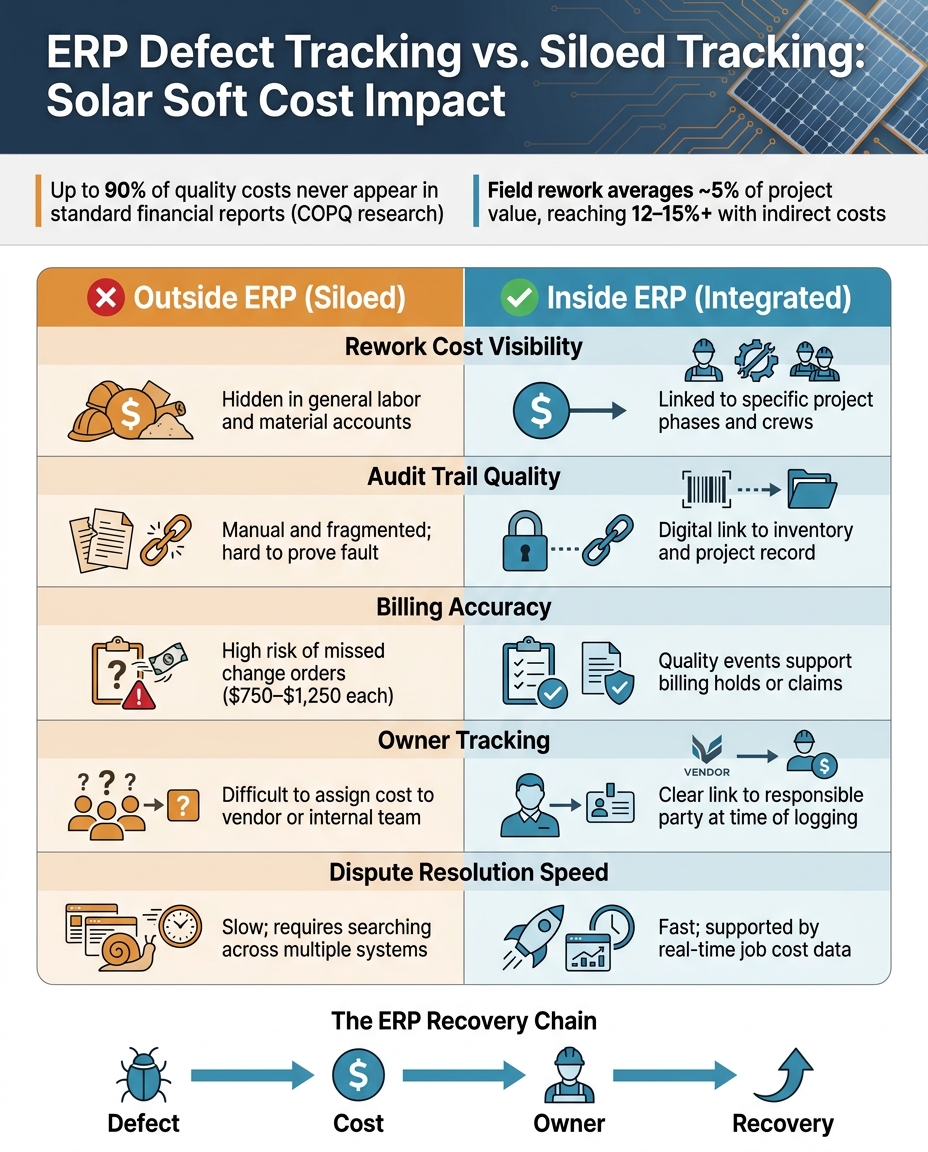
When quality issues live outside ERP, the cost gets spread across project records, inventory entries, work orders, and accounting lines. That makes the damage hard to see in one place. Studies on Cost of Poor Quality (COPQ) suggest that up to 90% of quality costs never reach standard financial reports. So in many cases, only a small slice of defect-driven waste shows up in the P&L. ERP closes that gap by tying the defect to the job, the cost, and the person or team responsible.
Rework, delays, and missing parts that never reach job cost records
A bad inverter or a missing batch of fasteners rarely stops at the cost of the part. It can set off a chain reaction: crew time spent troubleshooting, a return trip to the site, rush freight for replacement parts, and paid workers standing by while the team waits. That’s where things start slipping through the cracks.
If the defect gets logged only in a separate service spreadsheet or some other disconnected system, those costs often land in overhead instead of the job that caused them. And once that happens, recovery gets a lot harder. By the time someone spots the issue, the billing window may already be gone.
Construction Industry Institute data shows that field rework averages about 5% of construction value, with some projects reaching 12% to 15% or more when indirect costs are factored in. In solar, where margins are already tight, even part of that going untracked can quietly eat into a job that looked profitable on paper.
Billing gaps and warranty work that cut margin
There’s another hit here: missed revenue recovery.
When a supplier defect forces a replacement array component or extra labor, the company often absorbs that cost because there’s no clear record tying the defect to a claim. Without that paper trail, billing teams usually can’t support a change order. The cost stays in-house.
Warranty work causes the same kind of leak. If warranty labor and materials aren’t connected to the original project and vendor record, they turn into unrecovered service expense. NREL and industry data note that typical change orders in residential solar run around $750 to $1,250 each. If defect events aren’t tracked in a consistent way, those dollars can vanish project by project.
Spread that across a full portfolio, and the margin loss adds up fast.
Comparison table: defect tracking outside ERP vs. inside ERP
| Area | Outside ERP (Siloed) | Inside ERP (Integrated) |
|---|---|---|
| Rework cost visibility | Hidden in general labor and material accounts | Linked to specific project phases and crews |
| Audit trail quality | Manual and fragmented; hard to prove fault | Digital link to inventory and the project record |
| Billing accuracy | High risk of missed change orders and claims | Quality events support billing holds or claims |
| Owner tracking | Difficult to assign cost to a vendor, subcontractor, or internal team | Clear link to the responsible party when the defect is logged |
| Dispute resolution speed | Slow; requires searching across multiple systems | Fast; supported by real-time job cost data |
Inside ERP, that gap gets smaller because defects can be assigned, billed, or recovered before margin slips away.
The solution: ERP defect data builds cost visibility and accountability
To close that gap, defects need to be logged inside ERP as structured cost events. If defect tracking lives in one place and project costs live somewhere else, margin gets blurry fast. The fix is simple: keep defect records in the same system that handles project costs, inventory, and billing.
Once ERP records a defect code, timestamp, and project link, that issue stops being a vague problem and becomes a cost event. That means you can see the full cost of the defect, including the labor tied to the job.
Link each defect to labor, materials, and project records
ERP systems can require tags on timesheets, vendor bills, and expense reports before anything gets posted. That keeps defect costs from slipping into overhead where no one can trace them.
Here’s what that looks like in practice. If a crew logs hours under a rework phase for a specific project, those hours post at a fully burdened labor rate straight to that job. If replacement parts get ordered, the vendor bill links to that same project and cost code. Now you have a full view of what the defect cost in labor and materials, and you can see it before month-end close.
Breaking labor into phases also shows patterns a daily timesheet can miss. If rework hours jump for one crew or branch, that’s a sign to look closer before the project closes and the margin is locked in.
Track who owns the cost: internal team, vendor, or customer
Not every defect cost should stay with the company. ERP can assign cost ownership at the transaction level:
| Transaction Type | Required Tags | Purpose |
|---|---|---|
| Timesheets | Project Number, Cost Code | Tracks internal labor or service management for solar installers |
| Vendor Bills | Project Number, Cost Code | Tracks vendor/manufacturer-driven costs |
| Expense Reports | Project Number, Cost Code | Tracks individual accountability for field errors |
| Journal Entries | Project Number, Cost Code | Adjusts for warehouse or overhead leakage |
With that setup, teams can assign costs correctly the first time. If a defect leads to replacement parts and rework labor, the vendor bill and labor hours each carry the same project and cost code. That split makes accountability clear across departments.
How ERP defect data supports chargebacks and protects cash flow
Once defects are tied to a project in ERP, they stop being vague job pain and start becoming recoverable cost. That shift matters. After you can see the cost, you can go after recovery, issue chargebacks, and move billing faster.
Use defect evidence to build vendor chargeback claims
A chargeback claim needs proof you can trace, not just a complaint from the field. In ERP, that means logging the supplier, PO line, receipt, serial or lot number, photos, and inspection notes so finance has what it needs to back a debit memo.
One small detail can change who eats the cost: the receiving code. If a return is marked as “damaged on-site”, the cost stays with your team. If it’s marked as “vendor return”, you have a clear path to recover that cost from the supplier.
Once the defect is in the system, ERP can pull from the original PO and receipt records to create a vendor return authorization. From there, the credit can be applied straight to the affected project’s P&L. That recovery can cover rework, freight, delays, and billing gaps.
| Scenario | ERP Record Type | Impact on Project P&L |
|---|---|---|
| Committed equipment spend | Project-linked PO | Sets the recovery baseline. |
| Hardware received on-site | Item Receipt | Records actual material cost and lot/serial data |
| reducing inventory costs from damaged materials | Project-tagged Inventory Adjustment | Increases actual cost; identifies internal responsibility |
| Return to vendor | Vendor Return Authorization / Credit | Reduces actual cost; improves margin via recovery |
| Warranty replacement | Service Order or RMA | Tracks post-install costs separately from original job |
Connect quality events to billing timing and project cash flow
The same defect record used for a vendor claim can also show whether billing is stuck. When quality events are tied to project milestones inside ERP, teams can see which open defects are blocking completion status and which invoices are waiting for closure.
The link is simple: defect → closure delay → invoice delay → cash delay.
That’s why faster defect closeout does more than clean up project records. It helps billing move, and that helps protect project cash flow.
“To improve efficiency and profitability, solar installers must have real-time visibility into their entire end-to-end businesses.” – Jan Rippingale, CEO, Blu Banyan Inc. [1]
ERP can also show work that’s done but still not invoiced. That gives teams a plain view of how much income is being held up by unresolved quality events.
Metric table: KPIs leaders should monitor
These metrics should be tracked in real time while the project is still open. Waiting until month-end is like checking the score after the game is over.
| KPI | Calculation / ERP Use | Financial Impact |
|---|---|---|
| Defect Rate per Project | Number of corrective work orders or punch list items per project record | Flags problem projects or repeat vendor issues early |
| Rework Hours/Cost | Labor hours tagged to “Punch List” or “Warranty” phases × burdened labor rate | Identifies labor drift and crew-level inefficiency |
| Billing Lag Days | Days between physical milestone completion and invoice generation | Measures how defects delay revenue and hurt working capital |
| Warranty Recovery Rate | (Total Warranty Credits ÷ Total Warranty Expenses) × 100 | Measures how effectively finance recoups defect costs from vendors |
| Days to Recover Chargebacks | Days from defect identification to receipt of vendor credit or debit memo | Tracks how quickly cost recovery is actually closing |
| Net Defect Cost | Rework cost minus recovered credits and claims | Shows the direct bottom-line hit from quality issues |
| Margin Variance | Budgeted vs. actual soft costs (labor, permits, design) per project | Flags margin erosion from untracked defects or scope creep |
These KPIs act as an operating control, not just a finance report. They keep soft-cost management active while the project is still live. Use ERP data as it updates, not month-end reports, so teams can step in before margin gets locked in.
Conclusion: how a solar ERP approach lowers soft costs
Once defect KPIs live inside ERP, the next move is simple: use that visibility to recover cost and protect margin. That’s where soft-cost savings come from. If defect data isn’t tied to the project, cost code, and cost owner, the numbers may be visible, but they still won’t help much.
Spreadsheets and email threads can record defects. They just don’t recover cost. Rework, delays, missing parts, and billing gaps often sit in the background until they show up as lost margin.
Blu Banyan’s SolarSuccess brings project, inventory, accounting, and field data together in one ERP environment.
Key points for executives and operations leaders
At the ground level, this comes down to three rules:
- Standardize defect capture with the same cost codes across every branch and crew, such as “Punch List” or “Warranty.”
- Require a project number, phase ID, and cost code on every timesheet, vendor bill, and expense report. That keeps rework from slipping into overhead.
- Tie every defect to its cost owner, whether that’s an internal team or a vendor, so the tag can support chargebacks and protect cash flow.
Run pre-close reviews to catch untagged transactions before close and keep future bids clean. That’s how defect data cuts soft costs before they turn into lost margin.
FAQs
What defect data should go in ERP?
Your ERP should store standardized defect data in one source of truth. That means keeping quantitative measurements, qualitative inspection notes, defect rates, FPY, and COPQ tied to job numbers, phases, or equipment batches.
Use the same fields every time for pass/fail results, counts, and measurements. Then connect each defect record to item receipts and work orders so you have full traceability back to the vendor.
How does ERP help recover defect costs?
An ERP system helps recover defect costs by putting quality data in one place and tracking defects in real time. That gives teams a clear view of what’s going wrong, so they can step in before a small issue turns into expensive rework.
It also connects defects to specific projects, crews, or vendors, which makes chargebacks, accountability, and cost visibility much clearer. Automated alerts and compliance checkpoints help stop the same mistakes from happening again, protect margins, and support healthier cash flow.
Which ERP metrics best show margin risk?
Track First Pass Yield (FPY) to see how often work gets done right the first time. It’s a simple way to spot installation efficiency issues and measure rework without digging through a pile of job notes.
Use Defect Rate (DPMO) to compare quality across sites on the same scale. That makes it easier to see which crews, phases, or locations are running clean and which ones keep running into avoidable errors.
Keep a close eye on Cost of Poor Quality (COPQ) too. This metric puts a dollar figure on failures, so quality problems stop looking like minor hiccups and start showing up for what they are: margin loss.
Cost tracking matters just as much. Monitor budget-versus-actual costs for labor, permit fees, design, and overhead by project and by phase. That view helps you catch margin leakage, labor drift, and fee overruns before project closeout, when fixing them is a lot harder and a lot more expensive.
