
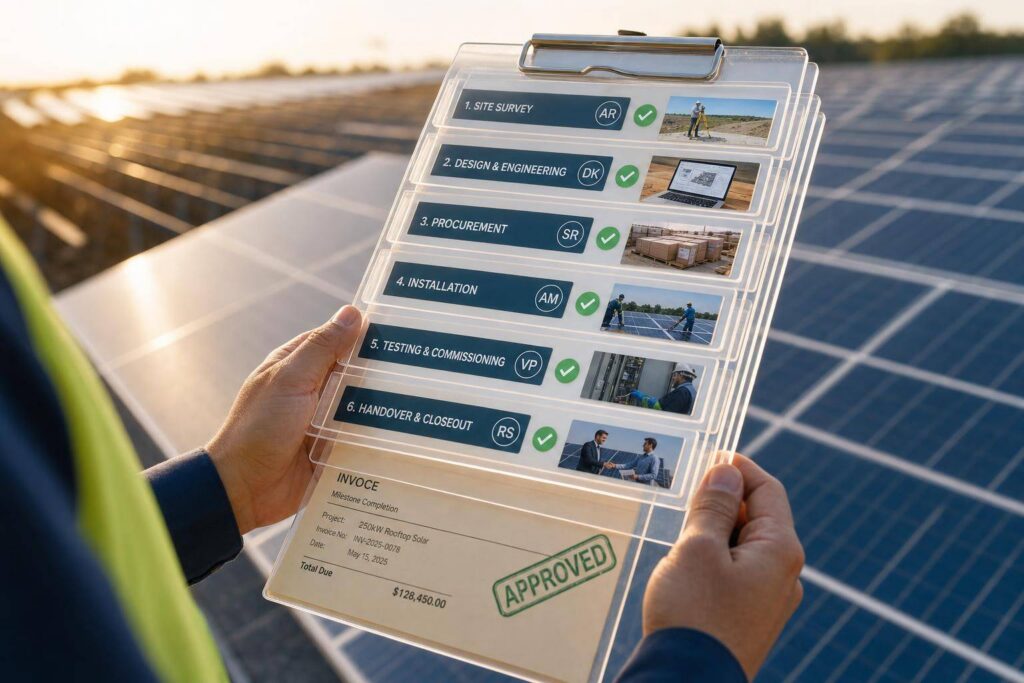
If your solar EPC team tracks work in different systems, delays and cash flow problems follow. I’d fix that with one milestone map, one owner for each step, proof for every closeout, and a direct link from field status to job cost, billing, and revenue.
Here’s the short version:
- I’d break the project into clear stages, from design through handover.
- I’d define each milestone with a yes/no completion rule.
- I’d assign one owner and one proof source to each milestone.
- I’d make field teams log photos, tests, and timestamps from the jobsite.
- I’d keep risks, issues, defects, delays, and change orders in separate logs.
- I’d track slippage at the milestone level instead of waiting for month-end.
- I’d tie milestone closeout to billing, revenue timing, and margin tracking.
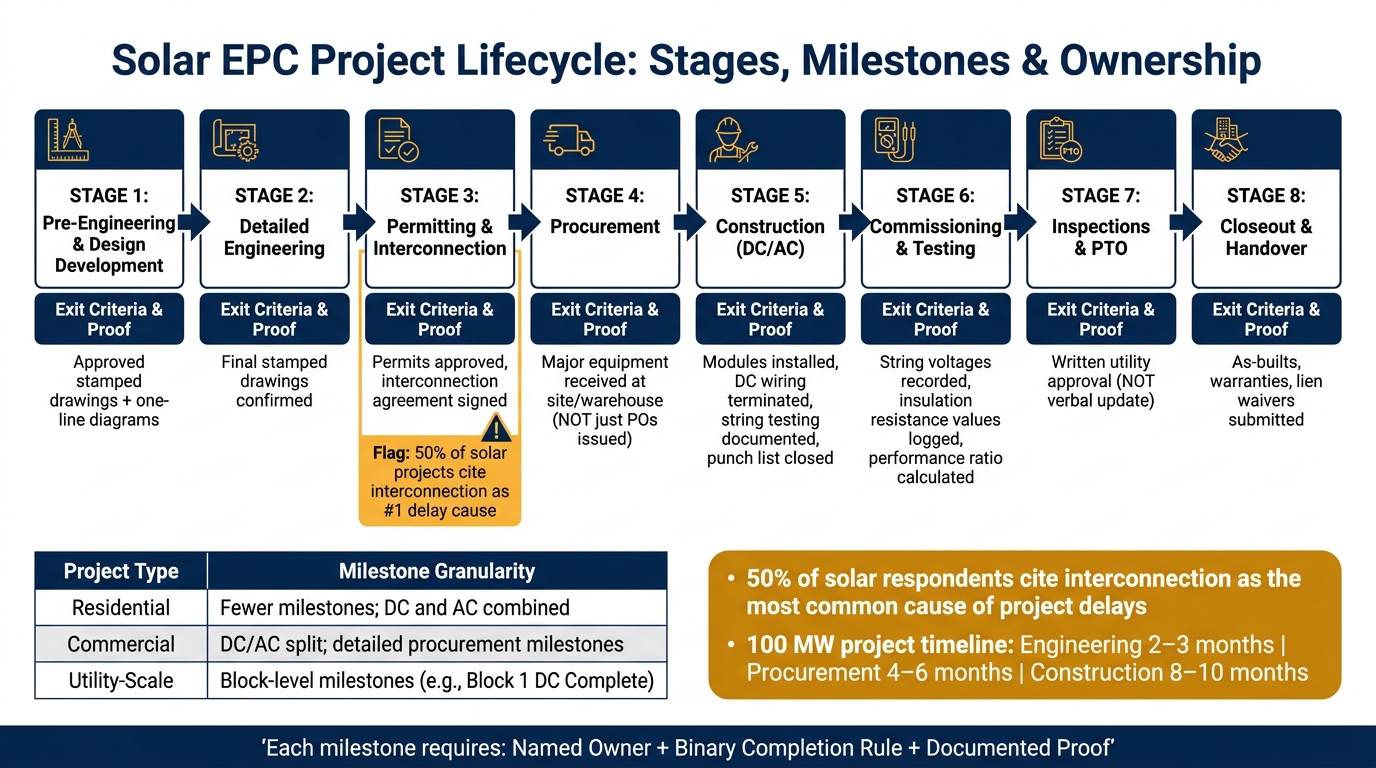
One stat says a lot: 50% of solar respondents cite interconnection as the most common cause of project delays. To me, that points to a tracking gap, not just a schedule problem.
A few points matter most:
- Engineering is not done until approved drawings are in place.
- Procurement is not done when POs are sent; it’s done when gear is received.
- Construction is not done until field proof, testing, and punch items are closed.
- PTO is not done until the utility gives written approval.
When I look at solar EPC tracking, I see two goals at once: keep the job moving and keep the numbers right. Every milestone is both a schedule checkpoint and a finance checkpoint. If that link is weak, billing slows, WIP grows, and margin gets harder to read.
That’s the model this article lays out: simple stages, clear ownership, proof-based closeout, early issue tracking, and finance tied to field progress.
Map the Solar EPC Lifecycle With Clear Stages and Milestones
With the tracking problem defined, the next move is to build a shared lifecycle map so every team reads project status the same way.
Core Project Stages From Engineering Through Handover
A U.S. solar EPC lifecycle usually runs from pre-engineering through closeout. The eight stages are: pre-engineering and design development, detailed engineering, permitting and interconnection, procurement, construction (DC/AC), commissioning and testing, inspections and Permission to Operate (PTO), and closeout and handover.
Each stage needs clear entry criteria, key activities, and exit criteria. That way, project managers, field crews, and finance can all agree on when a stage is done.
What matters most isn’t the stage name. It’s the exit criteria.
Engineering isn’t complete until final stamped drawings and one-line diagrams are approved. Procurement doesn’t close when purchase orders are issued. It closes when major equipment is confirmed as received at the site or warehouse. Construction isn’t done because someone says it is. Field proof has to back it up: DC modules and wiring are finished, AC equipment and terminations are tested, and punch list items are closed. PTO isn’t a verbal update either. It is the utility’s written approval.
Milestones That Drive Schedule, Payments, and Accountability
Milestones shape the schedule, billing, and accountability. In many contracts, invoices are tied to events like design approval, major equipment delivery, substantial completion, and final acceptance.
So a fuzzy milestone status like “in progress” doesn’t just create confusion in the schedule. It can delay cash coming in.
Each milestone needs a binary, proof-based definition. For example, DC Complete means modules are installed, DC wiring is terminated, string testing is finished with documented passing results, and punch list items are closed. The proof matters just as much as the work itself. Completed checklists, date-stamped photos, test reports, and formal documents should live in the project system, not buried in someone’s email.
A Standard Milestone Framework for Different Project Sizes
Use one milestone backbone across all project sizes. The backbone stays the same. What changes is the level of detail.
| Project Type | Milestone Granularity |
|---|---|
| Residential | Fewer milestones; combine DC and AC where appropriate |
| Commercial | DC and AC are often split; procurement milestones are more detailed |
| Utility-scale | Block-level milestones, such as Block 1 DC Complete |
For a 100 MW project, engineering and design alone usually takes 2–3 months, procurement takes 4–6 months, and construction takes 8–10 months. On a project that large, milestones are often set by blocks or arrays. Even so, they should still map back to the same high-level framework used on a smaller rooftop job.
That kind of consistency gives a firm a simple way to standardize templates, train teams once, and use the same tracking logic across the whole portfolio.
A standard milestone catalog helps make that happen. This shared reference document should define each milestone name with U.S. terms like Notice to Proceed, Mechanical Completion, Substantial Completion, Commercial Operation Date (COD), and Permission to Operate. It should also spell out the completion criteria, responsible owner, and required proof. When project templates are built from that catalog, every new job starts with the same structure, no matter the size.
Once the milestone catalog is defined, assign each milestone to a role and a proof source.
Assign Ownership for Tasks, Field Updates, and Subcontractor Steps
A milestone catalog lays out the work. Ownership tells you who runs each item, who signs off on it, and what proof closes it out. Once milestones are set, the next move is simple: give each one one owner and one proof source.
Role-Based Ownership Across PM, Engineering, Procurement, Field, and Finance
Use a RACI matrix to make ownership clear. One person does the work. One person owns the outcome. Everyone else is either Consulted or Informed. If you skip that step, work tends to fall through the cracks between teams.
Here’s how ownership usually splits across core roles:
| Role | Owns |
|---|---|
| EPC Project Manager | Master schedule from NTP to COD, budget, contract compliance, margin protection, and status reporting to clients and leadership |
| Construction Manager | Daily field work, subcontractor sequencing, safety compliance, and installed quantities and productivity reporting |
| Engineering | Design deliverable schedule, RFI resolution, and constructability reviews that unblock permits and procurement |
| Procurement Manager | Procurement schedule, material delivery coordination, and documentation for major equipment |
| Quality/Safety | Quality management plan audits, safety metrics such as EMR and TRIR, and inspection records |
| Finance/Project Controls | Monthly owner requisitions, AR/AP, cost projections, variance analysis, and executive KPI dashboards |
Role-based views help each owner stay on top of overdue work, missing proof, and blocked milestones. That’s what turns field updates and subcontractor proof into something the team can use at the milestone level instead of a pile of disconnected notes.
Field Reporting With Mobile Updates and Evidence
Each field task should work like a mobile checklist, with photos, timestamps, and direct sync to the project system. That system should update in near real time.
The proof has to fit the task. Structural work usually calls for photos of excavations, pile depth measurements in feet and inches, and compaction test reports. Electrical work needs megger test results, continuity checks, and labeled panel photos. Commissioning work should include recorded string voltages, insulation resistance values, and performance ratio calculations, signed by the commissioning engineer.
At remote U.S. sites, spotty service is just part of the job. So mobile tools need offline capture. Crews should be able to download checklists and drawings before they head out, log everything locally with timestamps and user IDs, and then sync on its own once coverage comes back. The site manager owns reporting completeness, while crews enter the data.
“Solar project delays eat margin. Missed handoffs, slow task updates, and disconnected communication add days or weeks to project timelines – and every delay chips away at profitability and customer satisfaction.” – Blu Banyan [2]
Subcontractor Workflow Control and Completion Proof
Subcontractor work for civil, racking, electrical, and testing should tie straight into the master schedule. Each scope should connect to named milestones with clear start and finish criteria. That way, if a schedule starts drifting, the team sees it early instead of weeks later.
Completion proof should be just as clear. In most cases, that includes:
- A signed field report from the subcontractor foreman
- Photo and video records of installed work
- Test results tied to the scope, such as open-circuit voltage or insulation resistance
- Any required regulatory or utility inspection approvals
- As-built drawings, warranty documents, and signed lien waivers before final payment
Payment should be released only after the accountable owner checks the proof and accepts the milestone. That control point sets up the next step: tracking issues, delays, and variances.
Track Issues, Delays, and Variances Before They Affect Margin
Once ownership and proof are set, the next step is simple: track exceptions the moment they show up. Missed due dates, failed inspections, and late subcontractor work should trigger action right away, before they hit the schedule or eat into margin. If a milestone slips or fails, log it at once in the same project record.
Separate Risks, Active Issues, Defects, and Change Orders
Throwing every problem into one list sounds tidy, but it creates a mess fast. Teams lose time figuring out what the item is, who owns it, and what happens next. Each category needs its own log, its own owner, and its own path to resolution.
Here’s the difference:
- A risk may affect future schedule or cost.
- An active issue is already affecting execution.
- A delay is a missed milestone forecast.
- A defect is a quality nonconformance.
- A change order is a scope change that needs approval and pricing before work continues.
When those categories get mixed together, people stall out sorting instead of fixing. Keep them separate from day one, and log each item with a priority level and a financial impact estimate as soon as it’s identified.
Use Variance Tracking at the Milestone Level
Month-end reporting is too slow for solar EPC work. By the time a report lands, the job may already be off track. That’s why variance should be tracked at the milestone level in near real time, not only in month-end reports, so the team can spot forecast slips before they turn into recovery work.
In practice, that means measuring the gap between the planned completion date and the current forecast for every active milestone, not just the final project end date. If a racking milestone slips because a predecessor task is blocked, the team needs to know that immediately. Frequent planning reviews for upcoming work give project managers a chance to reassign labor or escalate the issue before the delay hardens into the plan. Automated alerts that flag any deviation from the baseline plan make this much easier to manage [14].
“Feed every part, mile, and hour directly into your project budgets, timelines, and milestones for clear cost visibility.” – Blu Banyan [1]
Tie Quality and Inspection Results to Corrective Actions
A failed inspection should never just sit there as a record of what went wrong. It should automatically create a follow-up task with a named owner, a due date, and a note showing which milestone is now blocked.
The table below shows how common jobsite exceptions connect straight to schedule and financial outcomes:
| Operational Exception | Schedule Impact | Financial Linkage |
|---|---|---|
| Field Delay/Issue | Missed milestones and schedule slippage | Delayed revenue recognition and increased labor costs [1][2] |
| Failed Inspection | Delayed follow-on work | Delayed billing cycles and potential change orders [1][2] |
| Inventory Discrepancy | Extra truck rolls and project stalls | Increased job costs and reduced margin [1] |
| Milestone Close | Milestone achievement | Automated invoice generation and revenue timing [1] |
When corrective actions stay tied to the inspection record, the team can see resolution status and financial exposure in one place. Those records should then flow into cost and revenue tracking at that same milestone level.
Link Milestones to Cost, Billing, Revenue, and Executive Visibility
Once issues and milestone proof are logged, that same record should also drive financial reporting.
How Task Data Feeds Job Cost and Revenue Timing
When a milestone is closed, its labor, material, and subcontractor costs should feed billing and revenue timing. Field task data should flow straight into milestone cost totals. Labor hours, material issues, purchase orders, and subcontractor invoices update job cost in real time. Use percent complete = costs to date ÷ estimated total cost. That percentage then drives billing and revenue timing.
Here’s a simple example: a Mechanical Complete milestone can trigger progress billing once field checklists and QA sign-offs are confirmed. Under ASC 606, milestone completion can also trigger a revenue recognition entry, so recognized revenue matches actual field progress instead of an arbitrary calendar date. If that milestone slips, billing and cash flow slip with it.
Subcontractor costs should follow the same logic. A pile installation subcontract should be coded to the specific milestone it supports. That way, the job cost report shows exactly where the spend lands and whether it stays within the budgeted phase cost. Milestone-level variance helps teams spot phase overruns before closeout.
This cost and billing data should flow into the ERP without manual reconciliation.
Using Blu Banyan to Connect Solar Operations and Financials

Blu Banyan’s SolarSuccess, built on NetSuite, connects field updates to financial workflows without rekeying. bluTime captures labor, while material usage, purchase orders, and subcontractor bills feed milestone-level cost views that show budget versus actual by phase. Using the same milestone and task records set up earlier in the project, SolarSuccess can automatically generate a progress invoice in U.S. dollars against the customer contract, with revenue recognition aligned to that milestone event[1][15].
bluDocs keeps photos, inspection forms, and signed permits tied to the milestone record. bluChat keeps project, field, and finance teams in one thread tied to the project record[1].
Executive dashboards in SolarSuccess show real-time portfolio views like:
- Project margin
- Cost-to-complete
- Billing status
That gives leaders a shared view of project health based on the same milestone and task data field teams are updating.
With operational and financial data tied together, the next step is standardizing the control points across every project.
Conclusion: Control Points Solar EPC Firms Should Standardize
Solar EPC firms should standardize stage-based milestones, named ownership, proof of completion, separate issue workflows, and direct links to cost, billing, and revenue. When teams enforce these controls through an integrated system, margin surprises shrink, billing stays on schedule, revenue is recognized with accuracy, and the whole project team works from one version of the truth.
FAQs
What makes a milestone truly complete?
A milestone is complete only when it meets clear, pre-set completion criteria and passes the checks your team already uses.
That usually means a few verification steps, such as supervisor review, QA validation, or approval in mobile time tracking. Once those checks are done, the milestone can update project status, notify the right teams, and kick off the next step, like invoicing or moving into the next phase of work.
Who should own each solar EPC milestone?
Each milestone should belong to the team member assigned through role-based task queues, so the right action lands with the right person at the right stage of the project.
Project managers keep an eye on the full timeline and resource use. Field crews confirm completed work with digital checklists and supervisor review. When one phase wraps up, the system alerts the person responsible for the next step.
How do milestones affect billing and revenue?
Milestones are key trigger points for billing and revenue recognition. When you tie them to project timelines and accounting events, they can auto-generate invoices at set construction phases. That cuts down on manual reconciliation delays and helps prevent missed milestone payments.
They also help match revenue and expenses to the right months. As a result, teams get real-time visibility into milestone completion, which can speed up the project-to-cash cycle and support stronger cash flow.
