
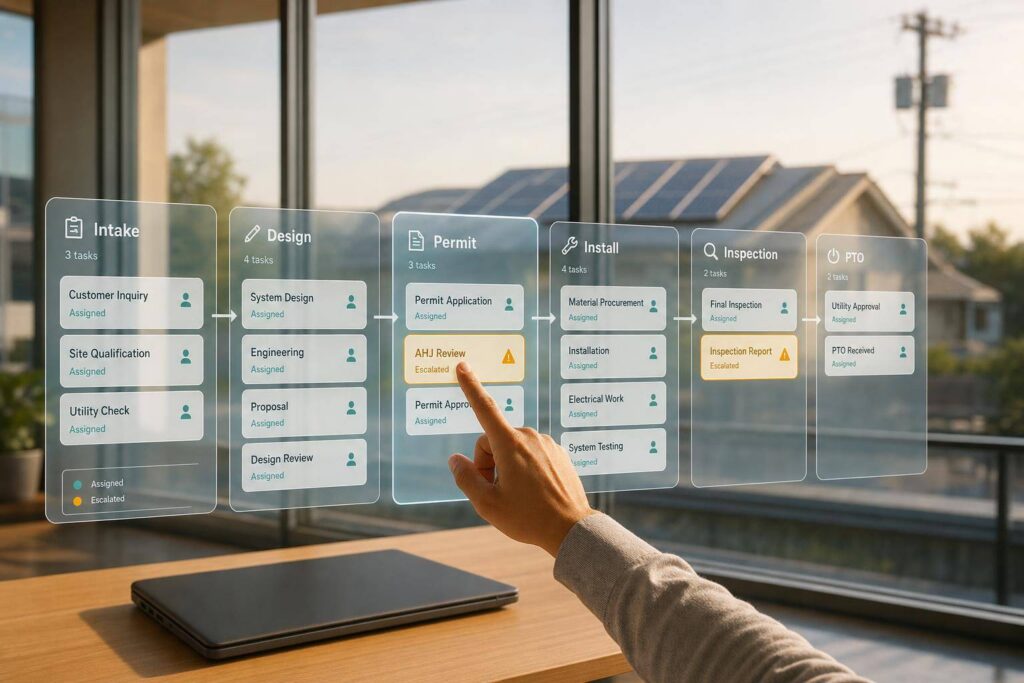
If task tracking lives in emails, spreadsheets, and side tools, solar jobs slip. I’d sum this up in one line: a solar ERP keeps every project on the same task map, blocks work that should not move yet, routes handoffs to the right team, and flags delays before they hit billing and PTO.
Here’s the short version:
- I use project templates so each job starts with the same phases, tasks, owners, and milestone rules.
- I use dependencies so design, permits, procurement, install, inspection, interconnection, and PTO happen in the right order.
- I track blockers and overdue approvals so outside delays do not sit hidden for days or weeks.
- I assign work by role, crew, and calendar so handoffs do not get dropped.
- I rely on dashboards and alerts to show overdue tasks, blocked jobs, crew load, and billing risk from one live record.
A few numbers make the point clear. NREL reports 63 business days from interconnection application to PTO, with 27 business days spent in review. And soft costs such as permitting, inspections, and overhead make up about 64% of the price of a residential solar array. That means poor task control does more than slow jobs down. It can delay invoices, push out cash, and cut margin.
What matters most is simple: standardize the work, sequence it, assign it, and escalate issues early. That is how I keep dozens of solar projects visible and moving at once.
Build Standard Project Templates for Each Solar Job Type
When every project manager builds a job sequence their own way, things get messy fast. Task names change. Phase labels shift. Milestones mean different things from one job to the next. That makes it hard to compare projects, spot trends, or automate workflows with any confidence.
A solar ERP fixes that by turning a repeatable job sequence into a reusable template. Every new project starts from the same base on day one. The ERP applies that standard sequence to each new job, so teams aren’t rebuilding the wheel every time.
Map Phases, Tasks, and Milestones into One Template
A strong template begins with a standard phase structure for each job type. That gives the ERP a clean way to track progress across dozens of jobs without manual cleanup.
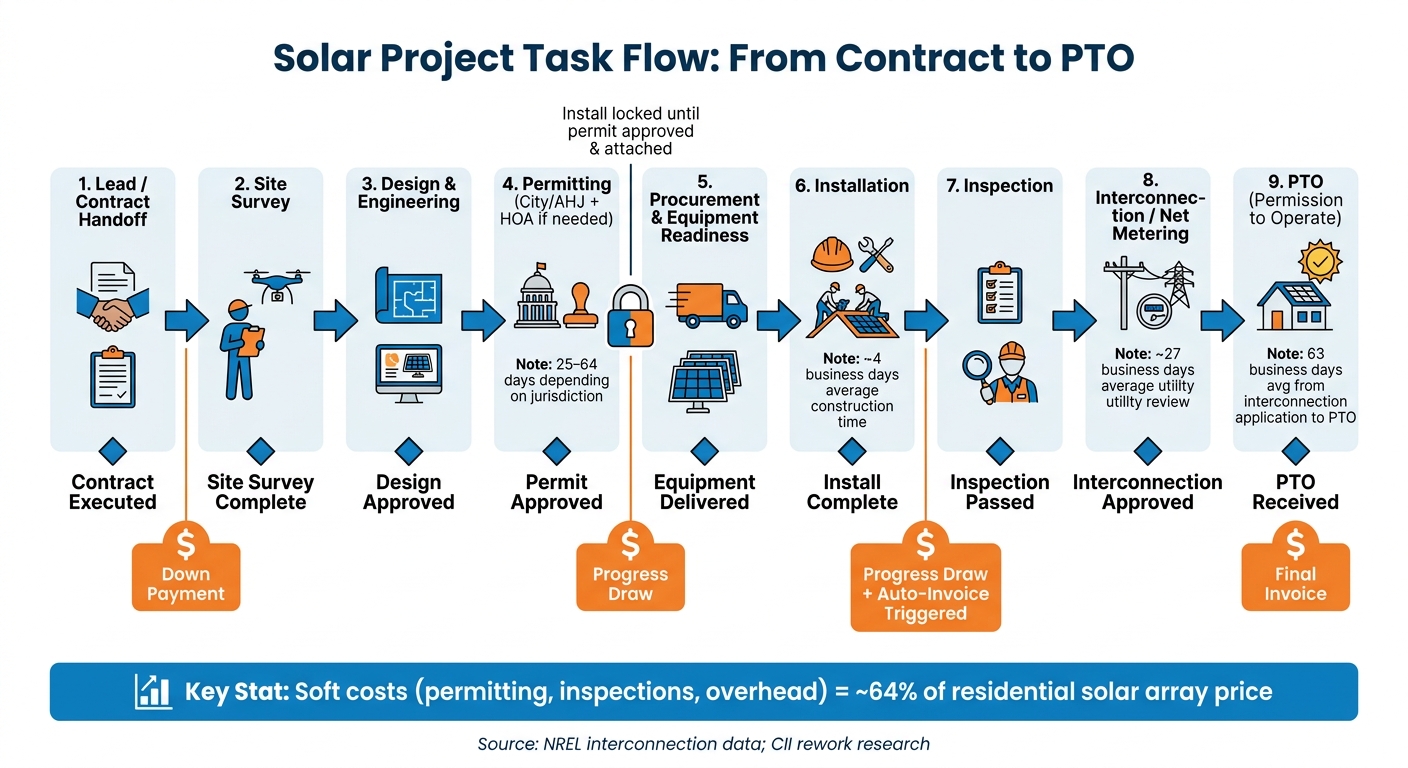
For a standard U.S. residential rooftop PV project, that phase structure usually includes:
- lead or contract handoff
- site survey
- design and engineering
- permitting, including city/AHJ and HOA approvals where needed
- procurement and equipment readiness
- installation
- inspection
- interconnection/net metering
- PTO
Commercial and solar-plus-storage projects usually need more steps, such as utility coordination, structural analysis, battery commissioning, and closeout. Battery-only installs also need their own version, with permitting, engineering, and interconnection steps shaped for that job type.
Inside each phase, the template should define clear tasks people can act on, not broad labels. For example, permitting isn’t just a bucket. It includes tasks like compile permit package, submit permit application, respond to correction requests, and upload approved permit document.
Each task should include:
- a planned duration
- a predecessor field
- a default owner role
That level of detail matters. Residential permitting can take 25 to 64 days, depending on jurisdiction. So if the template includes default durations by region or AHJ, project managers get a schedule they can actually use instead of a guess.
Milestones sit above those tasks as simple yes-or-no completion events. At a minimum, every U.S. solar template should include Contract Executed, Site Survey Complete, Design Approved, Permit Approved, Equipment Delivered, Install Complete, Inspection Passed, Interconnection Approved, and PTO Received.
These milestones do more than describe status. They act as trigger points that connect operations, scheduling, and finance.
The same template should also decide when billing and work orders become available.
Add Financial and Workflow Rules to the Template
Once phases, tasks, and milestones are standardized, the ERP can connect them to billing, procurement, and release rules.
For U.S. residential jobs, a common billing setup ties payment stages to milestones. That often means a down payment at contract execution, a progress draw at permit approval, another at installation completion, and a final payment at PTO. In the ERP, those invoice triggers live inside the template. When the Install Complete milestone is marked, the system automatically creates the matching invoice.
Commercial projects get a bit more layered. Progress billing may follow an AIA-style schedule of values tied to percent complete by phase, with retainage held until commissioning sign-off. The template can store those rules too, linking each phase completion point to a set dollar amount or a percentage of contract value.
BOM synchronization should be part of the template as well. It links design tasks to a bill of materials that flows straight into procurement purchase orders. That way, the quantities on the install crew’s work order match what engineering specified, without someone copying data by hand.
Workflow rules handle the rest. The Schedule Installation task stays locked until the permit is approved and attached. The Request PTO task can’t close without a passed inspection report. Those gates stop work from moving ahead too early and cut down on rework and compliance risk.
Set Dependencies, Milestone Dates, and Blockers Across Projects
Once your templates include phases, tasks, and milestones, the next job is making sure every project moves in the right order. With that template in place, the ERP can apply the same sequence rules across every active job.
Use Task Dependencies to Control Workflow Order
A solar ERP keeps work in sequence by linking each task to the work that has to happen first. The default setup is finish-to-start: the next task begins only after the prior task is done. When a predecessor closes, the ERP releases the next task to the right owner.
Some work doesn’t need to wait. Procurement can start after design is frozen, even while the permit application is still under AHJ review. A well-set ERP lets admins decide which dependencies are hard blocks and which are just warnings, so teams get some room to move without things turning messy.
Once the internal order is mapped out, outside approvals usually become the next source of schedule slip.
Track Milestone Dates and Overdue External Approvals
NREL research shows that interconnection application review and approval averages 27 business days, while system construction averages about 4 business days. That gap tells a pretty clear story: outside approvals, not crew availability, are often what slow a project across the portfolio.
The ERP should track both the planned date and the actual completion date for each key milestone tied to an outside party, such as utility interconnection approval or inspection sign-off. If an approval runs past its expected window, the system should flag it and show which downstream tasks are now at risk. And if the same utility is delaying multiple jobs, that pattern should trigger a portfolio-level escalation rule so the operations lead can escalate once for all three jobs.
Store three blocker fields:
- Reason
- Owner
- Created date
That data decides who gets the next action in the queue and keeps unresolved tasks in plain sight. Platforms like Blu Banyan’s SolarSuccess surface these blockers through role-specific Project Action Queues, where tasks only appear once their predecessors are cleared [1]. Those blocker records also decide when work can move to the next crew or department.
Manage Crew Handoffs with Shared Task Ownership and Schedules
Once blockers are in the system, the ERP still has one more job: move work from one team to the next without friction. That sounds simple, but internal handoffs are where a lot of projects get stuck. A permit gets approved, yet the install crew never gets the update. The issue usually isn’t the permit. It’s the handoff.
Assign Tasks by Role, Crew, and Availability
A solar ERP sends tasks to the right people by tying role-based assignment to crew schedules and resource calendars. Design work goes to the Design team. Permitting goes to a Permit Coordinator role. Field work goes to install crews like North Bay Crew A or Commercial Crew West. Supervisors can also assign work to specific people based on workload and skill.
On the scheduling side, the system relies on resource calendars that show each crew’s actual availability: working hours, local work hours, and blackout dates. When an installation task is ready, the ERP checks crew capacity before it places the job on the calendar. If one crew keeps getting overloaded while another has room, managers can shift work before it turns into a missed appointment.
Technicians also log hours against specific tasks, and the ERP feeds that data into job costing.
Use Handoff States to Prevent Missed Steps
The best way to stop dropped handoffs is to make each task’s status clear to every owner. A shared set of status codes – Ready, In Progress, Blocked, Awaiting Approval, and Complete – gives every team the same view of where work stands.
Status changes should also move work forward on their own. When one step changes, the ERP can release the next task to the next owner. So the install crew doesn’t have to chase the permit coordinator for an update. The system lets them know when the permit is approved and their task is live.
| Milestone | Triggering Event | Who Acts Next |
|---|---|---|
| Permit Approved | AHJ approval documented in ERP | Ops schedules install; Procurement releases materials |
| Install Complete | Field tech submits final work order | Finance initiates milestone billing; Ops schedules inspection |
| Inspection Passed | AHJ sign-off received | Ops submits PTO application; Finance recognizes revenue |
| PTO Granted | Utility PTO received | Finance issues final invoice; Collections begin |
Bad handoffs often start with bad paperwork. The Construction Industry Institute reported that 52% of rework is caused by outdated or missing documents reaching crews. That’s exactly the kind of mess handoff state controls are meant to stop.
Use Dashboards and Alerts to Keep Every Job on Track
Even with clean handoffs, managers still need solar business management software of every active job.
Build Dashboards for Task Queues, Risks, and Milestone Status
The best dashboards are built for decisions and exceptions, not just piles of status numbers. When a manager opens the dashboard in the morning, they should be able to spot the jobs that need attention right away: installs ready to schedule, permits that are overdue, and projects stalled by outside approval. Each of those views can live in a saved search or KPI tile.
A strong portfolio dashboard should make blocked work easy to spot. It should also show exception queues, the owner of each item, how many days it has been open, and a drill-down link to the record itself so managers can step in fast. It also helps to track days from install to PTO, labor utilization, and revenue at risk from blocked tasks.
SolarSuccess can surface these views with dashboards, saved searches, KPIs, and timeline views. [2] Since SolarSuccess ties accounting, inventory, and CRM data to the same task records, leaders can sort overdue work by revenue at risk or customer segment. That makes it easier to decide whether crews should be shifted toward time-sensitive jobs. The same view should also send the right task to the right owner before delays start to pile up.
Trigger Alerts When Tasks Slip or Handoffs Fail
Dashboards help teams see the problem. Alerts push people to act.
The most useful alerts fire when a clear exception or threshold is hit. For example:
- Send a reminder when a task is two days overdue
- Escalate it if it is still open two days later
- Notify the project manager, crew lead, and quality team right away after a failed inspection
- Alert at 15, 30, and 45 days with no utility update
Lower-priority alerts can be grouped into a daily digest, like all tasks due in the next three days. That keeps inboxes under control and helps prevent teams from tuning out notifications.
SolarSuccess can route alerts by email, SMS, or in-app message, while bluChat and bluDocs keep the discussion and documents attached to the task. That way, every overdue task stays tied to a clear owner and next step.
Conclusion: Standardize, Sequence, Assign, and Escalate
Managing tasks across dozens or even hundreds of solar jobs comes down to four controls: standardize, sequence, assign, and escalate. When everything runs through one ERP record, every task stays visible across the portfolio.
Templates set the same phases, tasks, and milestones across each job type. That kind of consistency matters for project management excellence. But it only holds up when the ERP also enforces the right sequence.
Dependencies keep work in the proper order, and shared ownership helps close handoff gaps. Once tasks are sequenced and clearly owned, dashboards and alerts help keep work from getting stuck.
Dashboards show slipped milestones, and alerts push the right owner to act right away. SolarSuccess by Blu Banyan connects tasks, financial milestones, and field schedules in one ERP view.
FAQs
How does a solar ERP keep tasks from moving too early?
A solar ERP helps stop work from kicking off too soon with milestone-based workflow automation and dependency tracking. SolarSuccess by Blu Banyan releases tasks only after the needed data is complete and earlier steps are finished.
By putting handoffs behind required fields and milestone approvals, it makes sure teams get tasks only when the project is ready. That keeps work moving in the right order and helps prevent teams, time, and budget from being assigned too early.
What happens when permits or utility approvals delay a project?
When permit or utility approvals slow a project down, SolarSuccess spots the bottleneck in real time and sends automated alerts so teams can jump in fast and keep the timeline from slipping.
Because permits and utility interconnections are tracked as core milestones, teams can see what’s stuck, adjust plans, avoid scheduling conflicts, and use resources well while approvals are still pending.
How does a solar ERP prevent missed crew handoffs?
A solar ERP helps stop missed crew handoffs by replacing manual, siloed communication with automated, real-time workflows. Stage-gate setups and milestone triggers check that the right data is in place before work moves to the next step.
When a project status changes, the ERP alerts the next team and updates their role-specific Project Action Queue with tasks that are ready to start. That keeps departments in sync and helps prevent crews from showing up before a site is ready.
