

Audit trails in Solar ERP systems are essential for tracking every action within a solar company’s operations. These logs record the who, what, when, and how of user activities, ensuring transparency, accountability, and compliance. For solar businesses managing complex projects and finances, audit trails help streamline processes, reduce errors, and meet regulatory requirements.
Key Takeaways:
- What They Do: Automatically log changes, approvals, and transactions with timestamps and user details.
- Why They Matter: Support financial accuracy, compliance with regulations like GAAP and GDPR, and secure operations.
- Features: System Notes, History Subtabs, Deleted Record Search, and Context Fields for detailed tracking.
- Benefits: Simplify audits, minimize manual errors, and enhance security across accounting, project management, and CRM systems.
SolarSuccess, built on NetSuite, centralizes these processes, enabling solar companies to manage projects efficiently while maintaining detailed records for audits and compliance. Whether tracking budget updates or project milestones, audit trails are a critical tool for solar businesses to operate smoothly and securely.
What Are Audit Trails and Why Do They Matter?
An audit trail in an ERP system is essentially a step-by-step record of system activity. It automatically logs every data change, configuration update, and user action. For instance, systems like NetSuite – the backbone of SolarSuccess – capture details like the source of a change, the user who made it, and the before-and-after values of any modified field. Each entry is timestamped, making it easy to establish accountability.
But audit trails go beyond basic logging. They include a "Context" field that specifies whether changes were made through the user interface, web services, or automated scripts. For solar companies juggling complex projects and multiple stakeholders, this level of detail is invaluable. It ensures that every budget adjustment, milestone approval, or document revision can be traced back to a specific individual and moment. This not only meets compliance requirements but also streamlines operations.
"A good audit trail allows you to track changes to transactions and master data, including the source of the change, the user initiating the change and the field values before and after the change." – Lisa Robinson, CPA, and Damien Fairbairn, CRISC
Audit trails also provide real-time visibility into sensitive data. Solar companies, for example, can set up alerts for anomalies in financial records or project data. By automatically tracking every change, audit trails help identify inefficiencies and cut down on unnecessary administrative work. This level of tracking builds confidence in operational processes.
Core Features of ERP Audit Trails
ERP audit trails come with several built-in tools that are particularly useful for solar operations:
- System Notes: Automatically log data and configuration changes across records, including transaction history, user logins, and general ledger audit numbering. Each entry includes login details and precise timestamps, making it clear who did what and when.
- History Subtab: Tracks detailed, line-level changes to records. For example, if a project manager updates a Bill of Materials (BOM), the system captures both the old and new values, ensuring teams can review past revisions without losing context.
- Deleted Record Search: Maintains information on records that have been removed from the system. This feature is critical for forensic audits and speeds up review processes by offering complete documentation of all activity.
| Audit Trail Feature | Function in Solar ERP | Operational Benefit |
|---|---|---|
| System Notes | Tracks data/configuration changes | Ensures data accuracy for project specifications |
| Time-Date Stamps | Records exact moment of approvals | Provides accountability for milestone sign-offs |
| Context Field | Shows if changes were via UI or script | Aids in debugging automated workflows |
| History Subtab | Tracks line-level record changes | Enables detailed tracking of BOM adjustments |
| Login Tracking | Monitors user access | Enhances security for sensitive data |
How Audit Trails Support Solar Operations
Audit trails play a critical role in unifying data transparency and security within solar operations. For solar installers, they provide a centralized view of data across accounting, project management, and CRM systems. Instead of sifting through scattered spreadsheets and disconnected tools, teams can rely on a single source of truth where every transaction is automatically logged and timestamped.
This transparency has a direct impact on project execution. For example, when project milestones trigger accounting events – like recognizing revenue or releasing payments – the audit trail documents the entire process without requiring manual input. This automation reduces the workload while ensuring financial records align seamlessly with project progress.
Security is another major advantage. Audit trails monitor user logins, role changes, and modifications to sensitive master data. By implementing role-based access controls and tracking actions through audit logs, solar companies can ensure users only access what they need. If someone modifies a restricted field or views a sensitive customer record, the system immediately logs the event.
A real-world example of this in action is Titan Solar Power. In February 2020, they transitioned from a custom-built project management system to NetSuite and SolarSuccess. Under the leadership of Aaron Casillas, their Technology and Infrastructure Director, the switch unified project management, file storage, and accounting processes. This shift significantly reduced the labor required for commission payouts and sped up project installations.
"With NetSuite, we’ve significantly decreased the amount of labor involved in paying out our partners and made that process very consistent across the board." – Aaron Casillas, Technology and Infrastructure Director, Titan Solar Power
Audit trails also enhance document management by tracking revisions and maintaining a complete history of project file updates. This level of documentation is critical for maintaining trust with investors, auditors, and regulatory bodies.
Benefits of Audit Trails for Solar Businesses
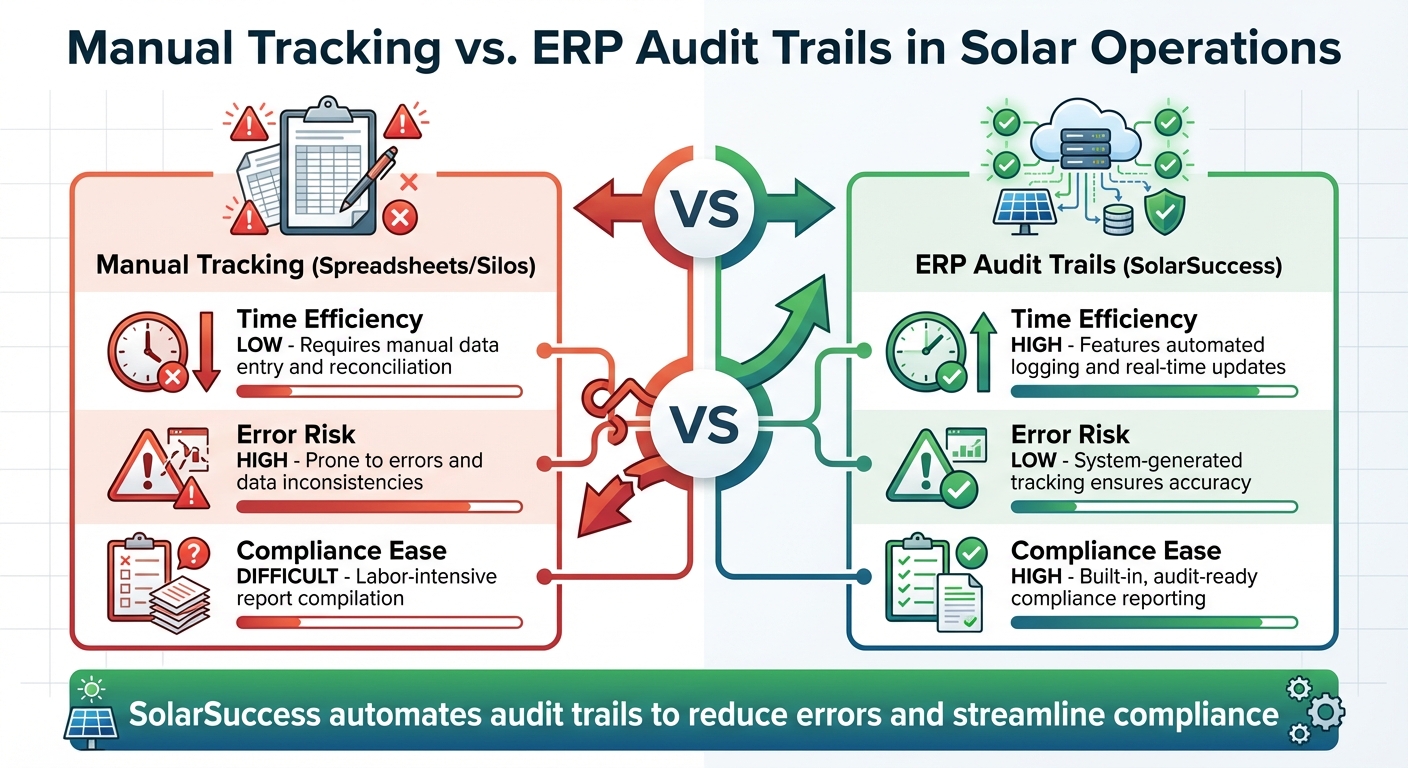
Manual Tracking vs ERP Audit Trails Comparison for Solar Companies
Improving Transparency and Accountability
Audit trails provide a centralized hub of truth for solar operations by integrating accounting, project management, and inventory data into one streamlined system. Instead of juggling disconnected tools, everyone works with the same real-time information. This eliminates the need for manual workarounds and spreadsheets that often result from data silos.
Every action taken – whether it’s a project manager updating a purchase order or modifying project costs – is meticulously logged. This level of precision is indispensable for monitoring soft costs, which can account for as much as 65% of a solar system’s total cost. These include expenses like permitting, financing, and customer acquisition.
"Solar installation has many moving parts, all generating soft costs, and there is no single application that solves them all… SolarSuccess streamlined things even further and allowed us to add our own customizations."
– Aaron Casillas, Technology & Infrastructure Director
This transparency extends to financial integrity as well. Audit trails enable advanced calculations, such as job costing and revenue recognition, ensuring reports for partners and investors are both accurate and trustworthy. For instance, SolarSuccess – responsible for nearly one-third of rooftop solar installations in the U.S. – tracks these transactions, giving companies the confidence to present clear and detailed financial data to stakeholders. This level of visibility not only improves day-to-day operations but also strengthens regulatory compliance.
Meeting Regulatory Compliance Requirements
Audit trails aren’t just about operational clarity – they’re also critical for navigating the maze of regulatory requirements that solar companies face. From financial standards like GAAP and the Sarbanes-Oxley Act to data privacy laws such as GDPR and CCPA, compliance demands are extensive. Audit trails simplify this process by creating permanent, time-stamped records for every transaction and data change. Auditors can seamlessly drill down from summary reports to granular transaction details without wasting time on manual data collection.
These systems also monitor who accessed, updated, or deleted sensitive customer information, a key feature for meeting privacy law obligations. Additionally, audit trails help companies demonstrate adherence to industry certifications like ISO 27001 (information security) and ISO 9001 (quality management). Automated logging ensures that processes align with required protocols, and they also support compliance with OSHA safety rules and EPA standards by maintaining detailed records of project milestones, material sourcing, and quality checks.
Tax and regulatory reporting becomes far more efficient, too. ERP systems provide features like GL Audit Numbering and system-generated journals, meeting global tax compliance requirements such as SAF-T (Standard Audit File for Tax) and local statutory standards. Integration with frameworks like the "Orange Button" taxonomy ensures consistent data across the solar lifecycle, which is essential for both regulatory clarity and seamless communication with financiers.
Reducing Errors and Simplifying Audits
Switching from manual systems to automated ERP solutions eliminates many of the errors common in spreadsheet-based processes. With unified platforms, solar companies no longer need to rely on manual data reconciliation or patchwork fixes, allowing them to standardize operations across the board.
"We’re doing more with the same number of people and we have a system that’s more reliable and less stressful than tracking a million different spreadsheets."
– Joe Marhamati, Co-Founder & VP, Ipsun Solar
Milestone-driven accounting automates key processes, such as triggering accounting events when specific project milestones are reached. This reduces the likelihood of manual invoicing errors or missed revenue recognition opportunities. Predefined search functions allow auditors to quickly generate filtered reports, and even deleted records remain accessible – clearly showing what was removed, by whom, and when. By minimizing manual errors, solar businesses enhance both their transactional accuracy and their ability to meet compliance standards.
Manual Tracking vs. ERP Audit Trails
| Process | Time Efficiency | Error Risk | Compliance Ease |
|---|---|---|---|
| Manual (Spreadsheets/Silos) | Low – requires manual data entry and reconciliation | High – prone to errors and data inconsistencies | Difficult – labor-intensive report compilation |
| ERP Audit Trails (SolarSuccess) | High – features automated logging and real-time updates | Low – system-generated tracking ensures accuracy | High – built-in, audit-ready compliance reporting |
Regulatory Requirements for Audit Trails in the Solar Industry
Regulations That Require Audit Trails
Solar companies operate in a highly regulated environment, requiring strict adherence to safety, environmental, and financial standards through detailed record-keeping. For example, the Environmental Protection Agency (EPA) mandates large-scale solar sites to perform environmental impact assessments, while bioenergy projects must monitor air pollutants under the Clean Air Act. The Occupational Safety and Health Administration (OSHA) enforces rigorous safety standards for construction and maintenance, requiring companies to maintain comprehensive safety logs and training records. Additionally, the Federal Energy Regulatory Commission (FERC) and Regional Transmission Organizations (RTOs) demand extensive technical data and reporting for grid interconnection.
For publicly traded solar companies, the Sarbanes-Oxley Act (SOX) imposes even stricter requirements. These organizations must retain at least 366 days of audit logs for critical systems to demonstrate financial accountability.
"An audit trail is a secure, computer-generated, time-stamped electronic record that allows reconstruction of the course of events relating to the creation, modification, and deletion of an electronic record." – FDA Guidance Definition
A proper audit trail must capture key details such as document name, version, user identity, timestamps, and the specific actions taken. Without automated systems to manage these records, companies would face significant challenges in assembling compliance documentation manually. These stringent requirements highlight the operational complexities that solar companies must navigate.
Impact on Solar Business Operations
Failing to meet regulatory standards without automation can disrupt daily operations and increase the risk of non-compliance. Manual processes to compile logs and records not only slow down audits but also leave room for errors. Automated audit trails, on the other hand, simplify compliance efforts and improve workflow efficiency. For instance, tools that automate compliance tracking and permitting schedules have been shown to reduce project delays by up to 30%.
The solar industry’s rapid growth adds to the urgency. Solar and storage projects accounted for 84% of new power capacity added in the United States last year. To avoid regulatory setbacks, companies must engage with relevant authorities – federal, state, local, and tribal – early in the project lifecycle. Automated systems, such as SolarSuccess ERP with built-in audit trails, can issue reminders for permit renewals, emissions reporting, and contract deadlines, helping to prevent fines and delays.
Additionally, integrating compliance into procurement processes ensures that components meet regulatory standards before reaching the site. This can be achieved by including certification clauses in supplier contracts, creating a seamless audit trail from the initial purchase order to final installation. These measures not only enhance compliance but also support smoother operations and project timelines.
sbb-itb-2560759
How SolarSuccess Improves Audit Trails for Solar Companies

SolarSuccess takes the concept of audit trails to the next level, enhancing document security and transparency for solar companies in meaningful ways.
SolarSuccess Features for Audit Trails
SolarSuccess, built on NetSuite, is designed to improve transparency and accountability in solar operations. One of its standout features is its ability to serve as a single source of truth, eliminating fragmented data across systems and simplifying audits.
With bluDocs powering document management, critical records like contracts, permits, and compliance documents are stored in a centralized, searchable system. Every document revision is tracked, ensuring a clear history of changes.
"SolarSuccess streamlined things even further and allowed us to add our own customizations on top of NetSuite." – Aaron Casillas, Technology & Infrastructure Director
The platform also employs role-based permissions, linking every action to an authorized user for greater accountability.
Budget versioning is another crucial feature. It meticulously logs every financial adjustment and approval, creating a transparent record. Blu Banyan highlights this functionality:
"Recording budget versions, project actions, approvals, and associated documentation provides a record of transparency and accountability."
Additionally, bluChat captures all project-related communications and attaches them to the corresponding records. This creates a permanent, searchable history that keeps everyone on the same page.
Together, these features simplify compliance and improve operational efficiency across solar companies.
Automating Compliance and Operations
SolarSuccess doesn’t just streamline audit trails; it also automates compliance and operational workflows. By automating processes, the platform shortens the project-to-cash cycle by up to 40%. Companies like Titan Solar Power have used these tools to triple their project throughput without increasing office staff. Similarly, POWERHOME Solar scaled to over $600 million in revenue with just six finance team members, reducing their monthly financial close from 28 days to just 5.
One key automation feature is milestone-based invoicing. This function generates financial records automatically after each stage of construction is completed, ensuring real-time audit trails.
"We’ve been able to automate most of our residential invoices. When a deal moves to a particular stage of construction, for example, SolarSuccess generates invoices based on that specific milestone." – Joe Marhamati, Co-Founder & VP at Big Sun Solar
The platform also streamlines change order management, digitally tracking every contract modification. This improves project material accuracy by 20% and reduces installation costs by 3–5¢/W.
Best Practices for Setting Up Audit Trails in Solar ERP Systems
How to Configure Audit Trails Step-by-Step
To activate audit trails in SolarSuccess, start by enabling System Notes. In NetSuite-based systems, this feature automatically tracks data and configuration changes. You can confirm if a record supports auditing by checking for a "System Notes" subtab on that record.
Next, implement role-based access control (RBAC) to safeguard master data. Assign specific roles, permissions, and restrictions to users, ensuring they access only the information they need – down to individual fields.
For monitoring and fraud detection, set up saved searches and alerts to oversee key financial controls. The "Context" field in audit logs is particularly useful, as it shows whether changes were made via the user interface, web services, or SuiteScript.
Strengthen security by enabling multi-factor authentication (MFA) and enforcing strict password policies. NetSuite’s SOC 1 Type 2 and SOC 2 Type 2 audited framework provides a solid foundation for these measures. Additionally, make it a habit to search for deleted records regularly to investigate any removed data.
"NetSuite provides a complete audit trail, tracking transactions by user login details and applying a timestamp to each change." – Oracle NetSuite
Once your audit trails are securely in place, you can take advantage of solar-specific dashboards for real-time monitoring and analysis.
Using Solar-Specific Dashboards for Monitoring
Custom dashboards are a game-changer for real-time tracking. They allow departments to monitor metrics and audit data while offering the flexibility to drill down from summary reports into transaction details and system notes. This level of transparency ensures every action is accounted for.
"Easily customizable dashboards provide every department and user with real-time tracking of the information, metrics and trends that are important to make confident data-driven decisions." – Blu Banyan
For enhanced monitoring, consider deploying the NetSuite Compliance 360 SuiteApp. This tool captures user activity that standard logs might miss, such as whether someone viewed, modified, or deleted a record. You can also configure role-based dashboards to display only the activity relevant to specific departments and set up custom preventative and detective controls using saved search alerts that feed directly into these dashboards.
To further streamline your audit processes, integrating specialized third-party tools is a smart move.
Integrating Third-Party Tools
Integrating your ERP with specialized tools ensures a unified system and comprehensive audit logs across all platforms. For instance, solar companies can use tools like PayStand for automated payment processing or Celigo for workflow automation. These integrations provide full visibility into payment flows and reduce manual effort.
A unified ERP system eliminates data silos, consolidating information across accounting, inventory, and project management. For solar companies operating internationally, NetSuite supports electronic audit formats like SAF‑T and GDPdU, which are essential for compliance in various jurisdictions. By connecting these tools, your audit trail becomes a complete, reliable source of truth for your business.
Conclusion
Audit trails play a crucial role in maintaining transparency, accountability, and efficiency in the solar industry. Whether you’re overseeing residential installations or tackling utility-scale projects worth over $100 million, keeping a detailed record of every budget version, approval, and transaction is an absolute must.
The solar sector comes with its fair share of challenges. Soft costs can account for up to 64% of total project expenses, and large-scale developments often involve managing over 125,000 modules. As Jan Rippingale, CEO of Blu Banyan, aptly states:
"When you’re working with incompatible, incomplete, out-of-date data, it can turn into a nightmare pretty quickly".
This is where SolarSuccess ERP steps in. Used for nearly one-third of rooftop solar installations in the U.S., this platform – built on NetSuite – brings everything under one roof. It integrates accounting, project management, CRM, and inventory costs into a unified system, ensuring that every change is tracked with context. Whether updates are made via the user interface, web services, or automated scripts, the platform creates a dependable single source of truth. This eliminates the need for manual data transfers and streamlines labor-intensive processes. For utility-scale developers managing complex financial consolidations and ownership transfers, the platform’s ability to maintain seamless audit trails is an essential tool.
FAQs
How do audit trails in Solar ERP systems help solar companies stay compliant with industry regulations?
Audit trails in Solar ERP systems serve as a clear and secure record of every document interaction. They log essential details such as who accessed or changed a document, the exact time of the action, and the modifications made. This creates a reliable, tamper-resistant log that promotes accountability and strengthens internal controls.
By keeping a comprehensive history of activities, audit trails make audit preparation easier, showcase adherence to industry regulations, and help solar companies align with legal and operational requirements. This not only minimizes the risk of compliance issues but also fosters trust among stakeholders and regulatory agencies.
How does SolarSuccess simplify audit trail management for solar operations?
SolarSuccess simplifies audit trail management by offering a centralized, real-time overview of all projects and financial data. It takes care of automating workflows and approval processes, ensuring that every transaction and document update is securely recorded and easy to track. Equipped with integrated accounting and reporting tools, SolarSuccess supports solar companies in staying compliant while enhancing transparency in their operations.
How do audit trails enhance accuracy and efficiency in solar ERP systems?
Audit trails in solar ERP systems serve as a secure, time-stamped ledger that tracks every user action, data update, and system change. This ensures a centralized repository for all project-related files – whether it’s contracts, permits, financial records, or other critical documents – removing the hassle of juggling spreadsheets or manual logs.
By recording who made changes, when they happened, and what was altered, audit trails enhance accountability and minimize errors. If a mistake occurs, it’s easier to pinpoint and fix, with the added assurance that original data remains intact. These records also play a key role in compliance, offering clear documentation for reviews and helping projects stay on track for permitting and financing approvals.
With platforms like Blu Banyan’s SolarSuccess, audit trail data integrates directly into real-time dashboards. This gives teams immediate insight into project progress, costs, and resource allocation. The result? Faster, better-informed decisions, shorter project timelines, and more time spent delivering outcomes rather than managing scattered records.
