
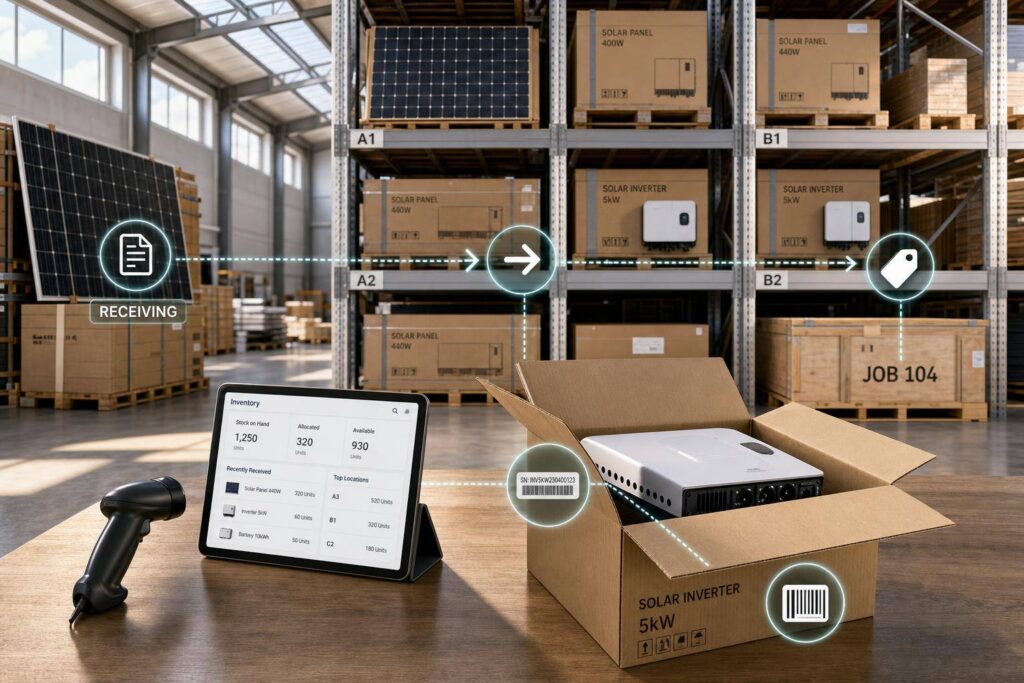
If your solar inventory is wrong, your schedule, project cost, and warranty records are wrong too.
I’d sum up this guide like this: ERP & Inventory Management Software works best when items are cleanly set up, locations are clearly defined, purchasing ties back to project demand, transfers are tracked through transit, and serials stay linked from receipt to install. When those pieces are in place, you can see what you own, what is reserved, what is on the move, and what has already been issued to a job.
Here’s the short version of what matters most:
- One item record per part helps stop duplicate SKUs, bad costing, and buying mistakes
- Units of measure must match field use like pallet-to-each or foot-to-foot
- Every location should exist in the ERP including warehouses, staging yards, vans, job sites, and in-transit points
- Project-driven purchasing should pull from BOQs, budgets, and required install dates
- Formal receiving and QA hold steps help stop billing errors and bad material from moving to jobs
- Transfer orders keep stock from getting counted twice
- Owned, allocated, and installed inventory should stay separate at all times
- Serial and lot tracking should follow equipment from PO to final install record
- Finance postings must match inventory movement so WIP, inventory, GRNI, and COGS stay in line
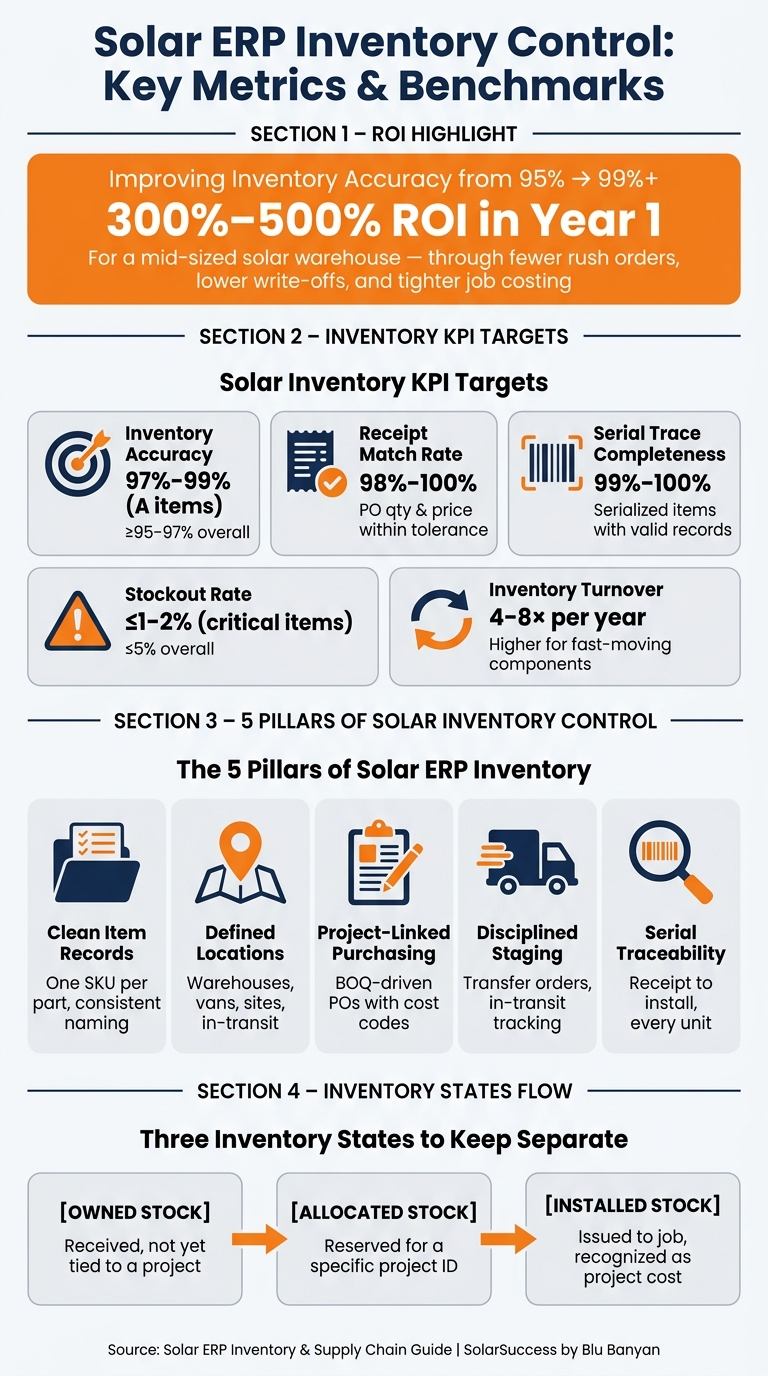
- KPIs matter: many teams aim for 97% to 99% inventory accuracy, 98% to 100% receipt match rate, and 99% to 100% serial trace completeness
One point stood out to me: even a small gap in inventory accuracy can create expensive field problems. The article notes that moving from 95% to 99%+ accuracy can produce 300% to 500% ROI in year one for a mid-sized warehouse, mostly through fewer rush orders, lower write-offs, and tighter job costing.
If you run solar projects in the U.S., this guide is about one thing: keeping materials, project status, and accounting in the same system so crews and finance are working from the same numbers.
ERP Setup for Solar Inventory Control
Before purchasing, warehouse transfers, or demand planning can work the way they should, the ERP needs clean setup at the base. Master data sits at the center of every transaction that comes after it. Item records, location structure, and financial mappings are the nuts and bolts behind the whole system. Get those wrong early, and the cleanup later can be expensive and frustrating.
Item Master, Units of Measure, and Data Governance
Every material should have one clean item record. At a minimum, that means keeping stock inventory items separate from non-inventory items like permits and design services, and also separate from kits or assemblies such as standard residential or C&I system packages. Each item record should include fields such as manufacturer, model, core electrical specs, warranty, listing, and tracking requirement.
A consistent naming convention helps buyers, warehouse teams, and project managers read the same item the same way. A practical format includes the details people need at a glance. Panels might use [Category]-[Wattage]W-[Manufacturer]-[Series], like MOD-400W-ABC-BLK. Inverters might use [Category]-[kW]-[Phase]-[Manufacturer], like INV-7_6KW-1PH-XYZ.
Units of measure should match how material moves in day-to-day work. For example:
- Modules may be purchased by pallet but valued by each
- Wire may be purchased and used by the foot
- Consumables like sealant or fasteners may be tracked by box or each
The ERP should store UoM conversions along with one valuation unit.
These fields affect purchasing, receiving, installation, and warranty traceability.
Use one costing method across items and projects, and stick with it.
| Costing Method | Pros | Cons | Best-Fit Use Cases for Solar |
|---|---|---|---|
| Standard Cost | Stable job cost reports; clear purchase price variance analysis | Needs regular updates; bad standards can distort margins | Larger EPCs with mature cost accounting and tight price contracts |
| Average Cost | Reflects blended actual costs; simpler to maintain | Margins can swing month to month | Installers with moderate price volatility and steady purchasing cadence |
| FIFO | Matches actual purchase history; works well when prices trend | More complex across multiple warehouses | Businesses with major price swings and separate inventory lots by shipment |
| Specific Identification | Tracks the exact cost of a specific unit | High admin effort; needs strict serial number discipline | High-value serialized assets like batteries and large-scale inverters |
Use standard cost, average cost, FIFO, or specific identification. Specific identification is a strong fit for serialized project stock.
Data governance is what ties this section together. Operations should own item naming and item content. Finance should own costing and GL mappings. Supply chain should own lead times and preferred vendors. A formal new item request process, with required fields and approval, helps block duplicates and cost mistakes before they spread.
Warehouses, Vans, Job Sites, and Staging Locations
A solar company’s inventory rarely stays in one building. It moves through storage points, mobile locations, transit stops, and job sites. The ERP has to reflect that movement clearly. If it doesn’t, available-to-promise (ATP) stops being something people can trust.
Location accuracy is what keeps warehouse stock, van stock, and job-site stock from being counted twice.
The location structure usually follows company → region → warehouse → bin. Main warehouses handle bulk receiving, put-away, and outbound transfers. Regional warehouses hold buffer stock near groups of projects. Service vans should be set up as mobile stock locations tied to technicians, so material assigned to field teams can be consumed straight from work orders. Staging yards near large C&I or utility-scale jobs can receive bulk deliveries, hold material during QC, and support kitting before final site delivery. In-transit locations show stock that has left one point but has not arrived at the next, which helps stop double-counting during warehouse-to-warehouse and warehouse-to-site moves.
Bin-level control inside warehouses lets the ERP track where material actually sits. That may mean secure cages for inverters and batteries, rooftop-ready staging areas, or quarantine and return bins for items waiting on inspection. Availability rules matter here. Stock sitting in a quarantine or return bin should never show up in ATP, and stock already committed to a project should not be promised to another one.
| Location Type | Primary Role | Key Data Fields | Common Workflows |
|---|---|---|---|
| Main Warehouse | Central storage and fulfillment | Address, bins, cost center, ship-from flag | PO receiving, put-away, kitting, transfers, customer shipments |
| Regional Warehouse | Local buffer near project clusters | Address, bins, region, ship-from flag | Replenishment from main, local staging, van replenishment |
| Service Van | Mobile inventory for field work | Technician ID, vehicle ID, region | Van replenishment transfers, on-site consumption, returns to warehouse |
| Staging Yard | Bulk project staging and QC | Yard address, bins, project tags | Container receiving, QC, kitting by project, site deliveries |
| In-Transit | Logical transit visibility | Source, destination, transfer IDs | Captures stock during transfers, supports ETA tracking |
| Project Site | Point of final consumption | Project ID, site address, job reference | On-site receipt (if direct), installation issues, leftover returns |
Location naming standards matter just as much as item naming. A format like WH-DENVER-01 for a warehouse or VAN-TECH123 for a vehicle makes reporting by geography and cost center much easier. It also cuts down on setup mistakes.
Once locations are defined the right way, transfers, staging, and van replenishment can post without inventory holes.
Financial Integration as the Base Layer
Inventory and accounting have to move together. The finance layer connects inventory records to the general ledger, so every receipt, transfer, adjustment, and project issue posts where it should.
That is how supply chain, project teams, and finance end up looking at the same numbers instead of arguing over three versions of the truth.
The mapping starts with item categories linked to GL accounts. Inventory items should point to an inventory asset account and a COGS account. Categories can override those defaults when needed, such as routing batteries and inverters differently from general BOS materials. Locations should also tie to departments or cost centers like “West Region”, “Service”, or “Utility-Scale”, so inventory movements carry the right department or cost center tag for profitability reporting.
Receive POs to inventory, or to work in process (WIP) for project-specific POs. Clear goods received not invoiced (GRNI) when the invoice is entered. Post write-offs to inventory adjustments. Adjustments tied to shrinkage, damage, or write-offs should hit a dedicated inventory adjustment account, and finance should review cycle count results before those entries are posted.
Once item, location, and GL mappings are in place, purchasing and project issue can post cleanly.
Purchasing, Receiving, and Material Flow Into Projects
Purchasing From BOQs, Budgets, and Project Schedules
Once item, location, and GL controls are set, project demand can flow straight into supplier orders. It starts with the bill of quantities (BOQ). Each material line in the BOQ should include a project ID, task reference, and cost code. When someone creates a requisition from that BOQ, those fields should carry over on their own. That way, committed costs land on the right project from the start.
Project schedules should also shape purchasing timing. The ERP needs to work backward from the required on-site date and the supplier lead time to figure out when the PO must be released. That gives purchasing teams a clear heads-up instead of forcing them to scramble at the last minute.
Approvals are the next control point. Low-dollar POs can go to purchasing, while higher-dollar commitments should move to finance for signoff. The ERP can also stop a PO when committed and actual costs go past the approved budget by more than a set threshold. Simple idea, big payoff: fewer budget surprises.
| Workflow Step | Responsible Role | Key Data Fields |
|---|---|---|
| Material requisition | Project Manager | Project ID, Task, Cost Code, Item, Quantity, Required Date, Estimated Unit Cost (USD) |
| Budget & scope review | Project Manager / PMO | BOQ reference, Budget line, Variance vs. budget, Required Date |
| Commercial review | Purchasing Manager | Supplier, Lead time, Price quote (USD), Incoterms, Minimum order quantity |
| Financial approval | CFO / Controller | Total commitment (USD), Budget availability, Cash flow impact, GL account |
| PO creation and issue | Purchasing Manager | PO number, Supplier, Item, Quantity, Unit Cost (USD), Required Date, Project ID |
For high-value items like modules and inverters, it helps to generate RFQs straight from BOQ lines. Then teams can compare supplier quotes by unit cost, lead time, and reliability inside the ERP. No side spreadsheets. No messy handoffs. And the audit trail stays clean. Once the PO is issued, it becomes the main record for receipt, QC, and transfer tracking.
Once the PO is out, the process moves into receiving, inspection, and project allocation.
Receiving, Put-Away, and Quality Control
Receiving is the moment when project commitments turn into actual inventory. Each receipt should be matched to the original PO, with delivered quantities, item condition, and receipt date recorded. Partial receipts happen all the time in solar, so the ERP should leave the PO open for any remaining quantities and show expected arrival dates clearly.
The main finance control here is the three-way match. The ERP checks the PO, the goods receipt, and the vendor invoice before payment can move forward. If a PO lists 100 inverters at $900 each, but the invoice comes in at a higher unit cost, the system should flag it before the bill is posted. That one check can stop margin from leaking away through overbilling.
Serialized parts like inverters and battery units should have serial numbers scanned at the receiving dock and tied right back to the PO line and project reservation. Modules and some balance-of-system parts should get lot assignments that record the manufacturer batch and production date. Later on, that data matters for warranty claims and recall work.
Before anything moves to staging or installation, there should be a quality hold step. If a receipt looks off, route it to QA hold until inspection clears it. And if a batch fails, the ERP should trace that lot across every project where it was reserved or staged. That makes the response focused instead of turning into a warehouse-wide fire drill.
Warehouse Transfers and Project Staging
Material moving from a central warehouse to a job site should go through a formal transfer order, not a manual adjustment. The transfer order should spell out the items, quantities, source location, destination, and required arrival date. When the shipment leaves the warehouse, the stock should move into in-transit inventory until the destination receipt is posted. Once the materials arrive and that receipt is confirmed, on-hand balances update at the destination.
That transfer-order to in-transit to receipt flow stops double-counting. It also gives operations a clean view of what is on trucks, what is sitting in staging yards, and what has already reached active job sites.
It also helps to keep three inventory states separate:
- Owned stock: received inventory that is not yet tied to a project
- Allocated stock: inventory reserved for a specific project ID and task but still in the warehouse
- Installed stock: inventory issued to the job and recognized as project cost
A solar ERP should show owned, allocated, and installed material in real time for both finance and operations.
That view then feeds demand planning and replenishment decisions.
Demand Planning, Traceability, and Cross-Team Visibility
Demand Planning and Replenishment for Solar Workloads
With staging and transfers in place, demand planning answers the next question: what should you buy next, and when?
That starts with pulling demand from the right sources: CRM pipeline, awarded BOQs, open POs, on-hand stock, and reservations. For smaller installers, close-rate forecasting usually works well. For awarded projects, time-phased schedules are the better fit because they map purchases to the actual job timeline.
Not every item should be planned the same way. Critical serialized components like panels, inverters, and batteries come with longer lead times and more capital tied up, so they need tighter controls. A practical rule of thumb is to keep about 2–4 weeks of safety stock for components that show up on most BOMs, using this formula: Reorder Point = (Average Daily Usage × Lead Time in Days) + Safety Stock. [1]
Commodity BOS items such as conduit, wire, and hardware are a different story. They’re easier to source and usually carry less financial risk, so simple min/max rules are often enough.
| Planning Method | Best For | Key Tradeoff |
|---|---|---|
| Manual Reorder | Very small installers, few SKUs | Simple to run, but high stockout risk as volume grows |
| Min/Max | Small to mid-size firms, stable BOS demand | Low overhead, but misaligns when project pipelines shift quickly |
| MRP | Mid-to-large C&I and utility-scale operations | Accurate and time-phased, but requires clean BOM and schedule data |
| Forecast-Driven | Large enterprises with multi-state or programmatic rollouts | Best precision, uses pipeline and seasonality data, highest setup complexity |
The goal is simple: flag demand gaps before they hit the schedule.
Serial and Lot Tracking From Receipt to Installation
Once supply is planned, traceability makes sure each unit stays tied to the right job.
This matters for two big reasons: warranty recovery and project margin. If a serial number gets lost somewhere between receiving and install, sorting out a claim can turn into a mess. Serials captured at receipt should stay linked to the PO, storage location, each transfer, the project issue, and the final installation record. That final record should include the technician, date, and site.
For panels, each serial should tie back to the project ID, customer account, and site address. For batteries and other safety-critical equipment, lot tracking needs to go far enough to support a tight recall response: which projects are affected, which sites need inspection, and what inventory is still sitting in stock.
| Traceability Element | Supports |
|---|---|
| Serial Number | Warranty claims, unit-level failure analysis, recall scope |
| Lot / Batch Number | Manufacturing defect identification, batch-level recall containment |
| Project ID | Job costing, budget vs. actual, BOQ reconciliation |
| Customer / Site Record | O&M history, service prioritization, owner notifications |
| Warranty Record | Coverage terms, claim history, expiry tracking |
Mobile receiving with barcode or QR scanning makes serial capture workable in the field. And the ERP shouldn’t treat this as optional. It should block installation completion if serials haven’t been assigned to the project BOM.
Finance, Project Teams, and Inventory Dashboards
Real-time posting keeps project cost and inventory value in sync.
To get the numbers right, freight, duties, tariffs, handling, and insurance should be capitalized into inventory value. If you skip that step, project cost won’t reflect the true landed cost, and margins can look better on paper than they are in practice.
| Transaction Type | Financial Account Impact | Project Reporting Impact |
|---|---|---|
| Item Receipt | Debit Inventory Asset; Credit GR/IR Accrual | Updates materials available status |
| Landed Cost Allocation | Increases capitalized inventory value | Raises true cost per unit on project budget |
| Warehouse Transfer | Moves value between location sub-accounts | Updates staging status |
| Issue to Project | Debit WIP; Credit Inventory Asset | Updates actual cost on project budget |
| Inventory Adjustment | Debit/Credit Inventory Variance or Gain/Loss | Flags discrepancies in project cost reports |
| Install Complete | Debit COGS; Credit WIP | Marks installed status and supports margin reporting |
Those same records should feed role-based views for finance, operations, and project teams. The data stays the same, but the lens changes. Planners need to see demand versus supply by item class. Project managers need a clean view of materials staged versus materials still required. The CFO needs committed cost versus budget, along with accrual positions.
A simple green/yellow/red project status view helps teams get the picture fast:
- Green = materials on hand and issued
- Yellow = partially staged
- Red = demand exceeds confirmed supply
That gives everyone a quick read on project health without digging through reports.
In SolarSuccess, bluChat and bluDocs connect demand alerts, supplier documents, and project decisions to the right PO and project record. So when exceptions come up, the documents, approvals, and decisions stay attached to the same inventory record.
Implementation Priorities and Conclusion
Process Design, Controls, and KPI Tracking
Once item rules, location logic, purchasing rules, and traceability steps are set, the next move is process discipline. Bring operations, warehouse, project, and finance teams together to map current workflows and future workflows, so everyone works from one source of truth for item data and locations. Map each handoff once, then treat every gap like part of the rollout plan.
A low-disruption rollout usually works best in three phases: foundation first, core transactions next, and advanced controls after that. In the foundation phase, clean up and standardize item master data, define every location, line up inventory with the chart of accounts and project structures, and pause major data-structure changes while the core model is being built. Then move into core processes for purchasing, receiving, put-away, transfers, and project issue. Only when those pieces are stable should you add cycle counting, dashboards, demand planning, and traceability analytics. Start with one region or business unit as a pilot, then expand after the core metrics settle down.
Before scaling, prove the full transaction flow in one controlled pilot. Test the full order-to-cash path and the full issue-to-install path before go-live. Role-based permissions should also limit who can create or edit POs, approve purchases, or post inventory adjustments.
After go-live, cycle counts help keep the system honest. Classify inventory by value and criticality, then pair routine counts with periodic full stocktakes coordinated with finance for year-end or mid-year close. Any variance above a set threshold – say, more than 2% in quantity or more than $2,000 in value – should go to a manager for review before the adjustment is posted. Every inventory transaction should include a user ID, timestamp, and source document reference.
After go-live, track the few metrics that surface stock, staging, and traceability issues FAST. These metrics keep warehouse, project, and finance teams aligned around the same data. Use these controls and KPIs to monitor risk after go-live:
| Solar Inventory Risk | Mitigation Controls in Solar ERP | KPI & Formula | Practical Target Range |
|---|---|---|---|
| Unreliable on-hand counts | Cycle counts, role-based permissions, mandatory reason codes for adjustments | Inventory Accuracy (%) = (1 − |System Qty − Physical Qty| ÷ Physical Qty) × 100 | ≥ 97–99% for A items; ≥ 95–97% overall |
| Stockouts of critical modules/inverters | Safety stock settings, min/max levels per location, vendor lead-time tracking | Stockout Rate (%) = (Stockout events ÷ Total item-location combinations) × 100 | ≤ 5% overall; ≤ 1–2% for critical A items |
| Excess or obsolete inventory | Turnover monitoring, aging reports, rationalized product catalog | Inventory Turnover (times/year) = Annual COGS ÷ Average Inventory Value | 4–8× typical; higher for fast-moving components |
| Incomplete project staging | Staging locations, project-linked allocations, pre-install readiness checks | Project Readiness Index (%) = (Items fully available ÷ Total required items) × 100 | ≥ 95–100% before firm scheduling |
| Lost or untracked van stock | Van locations in ERP, transfer orders, routine van cycle counts | Van Inventory Accuracy (%) = same formula as inventory accuracy, per van | ≥ 95–98% |
| Missing serial/lot records | Serial capture at receiving and installation, mandatory entry on project issue | Serial Trace Completeness (%) = (Items with valid serial/lot records ÷ Total serialized items) × 100 | ≥ 99–100% |
| PO-to-receipt mismatches | Three-way match (PO, receipt, invoice), tolerance rules, approval workflows | Receipt Match Rate (%) = (Receipts matching PO qty and price within tolerance ÷ Total receipts) × 100 | ≥ 98–100% |
Key Takeaways for Solar ERP Inventory Integration
The core message of this guide is simple: clean item records, defined locations, project-linked purchasing, disciplined staging, and serial traceability are the base that the rest of the system relies on.
The gains are measurable. Improving inventory accuracy from 95% to 99%+ typically delivers 300–500% ROI in the first year for a mid-sized warehouse operation [2], mostly through fewer emergency purchases, less write-off exposure, and tighter project margins. Demand planning that spots gaps before they hit the schedule helps keep crews productive and cuts the cost of rescheduling. The strongest rollouts also connect inventory movement and billing to project milestones so finance and operations stay in sync.
The goal is not just to turn the system on. It is to run it with control and keep it accurate as volume grows. A solar-specific cloud ERP like Blu Banyan‘s SolarSuccess can bring purchasing, inventory, project management, and accounting into one phased rollout, but the outcome still comes down to clear ownership, disciplined controls, and clean data.
FAQs
How do we start cleaning up solar inventory data?
Start by looking at your current process and pinpoint where inventory data gets lost, delayed, or entered twice across teams. Map every inventory touchpoint, then talk with your warehouse, project, and field crews to spot the slowdowns and errors. That gives you a baseline, so you can see what those problems are costing in time, money, and missed handoffs.
Then bring that work into a solar-specific, cloud-based ERP like SolarSuccess by Blu Banyan. It puts your data in one place, automates routine workflow steps, and links procurement with project management so teams aren’t working from different versions of the truth.
When should inventory move from WIP to COGS?
In a solar ERP system, inventory usually moves from WIP to COGS as project milestones are completed.
With Blu Banyan’s SolarSuccess, equipment costs are tracked and recognized as materials are tied to specific project phases. When field teams confirm a task or milestone, such as a completed install, the financial system records those costs so teams can see accurate gross margin reporting and real-time project profitability.
What serial tracking steps matter most in the field?
The most important step is recording serial numbers, lot numbers, and firmware versions at receiving. Using barcode or QR scanners at the receiving dock or laydown yard helps stop data gaps that are tough to fix later.
Track each panel, inverter, and monitoring device from receipt through installation. This supports quality control, warranty claims, recalls, and faster handling of RMAs or performance issues.
