

ERP pushback in solar usually comes down to five things: fear of slower work, weak training, bad data, unclear ownership, and leftover doubt from past software rollouts.
If I had to sum up the fix in one line, it would be this: match each problem to a direct response before go-live and keep tracking use after launch. That means phased rollout, role-based training, data cleanup 60 to 90 days before migration, named process owners, and clear updates from managers.
Here’s the short version:
- Slowdown fear shows up when teams keep using email, spreadsheets, or side trackers.
- Training gaps lead to low confidence and more mistakes.
- Bad data makes people stop trusting the ERP.
- Unclear roles create delays, duplicate entry, and missed handoffs.
- Past project failures make teams doubt the new rollout from day one.
A few numbers stand out:
- Soft costs can reach 65% of a new solar system’s total cost.
- Change efforts with strong change management are 6x more likely to meet goals.
- Poor training is tied to 30% of ERP failures.
- Post-go-live adoption often stalls around 40% to 50%.
So if you want less resistance, I’d focus on three things first: set ownership early, train by job role, and fix data before migration. That’s what keeps the ERP from becoming “just another system” people work around.
Five causes of ERP resistance in solar and how to respond
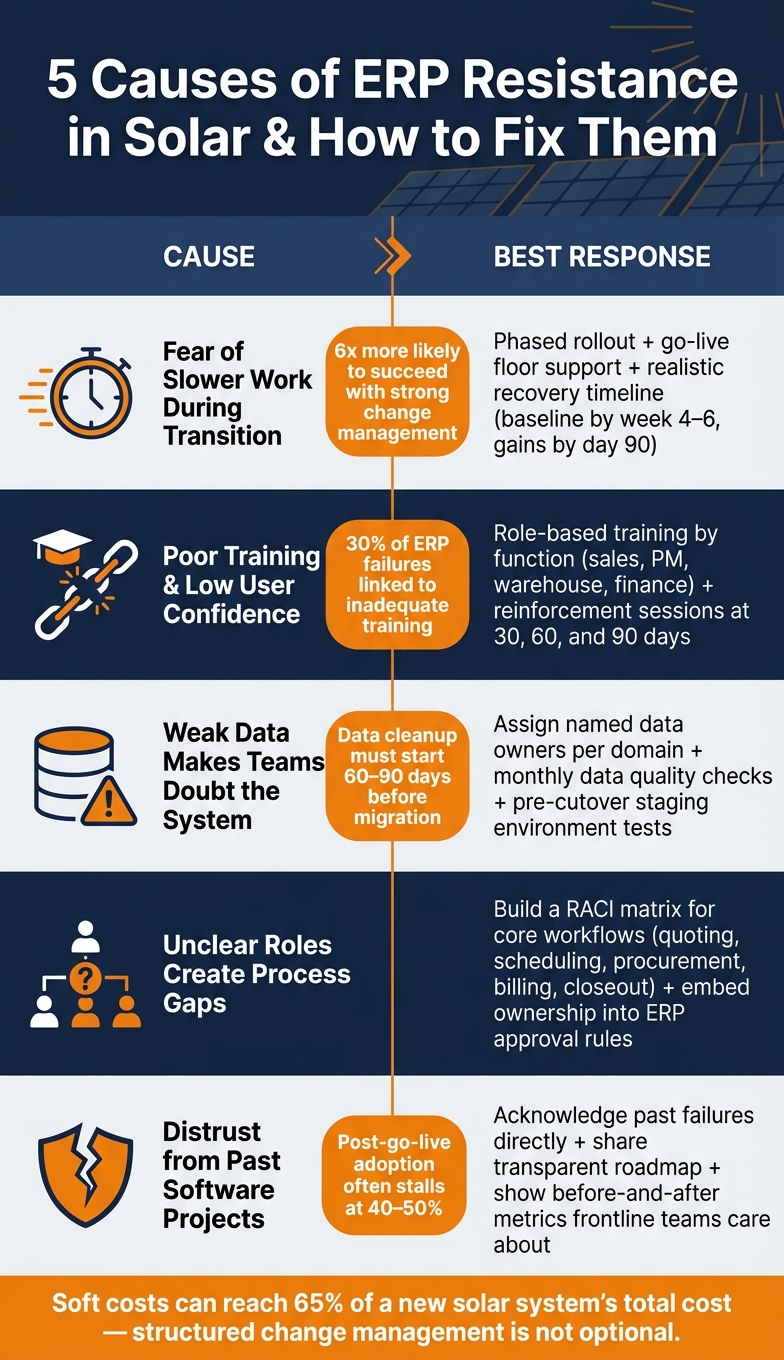
Fear of slower work during the transition
Solar teams work on a daily rhythm. So even a small ERP hiccup can slow quoting, scheduling, and inventory work.
The best move is to set expectations early and say it plainly: a short-term dip in output is normal. Research across thousands of change initiatives shows that projects with excellent change management are six times more likely to meet their objectives than those with poor change management. Leadership should also put a clear recovery goal on the table. For example, aim to get installs per crew per week back to baseline within four to six weeks, then show measurable gains by day 90.
A phased rollout can take some of the pressure off. Start with lower-risk work, like internal reporting, before moving into mission-critical processes like quoting or billing. It also helps to have go-live floor support in place. That can be super-users or implementation partners who stay close to estimators, coordinators, and warehouse staff during their first live days in the system.
Once people see the ERP is not going to slow them down for good, the next issue usually shows up fast: training.
Poor training and low user confidence
Generic training is one of the fastest ways to lose user trust. If people feel unsure before go-live, adoption starts slipping almost at once. Standish Group data points to inadequate user training as a factor in 30% of ERP failures.
The fix is role-based training tied to real solar workflows. Estimators should train on quoting. Coordinators should train on scheduling and milestone management. Warehouse teams should train on receiving, serial numbers, and inventory counts. In most cases, short sessions of 60 to 90 minutes work better than all-day overviews. People learn faster when each session sticks to one workflow.
Training also can’t stop at go-live. Run reinforcement sessions at 30, 60, and 90 days. Managers should review adoption numbers every week, such as the percentage of jobs scheduled through the ERP and the percentage of invoices created in the system. Adoption accountability sits with managers, not just the implementation team.
And even good training can fall flat if the data in the system is wrong.
Weak data makes teams doubt the system
When project phases are off or inventory counts don’t match reality, people stop trusting the ERP. Then the spreadsheets come back.
Data cleanup needs to start 60 to 90 days before migration, not after. That means removing duplicate customer records, standardizing address formats, matching physical inventory to system counts, and using the same project stage definitions across teams. After that, each department should check its own data:
- Sales reviews customer and opportunity records
- Operations confirms project milestones
- Warehouse checks inventory locations
- Finance reconciles open invoices and GL balances
Before cutover, test sample records from start to finish in a staging environment. Follow a job from lead to permission to operate (PTO). Track an inventory item from receipt to install. Review an invoice from issue to payment. If those paths break, users will spot it right away.
After go-live, assign named data owners to each area. Sales operations owns customer data. Project management owns job status and milestones. Warehouse owns inventory. Finance owns billing and payments. Pair that with monthly data quality checks, and people have a much better reason to trust what they see on screen.
Clean data only lasts if every department owns its piece of the process.
Unclear roles create process gaps
When ownership is fuzzy, work stalls and records start to clash. If no one clearly owns scheduling, approvals, or billing updates, the ERP won’t keep work moving. At that point, the issue isn’t the software. It’s who does what.
A simple RACI-style model, with Responsible, Accountable, Consulted, and Informed, can close a lot of these gaps in core solar workflows. In a contract-to-install workflow, project coordinators may be responsible for scheduling and status updates. Warehouse may be responsible for material reservations and picks. Field supervisors may be accountable for install completion and field data entry. Finance may be informed when billing readiness is confirmed.
Writing those duties down matters. Putting them into the ERP matters even more. Approval rules, required fields, and automated notifications make ownership visible and cut down on duplicate work.
Once ownership is clear, one last hurdle often remains: whether people trust the rollout at all.
Distrust from past software projects
If a team has been through a missed go-live date, a budget overrun, or a tool that never fit solar operations, that memory sticks. The skepticism is earned.
The best response is direct acknowledgment. Leaders should say what went wrong last time and explain, in plain terms, what’s different now: a solar-specific solution, stronger internal ownership, better data prep, and a more realistic scope. From there, share a clear implementation roadmap with honest milestones. Be open about risks. Give staff a clear way to raise concerns, and make sure those concerns get actual responses.
Use metrics frontline teams care about, like quote creation time, manual inventory adjustments, and invoice accuracy. Then show before-and-after results in plain language.
When people see concrete improvements in their daily work, skepticism starts to soften.
Cause-and-response table for quick review
What the table includes
This table turns the five causes above into a quick operating guide. You can scan it fast and see each cause, how it tends to show up in a solar company, the risk it creates, and the response that fits.
| Cause | How it appears in a solar company | Operational risk | Best response |
|---|---|---|---|
| Fear of slower work during transition | Sales reps keep deals in email; commercial PMs hold multi-phase projects outside the ERP until it feels proven, leaving pipeline reports incomplete | Missed install dates, delayed invoicing, and more rework | Set realistic transition timelines, protect teams from unrealistic productivity expectations during cutover, pilot one project or office first, and provide hands-on support at go-live |
| Poor training and low user confidence | Power users absorb too much work; basic-navigation tickets spike | Mis-coded job costs, compliance gaps from incorrect tax settings, and stalled purchase orders that disrupt material availability | Commission role-based training paths by function (sales, project management, warehouse, finance); set role-specific readiness checks; assign ERP champions for peer support |
| Weak data makes teams doubt the system | Warehouse counts don’t match ERP inventory; month-end WIP reconciliation becomes urgent and manual; finance and operations report different project margins | Leaders rely on inaccurate backlog and margin data | Start data cleanup before migration; assign named data stewards by domain; enforce a single source of truth for board-level KPIs |
| Unclear roles create process gaps | Two departments enter the same change order differently; no one owns interconnection milestone updates; PO and subcontractor invoice approvals sit in queues for days | Schedule slips, rework, and slower cash visibility | Build a RACI matrix for core workflows such as quoting, scheduling, procurement, billing, and closeout; embed ownership into job descriptions and ERP approval rules |
| Distrust from past software projects | Teams keep parallel trackers outside the ERP; conflicting numbers surface in executive meetings | Teams keep shadow systems, so leaders lose trust in cash flow and margin data | Acknowledge past failures directly; share a transparent implementation roadmap with honest milestones; show before-and-after results on metrics frontline teams care about |
These causes often overlap. That’s why the next section focuses on how leaders can reduce resistance both before go-live and after it.
How solar leaders can reduce resistance before and after go-live
The five causes tend to blur together. So the rollout plan has to do more than launch software. It needs to lock in ownership, keep communication clear, and give teams the help they need day to day.
Set ownership, communication, and adoption metrics early
These fixes fall apart without clear ownership. When nobody owns the outcome, roles get fuzzy and follow-through slips. Before the build starts, name an executive sponsor who owns business results, not just project completion. Then support that person with a cross-functional steering committee that includes finance, operations, sales, field operations, and IT.
After that, assign named process owners for the main workflows. For example, a Residential Project Lifecycle Owner or a Commercial Project Billing Owner. Put each role in writing and tie it to performance goals. That makes communication a lot easier, because people know who is responsible for what.
Communication also needs a head start. Don’t wait until a few weeks before go-live. If teams hear too late, they’ll keep leaning on spreadsheets and side trackers like nothing’s changed. Be specific about what will change, when it will change, and who it affects. Field crews should hear this from their own supervisors, not from a broad company email that gets skimmed and forgotten.
Set an advance notice standard too. Give at least two weeks’ notice for changes that affect daily work, payroll, or commissions. Once people know what’s coming, you can track whether the new process is taking hold.
For adoption metrics, keep the scorecard tight and tied to actual work. Focus on:
- On-time data entry
- Retiring shadow processes
- Manual correction rate
Set baselines before go-live. Then review progress each month in regular operations meetings. Tie every metric to a visible business result, like permit cycle time or fewer rescheduling calls. That way, the numbers mean something. And when adoption data is easy to see, support teams can zero in on the workflows that still feel clunky.
Use implementation support that fits solar workflows
Generic support can spark its own pushback. If the help feels off-base, teams may write the system off as just another generic tool that doesn’t fit how they work. Blu Banyan‘s SolarSuccess and SuiteApps are built around solar workflows, so training, communication, and data capture can line up more closely with the way solar teams actually operate.
Conclusion: Match each cause with the right response
ERP resistance in solar usually comes down to five common causes. The move here is simple: match each resistance signal to the right fix using the table above. Those fixes are phased rollout, role-based training, cleaner data, clear ownership, and transparent communication.
Structured change management plays a big part in ERP adoption. Formal programs are six times more likely to hit project goals, yet adoption still often stalls at 40% to 50% after go-live.
That’s why the fixes can’t just sit on paper. Leaders need to track adoption, spot friction early, and adjust fast. In planning sessions, use the table as a quick diagnostic: score each cause by severity, then put the highest-risk fixes first.
Leaders also need to own the rollout and stay visible after go-live. That means reviewing adoption metrics, clearing blockers fast, and staying close to what teams are dealing with day to day. For solar-specific workflows, tools like Blu Banyan‘s SolarSuccess can help support that discipline. Blu Banyan‘s SolarSuccess can help align ERP workflows with solar operations, but adoption still depends on disciplined change management.
Treat change management as part of ERP success, not an afterthought.
FAQs
How can we measure ERP adoption after go-live?
Use built-in analytics dashboards and saved searches to keep an eye on adoption. A simple way to measure it is user adoption rate:
(Active Users / Total Users) × 100
Aim for above 85%. It also helps to watch login frequency. Top-performing teams often average 4 to 5 sessions per user per day.
Don’t stop at logins, though. Look at role-based usage signals too, such as:
- Transactions completed
- Open tasks
- Error counts
- Missing fields
- Manual entries that bypass workflows
Review these on a regular basis. That makes it easier to catch disengagement early and direct training to the people and teams that need it most.
Which teams should own data cleanup before migration?
Data cleanup should sit with designated business process owners. They connect each functional team with IT and help make sure the data fits business needs, compliance rules, and technical requirements.
That work should involve key departments like finance, operations, and sales. These teams are often the first to spot manual entry errors, gaps between legacy systems, and siloed information before migration.
What should leaders do if teams keep using spreadsheets?
Leaders need to move teams to a single source of truth. That means replacing any instructions that still allow spreadsheets with clear, step-by-step directions for entering data straight into the system.
Once the new platform is fully up and running, turn off legacy tools. Then lock in adoption with required fields, validation rules, approval workflows, KPIs tied to the new system, and real-time dashboards.
