
CRM-ERP integration can transform your solar business. By connecting these systems, you can reduce data entry by 30-50%, improve operational efficiency by 25%, and enhance customer retention by 20-35%. This guide outlines how to plan, implement, and optimize this integration for better project timelines, inventory management, and customer service.
Key Takeaways:
- Integration eliminates inefficiencies caused by disconnected systems.
- Solar-specific tools like Blu Banyan‘s SolarSuccess simplify workflows.
- Steps include setting clear goals, cleaning data, and automating processes.
- Continuous monitoring and team training ensure long-term success.
If you’re ready to streamline operations and improve customer satisfaction, this guide provides actionable strategies to get started.
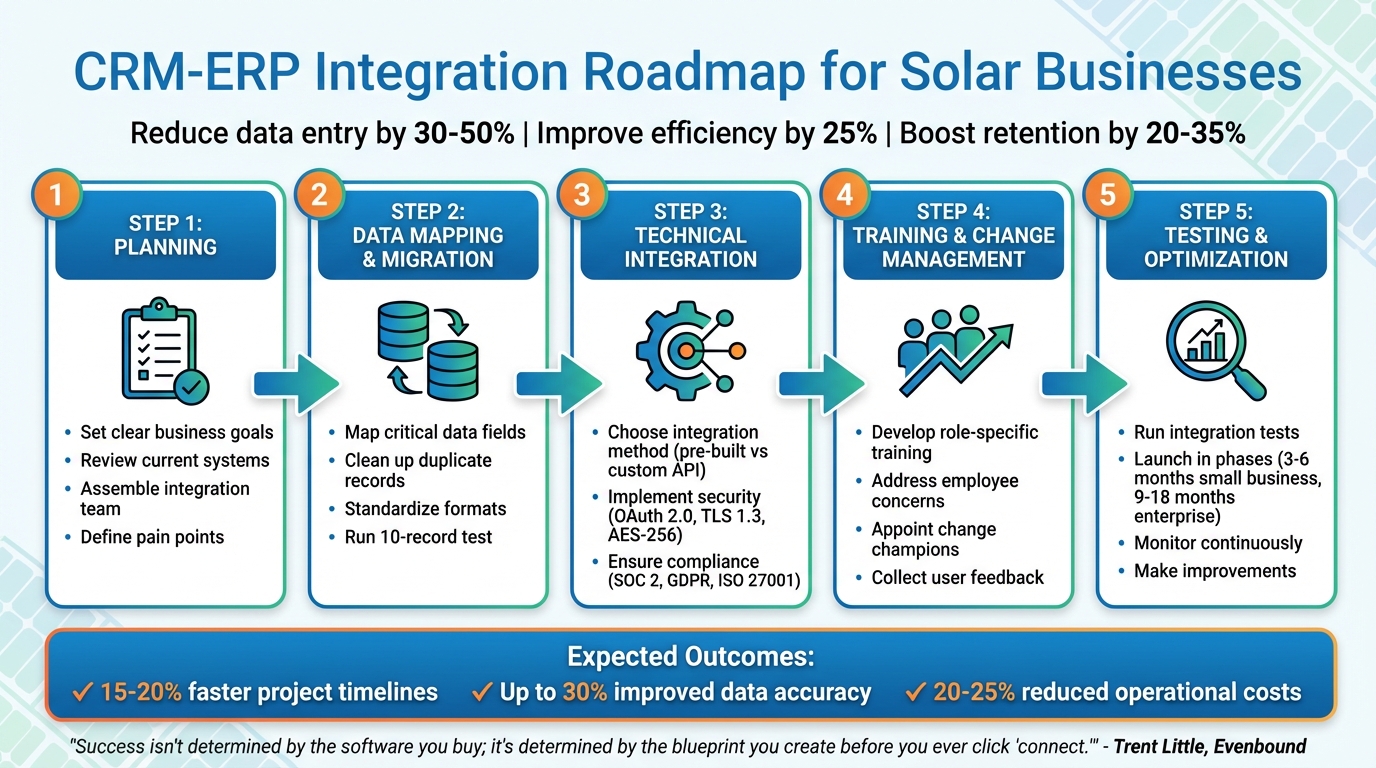
5-Step CRM-ERP Integration Process for Solar Companies
Planning Your CRM-ERP Integration
To tackle solar-specific challenges like tracking permits, PTO timelines, managing inventory, and financing complexities, you need a well-thought-out roadmap. Without a tailored plan, you risk fragmented data, frustrated teams, and inconsistent project updates for customers. A clear strategy not only addresses these issues but also helps define your business objectives and guide your technology choices.
Setting Clear Business Goals
Start by pinpointing your pain points. Are manual data entry and mismatched inventory data slowing you down? Maybe your operations team struggles to confirm installation dates due to unclear inventory levels. Or perhaps your finance team finds it difficult to track project profitability because critical cost data is stuck in spreadsheets rather than integrated into your ERP.
Canadian Solar, a global leader in photovoltaic solutions, faced similar challenges with software firewalls and data silos. By integrating their CRM and ERP systems, they gave stakeholders worldwide access to real-time, consistent information about customer timelines, system specs, and costs.
For solar companies, common goals often include eliminating data silos to create a single source of truth, improving quote accuracy by linking inventory data to pricing tools, and speeding up the sales cycle by cutting down on "Gray Work" – the manual transfer of data between disconnected systems. These goals directly address operational inefficiencies and customer service gaps.
Reviewing Your Current Systems
Take a close look at your existing systems. This includes your CRM, ERP, billing software, field service tools, permit tracking spreadsheets, and any other platforms where customer or project data is stored. With over 1,300 CRM providers available as of 2024, many systems aren’t built to handle solar-specific workflows. Your evaluation should determine whether your tools can manage critical needs like roof access documentation, hardware details, O&M management, and permit tracking.
Check if your systems support strong APIs or middleware for real-time syncing. Map out how customer data currently flows between sales, service, and field teams. This will help you identify where a unified platform could smooth out inefficiencies. For instance, if your CRM tracks "Opportunities" while your ERP manages "Sales Orders", mismatched data structures could cause integration headaches. Also, consider technical limitations like API call caps and whether your systems allow real-time syncing or only batch updates. Real-time updates are especially important for sales teams needing immediate inventory visibility.
Before integration, clean up your data. Archive outdated projects, remove duplicate records, and standardize data entry to avoid transferring low-quality information between systems. Once you’ve mapped your systems and data flows, gather key stakeholders to align on a unified integration strategy.
Assembling Your Integration Team
A successful integration requires input from every department. Your team should include:
- Technical leads to handle APIs and security
- Finance managers to define billing and tax compliance rules
- Sales leads to map workflows from lead to quote
- Operations managers to oversee inventory and shipping updates
In a 2024 survey on data management trends, 68% of respondents cited data silos as their top concern, highlighting the importance of cross-department collaboration during integration.
"CRM and ERP integration helps marketing, sales, operations, and finance teams collaborate better and make smarter decisions." – Lisa Schwarz, Senior Director of Global Product Marketing, NetSuite
Each team member plays a crucial role. IT ensures secure connections between systems. Finance identifies which records need approval before syncing. Sales defines essential data like pricing transparency and pipeline visibility. Operations specifies inventory updates that need to be instantly available to customer-facing teams. This collaborative approach ensures the technical side of integration aligns with broader business goals.
Establish data ownership early. Decide which system will act as the "source of truth" for critical information like contact details, billing records, and project timelines. Clear ownership rules prevent teams from overwriting each other’s updates and creating conflicts. Whether your integration takes a few months or up to two years, having everyone on the same page from the start is key.
sbb-itb-2560759
Data Mapping and Migration
After assembling your team and reviewing your systems, the next step is to map out how data will flow between your CRM and ERP. This step determines which fields sync, how they transform during transfer, and which ones are excluded. Poor mapping can lead to workflow disruptions and critical data mismatches.
Mapping Critical Data Fields
Begin by identifying the essential data fields for your solar operations. These typically fall into four categories:
- Customer data: Includes name, address, contact details, and an internal customer code. That internal code is key to avoiding attribution errors, especially when dealing with multiple projects for customers with common names like "John Smith" or "ABC Solar LLC."
- Field and technical data: Encompasses metering types, installation types (roof mount, ground mount, ballasted), and existing electrical system sizes.
- Design and equipment specifications: Covers system size, panel quantity, specific makes and models of panels, and electrical components like inverters, racking, and DC optimizers.
- Project operational data: Tracks project stages, survey and installation dates, and maintenance records.
To pinpoint these fields, audit the tools your teams already rely on. For example, sales teams may use Salesforce for customer contacts, while designers rely on CAD software for technical specs. Assign each data field to its correct location in the integrated system. Don’t forget to include AHJ (Authority Having Jurisdiction) and utility requirements – this compliance data must flow seamlessly from sales to project management. Also, map where CAD files are stored so project managers can easily access technical drawings without searching through external drives.
Document your mapping using the Four-Column Rule: Source Field, Destination Field, Field Type, and Transformation Logic. For instance, if your CRM tracks "Project Status" as a picklist but your ERP uses "Job Stage", your transformation logic might state: "If CRM = ‘Closed Won,’ set ERP = ‘Active Project.’" This prevents sync errors caused by incompatible field types or mismatched values. Be sure to flag any "Required" fields in your destination system early – missing data in these fields can cause the sync to fail before it even starts.
| Category | Key Fields |
|---|---|
| Customer | Name, Address, Internal Customer Code, Electricity Use/Offset Goals, Insurance Info |
| Field/Site | Metering Type, Installation Type, Roof/Service Upgrade Needs, AHJ/Utility Requirements |
| Design/Technical | System Size, Panel Make/Model, Inverter/Racking Specs, CAD File Locations |
| Operations | Project Stage, Survey/Installation Dates, Maintenance Records, Site Images |
Once you’ve mapped out these fields, ensure your data is in top shape before migration.
Cleaning Up Your Data
Data cleanup is a crucial step before migration. Eliminate duplicates like "ABC Corp" and "ABC Corporation", which may refer to the same customer. Standardize formats for addresses, phone numbers, and project names to ensure consistency. This prevents messy data from corrupting your integrated system.
"The fastest way to amplify chaos in your business is to automate a messy process." – Trent Little, Evenbound
Establish clear data ownership rules. Decide which system will serve as the "source of truth" for specific data points. For example, your CRM might own contact and lead information, while your ERP handles financial records and project billing. This avoids overwriting accurate data with outdated information during syncs.
Before a full migration, run a 10-record test. Use a sample of 10 distinct records – such as a new lead, an existing customer, and a record with complex formatting – and manually verify their accuracy in the destination system. This step helps catch mapping errors before they impact thousands of records.
Automating Data Migration
Once your data is clean and mapped, automation becomes the next logical step. Manual migration is time-consuming and prone to errors, but automation tools can speed up the process and minimize mistakes – provided you’ve done the groundwork properly.
Use idempotency keys, which are unique identifiers for each record, to avoid creating duplicate entries when a sync is retried after a timeout. Apply filtering logic to exclude non-essential data, such as inactive leads or archived marketing preferences, keeping the integration streamlined and efficient.
Set up automated error handling to manage issues like temporary failures. This includes retry mechanisms, error queues for failed records, and real-time admin notifications when something goes wrong. Instead of relying on fragile real-time webhooks, use queues to buffer events, which helps manage temporary API downtime. Also, watch for sync loops, where updates in one tool trigger endless updates in another. Clear "stop" conditions in your sync criteria can prevent this.
Run regular reconciliation reports to ensure consistency between your CRM and ERP. These reports can help you catch discrepancies in invoices, payments, or customer details before they become larger issues. Always test your automated integration in a sandbox environment before going live – never push automation directly into production.
"Success isn’t determined by the software you buy; it’s determined by the blueprint you create before you ever click ‘connect.’" – Trent Little, Evenbound
Technical Integration Methods
After mapping and cleaning your data, the next step is figuring out how to connect your CRM and ERP systems. The method you choose will impact how quickly you can deploy the solution, the level of customization required, and how reliably your data stays in sync.
Using Pre-Built Integration Tools
Pre-built integration tools simplify the process by connecting your CRM and ERP systems with connectors tailored for solar businesses. For example, Oracle NetSuite provides a unified cloud platform that combines CRM, accounting, project management, and inventory management into one centralized system. This eliminates the hassle of manually transferring data between systems like QuickBooks and Salesforce.
Solar-specific solutions, such as SolarSuccess, add an industry-focused layer to standard ERP platforms. These tools are designed to manage workflows unique to the solar industry, such as tracking installation milestones and project bills of materials (BOM), without requiring custom code. They automatically sync sales orders, project updates, and accounting data in real time, giving your team a clear view of the sales pipeline and project profitability.
The biggest advantage of pre-built tools is their speed. While custom API integrations can take anywhere from 4 to 9 months to implement, pre-built platforms can often be deployed in just 1 to 3 days. This quick turnaround is especially helpful if you’re scaling rapidly or need to address inefficiencies like manual data entry and disconnected workflows.
Customizing APIs for Your Business
If pre-built solutions don’t fully address your needs, custom APIs offer a more tailored approach. APIs allow you to connect third-party applications, create bi-directional data flows, and manage complex business logic beyond basic field-level syncing. For instance, you could set up an automatic trigger that creates accounting entries whenever a project milestone is completed. You could also sync calculated fields, such as "total system cost", which depend on multiple data inputs.
Custom API development requires careful planning. Be aware of API rate limits and use intelligent batching to prevent failures. You’ll also need to establish conflict resolution rules for bi-directional syncing. Options include designating one system as the "source of truth" or using a "most recent update wins" strategy.
Always test custom APIs in a sandbox environment before deploying them. Webhooks can be used to enable real-time updates, ensuring your data flows smoothly.
"Salesforce has become our global customer service platform. We can see everything we’re doing and everything we’ve done. It makes it easier for our people to do things in a standard way – and in a smarter way." – Terence Sorrell, Solutions Manager
Maintaining Security and Compliance
Integration isn’t just about speed and flexibility. Security and compliance are equally important, especially when handling sensitive customer data or meeting regulatory requirements. Start by implementing OAuth 2.0 for secure, token-based authentication to protect credentials. For data in transit, use TLS 1.3, and encrypt data at rest with AES-256 to ensure enterprise-grade security.
Solar companies often face specific compliance requirements, such as SOC 2 Type II, GDPR, and ISO 27001. If your operations involve utility systems, you may also need to adhere to NERC standards for outage reporting. To stay compliant, build features like comprehensive logging, real-time monitoring, and automated error handling into your integration from the start.
Role-based access controls are another critical security measure. These controls ensure that users only access the data they are authorized to see. Cloud-based user portals can also provide secure access from any location, while giving administrators visibility into who accessed what and when. Regularly monitor API response times, error rates, and data throughput to catch potential issues before they escalate into security or compliance risks.
User Training and Change Management
No integration can truly succeed without proper user training. To ensure smooth adoption, it’s essential to address both the technical hurdles and the emotional challenges employees face during transitions.
Developing a Training Program
Tailored, role-specific training is crucial. Using sandbox environments for hands-on learning allows users to practice in a safe space without fear of making mistakes. For instance, a sales representative doesn’t need to dive into financial reconciliation, just as the accounting team doesn’t need to master lead scoring. This kind of focused training builds confidence and reduces errors during rollout. Adding a certification program can help validate skills and motivate employees to engage more deeply.
| Training Component | Focus Area | Benefit |
|---|---|---|
| Data Management | Organizing customer info | Establishes a single source of truth |
| Sales Automation | Tracking leads/orders | Cuts down on manual entry errors |
| Analytics/Reporting | Data-driven insights | Enhances forecasting accuracy |
| Governance | Ownership rules | Prevents data conflicts |
Once training is in motion, it’s equally important to address the concerns employees may have about the changes.
Addressing Employee Concerns
Resistance to change often stems more from the process than the technology itself. Employees who have spent years mastering legacy systems may feel like they’re starting from scratch, which can be unsettling. Studies show that 82% of organizations face resistance due to poor communication about the benefits of new systems. Moreover, 60% of ERP implementations encounter significant user pushback, ranking it among the top reasons for project failure.
To ease these concerns, focus on clear, personal benefits. Instead of vague promises about efficiency, highlight specific improvements, like saving 30 minutes a day by automating manual data entry or eliminating the hassle of reconciling multiple spreadsheets.
"People support what they help create, even if the creation process involves compromise and isn’t perfect." – Bizowie
Appoint respected team members as change champions. These individuals can answer questions informally and help peers feel more comfortable. Training one person per department as a go-to expert creates a supportive network, often more approachable than formal IT assistance. Keep in mind that productivity may dip by 10–20% for a few weeks during the transition. However, with proper planning, this can be minimized. For example, at Avangrid, only 10% of 4,100 employees needed refresher training after their system launch.
After addressing initial concerns, gathering user feedback becomes the next critical step.
Collecting User Feedback
Involving end-users during testing is essential to refine the system before the final rollout. Their input helps identify issues with data mapping, workflows, or user interface design. Establish a clear process for reporting discrepancies, like mismatched invoices or duplicate records, so adjustments can be made quickly.
"It is also crucial to involve end-users to gather feedback and make any necessary adjustments during the testing phase." – Open Source Integrators
Use tools like audit logs and reconciliation reports to prove data accuracy. Regular health checks ensure that your CRM and ERP systems stay aligned as a single source of truth. Proactive monitoring can catch and fix technical issues before they escalate. When employees see that problems are resolved quickly and data remains consistent, they’re less likely to rely on manual workarounds. These steps ensure the integration not only works but also supports smoother operations overall, helping you surge ahead with SolarSuccess ERP.
Testing, Launch, and Optimization
Once you’ve completed planning, mapping, and training, the next step is to ensure a smooth and reliable CRM-ERP integration for your solar operations. This phase focuses on testing, launching, and improving your system.
Testing the Integration
Testing is where you iron out potential issues before they affect live operations. Begin by pinpointing which modules need to communicate effectively – like choosing the right solar CRM for lead management and inventory tracking in your ERP. Define the specific data flows required. For instance, when a sales rep closes a solar contract in the CRM, the ERP should automatically create a project installation task with all the correct customer and equipment details.
Set up a test environment using realistic mock data. Then, run multiple tests:
- Unit tests to check individual components.
- Integration tests to verify communication between systems.
- System tests to ensure the entire workflow functions as expected.
"Integration testing ensures that different applications and technologies are working as intended together. Its main objective is to evaluate interfaces between applications and modules and identify any flaws that might occur when they communicate with one another." – Sohaib Zaidi, Technical Content Writer, Opkey
Don’t skip User Acceptance Testing (UAT) – this is where solar sales reps and project managers confirm that workflows feel smooth and intuitive. They might spot usability issues that technical testers overlook. Also, double-check data integrity by looking for broken database schemas, cache errors, and ensuring API-transferred data remains accurate. Before moving to production, clean up test data and remove any temporary infrastructure.
Once you’re confident in the system’s performance, move on to a phased launch.
Launching the System
A well-thought-out launch strategy minimizes disruptions. Before going live, review all integration connections thoroughly. Decide how often you want data to sync:
- Batch synchronization: Updates data at set intervals, such as hourly.
- Real-time updates: Keeps data synced continuously.
The choice depends on how quickly your solar team needs updated project details. For example, real-time updates might be crucial for fast-paced sales environments.
Consider rolling out the system in phases rather than flipping the switch all at once. Start with the most critical business modules to ensure smooth operations. For smaller solar businesses, implementation typically takes 3 to 6 months, while larger enterprises may need 9 to 18 months.
Once the system is live, shift your focus to monitoring and ongoing improvements.
Monitoring and Making Improvements
After launch, continuous monitoring is key to catching and fixing issues early. Use audit logs and reconciliation reports to track data accuracy between your CRM and ERP. Have a clear process in place for employees to report discrepancies, like mismatched customer addresses or duplicate project records.
"User testing is an excellent technique to begin the training process and ensure the ERP system’s performance after launch." – Synergix Technologies
Regular checks on system health help maintain data consistency. With the average company using around 40 different applications, your integration must stay flexible as new tools are added or processes evolve. Encourage employees to share feedback about what’s working and what isn’t. Quick responses to their concerns will prevent them from resorting to manual workarounds, which can disrupt the system. Treat optimization as an ongoing process, not a one-time task.
Conclusion
Integrating CRM and ERP systems requires a methodical approach. Start by defining your business goals, assembling a capable team, and addressing data inconsistencies. This ensures a system that truly supports your solar operations. Whether you choose pre-built tools or custom APIs, it’s essential to prioritize security and compliance while providing thorough training to help your team embrace new workflows.
The rewards are hard to ignore: solar companies report faster project timelines (15–20%), improved data accuracy (up to 30%), and reduced operational costs (20–25%) through automation. These improvements translate into quicker lead-to-cash cycles, fewer quoting errors, and better visibility into critical metrics like inventory and project profitability – key advantages in a market shaped by seasonal demand and fierce competition.
However, integration is not a one-and-done process. It requires ongoing monitoring, regular feedback from users, and adjustments to keep up with changing business needs and regulations, such as updates to NEC codes or federal tax incentives.
If you’re ready to move beyond spreadsheets and disconnected systems, consider Blu Banyan’s SolarSuccess. This solution, built on Oracle NetSuite, offers pre-built CRM connectors, automated data migration, and workflows tailored specifically for solar businesses. From managing permits and rebates to milestone-based accounting, SolarSuccess streamlines operations. Its productivity tools, like bluChat and bluDocs, enhance collaboration across sales, project management, and field teams, providing the real-time insights and efficiency discussed in this guide.
Take the first step by auditing your current CRM and ERP systems using the strategies outlined here. Then, explore specialized, solar-focused solutions to ensure a seamless integration process. With careful planning, you can avoid the pitfalls that derail 40% of projects due to poor preparation. Setting the right foundation today will position your solar business for long-term growth and success.
FAQs
What data should serve as the ‘source of truth’ in a CRM–solar ERP integration?
When integrating a CRM with a solar ERP system, the ERP – like NetSuite – should act as the central hub for data management. This ensures that critical information, such as project updates, financial records, inventory details, and customer data, stays consistent and updated in real-time across all connected systems. By using the ERP as the single source of truth, businesses can maintain accuracy and streamline operations seamlessly.
Should our solar team use real-time sync or batch sync between CRM and ERP?
Your solar team should leverage real-time sync when integrating your CRM and ERP systems. Why? Because real-time synchronization keeps everything updated instantly, ensuring smoother coordination, fewer mistakes, and quicker decision-making. While batch sync might be fine for less time-sensitive tasks, the solar industry demands up-to-the-minute information for things like project management, invoicing, and staying compliant. By using real-time sync, you’ll simplify workflows and keep operations running more efficiently.
How do we prevent duplicate records and sync loops after go-live?
To avoid duplicate records and sync loops after going live, it’s crucial to set up real-time data synchronization with precision. Implement controlled triggers and validation rules to prevent unnecessary or repeated updates. Regularly clean up duplicate data, keep a close eye on sync processes, and ensure users are trained in accurate data entry practices. Using tools like native APIs and SuiteApps can help simplify data flow, minimize errors, and maintain consistent, accurate records after integration.
