

Bad vendor data slows solar jobs and puts margin at risk. In NetSuite, I can use one vendor record to control onboarding, pricing, compliance files, purchase approvals, receipts, bills, and payment.
Here’s the short version:
- Vendor records drive purchasing. They store legal details, remit-to and ship-from addresses, payment terms, lead times, buyer ownership, and approved item pricing.
- Compliance can stop bad purchases before they start. Missing W-9s, expired insurance, and lapsed licenses can block a vendor from moving to PO.
- Approvals can route by dollar amount. In this workflow, CFO approval starts above $50,000.
- Procure-to-pay stays linked. NetSuite connects requisitions, purchase orders, item receipts, vendor bills, and payment in one flow.
- Three-way match helps catch billing issues. The system compares the PO, receipt, and vendor bill before payment.
- Vendor scorecards show who is slipping. Teams can track on-time delivery, price variance, receipt accuracy, lead time gaps, spend, and match failures.
- Timing matters in solar. Some parts, like batteries and transformers, can have 6–12 month lead times.
- Cost control matters too. The article notes that soft costs can reach 64%–65% of a solar project’s total cost.
If I were setting this up, I’d start with three steps:
- Audit vendor records for duplicates and missing fields.
- Attach active contracts and compliance files with expiration dates.
- Link vendor pricing and POs to items and projects so job cost reporting stays clean.
Bottom line: clean vendor data in NetSuite helps me cut PO errors, keep vendors compliant, and see project spend before it turns into a budget problem.
How to structure vendor records for solar purchasing
A vendor record needs to hold the data NetSuite relies on for approvals, purchasing, and compliance. Those fields aren’t just admin details. They drive the controls NetSuite uses to automate purchasing and keep teams in line with compliance rules.
Required fields for onboarding, terms, and purchasing
The base of every vendor record is the legal entity information: the company’s legal name, tax ID status, and whether a W-9 has been received. After that, the record should include remit-to addresses for accounts payable and ship-from addresses for receiving and logistics.
Those addresses are often NOT the same. If they get mixed up, billing mistakes and delivery issues usually follow.
Purchasing data matters just as much as identity data. The vendor record should also include payment terms like Net 30, banking approval status, lead times, insurance expiration dates, and the assigned buyer or department owner. Standard lead times should live on the vendor record so buyers can back-schedule purchase orders without guessing.
| Field Category | Key Fields |
|---|---|
| Compliance | Tax ID status, W-9 received, insurance expiration, license number |
| Purchasing | Preferred items or approved SKUs, lead times, negotiated pricing |
| Financial | Payment terms, banking approval, remit-to address |
| Project | Authority having jurisdiction requirements, project history, subcontractor category |
Contracts, compliance documents, and expiration tracking
Documents like W-9s, certificates of insurance, contractor licenses, and AHJ requirements should sit right on the vendor record. That keeps the file trail tied to the same place buyers and AP teams already use.
For structured document control, bluDocs keeps vendor files inside NetSuite. Expiration dates should also be stored on the vendor record so teams can spot compliance gaps before they turn into a problem. When files and expiration dates are attached to the record, NetSuite can block noncompliant purchasing before a PO is issued.
Pricing and buying history tied to items and projects
NetSuite also lets you store item-level pricing on the vendor record, including tiered pricing and contract rates for panels, inverters, and racking. When a buyer creates a purchase order, the system pulls that pricing automatically.
That means pricing flows into requisitions and purchase orders without manual reentry. Less hand entry usually means fewer mistakes.
Buying history shows what was purchased, where it was purchased, and what it cost. prior purchase activity and project links give procurement and finance teams a clear view of spend versus budget for a given job, showing how solar project management software streamlines the installation process. That data feeds straight into job cost reporting and budget variance analysis across active projects.
At that point, the vendor record becomes more than a profile. It becomes the rule set NetSuite uses for onboarding, approvals, and PO pricing. Once the record is set up the right way, onboarding approvals and compliance rules can run automatically.
Vendor onboarding, compliance, and pricing controls in NetSuite
Once the vendor record is set up, NetSuite can start managing approvals, compliance, and purchasing controls.
Approval-based vendor onboarding
NetSuite keeps new vendors out of the buying process until tax, banking, legal, and finance approvals are done. The vendor record gets created first, then moves through an approval workflow with a full audit trail. NetSuite logs who approved the vendor, what they approved, and when they approved it.
Purchase terms, contracts, and negotiated pricing
You can store approved payment terms, contract dates, and pricing right on the vendor record. That way, requisitions and purchase orders pull in those details automatically.
Compliance tracking and renewal management
For solar and builder teams, keeping up with expiration dates for insurance certificates, licenses, and safety documents is a big deal. NetSuite uses dashboard alerts and workflow checks to flag missing or expiring documents before procurement can move ahead. If a required document isn’t renewed, the workflow blocks the vendor from moving forward to purchase. Those controls also flow straight into requisitions and purchase orders.
Once these controls are set, NetSuite applies them across requisitions, POs, receipts, and vendor bills.
Using vendor data to automate procure-to-pay workflows
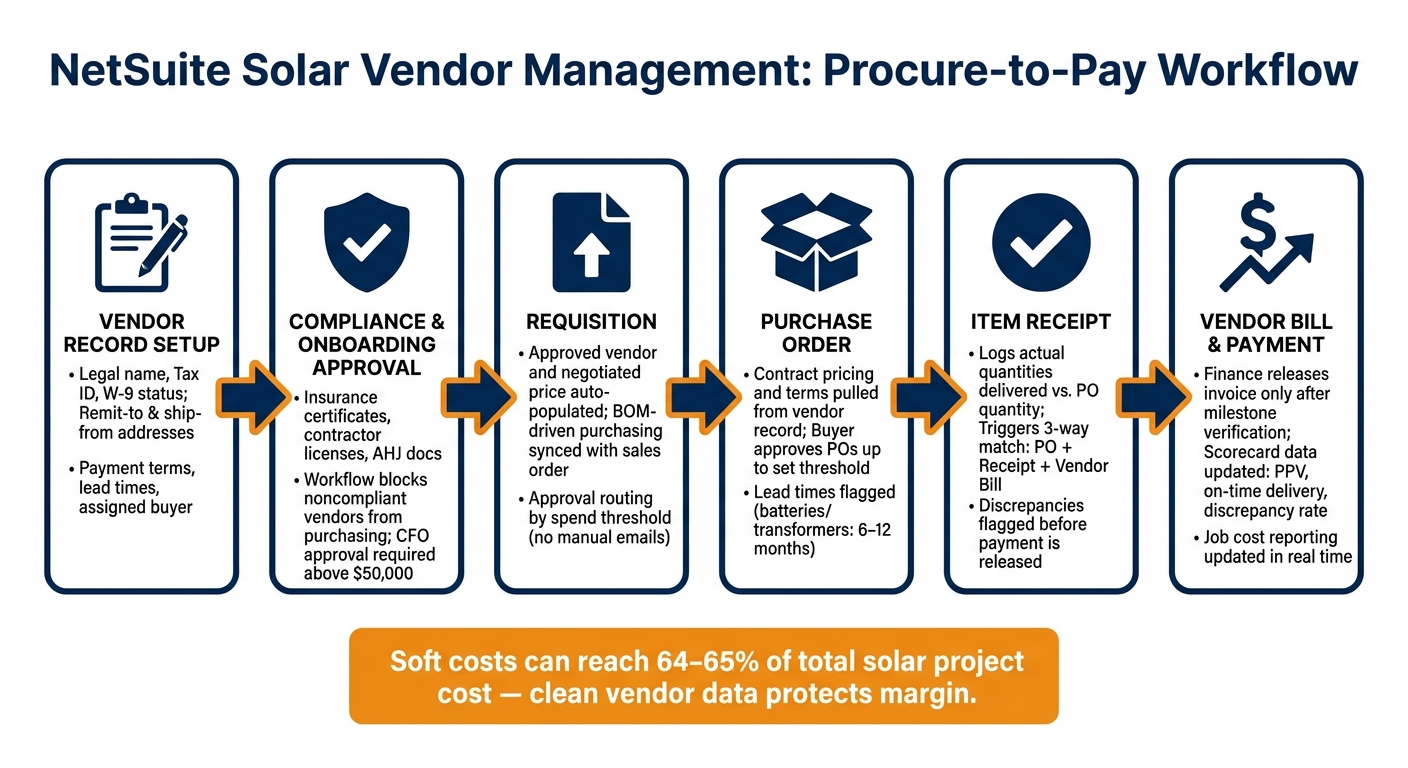
Once vendor records are standardized, NetSuite can use that data across the full purchasing cycle. Vendor records in NetSuite power purchasing rules for requisitions, POs, receipts, and bills.
From requisition to purchase order with vendor rules applied
NetSuite can pull the approved vendor and negotiated price into each requisition and PO. Approval routing then follows the spending thresholds set in the system, so each order goes to the right approver without back-and-forth emails or manual handoffs.
BOM-driven purchasing pushes this further. When the project’s bill of materials is synced with the sales order, procurement can move straight from approved equipment lists into purchase orders and item receipts. That helps cut over-ordering and duplicate buys.
Receipts, vendor bills, and discrepancy control
When materials arrive, the item receipt in NetSuite logs what was actually delivered. NetSuite then matches item receipts and vendor bills automatically, and flags mismatches before payment goes out. Procurement teams can approve POs up to their set threshold, while finance releases invoices only after milestones are verified. That setup helps limit unauthorized spend and keeps job costs in view.
Those controls also lay the groundwork for vendor performance tracking in the next section.
When solar teams use NetSuite extensions
For solar-specific workflows, extensions can carry these controls into ERP and inventory management processes. Solar-specific NetSuite extensions can connect vendor data with project, inventory, and financial workflows.
Measuring vendor performance and next steps
Vendor scorecards and buying history for better decisions
Once vendor controls are set up, NetSuite turns day-to-day purchasing activity into supplier performance data you can actually use. Every PO, receipt, and bill updates the vendor record. Over time, that gives your team scorecards for cost, timing, and quantity.
Track these vendor KPIs in NetSuite:
| KPI | What It Measures | NetSuite Data Source |
|---|---|---|
| On-Time Delivery Rate | Variance between PO expected receipt date and actual item receipt date | Purchase Order vs. Item Receipt |
| Purchase Price Variance (PPV) | Difference between negotiated contract price and actual billed amount | Purchase Order vs. Vendor Bill |
| Quantity Receipt Accuracy | Shortages or overages against PO quantity | PO Quantity vs. Item Receipt Quantity |
| Lead Time Deviation | Gap between planned receipt date and actual receipt date | PO Creation Date vs. Item Receipt Date |
| Vendor Spend Volume | Total spend with a supplier over a set period | Vendor Bill / Transaction History |
| Discrepancy Rate | Frequency of 3-way match failures requiring manual intervention | System Audit Logs / Billing Exceptions |
For solar projects, lead time deviation matters even more. Parts like batteries or transformers can come with 6–12 month lead times [2]. If a supplier starts slipping, procurement teams need to spot it early, not when the install schedule is already in trouble.
Key takeaways for solar and builder leaders
When vendor data is clean and automated, scorecards help teams make better calls on who to keep using, who needs a price review, and who should be blocked. In NetSuite, vendor management works like a single control chain: clean vendor records support controlled onboarding, onboarding helps enforce the right pricing on each PO, that flows into automated procure-to-pay matching, and the results show up in scorecards and buying history.
For teams just getting started, the most useful first step is a vendor record audit. Clean up duplicate records, attach all active contracts and compliance files, and make sure negotiated pricing is linked to the right items. After that, tag POs to specific projects so procurement and finance can see committed costs against budget in real time.
Soft costs can reach 64%–65% of a solar project’s total cost, so tighter vendor controls help protect margin [1]. Scorecards and buying history are more than reporting tools. They help protect profit.
FAQs
How does NetSuite block noncompliant vendors from purchasing?
NetSuite blocks noncompliant vendors with automated compliance checks built into the procurement workflow. Before a vendor can join an RFQ or receive a purchase order, the system verifies required standards, such as current state licenses and certifications.
It also tracks expiration dates for insurance and regulatory documents, sends alerts, and stops transactions when records have lapsed. That means teams work only with preapproved, compliant vendors instead of finding problems after the fact.
What should a solar vendor record include?
A solar vendor record in NetSuite should act as your single source of truth.
That means one place for the details that matter most: contract terms, renewal schedules, pricing agreements, and compliance records like insurance policies, state licenses, and safety training certifications.
It should also track day-to-day performance, including on-time delivery, defect rates, and response times. And it should tie those details to related purchase orders, inventory needs, and communication history, so every interaction stays visible and audit-ready.
How do vendor scorecards help control solar project costs?
Vendor scorecards help keep solar project costs in check because they give teams hard data on supplier reliability and quality. Instead of relying on gut feel, teams can track metrics like defect rates, lead times, and on-time delivery to spot problems early. That matters, because those issues can turn into schedule delays, extra labor, or higher maintenance costs.
In NetSuite dashboards, that kind of visibility gives managers a clear view of which vendors are pulling their weight. They can put more business toward strong suppliers, push for better terms based on proven performance, and deal with weak spots before they hit budgets, timelines, or profit margins.
