

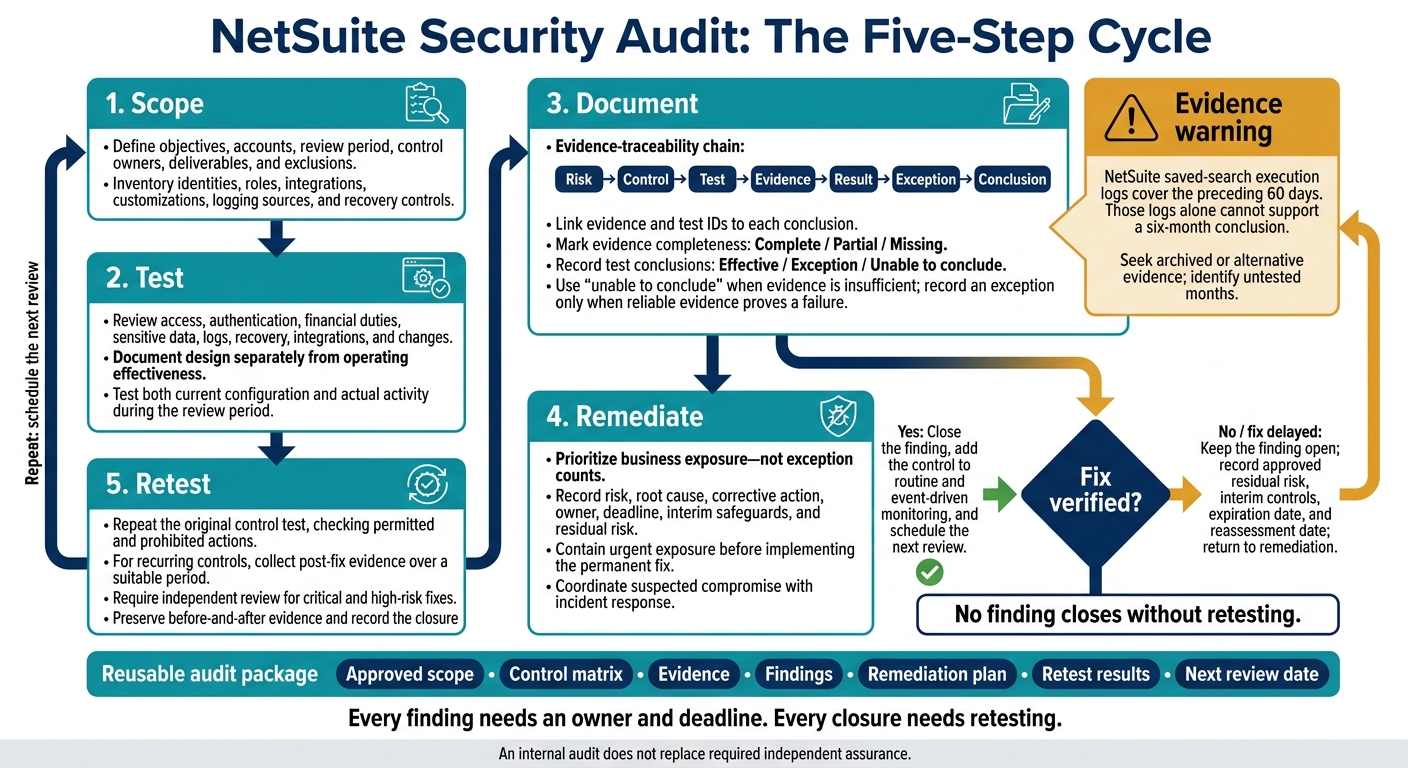
I use five steps to audit NetSuite security: scope, test, document, remediate, and retest. Start by defining the accounts, review period, and control owners. Then check access, financial duties, sensitive data, logs, recovery, and changes – not just current settings, but how controls worked during that period.
Here’s what I focus on:
- Access: Who can view data, change records, approve payments, or manage integrations?
- Proof: Do records support each test result? A 60-day log cannot establish six months of control performance.
- Fixes: Which risks need containment, who owns each fix, and when is it due?
- Follow-through: Does an independent retest confirm the fix, and when will the next review happen?
My rule: <u>no finding closes without retesting</u>. Keep the scope, test records, findings, and next review date together. An internal audit does not replace required independent assurance.
Review NetSuite Security Controls
Use the approved scope and review period to test the access, logging, recovery, and change controls that protect production data.
Test Access, Authentication, and Segregation of Duties
Access becomes a risk when permissions go beyond approved duties. Inventory every identity and role. Record the owner, function, assigned roles, subsidiary or location access, last login, authentication method, privileged permissions, and expiration date.
Compare access with approved duties and test joiner/mover/leaver samples. Review MFA, password rules, inactive users, shared credentials, emergency access, and token or OAuth grants. Review named administrator accounts separately. In an approved sandbox, test conflicting permissions, transaction paths, and approval bypasses through imports, scripts, and secondary roles.
| Access review | Evidence and test | Justification and approval | Exceptions and mitigating controls | Remediation owner |
|---|---|---|---|---|
| Administrator role | Review assignments, login history, and privileged activity | Written approval from the CFO or designated security owner | Separate backup administrator; review privileged activity weekly | NetSuite administrator |
| Payment approval | Compare permissions, approval limits, and actual payment approvals | Finance owner confirms required approval threshold | Independent payment-batch review | Controller |
| Employee records | Test compensation, bank, and tax-field visibility | HR owner confirms business need | Quarterly access recertification | HR systems owner |
| Integration user | Inspect roles, tokens, OAuth grants, and execution logs | Application owner approves minimum required access | Monitor failed calls and rotate credentials | Integration owner |
| Duty conflict | Test | Justification and approval | Exception and mitigating control | Remediation owner |
|---|---|---|---|---|
| Vendor creation and payment approval | Trace vendor edits to payment approvals | Controller approves any documented business need | Expiring exception; independent payment-batch review | Controller |
| Purchase-order creation and receipt approval | Inspect PO and receipt approvals | Finance and operations approve authority limits | Independent review of receipts and matching | Procurement owner |
| Employee bank changes and payroll processing | Compare access and payroll activity | HR and finance approve exception | Independent verification of bank changes before processing | Payroll owner |
| Inventory adjustments and reconciliation | Compare adjustment rights with reconciliation duties | Operations and finance approve exception | Independent source-document review | Inventory owner |
Record every exception, sample, and failed test in the evidence register.
Check Logs, Alerts, and Incident Response
Logging gaps can hide activity that wasn’t approved. System Notes are immutable, but they don’t cover everything. Users without the Administrator role may also see only their own changes.
Fill these gaps with role-history records, saved searches, configuration exports, and approval evidence. Match actors, record IDs, timestamps, and changes across NetSuite, identity-provider, and integration logs.
Run an annual tabletop exercise covering account suspension, token revocation, evidence preservation, stakeholder notification, transaction review, recovery decisions, and post-incident reporting.
The frequencies below are review targets. Record each source’s actual retention period and any coverage gaps.
| Event | Detection method | Owner | Review frequency | Retention evidence | Escalation |
|---|---|---|---|---|---|
| Administrator or role change | System notes and change report | NetSuite security owner | Daily or next business day | Exported report and approved ticket | Security lead and CFO |
| Failed or unusual login | Login Audit Trail and identity-provider alert | Identity team | Real time or daily | Login report and alert record | Incident response lead |
| Vendor, bank, or payment change | System notes, workflow alert, transaction review | Controller | Daily | Record history and approval evidence | Controller and fraud-response contact |
| Integration failure or privilege error | API, middleware, or script logs | Integration owner | Each business day | Execution and error logs | Application owner |
Review Data Protection and Recovery
Recovery gaps can extend downtime or leave data incomplete. Test access to sensitive data through records, saved searches, dashboards, reports, attachments, and exports – not just forms. Check external sharing, recipient lists, downloaded-file protection, and retention/deletion rules.
Exports are not complete account backups. They may leave out configuration dependencies, workflows, scripts, roles, tokens, attachments, system history, sequencing, and other dependencies.
Separate Oracle’s contracted recovery duties from customer-managed rebuilding. In nonproduction, test both RTO and RPO, then reconcile records, approvals, attachments, and integration behavior.
| Asset | Responsible party | Objective | Recovery method | Last test and result | Evidence |
|---|---|---|---|---|---|
| Transactions and master data | Oracle/customer, according to contracted service model | Defined RTO/RPO for critical operations | Provider recovery plus customer validation and documented exports | Date, scope, and reconciliation result | Test report and reconciliation |
| Roles and permissions | Customer NetSuite owner | Recreate approved access quickly | Role matrix, configuration records, and approvals | Date and sample roles restored | Role baseline and approval tickets |
| Scripts and workflows | Customer development owner | Restore approved application behavior | Version-controlled source and controlled deployment | Date and deployment test result | Repository and deployment record |
| Attachments and documents | Customer or backup provider | Preserve critical project and contractual records | Tested document backup and restore | Date and file-integrity result | Restore log and hash or checksum where used |
| Integrations and credentials | Integration owner | Resume critical data flows securely | Rebuild endpoints, rotate credentials, and reconcile queues | Date and end-to-end test result | Credential rotation and reconciliation evidence |
Test Integrations, Customizations, and Change Controls
Uncontrolled changes can expose data or disrupt processing. Inventory every inbound and outbound flow: APIs, middleware, file transfers, SuiteScript, RESTlets, workflows, custom records, mobile apps, and installed SuiteApps.
For each item, record the owner, data exchanged, authentication method, privileged access, approval record, monitoring location, error-handling process, and evidence repository. Test whether each credential is assigned to one identity or purpose, stored securely, rotated, limited to minimum permissions, and revoked when no longer needed.
Verify encryption in transit, duplicate or missing-record handling, reconciliation totals, retry behavior, dead-letter or exception queues, and alert escalation. Review procedures for development, testing, approval, deployment, emergency changes, and rollback.
Include only deployed Blu Banyan components. You can reference Blu Banyan for NetSuite implementation, customization, and integration services. But deployment by Blu Banyan does not, by itself, prove that permissions, authentication, monitoring, recovery, or change controls are secure. Confirm each component’s actual version, configuration, and responsibilities.
For deployed Blu Banyan components, document the same fields once: owner, data handled, authentication, privileged access, approvals and changes, monitoring, and evidence location.
Record each flow test, approval, and exception in the evidence register and findings log.
Collect Evidence and Record Test Results
After testing controls, record the evidence that supports each result. Link each audit objective through risk, control, test, evidence, result, exception, and conclusion. Assign evidence and test IDs so reviewers can trace every conclusion back to its source.[2] This trail gives findings a clear basis.
Build an Evidence Register
Request evidence covering both configuration and actual activity during the review period. For each item, record its source, review period, actual extraction timestamp, filters, exclusions, record counts, preparer, reviewer sign-off, and storage location. Every item must support a specific control test and outcome.
Mark completeness as complete, partial, or missing.
| Control | Evidence request and source | Period and extraction details | Reviewer | Completeness status | Test/finding reference |
|---|---|---|---|---|---|
| Privileged-access approval | Role assignments, System Notes, approval tickets; production NetSuite account and ticketing system | Approved review dates; actual extraction timestamp in UTC | Access reviewer | Assign after verification | Linked test ID; finding ID if needed |
| Controlled changes | Workflow configurations, deployment records, change tickets; production NetSuite account and release repository | Approved review dates; actual extraction timestamp in UTC | Change-control reviewer | Assign after verification | Linked test ID; finding ID if needed |
| Recovery readiness | Recovery-test report and reconciliation records; recovery repository | Tests within approved review dates; actual collection timestamp in UTC | Recovery reviewer | Assign after verification | Linked test ID; finding ID if needed |
Before sampling, reconcile export counts and dollar totals to the source report. Check date boundaries, subsidiaries, record types, and search parameters, and preserve the search definition.
Store originals read-only and keep working copies separate. Encrypt files in transit and at rest, limit sharing, and redact secrets from copies. Under the approved retention policy, record integrity checks, the custodian, retention class, and destruction date.
Use the register to select samples and document each test result.
Test Control Design and Operating Effectiveness
Use the evidence register to check whether each control was designed well and worked as intended. Document design separately from operating effectiveness. Define the population, verify completeness, and record the sample method, size, IDs, expected result, actual result, tester, and review date.
Select samples based on risk, and test every item in small, high-risk populations. Current settings and management statements do not prove how a control performed in the past.[2] Add each result to the findings register and retest plan, as applicable.
| Objective | Design procedure | Operating-effectiveness procedure | Evidence | Conclusion to record |
|---|---|---|---|---|
| Remove access promptly | Review the documented offboarding workflow, responsible owner, timing requirement, and escalation path | Compare termination dates with access-removal timestamps | Offboarding procedure, HR termination population, user status history, system notes | Effective, exception, or unable to conclude |
| Approve privileged access | Determine whether approval is required from an appropriate owner before role assignment | Verify dated approval preceded each selected assignment | Role permissions, approval tickets, system notes | Effective, exception, or unable to conclude |
| Authorize production changes | Assess whether changes require testing, approval, and segregation of duties | Match selected deployments to prior approvals, test results, and deployment timestamps | Change tickets, test records, deployment history | Effective, exception, or unable to conclude |
Use “unable to conclude” when evidence is insufficient. Record an exception only when reliable evidence proves a failure. Missing documentation may be a separate deficiency.
Expand testing when deviations point to a broader issue, evidence conflicts, or the population is incomplete. State each limitation and its effect. NetSuite saved-search execution logs cover the preceding 60 days, so those logs alone cannot support a six-month conclusion. Seek archived or alternative evidence and identify any months that remain untested.
Prioritize Findings, Fix Issues, and Retest
Use the findings register to move each issue from testing to remediation. Prioritize business exposure – not exception counts. Keep one corrective-action register for owners, deadlines, interim safeguards, and retest requirements. Send the approved audit report to finance, IT, and executive leadership. Include major risks, testing limits, open findings, accepted risks, and items that need executive approval.
Rate Risks and Identify Root Causes
Rate each finding based on likelihood, financial and operational impact, exposure duration, and proven mitigating controls. Lower a rating only when compensating controls have been shown to work. Pay particular attention to permissions for vendor bank details, payments, journal entries, and sensitive data.[12][16]
Classify each issue as a control deficiency, policy violation, documentation gap, isolated exception, or confirmed incident. Send confirmed incidents to incident response. Verify the facts with control owners, but retain supported findings even when management disputes their severity or wording. Identify the root cause – not just the affected account or transaction – and check whether it also affects other roles, subsidiaries, workflows, or integrations.[12][16]
| Rating | Criteria | Escalation | Suggested response target |
|---|---|---|---|
| Critical | Active or readily exploitable access, exposed credentials, terminated-user access to sensitive data, or a high-probability weakness that could cause material financial or operational harm | CFO, CIO, incident-response lead, executive leadership | Contain immediately; action plan within 5 business days |
| High | Significant excess privilege, major segregation-of-duties conflict, ineffective privileged-access review, or an integration weakness affecting financial data | Finance, IT, control owner, executive risk owner | Contain within 10 business days; remediate generally within 30–60 days |
| Medium | A control operates inconsistently, a recurring documentation gap exists, or exposure is limited by effective compensating controls | Process owner and control owner; include in management reporting | Remediation generally within 60–90 days |
| Low | Isolated exception with limited impact, minor documentation issue, or an improvement opportunity | Control owner and audit coordinator | Correct during the next scheduled control cycle, commonly within 90–180 days |
These are planning targets, not regulatory deadlines. Adjust them for contractual duties, risk appetite, and the financial close calendar. Suspected compromise must not sit in a routine ticket queue.[11]
Track the following required fields in the findings register. Change tickets alone aren’t enough to track remediation.
| Register field | Required detail |
|---|---|
| Finding ID and date | A distinct identifier, discovery date, and audit period |
| Control and scope | Control objective, NetSuite account or subsidiary, roles, integrations, and population tested |
| Condition and evidence | Exact exception, affected records or users, evidence location, and testing limitation |
| Rating and rationale | Severity, likelihood, impact, duration, mitigating controls, and escalation decision |
| Root cause | Process, people, technology, governance, or third-party cause |
| Corrective action | Specific design or operating change, dependencies, milestones, and interim safeguards |
| Accountability | Control owner, action owner, executive risk owner, and approver |
| Deadline and status | Target date, overdue status, blockers, and management updates |
| Validation | Retest procedure, sample or period, before-and-after evidence, reviewer, and closure decision |
| Risk acceptance | Approver, rationale, compensating controls, expiration date, and reassessment date |
Contain Risks and Verify Fixes
After rating a finding, contain urgent exposure before making a permanent fix. Disable improper or terminated-user access, rotate exposed credentials or tokens, remove unnecessary privileges, and separate high-impact conflicting duties. Preserve relevant evidence where possible, but don’t delay containment. Coordinate suspected compromise with incident-response owners.[11][15][16]
Test changes in a sandbox or another controlled environment before moving them to production. Then repeat the original control test, checking both permitted and prohibited actions. For recurring controls, collect evidence that they work over a suitable period. Keep before-and-after records, and require independent review for critical and high-risk fixes.[11][15][16]
If the permanent fix is delayed, keep the finding open. Record the approved residual risk, rationale, interim controls, expiration date, and reassessment date instead of silently extending the deadline.[11][15][16]
Schedule Routine and Event-Driven Reviews
Use the schedule below as a minimum baseline. Don’t postpone reviews after an acquisition, reorganization, incident, or material NetSuite change. Keep control owners, evidence locations, and remediation history up to date. Report overdue actions separately from accepted risks. Track repeat findings, average days to closure, accepted-risk expirations, and the percentage of fixes that pass independent retesting.[15][16]
Once a fix is verified, add the control to routine and event-driven monitoring.
| Control area | Post-audit monitoring | Event-driven triggers | Owner | Required evidence |
|---|---|---|---|---|
| Privileged and administrator access | Check for recurring excess privilege and unapproved assignments | Administrator turnover, suspected misuse, major role redesign, or security incident | NetSuite security administrator and IT security | User-to-role export, approval records, activity review, exceptions, and sign-off |
| Financial permissions and segregation of duties | Verify mitigating controls and check for recurring conflicts | Acquisition, reorganization, new entity, fraud alert, or finance-system redesign | Controller and finance systems owner | Role matrix, conflict analysis, compensating controls, and remediation history |
| Integrations, tokens, and service accounts | Monitor credential scope and recurring interface exceptions | New integration, credential exposure, vendor change, outage, or API redesign | Integration owner and security | Integration inventory, credential scope, logs, data-flow review, and change approval |
| Standard roles and inactive users | Check for restored excess access and missed terminations | Workforce reduction, department change, identity-platform change, or audit finding | HR/identity owner and NetSuite administrator | User population, termination reconciliation, role review, and exception approvals |
| Workflows, scripts, SuiteApps, and customizations | Verify fixes remain effective after changes | NetSuite release, major customization, acquisition, incident, or failed deployment | Application owner and change advisory group | Requirements, code or configuration review, test results, deployment approval, and rollback plan |
Conclusion: Repeat the Audit Cycle
A completed NetSuite audit should leave a reusable audit package. Store the approved scope, control matrix, evidence, findings, remediation plan, retest results, and next review date in a restricted repository. Use that package to start the next review without rebuilding the audit file. Carry the cycle forward: scope, test, document, remediate, retest, repeat.
Every finding needs an owner and deadline. Every closure needs retesting. Schedule the next review before the audit ends. Before sign-off, use this checklist as the final control check:
- Plan: Confirm objectives, scope, period, owners, NetSuite professional services deliverables, and exclusions.
- Inventory: Reconcile users, service accounts, roles, permissions, integrations, customizations, logging sources, and recovery controls with their owners.
- Test: Link system notes and transaction audit trails to the controls tested.
- Document: Index evidence by control, source, timestamp, reviewer, and retention location. Record testing limitations.
- Remediate: Record each finding’s risk, root cause, owner, deadline, fix, interim safeguards, and residual risk.
- Validate: Require an independent retest with post-fix evidence before closing a finding.[19]
- Repeat: Record the next review date, scope owner, evidence window, and early-review triggers. Set review frequency by risk, including finding severity and event-driven triggers. Update the audit calendar immediately using the next cycle’s scope and triggers.
FAQs
How long should a NetSuite security audit take?
NetSuite security audits have no single required duration. Review access at least quarterly to find and remove inactive accounts or redundant roles [1].
Assess broader processes at least annually. During the first year of use or after major system changes, conduct these assessments every three to six months [2].
For critical security events, aim to review 100% within 24 hours.
How can small teams manage segregation of duties?
Use Role-Based Access Control (RBAC) to give each user access only to the data and tools their job requires. Assign reviews to someone other than the workflow owner, and keep ERP administration separate from audit-log administration.
Use NetSuite’s stage-gate workflows to require approvals and check required data before a process moves forward. Review roles regularly – ideally every quarter – to prevent permission drift as your business changes.
Who qualifies to independently retest audit fixes?
Audit fixes must be retested by someone independent of the original workflow owner to verify the results objectively [1]. This separation of duties lowers the risk of missed errors or issues when process owners review their own fixes [1]. Independent retesting also checks that corrective and preventive actions work as intended and that security controls remain strong [1].
