

Most solar delays do not start in the field. They start in handoffs, approvals, shipments, and status gaps. In the source article, installation took just 2 to 4 business days in many cases, while the path to PTO had a median of 53 days. That tells me the main risk is not panel install speed. It’s schedule control.
If I had to sum up the whole piece in one line, it would be this: keep one live schedule, assign one owner to each milestone, and update dates as soon as permits, materials, crews, design, or field status change.
Here’s the full article in plain English:
- Use one master schedule in the ERP so every team works from the same dates.
- Track permit and interconnection milestones closely because they often drive the job finish date.
- Tie purchase orders to work dates so late gear shows up as a schedule issue, not just a buying issue.
- Schedule crews based on actual ready-to-build work, not open calendar space.
- Freeze design before field release and route changes through a written change-order process.
- Log field status every day so blockers are seen early.
- Review variance each week and move the forecast when facts change.
That’s the core idea: small misses stack up fast in solar. A correction notice, a slipped inverter ETA, or a failed inspection can push the next task, then the next one after that. So the fix is simple in concept: one record, clear ownership, proof at each gate, and fast follow-up on anything late.
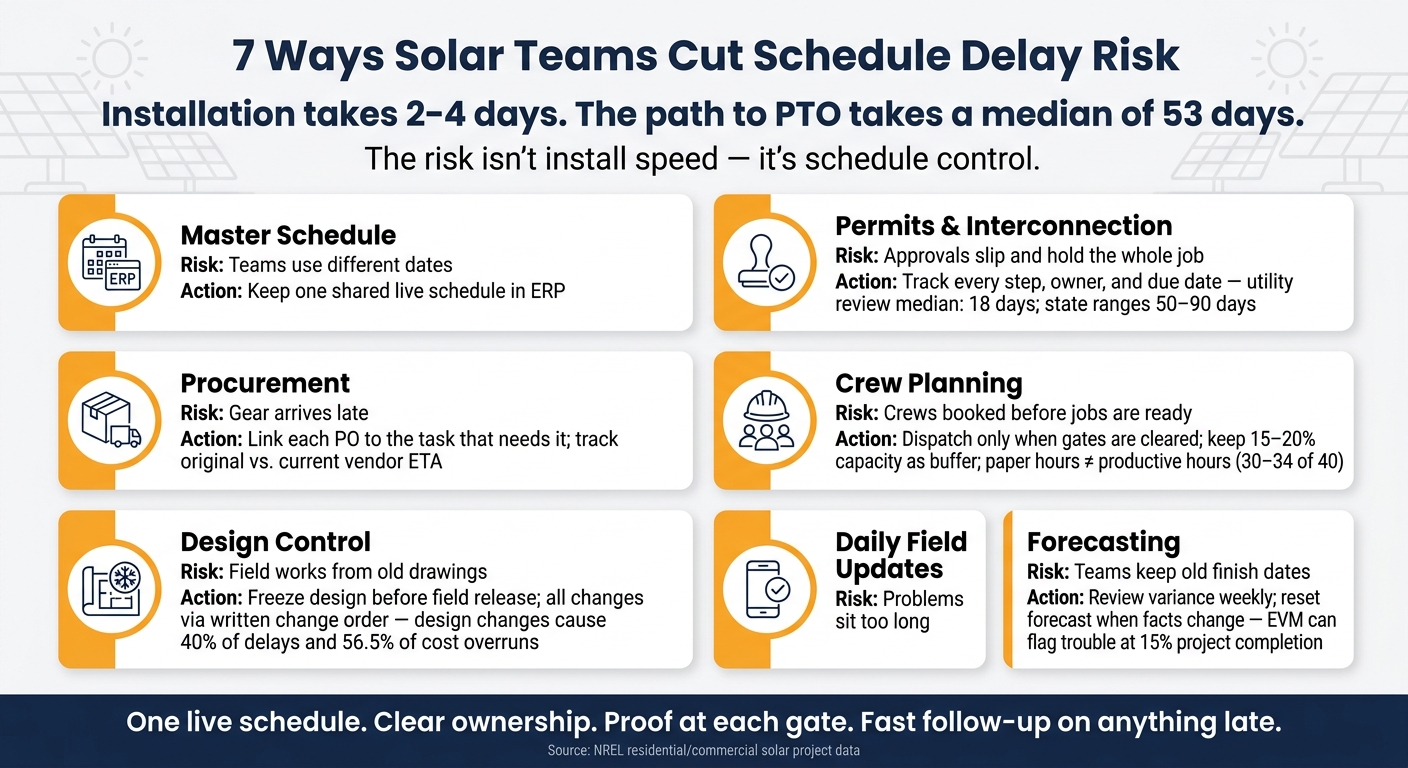
Quick Comparison
| Area | Main risk | What to do |
|---|---|---|
| Master schedule | Teams use different dates | Keep one shared schedule in solar project management software |
| Permits/interconnection | Approvals slip and hold the whole job | Track every step, owner, and due date |
| Procurement | Gear arrives late | Link each PO to the task that needs it |
| Crew planning | Crews get booked before jobs are ready | Dispatch only when gates are cleared |
| Design control | Field works from old drawings | Freeze release and control changes in writing |
| Daily field updates | Problems sit too long | Log issues daily and assign owners fast |
| Forecasting | Teams keep old finish dates | Review variance weekly and reset forecast |
If you want fewer surprise delays, this is the playbook: control the schedule around dependencies, not just tasks.
Why Schedule Risk Spreads Fast in Solar Projects
Solar schedules don’t usually slip one task at a time. They slip like dominoes.
Each workstream depends on the one before it. Engineering decides what gets permitted. Permits decide when crews can legally mobilize. Equipment availability decides whether installation can start at all. Inspections and interconnection approval decide when the system can go live – and when the final invoice can be sent.
That dependency chain is why one delay rarely stays in its lane. A late design revision can push permit submission back by days, delay equipment release, and move installation into a worse weather window. NREL’s analysis of U.S. residential and small commercial projects found median construction durations of 2 days for residential systems and 4 days for small commercial systems. But the full path from interconnection application to PTO had a median of 53 days, and some projects took more than six months.
Interconnection is often one of the toughest external gates to call ahead of time. Utility review, technical studies, required network upgrades, and paperwork can each delay PTO on their own. Utilities, local permitting authorities, equipment suppliers, inspectors, and engineering firms each control a point on the schedule. If those outside milestones aren’t tracked with the same discipline as internal tasks, delays show up late. And by then, the damage is already spreading.
So the issue isn’t just outside complexity. It’s tracking discipline.
That’s why schedule control can’t sit on the project manager alone. Each milestone needs one clear owner across design, permits, procurement, warehousing, field execution, and billing. When schedules live in spreadsheets and email threads, teams usually spot problems only after the next task slips. Current records and clear ownership help stop small delays from snowballing. That’s why the first control is a single master schedule in ERP.
1. Track the Master Schedule in One ERP
Delay risk addressed
When sales, engineering, permitting, procurement, and field teams all use separate spreadsheets or their own tracking tools, dates start to drift. One project can show up with one timeline in sales, another in engineering, and a third in the field.
A unified solar ERP fixes that. It gives every team one live schedule, one baseline, and one current forecast. Everyone looks at the same source, so there’s less back-and-forth and fewer surprises.
Control process and owner
Put one project manager or project controls lead in charge of the master schedule. Then give each milestone a clear owner across permits, procurement, engineering, and field execution.
The baseline shouldn’t move just because plans changed in a hallway chat. If it changes, log the reason, date, owner, and approval. Keep that record in the ERP, not buried in email.
A weekly exception review works better than a long status meeting. Focus on what slipped, what’s blocked, and what needs a call now.
Required data and checkpoints
A milestone should count as complete only when proof is attached in the system. That can include:
- approval documents
- receiving records
- approved drawing sets
Use simple gates to keep the project moving in the right order:
- ready for permit
- ready for procurement
- ready for install
- ready for PTO
ERP-enabled visibility
A practical ERP dashboard should let the team spot issues fast. At a glance, it should show due dates, overdue tasks, blocked projects, and forecast variance.
Once one live schedule is in place, the next timing risk to watch is permit and interconnection timing.
2. Monitor Permits and Interconnection Milestones
Delay risk addressed
Permits and interconnection are schedule gates, not paperwork you handle on the side. If a submission goes in late, an application is missing something, a correction request sits untouched, or the handoff between your team, the AHJ, and the utility gets messy, the whole job can slide. Construction gets pushed. Inspection gets pushed. System activation gets pushed. That’s why these dates need to live inside the master schedule. If one slips, construction and PTO should move with it.
Utility application review alone had a median of 18 days, and state medians for the full interconnection process ranged from 50 days in California to 90 days in New Jersey.[6] If those timelines sit outside the master schedule, crews get booked off guessed approval dates. Then one correction request comes in, and the plan starts to unravel.
Control process and owner
Every permit and interconnection milestone needs one person clearly on the hook. In most teams, the permitting coordinator handles AHJ submissions and correction responses. The interconnection specialist handles utility applications and PTO follow-up. The project manager handles escalation calls and decides what the slip means for the schedule.
Your ERP should log the owner, submission date, current status, next required action, and escalation date for each milestone. If a utility hasn’t acknowledged an interconnection application by the internal follow-up date, the system should create an overdue task for the interconnection specialist and alert the project manager right away. “Waiting on the utility” can’t be a status with no owner attached to it.
Once ownership is clear, the next step is making sure the submission data is clean before anything goes out the door.
Required data and checkpoints
Before submitting, confirm the design is released, the equipment list is final, the needed calculations are done, customer authorization is in hand, and all fees and signatures are ready. That includes stamped plan sets, electrical single-line diagrams, equipment specifications, structural calculations, and the code references that apply. One correction request can send the project right back into the queue.
After submission, the ERP should track:
- Confirmation number
- Expected response date
- Correction notices as dated exceptions
- Assigned owners
- Response deadlines
That setup gives the system enough information to spot schedule drift before crews are booked.
ERP-enabled visibility
Permit and interconnection milestones should work as hard dependencies in the master schedule. If a permit slips by five business days, the ERP should show right away which installation slots, crew assignments, and customer commitment dates move with it. The point is to let the project manager act, not just watch the delay happen.
A simple status model usually works best: green when the milestone is moving within the expected cycle time, amber when the response window is about to expire or a correction is open, and red when a deadline has passed, an application was rejected, or PTO is still pending after installation.
Track approved to build and approved to energize as separate milestones. Then release crews only when both are clear.
3. Control Equipment Procurement and Vendor Updates
Delay risk addressed
Once permits start moving, materials become the next big schedule gate. If a crew shows up before key equipment arrives, work stops. And when work stops, costs stack up fast.
Long-lead items like inverters, transformers, switchgear, and trackers often sit right on the critical path. A late shipment can leave crews standing around, throw off handoffs, and push the schedule off plan. That’s why each PO needs to connect to the task that depends on it and the date the material must be on-site.
Control process and owner
This process works best when each role owns a clear part of it to streamline operations.
The procurement manager handles supplier communication, PO issuance, and escalation. The project manager owns the required-on-site dates and decides whether a late delivery affects the critical path. The warehouse or logistics lead confirms receipt, quantity, condition, and project allocation. The field superintendent should also confirm that materials are on hand and accepted before installation work is released.
Finance can match invoices to the PO and receipt. But delivery status should never sit only inside accounts payable. If that’s where the update lives, the field team finds out too late.
With ownership set, the next step is simple: lock down the PO data that keeps the schedule in view.
Required data and checkpoints
Every PO for critical material should tie back to the project, the exact work package, and the installation activity that depends on it. An inverter PO sitting in the system as a loose purchasing record doesn’t help much. Tie it to the electrical-installation milestone, and a late delivery shows right away which crew, customer, and due date are at risk.
Vendors should confirm milestones in order:
- PO acknowledged
- Submittals approved
- Production started
- Factory testing complete
- Shipment released
- Estimated arrival updated
- Material received and inspected
Track both the original promised date and the current vendor forecast. That gap tells you a lot. If the forecast slips away from the original promise, you’ve got your first warning sign.
ERP-enabled visibility
A procurement dashboard inside the ERP should show open POs by project and required-on-site week, orders with no acknowledgment, ETA changes, partial receipts, and materials still in transit against upcoming work. When each PO is tied to the master schedule, a delivery change doesn’t get lost in an email chain. It shows up as a schedule exception, and updated ETAs flow into the master schedule directly, not just the purchasing record.
A simple three-color system keeps this easy to read:
- Green: confirmed delivery arrives before the need date with enough float
- Yellow: the forecast uses up most of the float
- Red: the forecast misses the need date or still lacks solid confirmation
Set clear escalation points too. Send it to the procurement manager when float drops below two weeks. Move it to the project executive when a missed delivery could idle a crew or delay interconnection. That way, a vendor update becomes a controlled call, not a fire drill.
Once materials are under control, the next risk is crew capacity.
4. Plan Crews Against Actual Capacity
Delay risk addressed
Once upstream work is close to clear, crew planning becomes the next pressure point. The risk is simple: assigning crews to open calendar slots before the site, materials, prior work, and access are ready.
Crew planning works only when upstream gates are actually clear.
A crew that looks like it has 40 hours open on paper may, in practice, deliver only 30–34 productive hours after you factor in travel, material pickup, inspections, and admin work. Plan against the paper number, and you’ll miss the mark again and again.
Control process and owner
The operations or scheduling manager owns the capacity plan. Project managers confirm readiness. Field supervisors check crew skills, production rates, and site constraints. Procurement confirms materials.
The scheduler’s job is to match confirmed capacity to confirmed readiness – not to fill empty slots.
Required data and checkpoints
Before a crew is dispatched, confirm:
- permit status or design approval status
- site access
- materials
- tools
- safety requirements
- dependencies
- crew qualifications
A simple job status – “not ready”, “ready for scheduling”, “scheduled”, or “blocked” – with a named owner and a reason for each blocked item keeps the team on the same page.
Keep 15%–20% of weekly crew capacity unscheduled. That buffer helps absorb permit timing shifts, site surprises, jobs that run long, and customer rescheduling. A crew plan that fills every open hour may look efficient, but it starts to crack as soon as one job slips.
ERP-enabled visibility
An ERP that connects resource calendars, project milestones, site-readiness gates, skills, geographic assignments, materials, and field-status updates makes this much easier to manage at scale. When a job clears its readiness checklist, the system can check whether a qualified crew has room before the job lands on the calendar. Dashboards can show crew load, blocked jobs, and upcoming availability gaps.
Blu Banyan’s SolarSuccess supports this coordination with resource calendars, crew availability, capacity checks, dashboards, and alerts.[8]
Late design changes can still throw off a good crew plan, so the next control is to freeze releases and manage change orders.
5. Freeze Design Releases and Manage Change Orders
Delay risk addressed
A solid crew plan can still fall apart if the drawings change after mobilization. When teams go to the field before the design is locked, rework starts piling up. Materials get ordered against the wrong version, crews build from old drawings, and inspections slow down because the package no longer matches the work in place. That kind of disconnect turns into direct schedule slippage.
The numbers make the point. One study found that design changes contributed to 40% of project delays and 56.5% of cost overruns in that study. Rework can account for roughly 52% of total project delay.[12]
Control process and owner
The project manager owns the design-release gate. That means field release does not happen until the package is final. Before work is released to the field:
- Engineering confirms the design is complete
- Procurement verifies that equipment and quantities can be ordered against the approved design
- Construction signs off that the work is ready to build in the field
Do not mobilize crews until the approved, revision-controlled package is available in the field.[9]
After the freeze, every change must go through a written workflow. Not a quick text. Not a hallway conversation. Every change order should be treated as a scope change that needs approval and pricing before the work moves ahead. No approval means no changed work.
If a safety or code issue needs urgent action, the superintendent should document the issue, stop only the affected work, and get a written field directive. The design and commercial record can then be completed afterward.
Required data and checkpoints
The release checklist should cover the full build package: module and inverter layout, electrical one-line diagrams, equipment specifications, structural and racking details, conduit routing, fire-access rules, utility and interconnection documents, and permit-set alignment.[9]
Each post-freeze change request should include the basics needed to make a clean decision: change-order number, affected revisions, cost impact, schedule impact, and required approvals before field release.
| Checkpoint | Evidence required | Owner |
|---|---|---|
| Design readiness | Approved IFC package, revision number, interdisciplinary sign-off | Engineering manager |
| Constructability | Crew and superintendent sign-off; sequencing review | Construction manager |
| Procurement alignment | Equipment availability, approved substitutions, lead times | Procurement manager |
| Permit alignment | Permit set, resubmittal need, inspection implications | Permitting manager |
ERP-enabled visibility
This is where the system side matters. Link the approved design package, revision history, BOM, POs, work breakdown structure, schedule activities, change requests, approvals, and field status in one project record.
When a change request is logged, the ERP can show which schedule activities and cost codes are affected before the change is approved. That turns scope drift into a controlled decision instead of a problem discovered too late.[5] Once design changes are under control, daily field status makes it much easier to see whether the schedule is still holding.
6. Log Daily Field Status and Flag Exceptions
Delay risk addressed
Daily field reporting helps stop small issues from turning into schedule damage. If reports aren’t filed every day, missing shipments, failed inspections, access problems, equipment breakdowns, predecessor delays, and design questions can sit in the background until they start affecting the critical path in the master schedule.
The point isn’t the report by itself. The point is how fast the ERP turns that report into an exception, assigns an owner, and pushes action.
A vendor-produced field-analytics guide described an illustrative case study involving more than 50 residential solar crews: paper reports arrived 2–3 days late, while mobile reporting cut lag by 2 days and cut issue identification time by 40%.[16]
Control process and owner
The foreman or site superintendent should submit the daily report before the end of the day. Then the project manager or project controls lead should review it the next business morning, check whether any exception touches a milestone or critical-path activity, and assign a response date.
Each exception should be logged in the ERP with a clear owner and due date. Vague notes don’t help much. “Materials delayed” leaves too much open. This is better: “Tracker steel for Block C is two days late; procurement manager owns recovery plan; delivery required by October 2; escalation October 1”.
Required data and checkpoints
Each daily report should include the basics needed to see what happened, what got blocked, and what may hit tomorrow’s plan:
- project, date, shift, site area or building zone, crew and subcontractors, hours, planned work, completed work, and installed quantities
- materials delivered or missing, equipment used, weather, open RFIs, punch items, and any material, access, or crew needs for the next day
The big discipline here is simple: keep normal status separate from exceptions. A blocked work front or failed inspection should never be tucked away inside a long narrative. If the issue matters, it should stand out right away.
A basic severity system keeps reviews tight and helps people act faster:
| Severity | Condition | Response |
|---|---|---|
| Critical | Likely to affect the critical path, energization, or a contractual milestone | Escalate immediately |
| High | Threatens available float or blocks a successor trade | Same-day owner assignment |
| Medium | Productivity or quality issue not yet affecting the schedule | Next daily coordination meeting |
| Low | Observation or administrative follow-up | Logged and monitored |
ERP-enabled visibility
An ERP should connect field actuals to the master schedule, flag blockers, notify owners, and update forecast dates in the same record. When a foreman sends in a report, the system can compare planned versus actual quantities, flag blocked work, and recalculate the forecast completion date automatically.
Once daily actuals are inside the ERP, the next move is to compare them with the baseline and refresh the completion forecast. When field actuals are visible, variance is easier to spot, and forecast dates can be reset with more confidence.
7. Review Schedule Variance and Update Completion Forecasts
Delay risk addressed
Once daily field status is already flowing into the ERP, the next step is to review variance on a set rhythm. If you skip that step, small slips can pile up inside subpackages while the top-line project view still looks fine.
PMI says EVM can spot trouble as early as about 15% into a project. Schedule Variance (SV = EV − PV) shows whether work is ahead of plan or behind it. And when SPI is below 1.0, the project is behind schedule.
A 2026 solar scheduling study found that a 24-month baseline understated duration by 14.2 months, with an 82% chance of overrun. The biggest drivers were grid interconnection and civil work.[20] That’s a strong case for forecasting those workstreams on their own instead of leaning on one rolled-up project finish date.
Control process and owner
The project manager or project controls lead should run a weekly schedule review during active construction, with input from engineering, procurement, permitting, the superintendent, and finance.[17] Each review should end with corrective actions, named owners, due dates, and, when needed, a revised completion forecast. In plain terms: the meeting should end with an updated forecast, not just talk.
If the same variance shows up in two straight reviews and there’s no documented recovery plan, escalate it. Don’t keep carrying the original date with nothing behind it. Set escalation thresholds at kickoff. For example:
- Any critical-path activity slipping by more than 1–2 working days
- A milestone forecast moving by more than 5 working days
- Float dropping below the project’s minimum reserve[17]
Required data and checkpoints
A forecast is only as good as the record behind it. It should come from one controlled source, not a pile of disconnected spreadsheets. At each review, confirm four things: what was planned, what was completed, what remains, and what could block the rest of the work.[17]
Field teams should report measurable quantities like modules installed, feet of conduit completed, and inverter terminations finished, not gut-feel percentage updates. An activity marked 80% complete can still carry major schedule risk if the last 20% includes energized testing, utility approval, or a final inspection. That’s why reported progress should always be checked against labor hours, installed quantities, and open punch-list items.
When conditions shift, the forecast should shift too. If a vendor changes a delivery date, crew output drops, a permit milestone moves, or a change order alters sequencing, recalculate the forecast right away instead of waiting for the next review.
ERP-enabled visibility
An ERP dashboard should do more than show that a problem exists. It should help the team act on it. By project, the dashboard should show baseline finish, current forecast finish, variance in working days, critical-path status, float, open constraints, material readiness, permit status, and change-order impact.
Traffic-light flags only work when each color means something specific. For example, yellow can mean consumed float or forecast risk, while red can mean a committed milestone is at risk.
Blu Banyan‘s SolarSuccess connects schedule, procurement, field, and financial information in one system.[1] Each late milestone should link back to the task, PO, permit record, or field update behind it so the project manager can go straight from the warning to the fix.
The reference tables below turn these variance checks into quick risk signals.
Reference Tables and Risk Signals
The tables below help turn variance into action. The goal is simple: spot the exact milestone or change point that’s slipping, then act before it turns into a missed date.
Permit and Interconnection Stage Reference
Each stage needs a clear owner, proof, and an escalation trigger. If any one of those is fuzzy, delays can sneak in fast.
| Stage | Owner | Required Evidence | Escalation Trigger |
|---|---|---|---|
| Permit package preparation | Design or permitting coordinator | Complete application, code review, stamped plans where required, equipment data | Package is incomplete or a required document is missing at internal quality check |
| Permit submission | Permitting coordinator | Submission receipt, application number, submitted plan set, fee confirmation | No receipt or application number by the planned submission date |
| AHJ review | Permit coordinator and design lead | Review status, comments, correction list, response deadline | Review exceeds the jurisdiction’s expected timeline or the correction notice is unresolved |
| Permit approval | Permit coordinator | Issued permit, approved drawings, conditions of approval | Permit is not issued before procurement, installation, or inspection dependency |
| Utility interconnection application | Interconnection coordinator | Utility application receipt, one-line diagram, equipment specifications, fee payment | Application is rejected, incomplete, or missing required technical evidence |
| Utility technical review | Interconnection coordinator and engineering | Utility comments, study results if required, upgrade requirements, correspondence log | Utility response is overdue or identifies study, upgrade, or redesign risk |
| Interconnection approval or agreement | Interconnection coordinator | Approval notice, executed agreement, approved operating conditions | Approval or agreement is not complete before construction or commissioning gate |
| Build and inspection readiness | Construction manager or field supervisor | Approved plan set, permit card, inspection request, equipment records, installation checklist, crew assignment | Installation is scheduled without an active permit, required inspection appointment, or approved construction documents |
| Final inspection and closeout | Field supervisor and permitting coordinator | Passed electrical/building inspections, correction closure, as-built documents, test results, and photos | Failed inspection, incomplete correction, missing as-built evidence, or inability to schedule reinspection |
| Permission to operate (PTO) | Interconnection coordinator | PTO letter or utility authorization, meter or monitoring confirmation where applicable | PTO is missing before energization, customer turnover, or final billing milestone |
Populate the response targets in the escalation column using your local AHJ, utility, and contract requirements. A tracker should also log the responsible owner, current status, next action, due date, evidence location, and escalation date for every milestone.
That same level of control matters when a design changes after release. This is where teams often get tripped up. A change can look small on paper, but if it touches permits, materials, or crew plans, it can ripple through the whole job.
Controlled vs. Uncontrolled Change
A change order is field-ready only when the revision, materials, permit impact, crew instructions, and schedule impact are all approved. Until then, it’s not ready for the field.
| Control area | Controlled change | Uncontrolled change |
|---|---|---|
| Schedule consequence | Impact is estimated, approved, and incorporated into the baseline or forecast | Crews, inspections, procurement, and customer commitments continue against obsolete dates |
| Approval | Authorized by the required project, customer, engineering, commercial, or utility stakeholders before release | Verbal or informal approval is treated as sufficient |
| Document version | New revision has a unique identifier, issue date, change description, and distribution record | Field teams may use mixed or superseded drawings |
| Procurement | Equipment, quantities, and lead times are rechecked before purchase or release | Materials may be ordered for the wrong design or arrive too late |
| Permit/interconnection impact | Required AHJ or utility resubmittals are identified and scheduled | Construction proceeds without confirming whether approvals remain valid |
| Field readiness | Crew receives the approved plan, work instructions, material list, and effective date | Crew discovers the change onsite, causing rework, idle time, or unsafe conditions |
| Cost and responsibility | Change order value, customer authorization, and schedule ownership are documented | Cost, delay liability, and customer expectations remain disputed |
| Closeout | As-builts, inspection records, and final documentation reflect the approved revision | Closeout documents conflict with the installed system |
These are the early warning signs to watch in daily reviews. If a job starts drifting, the first clues usually show up here.
Mini Risk Register
Use these signals to catch slips before they become missed milestones. When a milestone goes yellow, these are the first checks to run.
| Risk signal | What it may indicate | Immediate response | Escalation trigger |
|---|---|---|---|
| Overdue predecessor activity | A dependent task cannot start on the planned date | Confirm actual status and remaining work; recalculate successor dates | Forecast finish threatens a committed milestone or creates crew/equipment conflict |
| Shifted vendor date | Equipment delivery may no longer support the installation window | Validate the new ship and arrival dates; identify substitutes; resequence work | Delivery moves beyond the latest material-needed date or affects inspection or PTO timing |
| Open permit correction | Construction or approval cannot proceed as planned | Assign the correction, confirm required documents, and log the resubmission date | Correction remains open past the response target or affects a scheduled mobilization |
| Crew conflict | Two jobs require the same crew, specialty, or supervisor | Compare actual capacity with the master schedule and reassign or resequence work | No qualified replacement exists or the conflict moves a contractual milestone |
| Failed inspection | Rework, reinspection, and possible permit or PTO delay | Record the failure reason, assign corrective work, book reinspection, and update the forecast | Correction cannot be completed before the next available inspection window |
| Pending change-order approval | Work scope or design is unresolved | Freeze affected work, identify unaffected tasks, and obtain a dated decision | Approval is not received before procurement, mobilization, or installation cutoff |
Here’s what that looks like in practice: if a panel shipment moves from June 8 to June 15 and installation is planned for June 16, the PM should immediately check crew availability, staging, and the latest inspection date. If the equipment-needed date was June 12, the project is already at risk.
SolarSuccess can link alerts to the underlying task, PO, or permit record.
Conclusion
Solar delays rarely come from one big failure. More often, they start with small misses in permitting, procurement, crew planning, design changes, and field work. The answer isn’t better guessing. It’s one live schedule with clear ownership.
Solar management software connects the master schedule to project, purchasing, inventory, vendor, crew, permitting, and financial records. That gives teams a way to spot dependencies early, assign owners, and update forecasts before dates start to slide. When those controls stay current, schedule risk becomes visible early enough to act on.
That kind of visibility helps solar teams protect promised completion dates and explain changes clearly.
FAQs
Why do solar projects get delayed before installation starts?
Solar projects often slow down before installation even starts. The holdup usually comes from planning and coordination problems: permitting bottlenecks, site assessment issues, equipment delivery delays, and missing or incorrect documents.
On top of that, disconnected systems can make a bad situation worse. They create communication gaps, manual entry mistakes, scheduling mismatches, utility interconnection backlogs, and on-site surprises. And all of that slows progress and adds cost before crews even arrive.
What should a solar ERP track to reduce schedule risk?
A solar ERP should track project milestones, resource use, vendor performance, inventory levels, labor hours, and delivery schedules in real time.
It should also keep an eye on permit approval timelines, labor efficiency, interconnection completion rates, and inspection pass/fail ratios. That way, teams can spot bottlenecks early, like delayed materials or pending permits, before those issues turn into bigger project delays.
How often should teams update the project forecast?
Teams should update project forecasts in near real time, not just at month-end.
A simple way to do that is to track the gap between each active milestone’s planned completion date and its current forecast. That gives teams an early warning when a schedule starts to slip, so they can deal with the delay before it gets baked into the plan.
Frequent reviews of upcoming work help project managers act fast, too. If they spot a deviation from the baseline, they can reassign labor or escalate the issue right away instead of waiting for the next reporting cycle.
