

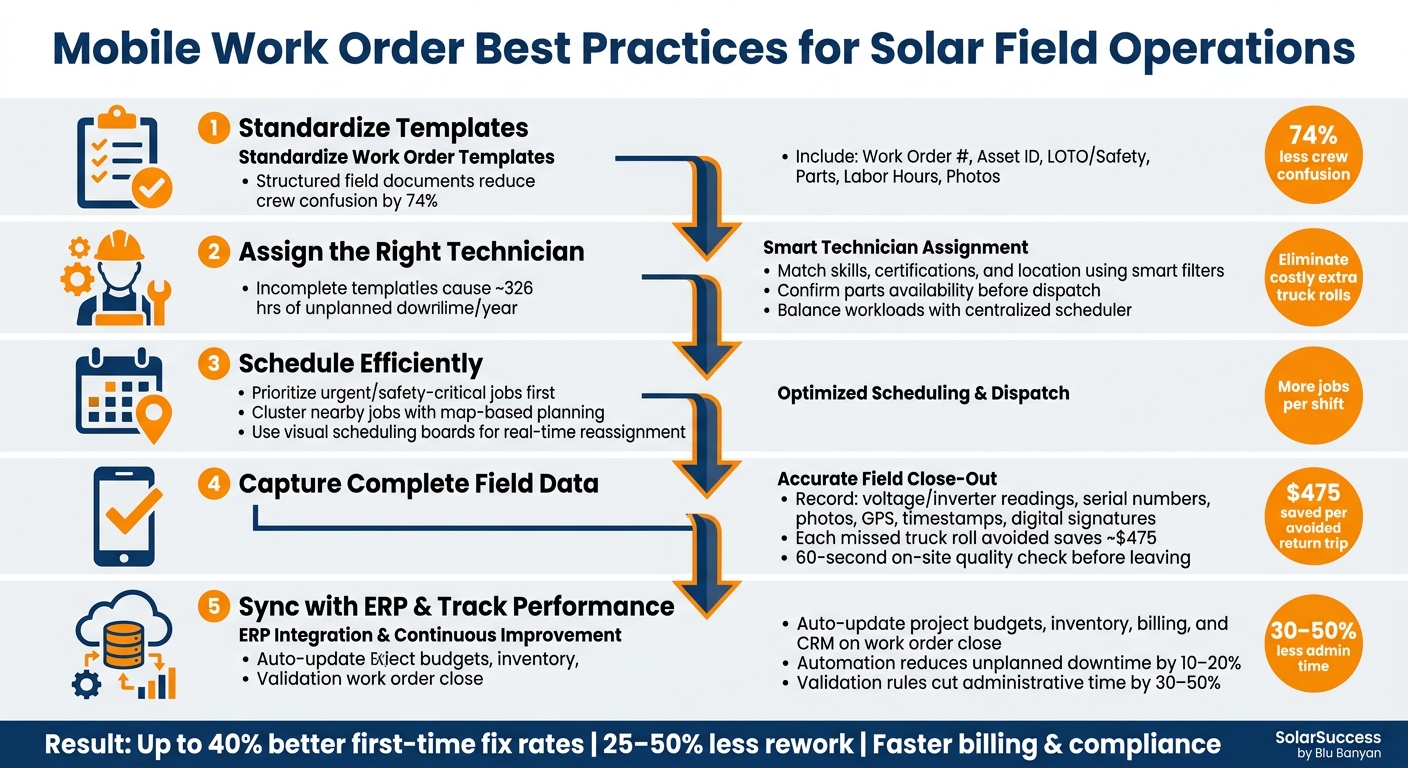
Mobile work orders simplify field service operations by replacing paper forms with digital tools, ensuring accurate communication between teams. In solar projects, they help manage complex workflows, improve first-time fix rates by up to 40%, and reduce rework by 25–50%. Key practices include standardizing templates, assigning the right technicians, scheduling efficiently, and integrating with solar ERP systems for real-time updates. These steps cut costs, save time, and ensure accurate data for billing, inventory, and compliance. Tools like SolarSuccess by Blu Banyan streamline these processes, helping solar companies operate more efficiently and profitably.
Setting Up Standard Mobile Work Order Fields and Templates
Inconsistent work order data can make it harder to track job history, identify recurring issues, and keep field and office teams on the same page. The easiest way to address this? Standardize your mobile work order fields and templates. This small step can have a big impact. Studies show that structured field documents reduce crew confusion by 74%, while incomplete templates lead to an average of 326 hours of unplanned downtime per year.
Required Fields for Solar Work Orders
Every solar work order needs to capture certain key details. The table below highlights the most important categories, the specific fields to include, and why they matter:
| Category | Essential Field | Purpose |
|---|---|---|
| Identification | Work Order Number | Links parts, labor, and history to a single job. |
| Asset | Asset ID / Serial Number | Tracks work on specific equipment and monitors warranty status. |
| Safety | LOTO / Hazard Category | Ensures OSHA and electrical safety compliance. |
| Materials | Part Number & Quantity | Monitors inventory use and calculates job costs. |
| Labor | Actual vs. Estimated Hours | Evaluates technician efficiency and improves scheduling. |
| Evidence | Photo Attachments | Provides visual proof of conditions before and after the job. |
Additionally, solar work orders should include electrical metrics like voltage, amperage, and inverter data to confirm that the system is running at peak efficiency. Separate fields for reported issues and actual resolutions are also critical – they make it easier to analyze recurring problems.
These standards create a solid framework for designing templates that fit specific job needs.
How to Build Effective Standardized Templates
After defining the core fields, the next step is to standardize the template format for consistency. Tools like drop-down menus, pre-set checklists, and required fields make this process smoother. For instance, instead of allowing vague descriptions like “replaced part”, require technicians to input a specific part number and quantity. This ensures the system automatically updates inventory and calculates job costs in real time.
It’s also smart to create separate templates for different types of jobs. Routine maintenance, emergency repairs, and new installations each require unique data. As Jan Rippingale, CEO of Blu Banyan, explains:
“With these checklist templates, even smaller residential solar installers can benefit from the years of experience that larger installers have accumulated.” [6]
For added efficiency, include a QR code scanning field in your templates. This feature can auto-populate fields like Asset ID and location, reducing manual entry errors and saving time. By organizing templates logically and tailoring them to specific job types, you’ll streamline operations and improve accuracy.
Assigning Technicians and Scheduling Work Orders
A well-prepared work order can fall apart if it’s assigned incorrectly. Getting the assignment and scheduling right is what keeps field operations running smoothly instead of constantly scrambling to fix issues.
How to Choose the Right Technician for Each Job
The key is matching technicians to jobs based on their skills and location. For example, a licensed electrician is essential for complex inverter repairs, while simpler tasks can be handled by someone with less specialized training. Smart filters are a great tool to match certifications, skills, and workloads to the needs of each job.
“Match the right techs to the right jobs using smart filters for skills, location, and job priority.” – Blu Banyan [1]
Geographic proximity is another factor that can’t be ignored. Assigning the closest qualified technician reduces travel time and creates flexibility. If a technician finishes a nearby job early, they can quickly move on to the next task. At the same time, workload visibility helps dispatch managers balance assignments. A centralized scheduler ensures no one is overloaded, double-booked, or left without tasks.
Before dispatching, always confirm that the necessary parts are available. This avoids wasted trips and unnecessary costs.
“Track inventory and truck stock in real time, so your techs show up with the right parts every time, eliminating discrepancies and costly extra truck rolls.” – Blu Banyan [1]
Once the right technician is selected, the next step is scheduling in a way that maximizes efficiency.
Scheduling and Dispatch Best Practices
After assigning technicians, scheduling work orders deliberately can take efficiency to the next level. Start by focusing on urgent tasks – critical repairs and safety-related jobs should always take priority over routine maintenance. Next, group nearby jobs together using map-based planning tools. By clustering work orders geographically, technicians can complete more jobs in a single shift with less time spent driving.
For complex solar installations that require multiple team members, it’s essential to use a system that supports assigning more than one technician to a single work order. This ensures clear coordination and avoids communication breakdowns on-site.
Automation can also make a big difference. Automate task sequencing so that dependent work orders are only released once prerequisite steps are completed.
“Multi Preceding Action Automation automatically prioritizes tasks based on readiness, optimizing project execution.” – Blu Banyan [2]
Finally, visual scheduling boards are a lifesaver when unexpected changes arise. If a technician is delayed or a job takes longer than planned, these tools allow dispatchers to quickly reassign tasks in real time without throwing off the entire day’s schedule [1].
Capturing Field Data and Closing Work Orders Accurately
Once jobs are assigned and scheduled correctly, the next crucial step is capturing complete field data to close work orders effectively. Even the most well-planned work order can fall apart if technicians leave without documenting everything. Missing or incomplete field data often results in unnecessary return trips, which cost an average of $475 per additional truck roll. Adding to this, technician wages are expected to rise by 16% between 2019 and 2024, further driving up costs.
What Data to Record When Closing a Work Order
When technicians close a solar work order using a mobile device, they need to go beyond simply marking the job as complete. The data they record must be thorough enough to support warranty claims, billing, and compliance audits.
| Data Category | What to Capture | Why It Matters |
|---|---|---|
| Technical Readings | String voltage, inverter readings, amp draw | Verifies system performance and supports warranty claims |
| Asset Details | Serial numbers, Asset ID, make/model | Tracks warranties and maintains equipment history |
| Photos | Placards, labels, roof condition, wiring | Ensures compliance and verifies quality |
| Labor & Parts | Actual hours, part numbers, quantities used | Helps with job costing and inventory management |
| Validation | GPS location, timestamps, digital signatures | Provides proof of work and supports audits |
Failing to document even one of these categories can have serious repercussions. For example, incomplete equipment readings are a top reason warranty claims in solar operations and maintenance (O&M) are rejected. Similarly, digital signatures and Lockout/Tagout (LOTO) references are non-negotiable – they’re essential for passing audits.
“If your teams are collecting bad data, you’re paying a premium for a job that isn’t truly finished.” – SiteCapture
Comprehensive documentation not only closes the work order but also lays the groundwork for improving processes in the future.
Making Mobile Forms Easier to Use and More Accurate
To improve data accuracy, pay attention to the mobile forms technicians use. Well-designed forms can make a big difference in the quality of the data collected. For instance, required fields ensure that critical information – like safety sign-offs or specific measurements – must be entered before the work order can be closed. Conditional logic can simplify the process by showing only the fields relevant to the specific job.
Using barcode or QR code scanning can also reduce manual entry errors by auto-filling Asset IDs and serial numbers. For photo documentation, forms should require “before, during, and after” images tied to specific checklist steps, rather than allowing a single optional upload at the end.
Another helpful strategy is to implement a 60-second on-site quality check. Before leaving, technicians can quickly confirm that all required fields and photos are complete. This simple step can save the hassle and expense of a return trip. Additionally, ensure the mobile app works offline to prevent data loss in remote locations.
Connecting Mobile Work Orders to Solar ERP Systems
Collecting accurate field data is just the first step. That data becomes truly useful when it flows directly into the tools your office team uses daily. When mobile work orders are isolated – whether in a standalone app or a spreadsheet – someone still has to manually input critical details like labor hours, parts used, and job status into accounting or project management systems. Integrating field data into your ERP bridges this gap, ensuring on-site actions align with back-office records.
How Work Orders Sync Across Business Systems
Closing a work order doesn’t just wrap up a job – it updates multiple ERP modules simultaneously. For example, when a technician logs 3.5 hours of labor, replaces an inverter, and collects a customer signature, that single action can trigger updates across project budgets, inventory levels, and billing systems. Here’s how it works:
| ERP Module | Automatic Updates |
|---|---|
| Project Management | Tracks task completion, percent-complete metrics, and milestone progress |
| Inventory | Deducts parts from truck stock and triggers replenishment orders |
| Billing/Accounting | Generates invoices based on actual labor and materials used |
| CRM & Asset Records | Updates customer history, warranty details, and equipment notes |
“This all-in-one platform brings your ERP and field operations together, efficiently aligning every schedule, work order, technician assignment, and field resource to improve productivity and real-time visibility of your teams.” [1]
Blu Banyan’s SolarSuccess, built on Oracle NetSuite, is designed specifically for solar businesses. It integrates solar project structures, bills of materials, and O&M contracts directly with mobile work order data. Supporting tools like bluDocs manage photos and documents linked to work orders, while bluTime ensures labor hours are accurately captured and synced across departments.
Using Automation and Validation to Minimize Errors
Integration isn’t just about syncing data – it can also automate work order creation. For example, SolarSuccess can generate preventive maintenance work orders based on asset records. Need an annual inspection for a commercial rooftop system? The system can automatically schedule it for 06/15, complete with pre-assigned tasks, standard durations, and required materials. Companies using this approach have seen 10–20% reductions in unplanned downtime, making O&M workloads more predictable.
Validation rules are another key feature. Before a technician can close a work order, the system can enforce requirements like completing all checklist fields, attaching photos, and using valid item codes for parts. Logic checks prevent errors like negative labor hours or excessive quantities. Once synced to the ERP, additional checks ensure the project is active and no duplicate work orders exist. These measures can reduce administrative time by 30–50%, cutting out manual data entry and cleanup tasks.
“Automating routine tasks enhances efficiency, reduces errors, and ensures that projects are completed on time and within budget.” – Blu Banyan [2]
Tracking Performance and Improving Work Order Processes
Once your mobile work orders are synced with your ERP system and automation is in place, the next step is to assess how well the process is working. This helps uncover inefficiencies that might otherwise go unnoticed.
Key Metrics to Track Work Order Quality
To spot inefficiencies and hidden costs, keep an eye on key metrics like first-time fix rates and data completeness scores. It’s also important to monitor response times, inventory accuracy, and resource utilization [1].
- First-time fix rate: This measures how often a technician resolves an issue in a single visit. Every additional truck roll means extra labor, fuel, and scheduling costs, which can eat into profits.
- Data completeness scores: These track how consistently field crews fill out all required fields. Missing or incomplete data can lead to costly rework and delays. As the OB Alliance explains:
“Soft costs now represent 55 to 64 percent of residential solar installation costs… A meaningful share of that comes from rework, miscommunication between field and office teams, and projects stalling because the right data wasn’t collected in the right format at the right time.” [9]
These metrics provide a foundation for regular audits to ensure ongoing process improvement.
How to Audit and Update Your Work Order Process
Regular audits are essential for identifying gaps in your process and finding opportunities to improve. A quarterly review works well – examine work order history, look for recurring data issues or cost overruns, and identify patterns. For example, are certain technicians consistently missing specific fields? Is a particular job type frequently leading to callbacks? These are the areas where your templates may need adjustments.
Technician feedback is just as important as the data itself. The people working in the field can highlight where checklists are unclear or where required fields don’t align with on-site realities. This feedback loop is invaluable for refining templates and improving data accuracy. As Jan Rippingale, CEO of Blu Banyan, explains:
“Most solar companies know what a good site survey or installation process should look like. Getting that knowledge into a repeatable format that every crew follows, every time, is the hard part.” [9]
When you identify gaps, don’t just add more fields to your templates. Instead, focus on simplifying and clarifying. Remove redundant fields, make labels clearer, and test any changes with a small group of technicians before rolling them out to the entire team. With tools like SolarSuccess, updated templates and validation rules can be instantly deployed to all mobile users, ensuring quick fixes without delays or confusion.
Conclusion: Building a Better Mobile Work Order Process for Solar Operations
Using standardized templates ensures that every technician collects data in a consistent format every time. Smart scheduling assigns the right technician to the right job, while field close-out procedures keep billing accurate and documentation complete. ERP integration ensures that no data gets lost between the field and the back office.
By sticking to these core practices, you create consistent templates that produce reliable metrics – metrics that fuel productive audits and ongoing improvements. This cycle of standardizing, measuring, and refining is what sets smoothly scaling solar operations apart from those bogged down by rework and increasing soft costs.
Improving your mobile work order process is one of the most effective ways to protect your margins.
To make this process seamless, platforms like SolarSuccess by Blu Banyan bring all these elements together in one place. Work orders integrate directly into project budgets, inventory, and billing within a NetSuite-native system tailored for solar operations. Additional tools like bluTime for tracking field time and bluDocs for managing documentation help crews capture precise data without slowing down work on-site.
Start by auditing recent work orders to pinpoint gaps – missing fields, inconsistent formats, or jobs requiring callbacks. That gap between your current process and your ideal workflow is where the real work begins.
FAQs
What should I make required on every solar work order?
To keep solar work orders accurate and efficient, it’s crucial to standardize how data is collected. This helps minimize mistakes and avoids unnecessary return trips. Each work order should clearly document key project details, including milestones, material usage, and labor hours. Digital checklists can make this process smoother by allowing crews to capture site photos, upload necessary documents, and record installation specifics like inverter serial numbers, wire runs, and conduit painting. For added convenience, Blu Banyan provides customizable templates to help teams consistently gather all the essential information.
How do I prevent extra truck rolls caused by missing field data?
To cut down on unnecessary truck rolls, consider using digital, role-specific checklists to make sure all essential field data is collected before crews leave the site. Tools like Blu Banyan’s SolarSuccess streamline this process by integrating field data directly into NetSuite, providing real-time updates on inventory, labor, and project progress. Additionally, mobile tools such as barcode scanning and photo documentation equip technicians to arrive fully prepared and complete their tasks efficiently, minimizing mistakes and avoiding costly return visits.
What’s the simplest way to sync mobile work orders to my ERP?
The easiest approach is to use an all-in-one field service solution like Blu Banyan’s SolarSuccess, which is built on NetSuite. With tools like the bluTime mobile app or NetSuite Field Service Management, field data – such as hours worked, materials used, and project updates – syncs instantly with your ERP. This removes the need for manual data entry and ensures both your office and field teams are working with a single, accurate, real-time system.
