
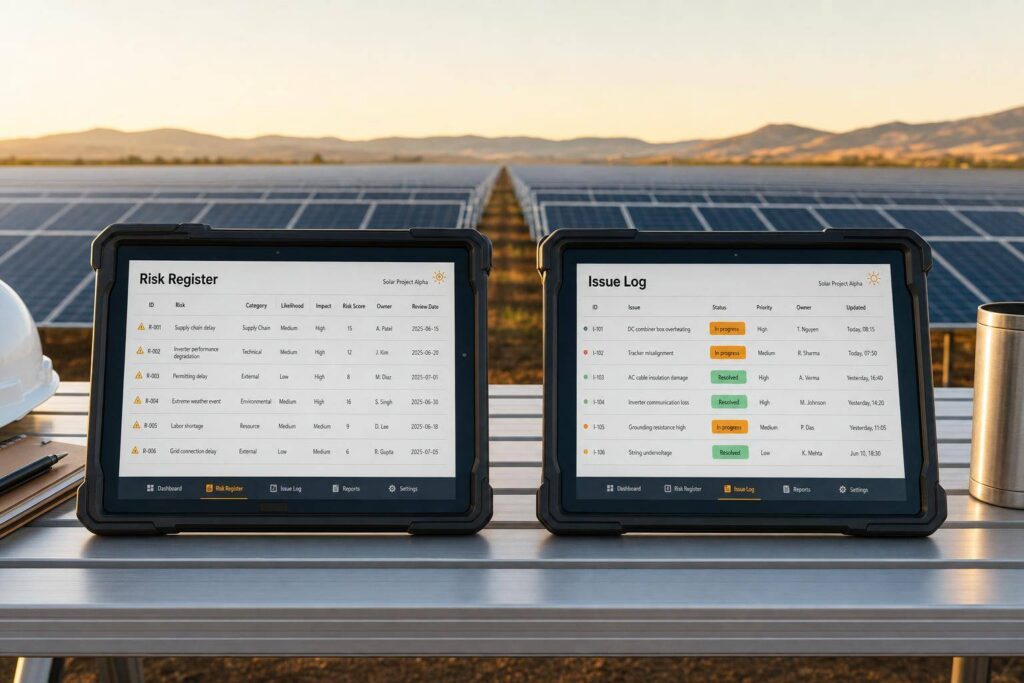
If it might happen, put it in the risk register. If it has happened, put it in the issue log. That’s the whole split solar teams need to keep schedule, cost, permits, equipment, and field work under control.
I’d sum it up like this:
- A risk register tracks future problems, like a permit delay, supply shortage, or utility study that could push work back.
- An issue log tracks live problems, like a failed inspection, a late shipment, or an inverter that already arrived out of spec. Managing these logistics requires robust inventory management software.
- A risk becomes an issue when the event is confirmed. At that point, I’d stop tracking probability and start tracking actual impact, owner, due date, and fix plan.
- Each record needs one named owner.
- Teams should link the two records so they can trace what was expected, what happened, and what it ended up costing in days and dollars.
A few numbers make the split even clearer:
- Safety issues: review within 1 hour
- Production-impacting issues: review within 24 hours
- Example live issue impact: 3 idle crew days, 5-day COD slip, and $12,500.00 in extra shipping and overtime
- Example risk impact: 45-day delay and $75,000.00 in carrying cost exposure
Quick Comparison
| Criteria | Risk Register | Issue Log |
|---|---|---|
| What it tracks | Possible future event | Current problem |
| Main use | Prevention | Resolution |
| Time frame | Before it happens | After it happens |
| Main fields | Likelihood, trigger, mitigation, exposure | Date found, actual impact, severity, due date, closure notes |
| Owner | Person watching triggers | Person fixing the problem |
| Close when | Threat passes or exposure drops | Problem is fixed and documented |
If I were setting this up for a solar team, I’d keep the rule simple: use the risk register to prepare, and the issue log to respond.
Risk Register vs. Issue Log: Side-by-Side Comparison
Use the table below to separate prevention from resolution.
Across permitting, procurement, utility work, and field execution, a risk register helps the team make planning calls. That can mean locking in equipment pricing early, adding schedule float around utility work, or spreading orders across suppliers. An issue log handles the day-to-day calls that come up once something goes wrong, like approving overtime to recover from a slip or issuing a change order for an unforeseen site condition.
Same project, different job: risks drive prevention; issues drive correction and lessons learned. The table below shows what belongs in each record.
| Dimension | Risk Register | Issue Log |
|---|---|---|
| Purpose | Plan for potential future disruptions | Resolve active problems affecting delivery |
| Timing | Proactive – before the event occurs | Reactive – after the event has occurred |
| Primary Owner | Project manager, permitting manager, or procurement lead | Construction manager, service or O&M manager, or finance/collections lead |
| Key Fields | Probability, trigger conditions, mitigation plan, financial exposure estimate | Date raised, actual impact, severity, target resolution date, closure notes |
| Review Cadence | Weekly during active construction; monthly during operations [1] | Immediate for safety issues; within 24 hours for production losses [2] |
| Closure Criteria | Risk window passes or mitigation reduces exposure to an acceptable level | Problem fully resolved, follow-up tasks complete, closure notes entered |
Purpose, Timing, and Decision Use
Use this split to tell whether the team is trying to stop a problem before it starts or fix one that already hit.
Finance stakeholders use the risk register to estimate contingency reserves and model downside scenarios. Operations leaders use it to plan crew capacity and spot bottlenecks before they slow the job down.
Once a problem becomes real, the work changes. The focus moves to resolution and accountability. Finance teams use the issue log to track realized cost variances tied to specific problems and to check whether project forecasts or margins need to change.
The fields below show how each record supports that decision.
Ownership and Accountability
Risk entries should be owned by the person watching triggers and reducing exposure. In many cases, that’s a project manager, a permitting manager for AHJ-related risks, or a procurement lead for supply chain risks. Their job is simple: watch for early warning signs and act before the risk turns into a live problem.
Issue entries belong to the person directly responsible for resolution and closure. That might be a construction manager for a field execution problem, a service or O&M manager for an inverter fault, or a finance/collections lead for a delayed incentive payment. Use one named owner per record.
What Belongs in Each Tool
The fields in each record match the job that record is meant to do.
A risk register entry needs:
- Probability
- Impact on cost and schedule
- Trigger conditions – the specific event or date that signals the risk is getting closer
- A mitigation plan
- An estimated financial exposure in U.S. dollars
An issue log entry focuses on what already happened: date raised, actual impact in days of delay or USD, severity, root cause, target resolution date, and closure notes. Those closure notes feed lessons learned back into future risk register templates and standard operating procedures. That helps tighten estimates and lowers the odds of the same problem showing up again across the portfolio.
What Solar Teams Should Track in Each Record
Now that the difference is clear, the next step is knowing what each record needs to hold.
Required Fields in a Risk Register
Write each risk in a cause → event → effect format. For example: “If the city has not acknowledged the permit within 10 business days, construction start may slip and carrying costs may rise.”
Start with the fields that turn a risk into something a team can act on.
| Field | What to Capture | Solar Example |
|---|---|---|
| Risk ID & Category | Unique ID plus category (permitting, interconnection, supply chain, weather, site access) | RISK-042 / Interconnection |
| Description | Cause–event–effect statement | Utility requests a protection study beyond standard scope, delaying PTO by up to 60 days |
| Likelihood | Consistent 1–5 scale or Low/Medium/High with defined probability bands | High – utility has requested studies on several comparable projects |
| Impact | Schedule days and USD cost exposure | 45-day slip; $75,000.00 in additional carrying costs |
| Risk Score | Likelihood × impact to enable portfolio ranking | P1 (Critical) |
| Trigger / Warning Sign | Specific event that signals the risk is escalating | Permit application not acknowledged by city within 10 business days |
| Mitigation Strategy | Concrete actions to reduce likelihood or impact | Pre-qualify an engineering firm for protection studies; add 30-day schedule float around interconnection milestone |
| Owner | One named person or role | Interconnection Specialist |
| Review Date | Next scheduled reassessment | 10/01/2026 |
| Status | Open, Monitoring, Mitigated, Closed, or Converted to Issue | Monitoring |
The two fields teams skip most often are trigger and review date. That’s a mistake. Those are the fields that help people act early instead of reacting late.
Once the risk record is set up, the issue log needs to track the live problem.
Required Fields in an Issue Log
When the event has already happened, stop talking about probability and start tracking actual impact, ownership, and closure.
Do not put likelihood in the issue log. Use the record to show what happened and what it cost in time and money.
An issue log entry for a non-compliant inverter shipment should capture:
- Discovery date
- Actual impact
- Priority
- Owner
- Resolution plan
- Target resolution date
- Escalation path
For example: discovery date 09/07/2026; actual impact: crew idle 3 days; COD moved from 10/15/2026 to 10/20/2026; $12,500 in expedited shipping and overtime; priority Critical; owner Procurement Lead; resolution plan “submit RMA, arrange expedited replacement, negotiate cost-sharing with manufacturer”; target resolution date 10/05/2026; escalation path “escalate to CFO if cost impact exceeds $25,000.00.”
It also helps to add location or discipline details, such as “electrical, inverter pad, Zone B.” That kind of detail saves time in the field. O&M managers and crews can diagnose the problem faster and coordinate the right response. It also makes portfolio reporting easier to read, since executives can spot whether issues are piling up around one discipline or one site condition.
When a Risk Becomes an Issue in a Solar Project
The Trigger Point: From Uncertain to Real
A risk turns into an issue when the event actually happens, or when the impact is no longer theoretical. At that point, don’t keep tracking likelihood. Start tracking the actual problem, the person responsible, and the path to fix it.
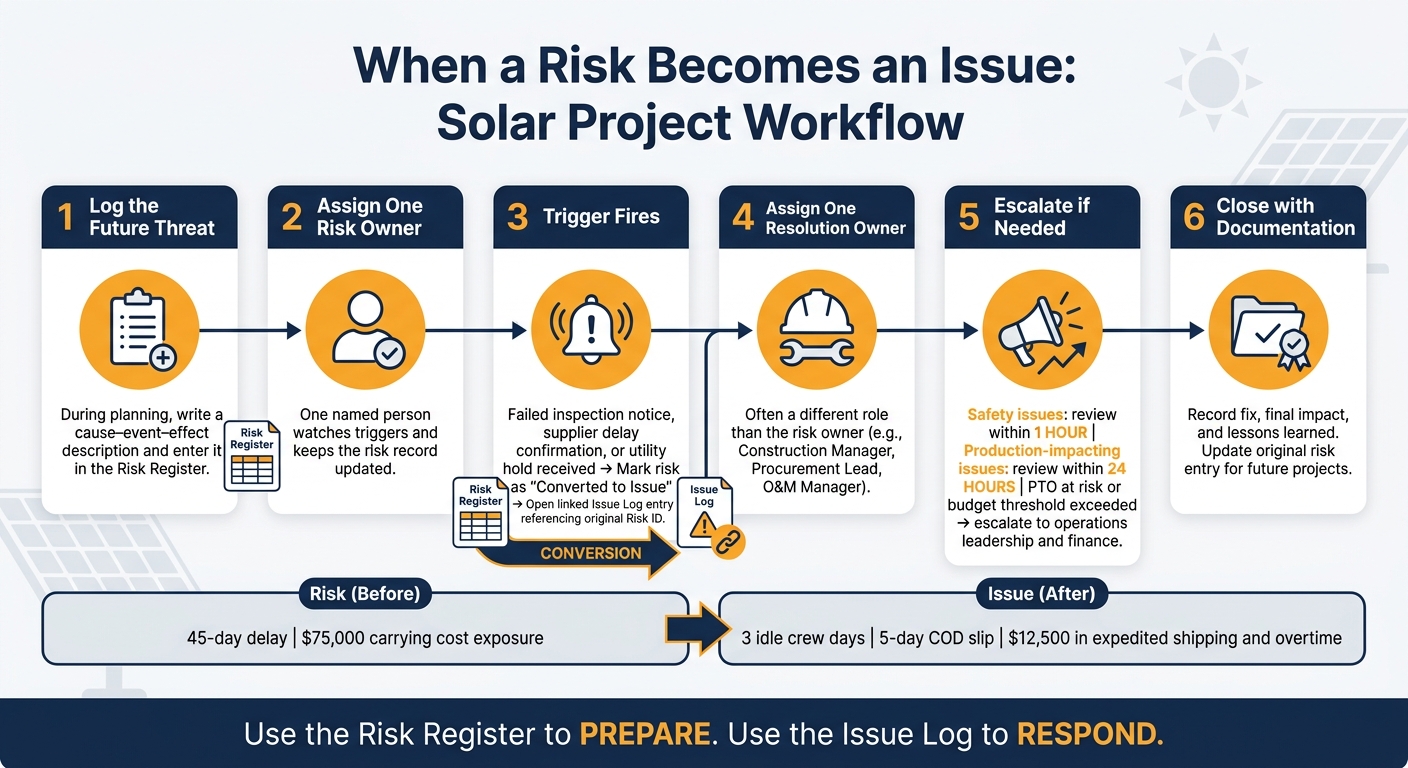
For example, an AHJ inspection failure becomes an issue when the inspector sends a failed report. A delivery-delay risk becomes an issue when the supplier confirms a late ETA. In both cases, update the risk status to “Converted to Issue” and create a linked issue log entry that points back to the original risk ID.
A Simple Workflow for Project Control
Once the event is confirmed, the handoff should follow the same path every time. That consistency keeps things from slipping through the cracks.
- Log the future threat during planning or review using a clear cause–event–effect description.
- Assign one risk owner to watch triggers and keep the record up to date.
- Detect the occurrence. When a trigger fires – a failed inspection notice, a supplier delay confirmation, or a utility hold – mark the risk as converted and open a linked issue log entry that references the original risk ID.
- Assign one resolution owner, often someone in a different role than the risk owner.
- Escalate when thresholds are crossed. If the issue puts a critical milestone like PTO at risk or goes past a set budget threshold, send it to operations leadership and finance for a call on contingency use or contract changes.
- Close with documentation. Record the fix, final impact, and lessons learned. Then update the original risk entry so the next project can use that history.
Set response times based on severity: review safety hazards within 1 hour and production-impacting issues within 24 hours [2]. Fast handoffs need shared visibility across project, finance, and operations teams.
How a Central System Supports Visibility
This process works best when both records sit in one place. SolarSuccess keeps risk and issue records in one system alongside purchase orders, schedules, and financial data. bluDocs stores supporting evidence – failed inspection reports, utility interconnection letters, and supplier delay notices – right on the related record. bluChat keeps the conversation tied to that same record, so coordination between the procurement lead and construction manager stays attached to the issue entry instead of getting lost in email.
It also helps to track repeat risk-to-issue conversions by site, discipline, and category. Over time, that history makes future mitigation tighter and easier to manage.
Conclusion: Use Both Records to Improve Solar Project Control
When these two records are split the right way and kept up to date, they create one practical control loop for the project. A risk register tracks what might happen. An issue log tracks what is happening. Used together, they cover identification, escalation, resolution, and closeout across schedule, budget, compliance, and execution.
That matters even more in multi-project portfolios. A problem at one site isn’t always just a one-off. Sometimes it’s a sign of a pattern showing up somewhere else too. When teams can spot that early, they can act before the same problem spreads.
Key Takeaways for Operations and Finance Leaders
For operations and finance leaders, the upside is pretty clear: faster action on risks, cleaner issue closure, and tighter cost control. Clear ownership rules help a lot here. One named owner per risk and one named owner per issue cuts down confusion and makes escalation much easier.
Standard fields like:
- probability
- impact
- severity
- resolution dates
- cost impacts in USD
turn both records into decision tools instead of static checklists.
Past project data helps too. When teams track which risks most often became issues, and what those issues ended up costing, they get a better handle on contingency planning and cash flow forecasting for future projects.
The gain is strongest when both records stay linked to the rest of the project record. In a unified platform like SolarSuccess, risk and issue data sits next to financials, schedules, and purchase orders. Portfolio dashboards can then show top risks by dollar exposure, critical issues by age, and COD impact, turning risk and issue management into a day-to-day project control tool.
FAQs
How do I know when a risk should move to the issue log?
Move a risk to the issue log when it stops being a forecast and starts affecting execution.
Here’s the simple rule: a risk is a possible future impact. An issue is happening now and needs action right away.
That shift usually shows up in situations like these:
- A milestone is missed or failing
- A due date is missed
- An inspection fails
- A subcontractor is late
- An inverter or production-loss problem is already affecting the job
When you log the issue, keep the owner and priority attached so nothing gets lost in the handoff.
Who should own a risk versus an issue?
Ownership should map to role-based accountability. That way, each item has a clear path to resolution, and every risk or issue has a named owner tied to the work they already handle.
Project managers usually own risks linked to schedule, budget, and contract compliance. Active issues, especially those that show up in the field, should sit with the team that owns that area, such as a field supervisor or engineering lead.
What fields matter most in each record?
In a risk register, focus on the fields that help you see trouble coming and decide what to do about it. That usually means the category, a short description, the possible impact on schedule, cost, or people, the likelihood, timing, owner, priority, and the mitigation or response plan.
An issue log is different. It tracks what’s happening right now. Include the project or job number, customer or site, asset ID, issue type, severity, date and time, owner, status, impact, resolution details, and any supporting evidence.
