
Managing solar assets effectively requires streamlined tools and processes. Cloud ERP systems are transforming how solar companies handle asset tracking, maintenance, and compliance. By centralizing data, automating workflows, and integrating monitoring tools, these systems help reduce downtime, improve financial oversight, and simplify regulatory compliance. Here’s what you need to know:
- Centralized Data Management: Combine financials, inventory, and maintenance data into one platform for real-time updates.
- Standardized Asset Data: Use consistent naming conventions, unique IDs, and structured hierarchies to ensure accuracy.
- Automated Workflows: Streamline procurement, maintenance, and reporting processes with built-in ERP tools.
- Integration with Monitoring Systems: Sync operational tools for seamless data exchange and actionable insights.
- Compliance Simplification: Maintain audit trails and automate reporting to meet regulatory requirements.
Cloud ERP platforms like SolarSuccess by Blu Banyan offer solar-specific features, making them ideal for managing the entire lifecycle of solar assets – from procurement to decommissioning. Whether you’re optimizing performance or navigating compliance, a well-implemented ERP system can save time, reduce errors, and improve efficiency.
Standardizing Solar Asset Data and Governance
To get the most out of your cloud ERP system, your asset data needs to be rock solid. Without consistent naming conventions, clear hierarchies, and proper ownership, even the most advanced system will churn out unreliable results. A solid data foundation not only ensures accuracy today but also spares you from messy cleanups down the road. Here’s how to organize and manage your solar asset data effectively.
Setting Up Asset Identification and Hierarchies
Start by structuring your assets into a clear, three-level hierarchy: portfolio, site, and device. This setup makes it easy to analyze performance and financial data, whether you’re zeroing in on a single inverter or comparing output across multiple sites in different regions.
Every asset should have a unique ID that stays consistent across your ERP and monitoring systems. Following the SunSpec Alliance guidelines for asset identification is a smart way to ensure these IDs remain uniform and compatible across platforms. For example, if you replace an inverter or swap out a panel, updating your system once should automatically sync the change across all connected tools.
Standardizing Master Data Fields
Clean, consistent data fields are the difference between useful insights and a noisy mess. At the very least, every asset record should include critical details like:
- Manufacturer
- Model number
- Serial number
- Installation date
- Site location
- Warranty expiration
Making these fields mandatory ensures that every record is complete from the start. Consistency is also key when naming locations such as warehouses, laydown yards, or job sites. For instance, “PHX-Site-1” and “Phoenix Site 1” might refer to the same place but can lead to major inventory headaches if not standardized.
Blu Banyan supports the Orange Button Initiative, a U.S. Department of Energy project. This initiative offers a standardized data format for solar, providing a ready-made framework for aligning your master data fields across various systems.
Setting Up Data Governance Protocols
Data governance isn’t just a nice-to-have – it’s essential for smooth operations. Assign a data owner for each asset category (e.g., panels, inverters, batteries, mounts). These owners approve new records, identify outdated ones, and ensure only authorized users can create, edit, or retire data using role-based ERP controls.
Regular audits are crucial. A quarterly review can catch missing fields, duplicate entries, or decommissioned assets that haven’t been updated. Automated alerts tied to custom KPIs can flag issues early, preventing small problems from becoming major headaches.
Here are some key governance elements to focus on:
| Governance Component | Best Practice | ERP Feature |
|---|---|---|
| Data Standardization | Use Orange Button taxonomy | Custom Records / SuiteCloud |
| Asset Identification | Serial and lot tracking for panels/inverters | ERP and inventory management |
| Financial Integrity | 3-way matching for purchase orders, receipts, and bills | Procure-to-Pay Automation |
| Lifecycle Tracking | Link assets to project sites and depreciation | Fixed Assets Management |
| Access Control | Role-based permissions, segregation of duties, and audit trails | Auditable Workflows |
Integrating Cloud ERP with Solar Monitoring and Field Systems
Once your asset data is standardized, the next step is ensuring smooth data exchange between your cloud ERP and essential operational tools – like monitoring platforms, field apps, or service systems. Without proper integration, you might find yourself juggling updates across spreadsheets and disconnected systems. This step is critical for defining clear API scopes and improving operational visibility.
Defining Integration Scope and APIs
Start by identifying which manual processes are slowing you down. Are project managers waiting too long for field updates? Is your finance team spending hours manually reconciling inventory data? Pinpointing these bottlenecks can help you prioritize the integrations that will deliver the most immediate benefits.
From there, leverage open data standards to ensure seamless system compatibility. APIs can automate data transfers, streamlining processes like procurement. For example, integrating with suppliers such as BayWa r.e. enables your procurement team to access live stock availability and automate purchase orders.
“When you’re aggregating a group of point applications – regardless of how good each of those programs is individually – you really need them to be able to talk to one another. The only way to make that happen is with an integrated or unified application suite on a single database.” – Clive Smith, Chief Business Development Officer, Blu Banyan
Once integration parameters are set, the focus shifts to turning all that data into actionable insights.
Improving Real-Time Visibility
An integrated ERP transforms raw monitoring data into actionable dashboards. By configuring role-based views, each team only sees the information they need. For instance, project managers can monitor weather conditions and installation schedules, while finance teams track real-time margins and cash forecasting data.
Automated alerts ensure that performance deviations – like an underperforming inverter or missed project milestones – are flagged immediately. This allows your team to respond within hours instead of days, keeping operations running smoothly.
Managing Work Orders More Efficiently
With reliable data and real-time notifications in place, field technicians gain access to complete asset information. When your ERP syncs with mobile field tools, technicians can view details like installation dates, warranty coverage, service history, and live performance data – all while on-site. This eliminates the need for time-consuming phone calls and reduces errors caused by outdated paperwork.
Linking service ticketing to your ERP’s asset management module ensures every maintenance visit, warranty claim, and repair cost is logged against the correct asset. Companies using integrated ERP systems have reported a 20% improvement in project materials accuracy and a 40% reduction in the project-to-cash cycle thanks to workflow automation [4]. Additionally, tools like bluChat enhance communication by enabling direct discussions on problem records, further streamlining operations.
Maintaining Data Quality, Security, and Compliance
Accurate and secure data is non-negotiable. With live ERP field data, you need clear procedures to ensure precision, protection, and readiness for audits.
Setting Up Data Quality Controls
One of the easiest ways to reduce errors is to connect your ERP directly to sensors and SCADA systems. This allows real-time automated validations to catch mistakes instantly. For solar assets, this is critical – just one faulty signal from a malfunctioning sensor can distort performance metrics across an entire portfolio.
Another key step is setting up a regular reconciliation process. Compare your modeled production data with actual field data to catch and address discrepancies before they escalate. Adopting established standards like IEC 61724 can also save time by eliminating the need for manual data reformatting.
“Standardization of data sources would help avoiding any need for manual data processing of normalization and reformatting before any aggregation.” – Asset Management Best Practice Guidelines
These processes not only improve data quality but also create a strong foundation for cybersecurity.
Strengthening Cybersecurity Measures
Once your data is accurate, protecting it becomes the next priority. Start with role-based access controls. For example, a cloud ERP like NetSuite allows you to tailor permissions so a field technician can input service data without accessing sensitive financial records. Add multi-factor authentication (MFA) and encrypted data transmission to further prevent unauthorized access.
To enhance accountability, ensure your ERP logs all data revisions. These audit trails make it easier to resolve disputes and track changes effectively [7].
Meeting Regulatory Compliance Requirements
Strong data controls and cybersecurity measures also simplify regulatory compliance. Solar asset managers in the U.S. deal with a variety of federal tax rules, state interconnection standards, and investor reporting requirements. A cloud ERP can centralize compliance documents – like interconnection agreements and re-certification records – within each project record, complete with full revision tracking [8].
Automating accounting events tied to project milestones can help align financial reporting with physical progress, reducing errors during audits or tax filings. To stay on top of deadlines, configure automated alerts and reporting based on these recommended frequencies:
| Data Category | Recommended Frequency | Purpose |
|---|---|---|
| Technical KPIs | Monthly | Contract compliance and performance verification |
| Revenue & Cash Balance | Monthly | Financial control and reforecasting |
| Key Contractual Deadlines | Quarterly | Risk management and obligation tracking |
| Financial Reports (P&L, Balance Sheet) | Quarterly | Stakeholder reporting and transparency |
| Regulatory/Agency Reports | Annually (or as required) | Compliance with local and state authorities |
(Source: Asset Management Best Practice Guidelines)
Automated alerts for overdue compliance tasks are especially handy when managing a large portfolio. With so many deadlines to juggle, these reminders ensure nothing important gets overlooked.
Managing Solar Asset Lifecycles with Cloud ERP
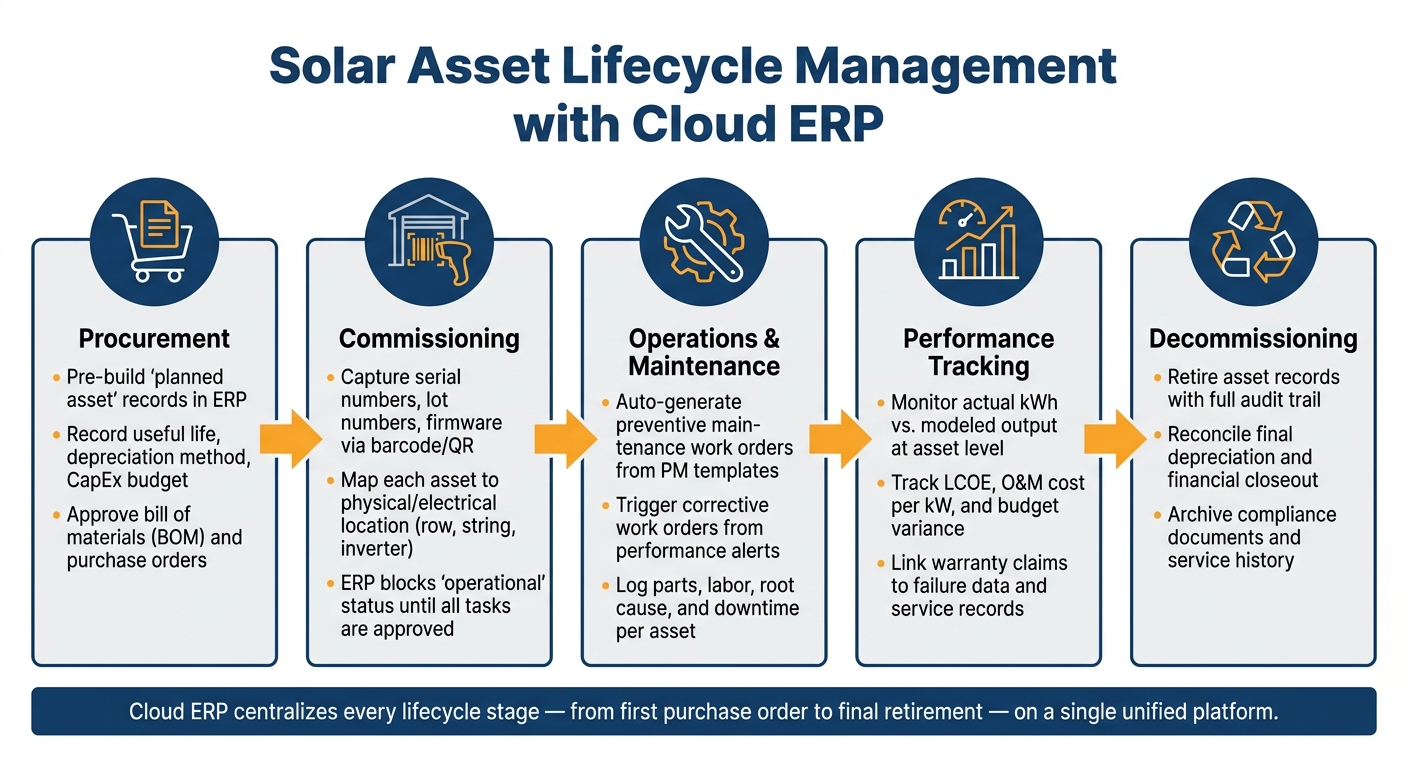
Managing a solar asset isn’t just about tracking its performance while it’s generating power. It’s about having a complete record of its journey – from the moment it’s ordered to the day it’s retired. Cloud ERP systems provide a unified platform to handle every stage of this lifecycle. By using standardized data and integrated workflows, these systems help ensure that assets are well-managed from procurement through retirement.
Simplifying Procurement and Commissioning
The lifecycle of a solar asset begins long before it starts producing energy. With a cloud ERP, you can create asset records even before the equipment arrives. This early data capture during procurement lays the groundwork for all future processes. For example, once a project’s bill of materials (BOM) is finalized and purchase orders are approved, you can pre-build “planned asset” records in the ERP for key components like modules, inverters, trackers, and batteries. At this stage, it’s essential to record financial details such as the asset’s expected useful life, depreciation method, capital expenditure budget, and anticipated commissioning date.
When the equipment arrives, it’s crucial to update these records promptly. Tools like barcode or QR scanners integrated with the ERP can streamline this process by capturing serial numbers, lot numbers, and firmware versions at the receiving dock or laydown yard. Requiring serial number entry at the time of receiving ensures there are no gaps in the data – gaps that can be difficult, if not impossible, to fix later.
During commissioning, each asset should be mapped to its exact physical and electrical location, such as a specific row, string, combiner, or inverter. Instead of relying on PDFs, structured commissioning data should be attached to the asset record. A properly configured ERP workflow can even block the system from marking the asset as “operational” until all commissioning tasks are completed and approved. This ensures nothing slips through the cracks.
Managing Preventive and Corrective Maintenance
Once the assets are operational, the focus shifts to keeping them running smoothly. Preventive maintenance (PM) is a key part of this. By creating PM templates for different asset types – like inverters, transformers, trackers, or batteries – you can standardize tasks, set maintenance frequencies (e.g., quarterly or annually), and define the required skills and consumables. Assigning these templates during commissioning allows the ERP to automate work order generation, saving time and reducing errors.
Corrective maintenance, on the other hand, is all about speed and traceability. When a performance alert is triggered, a corrective work order can be initiated immediately. This includes assigning a technician, logging parts and labor, recording the root cause, and documenting downtime. Keeping a detailed service history for each asset ensures that you have the insights needed for future decisions.
“Our solar solutions system will alert you to specific areas of deviation from plan so that you can then zero in on problem areas or opportunities to maximize revenues.” – Blu Banyan [4]
Collaboration tools like bluChat can further streamline maintenance processes. By enabling field technicians, office staff, and vendors to communicate directly within work order records, these tools help keep all relevant information in one place, reducing resolution times.
Tracking Performance and Financial Metrics
The final piece of lifecycle management involves tracking both performance and financial metrics. Monitoring actual kWh output against modeled expectations at the asset level provides valuable insights. For example, discrepancies can help prioritize maintenance visits based on performance issues rather than sticking to a rigid schedule.
On the financial side, connecting costs – such as operations and maintenance (O&M) labor, parts, warranty recoveries, and replacement capital expenditures – to broader portfolio-level metrics is essential. Key performance indicators (KPIs) like Levelized Cost of Energy (LCOE), budget variance, and O&M cost per kW offer a clear picture of whether an asset is still profitable. Additionally, tracking warranty eligibility within the ERP by linking failure data, service records, and vendor documentation simplifies the process of submitting and recovering warranty claims. [4]
Using ERP Analytics and Collaboration to Drive Improvement
Asset tracking is only as good as the decisions it informs. A cloud ERP system transforms raw operational data into actionable insights and provides a unified platform for teams to collaborate effectively.
Defining and Tracking Key Performance Indicators (KPIs)
Not every metric deserves attention. The key is to focus on KPIs that truly influence decision-making. For solar operations, this means analyzing a broad range of performance data rather than just energy output. Here’s a breakdown of impactful KPI categories:
| KPI Category | Metric to Track | Why It Matters |
|---|---|---|
| Financial | Project-specific profitability | Highlights high-cost regions or AHJs |
| Operational | Installation cycle time | Enhances resource scheduling and boosts customer satisfaction |
| Inventory | Cycle count accuracy | Prevents delays caused by missing components |
| Admin | Commission payout labor hours | Cuts administrative overhead and strengthens partner relations |
| Supply Chain | Preferred vendor order status | Provides real-time visibility into inbound goods |
Solar-specific ERP platforms like SolarSuccess offer custom dashboards and real-time alerts, enabling teams to catch deviations as they happen rather than waiting for end-of-month reports. According to the U.S. Department of Energy, soft costs – like permitting and financing – can account for as much as 65% of new solar installation expenses [5].
Once these KPIs are defined, the next step is ensuring seamless collaboration among teams to drive operational improvements.
Improving Team Collaboration
Fragmented tools and systems slow down decision-making. When emails, shared drives, and financial systems are disconnected, errors pile up and efficiency takes a hit.
Centralizing communication within the ERP changes this. Tools like bluChat and bluDocs integrate conversations, documents, and approvals directly into related project or asset records. This means field technicians, project managers, and finance teams all work from the same data source – no more chasing updates or reconciling conflicting information.
Titan Solar Power, the third-largest residential solar installer in the U.S., saw these benefits firsthand. After implementing the NetSuite-SolarSuccess platform and bluChat in February 2020, the company streamlined operations for its 153.5 MW capacity, reducing labor for partner commission payouts and speeding up project installation timelines.
“Sharing data across these systems was difficult, and in most cases our only way to ‘patch the holes’ was by adding labor. We wanted to get everything on one system.” – Aaron Casillas, Technology and Infrastructure Director, Titan Solar Power
Building a Continuous Improvement Loop
ERP analytics fuel ongoing improvements. By combining accurate KPIs with real-time collaboration, businesses can refine their processes continuously. As data grows – covering maintenance histories, vendor performance, installation cycles, and weather-related delays – patterns emerge that might otherwise go unnoticed in spreadsheets.
This data can inform smarter decisions, like optimizing preventive maintenance schedules, renegotiating vendor contracts, or reallocating field crews based on actual performance metrics.
Tying project milestones directly to accounting events – such as triggering customer invoices or commission payouts – further reduces administrative workload and speeds up the project-to-cash cycle. Each operational cycle generates better data, creating a feedback loop that supports smarter and scalable decision-making.
Conclusion and Key Takeaways
Tracking solar assets effectively isn’t just a nice-to-have – it’s a critical part of staying competitive. The strategies discussed here work together as a system: standardized data and governance provide a strong foundation, integrated monitoring and field systems bridge the gap between on-site activity and office visibility, and rigorous data quality and compliance controls safeguard your business during audits, financing reviews, and incentive claims.
Managing every stage of the asset lifecycle within a single cloud ERP – covering procurement, commissioning, operations, and eventual decommissioning – offers unmatched clarity. This setup enables better insights into asset performance, vendor reliability, and market trends. Combine that with consistent KPI tracking and collaboration tools, and you’ve built a feedback loop that drives continuous improvement. Research shows that renewable asset owners using integrated platforms with automated data flows cut manual reporting time by 30–50% and reduced data errors by up to 70%. Given that operations and maintenance (O&M) costs can make up 20–25% of a solar project’s total lifetime LCOE, even small efficiency gains can significantly improve margins.
If you’re ready to improve, start small. You don’t need to overhaul everything at once. Begin by cleaning up your asset master data and creating consistent IDs and hierarchies. Focus on integrating the tools that matter most, like production monitoring, work order systems, and field tools. From the start, design your workflows to meet compliance requirements, ensuring your documentation is always ready for audits, tax equity partners, lenders, and incentive programs.
For solar companies looking to streamline this process, solar-specific platforms like SolarSuccess by Blu Banyan – built on Oracle NetSuite – offer preconfigured solutions for asset tracking, project accounting, and integrations tailored to the solar industry. Tools like bluChat, bluDocs, bluConnect, and bluTime extend this foundation, ensuring all teams work from a single, unified dataset. Whether you choose a specialized partner or configure a general-purpose ERP system yourself, the goal remains the same: a cloud-based platform where standardized data, integrated monitoring, and portfolio-wide analytics work together seamlessly.
As the industry grows, having a solid ERP strategy becomes even more important. Global solar PV capacity is expected to reach 5,200 GW by 2030, up from around 1,100 GW in 2022. With the number of assets requiring professional digital management increasing rapidly, companies that treat cloud ERP as core infrastructure – not just a back-office tool – will be better equipped to scale, attract investors, and maintain top-performing fleets.
FAQs
What’s the first step to standardize solar asset data in an ERP?
The initial move toward efficiency is bringing operations together on a single cloud platform, such as SolarSuccess ERP. This system gathers all solar asset data in one place, improving accuracy, simplifying management, and offering real-time insights at your fingertips.
Which systems should a cloud ERP integrate with first for solar ops?
A cloud ERP must focus on integrating with supply chain and supplier management systems. This integration streamlines procurement, inventory management, and logistics – key elements for running solar operations efficiently.
How do I keep asset data audit-ready without extra admin work?
To keep asset data audit-ready without breaking a sweat, consider using automated workflows and tools like Blu Banyan’s SolarSuccess. This platform brings everything – project details, asset information, and financial data – into a single, real-time dashboard. By doing so, it cuts down on manual data entry and minimizes errors.
It also takes care of document tracking automatically. Contracts, permits, and compliance documents are neatly organized, while features like change order and contract management ensure a seamless audit trail. The result? Data that’s both accurate and easy to access whenever you need it.
