

Managing solar field dispatch can be chaotic without the right tools. Disconnected systems create inefficiencies like missed updates, scheduling conflicts, and inventory shortages. This leads to costly delays, repeat trips, and dissatisfied customers.
Solution: ERP systems, like SolarSuccess by Blu Banyan, centralize operations, automate scheduling, and integrate real-time communication tools. Here’s how it transforms solar dispatch:
- Centralized Data: Combines accounting, inventory, CRM, and project management into one platform.
- Real-Time Scheduling: Tools like bluTime match technicians to jobs based on skills and location.
- Mobile Integration: bluConnect automates task assignments and tracks inventory on trucks.
- Improved Communication: bluChat links field updates directly to project records.
- Performance Tracking: Solar-specific KPIs and dashboards highlight inefficiencies and trends.
- Inventory Management: Real-time tracking ensures technicians have the right parts on-site.
Results: Companies using SolarSuccess report 40% faster project completion, 20% fewer inventory errors, and lower costs by up to $0.18 per watt. This approach eliminates manual processes, improves resource allocation, and enhances overall efficiency.
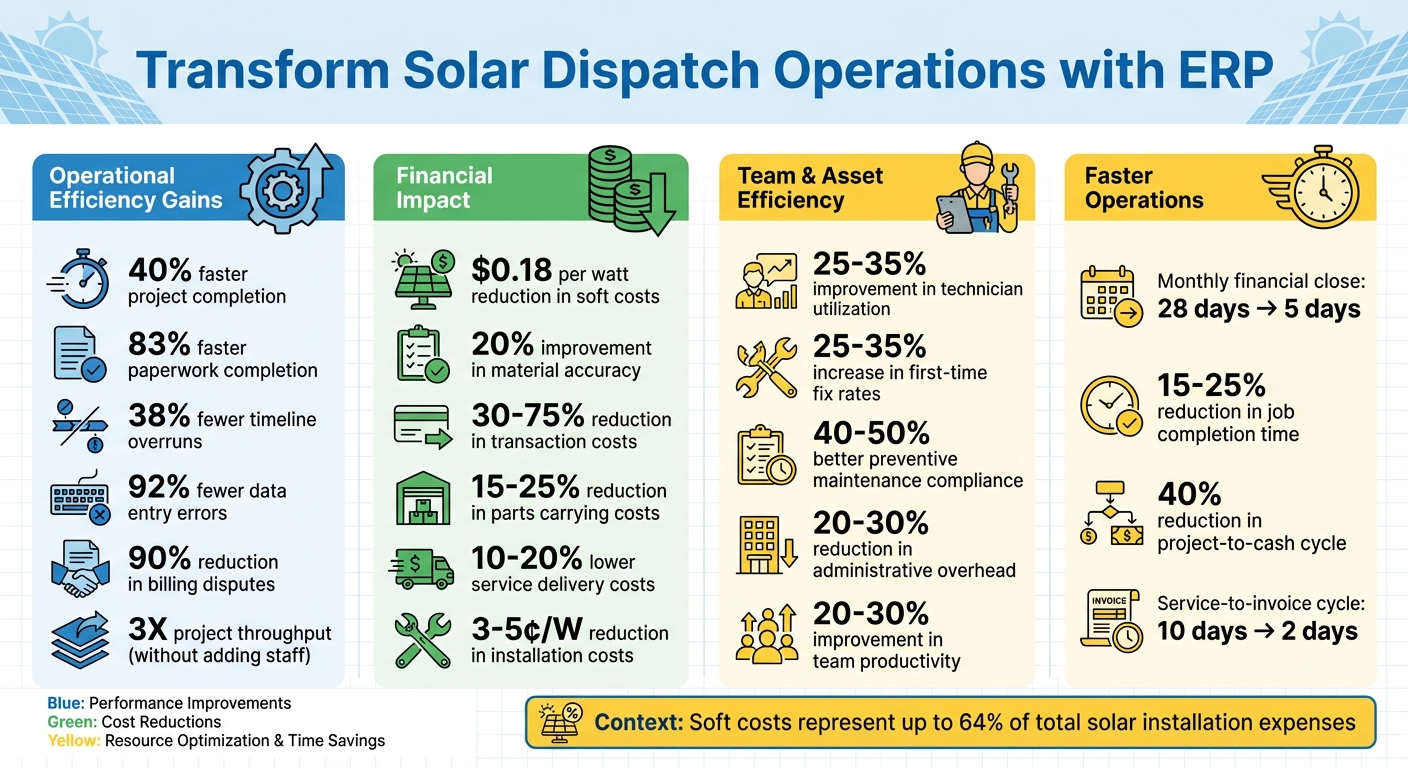
Solar ERP Benefits: Key Performance Metrics and Cost Savings
Step 1: Centralize Your Operations with SolarSuccess ERP
Managing a solar business with a mix of disconnected tools can lead to chaos. Imagine juggling QuickBooks for accounting, Salesforce for CRM, and spreadsheets for everything else. Each department ends up working with different sets of data, which means duplicate entries, miscommunication, and mistakes become the norm. SolarSuccess ERP changes the game by operating on Oracle NetSuite, offering a unified cloud platform where accounting, project management, CRM, and inventory management all share the same real-time data. This streamlined approach lays the groundwork for smoother operations and better efficiency.
Take POWERHOME Solar (Pink Energy), for example. Between 2020 and 2022, they swapped out their fragmented systems for SolarSuccess ERP. The result? They scaled to over $600 million in revenue with just six people on their finance team and cut their monthly financial close from 28 days to just 5 days. That’s the impact of having a single source of truth across your entire operation.
How Centralized Data Improves Dispatch
When all your operational data is centralized, dispatchers can make smarter, faster decisions. No more calling around to find available technicians or digging through spreadsheets to check inventory levels. Instead, everything is displayed on role-based dashboards accessible on both desktop and mobile devices. Field technicians can instantly access job details, submit completed work orders, and update their status, while the back office monitors labor costs, parts usage, and project milestones – all in real time.
This level of visibility completely transforms how field operations are coordinated. Dispatchers can see which technicians have the right certifications, who’s closest to the next job site, and whether the required parts are in stock or already on a service truck. Companies using SolarSuccess have reported a 40% reduction in the project-to-cash cycle and achieved 3X project throughput without adding more office staff. Plus, real-time inventory tracking can improve material accuracy by 20%, cutting down on those annoying trips back to the warehouse for missing components like inverters or mounting hardware. This streamlined approach not only simplifies dispatching but also supports ERP customization tailored specifically for solar businesses.
Customize ERP for Solar Operations
Generic ERP systems often force solar companies to adjust their workflows to fit the software. SolarSuccess flips the script – it’s designed specifically for solar operations, with modules that align perfectly with industry needs. It includes solar-specific features like project management, equipment tracking, energy production monitoring, and milestone-based billing. For example, you can set it up to trigger accounting events automatically as installers complete different project phases, from site surveys to final commissioning.
SolarSuccess also integrates seamlessly with the tools you already rely on. Through API connections, it syncs with monitoring platforms like Also Energy and SolarEdge, as well as proposal software like OpenSolar and Aurora. This eliminates the hassle of manual data entry and ensures records stay consistent across systems. Jan Rippingale, CEO of Blu Banyan, sums it up perfectly:
"The only way to… effectively reduce the soft costs… is with an integrated application suite that provides reliable data and a common interface across all functions".
Considering that soft costs can account for up to 64% of total solar installation expenses, centralizing operations isn’t just a convenience – it’s a smart move for your bottom line, cutting installation costs by 3-5¢/W.
sbb-itb-2560759
Step 2: Improve Scheduling with Real-Time Tools
After centralizing operations, the next move is to integrate real-time scheduling tools into your workflow. Relying on traditional methods like whiteboards, phone calls, or spreadsheets doesn’t cut it when you’re managing multiple technicians across various job sites. By combining SolarSuccess ERP with bluTime, scheduling becomes a proactive, adaptable process that adjusts to real-world changes as they happen.
The key benefit here is visibility. Dispatchers no longer have to rely on guesswork or outdated information. Instead, they can see everything in one place: which technician is certified for specific tasks like inverter repairs, who’s wrapping up early, and who’s stuck in traffic. This real-time synchronization between the field and office allows for quick reassignment of jobs, ensuring the right technician reaches the right task at the right time. With centralized data feeding into these tools, dispatching becomes far more accurate and efficient.
Use bluTime for Dynamic Scheduling

bluTime takes SolarSuccess ERP into the field with location-based tracking, giving you precise updates on where your technicians are and what they’re doing. This removes the guesswork of manual time entries and ensures payroll reflects actual work, not estimates. Dispatchers can confidently track technician status, knowing the data is accurate and up-to-date.
For urgent tasks, bluTime’s smart filters make it easy to find the nearest certified technician within a 5-mile radius. This skills-based and location-aware dispatching can significantly reduce administrative overhead – by as much as 20-30% for mid-sized solar companies. Technicians can even use the mobile app to self-schedule nearby jobs, cutting down on unnecessary back-and-forth communication with the office. To tie it all together, project dashboards provide a complete overview of operations, ensuring nothing slips through the cracks.
Use Project Dashboards for Better Visibility
Project dashboards take real-time scheduling a step further by consolidating all active job data into one view. The All Projects Gantt Chart dashboard, powered by SolarSuccess ERP, lets you compare multiple project timelines side by side. This makes it easier to identify potential conflicts and address them before they cause delays. Wondering if you have enough crew for an upcoming installation? The dashboard shows real-time resource allocation, helping you avoid double bookings or underutilized staff.
When unexpected changes occur – like weather delays, equipment issues, or jobs running longer than expected – you can quickly adjust schedules using the drag-and-drop interface. Simply move a calendar tile, and the project record updates automatically. With one-click drill-down features, you can seamlessly switch from a high-level timeline to specific task details without navigating multiple screens. This streamlined approach leads to quicker decisions and fewer scheduling headaches, keeping your operations running smoothly.
Step 3: Automate Dispatch Assignments with Mobile Tools
Say goodbye to the delays and confusion of old-school dispatch methods. Real-time scheduling takes the guesswork out of assigning tasks. With bluConnect, technicians are automatically matched to jobs based on factors like location, skill set, and priority. This means no more manual juggling – just the right person for the right job, every time.
But it doesn’t stop at assignments. bluConnect integrates field data with back-office systems, ensuring everything from project management to accounting stays in sync. For example, technician updates – like work logs or parts used – are instantly reflected in the SolarSuccess ERP system. This reduces paperwork, keeps budgets accurate, and streamlines operations. SolarSuccess, which now supports nearly one-third of rooftop solar installations in the U.S., showcases how effective this system can be for scaling solar projects.
Assign Technicians Automatically with bluConnect
bluConnect’s automated filters take the hassle out of dispatching. Instead of manually checking certifications or proximity, the system instantly evaluates these factors alongside job priority. This ensures that technicians with the right skills handle complex tasks while cutting down on travel time. Plus, bluConnect tracks truck inventory in real time, so technicians arrive with the parts they need for first-time fixes. Considering that a single extra truck roll can cost around $475 in the solar industry, this feature can save significant costs.
The mobile interface also gives technicians access to job details, inventory updates, and work logs from anywhere. By automating assignments and equipping teams with the right tools, bluConnect sets up a seamless workflow. But automation is only part of the equation – clear communication ensures everything runs smoothly.
Send Real-Time Updates and Notifications
With centralized data and real-time scheduling, bluConnect keeps everyone in the loop. Once a job is assigned, technicians receive instant notifications on their mobile devices, complete with site details, task requirements, and any special instructions. If priorities shift or schedules change, the system updates automatically, ensuring no one is working with outdated information.
Dispatchers can also monitor progress in real time and adjust assignments on the fly. For instance, if a technician finishes early, they can be reassigned to a new task immediately, keeping operations efficient. As Joe Marhamati, Co-Founder of Big Sun Solar, shared after adopting SolarSuccess:
"We’re doing more with the same number of people and we have a system that’s more reliable and less stressful than tracking a million different spreadsheets".
Step 4: Improve Communication with bluChat Integration
Automated dispatch and real-time updates are game-changers – but their true potential lies in how quickly and effectively your team can communicate. bluChat brings instant communication directly into SolarSuccess, eliminating the need for multiple communication tools. With this feature, field technicians can report problems, ask questions, or request assistance directly within the ERP system. Meanwhile, office staff can access complete project details instantly, streamlining collaboration.
This seamless communication builds on real-time scheduling to create a fully connected workflow. For instance, if a technician flags an issue, every conversation is automatically linked to the relevant work order or project record. This means dispatchers can immediately view job details, inventory status, and technician updates. As Blu Banyan explains: "When every assignment, update, and decision happens inside NetSuite, your projects stay on track and your team stays aligned".
Enable Real-Time Communication for Field Teams
bluChat offers mobile instant messaging, allowing technicians to send text updates, attach photos of site issues, or request materials – all within the ERP. Take this scenario: A technician discovers an inverter fault during installation. With bluChat, they can instantly share diagnostics with the office team. Engineers can then review the information, provide remote guidance, and update the work order – all within minutes.
bluChat also connects with SMS providers like MessageMedia, pulling external text messages into the ERP workflow. This ensures that no communication happens "off the grid." Every message is logged, searchable, and permanently tied to the project, giving teams full visibility into all discussions.
Increase Team Productivity with Integrated Tools
bluChat doesn’t just facilitate communication – it also enhances overall efficiency. Its native integration with SolarSuccess combines communication, scheduling, and project management into a single platform. Technicians can check job details or inventory status without bouncing between apps, while scheduling and communication are unified within the ERP.
This kind of integration has a real impact. Research suggests that unified communication platforms can improve team productivity by 20–30% by reducing miscommunications and speeding up task transitions. For solar companies managing teams spread across multiple job sites, these improvements translate into fewer delays, lower costs, and timely installations. By embedding communication directly into SolarSuccess, bluChat helps solar businesses stay efficient and on schedule, laying the groundwork for smoother operations ahead.
Step 5: Track Performance with Solar-Specific KPIs and Analytics
After fine-tuning your dispatch and communication workflows, the next step is to measure performance effectively. This ensures your operations stay on track and continue to improve. Tools like Blu Banyan’s SolarSuccess ERP make this easier by offering tailored dashboards that focus on solar-specific KPIs. These dashboards provide a clear, centralized view of essential metrics, complete with features like color-coded alerts and heat maps. For example, they can quickly flag issues such as underutilized technicians or overdue installations, helping managers address problems before they grow.
Measure Dispatch Efficiency
Monitoring the right metrics is key to identifying and addressing inefficiencies. For instance, optimizing job assignments can lead to a 15–25% reduction in job completion time. Assigning technicians based on their skills and proximity to job sites can improve technician utilization by 25–35%. Giving field technicians access to complete system histories can increase first-time fix rates by 25–35%, cutting down on follow-up visits. Additionally, automated scheduling enhances compliance with preventive maintenance by 40–50%, which can lower service delivery costs by 10–20%.
Analyze Trends for Ongoing Improvement
Looking beyond day-to-day performance, historical data offers valuable insights for long-term planning. SolarSuccess ERP keeps a detailed record of every dispatch event, enabling you to identify patterns and refine strategies. For example, if data shows recurring inverter failures in a specific area during summer, you might adjust inventory levels and schedule proactive maintenance to address the issue. This kind of analysis can cut inventory costs by 20–30% while increasing energy production by 3–7%.
To stay ahead, managers should generate monthly reports that highlight utilization trends and use forecasting tools to anticipate seasonal resource demands. A great example of this approach is Lightsource bp, which implemented the SolarGrade platform in 2023. This tool streamlined field data management and analytics, leading to quicker response times and better coordination between operations and maintenance teams. By continuously refining dispatch strategies based on these insights, solar companies can tackle operational hurdles and protect their profit margins.
Step 6: Manage Resources Better with Inventory Integration
After streamlining scheduling and dispatch, the next step is managing inventory to align resource planning with field operations.
Efficient dispatch hinges on having all necessary materials available on time. Imagine a technician arriving at a job site without essential items like solar panels, inverters, or mounting hardware – projects get delayed, and costs pile up. SolarSuccess ERP tackles this issue by centralizing inventory tracking and integrating it into the dispatch process. With real-time visibility into stock levels across warehouses and field vehicles, the system ensures materials are allocated and ready before technicians head out.
Ensure Resources Are Available for Jobs
SolarSuccess simplifies resource allocation with its Bill of Materials (BOM) integration, which links each project type to its required components. When a work order is generated, the system automatically checks inventory against the BOM and reserves the necessary materials for that job. This eliminates competition between projects for limited stock.
The platform also offers real-time tracking of truck inventory, giving dispatchers an up-to-the-minute view of what each technician has on hand. Blu Banyan highlights how this ensures "your techs show up with the right parts every time, eliminating discrepancies and costly extra truck rolls". For solar companies juggling multiple installations across various sites, this level of coordination can cut parts carrying costs by 15–25% while boosting first-time fix rates.
This approach not only improves efficiency but also sets the groundwork for minimizing delays through smarter planning.
Reduce Downtime with Better Planning
SolarSuccess ERP continuously monitors inventory levels and sends automated alerts to procurement teams when stock dips below specified thresholds. These alerts allow companies to reorder materials ahead of time, avoiding project delays caused by shortages. The system also supports just-in-time (JIT) ordering, enabling real-time purchasing decisions that keep installations on track without tying up capital in excess inventory.
Beyond alerts, SolarSuccess leverages historical project data and CRM pipeline insights to predict future material needs. This demand forecasting feature can lower inventory costs by 20–30% by aligning stock levels with actual project demands. Additionally, the platform integrates with suppliers like BayWa r.e., providing live catalog updates and enabling direct purchase orders as soon as stock is confirmed.
Best Practices for Maintaining Your ERP System
Once you’ve aligned your inventory and dispatch processes, it’s critical to focus on maintaining your ERP system over the long haul. Many solar companies tend to neglect this, which can lead to performance issues down the line. Blu Banyan highlights the importance of ongoing maintenance:
"It is also crucial to keep up with maintenance and support for long-term success. You can either set up an in-house support team or engage with the software vendor for ongoing technical assistance, software updates, and bug fixes".
By following proper maintenance practices, you ensure your ERP system remains a dependable foundation for all your solar operations.
Conduct Regular System Audits and Updates
Periodic reviews of your SolarSuccess ERP system are essential to keep up with changing business requirements. With Business Activity Monitoring, you can automatically track the system’s health and receive alerts about potential issues before they affect your operations. This proactive approach helps avoid disruptions, especially in dispatch workflows. Additionally, maintaining detailed audit trails for changes and financial transactions ensures compliance and accountability. To prevent costly errors, it’s also important to enforce strict version control for your BOM and project designs.
Blu Banyan emphasizes the value of regular optimization:
"Regularly review and optimize the software configuration to accommodate evolving business requirements and industry trends".
If you’re using a cloud-based platform like Oracle NetSuite, which powers SolarSuccess, the system handles core infrastructure updates and security patches automatically. This reduces the workload on your internal team. Pairing regular system reviews with ongoing user training ensures you’re getting the most out of your ERP system.
Train Your Employees on ERP Tools
The success of your solar ERP system hinges on how effectively your team can use it. Proper training is essential to unlock the system’s full potential. For field technicians, focus on mobile tools that allow them to log work, track truck stock, and submit expenses directly from job sites. For dispatchers, mastering smart filters in the scheduler – designed to match jobs with technicians based on skills, location, and priority – can eliminate the hassle of manual assignments.
Training shouldn’t be a one-time event. Offer ongoing sessions, create user manuals, and provide video tutorials to reinforce learning. Key areas to cover include Project Action Management for automating approvals, real-time analytics to interpret solar-specific KPIs, and tools like bluChat for seamless communication between field and office teams. Teaching staff to use automation features like Preceding Action Automation helps eliminate human error in task sequencing and keeps projects running on schedule.
Conclusion
Streamlining solar field dispatch operations bridges the gap between disconnected systems and fragmented data. With SolarSuccess ERP, you can centralize operations using its integrated tools for scheduling, mobile dispatch, and communication, creating a unified system that ensures seamless coordination between field and office teams.
The benefits are clear: 83% faster paperwork completion, 38% fewer timeline overruns, and 92% fewer data entry errors. Automated billing and consolidated systems reduce billing disputes by 90%, while real-time inventory tracking ensures technicians arrive fully equipped, avoiding costly return trips.
The financial advantages are just as striking. SolarSuccess users have reported a decrease in soft costs of approximately $0.18 per watt, which is significant given that soft costs can account for up to 64% of a solar system’s total cost. Additionally, integrated platforms slash transaction costs by 30%–75%, delivering a strong return on investment.
But the impact goes beyond numbers. Field technicians can focus on installations instead of paperwork, dispatchers can quickly adapt to shifting schedules, and project managers gain real-time insights into progress. Customers also benefit from timely updates via integrated portals, leading to increased satisfaction and fewer support calls.
To get started, assess your current workflows, set clear objectives like reducing the service-to-invoice cycle from 10 days to 2 days, and implement the system in phases with robust training. When your tools for dispatch, scheduling, inventory, and communication are all connected to a shared database, you’re not just improving efficiency – you’re building a scalable, profitable future in the competitive solar industry.
FAQs
What data should be centralized first for dispatch?
To streamline dispatch operations, the first step is bringing together essential project and resource information. This includes details like technician availability, skill sets, locations, and job requirements. Having this data in one place allows for real-time scheduling, smoother work order assignments, and improved team coordination.
Another critical piece is inventory and material data. By integrating this information, you can ensure that necessary parts are on hand for scheduled jobs, reducing delays and avoiding the need for repeat visits.
By centralizing these core data sets, solar operations can achieve more efficient dispatching and make quicker, more accurate decisions in real time.
How does ERP choose the right technician for a job?
ERP systems streamline technician assignments through smart scheduling and dispatch tools that factor in skills, location, and job priority. For instance, Blu Banyan’s SolarSuccess uses real-time automation to match technicians with tasks based on their expertise and proximity. By tapping into real-time data, these systems ensure technicians are assigned efficiently, leading to improved service quality and faster response times.
What KPIs best measure dispatch performance?
Key performance indicators (KPIs) for tracking dispatch performance in solar operations include:
- Milestone progress: This tracks critical stages like permitting and installation to ensure projects are moving forward as planned.
- Resource utilization: Measures team efficiency and inventory levels, highlighting how effectively resources are being deployed.
- Operational efficiency: Focuses on uptime and processing speed to assess how smoothly operations are running.
These metrics offer valuable insights into project timelines, cost control, and scheduling accuracy, making it easier to fine-tune ERP systems and enhance dispatch performance.
