
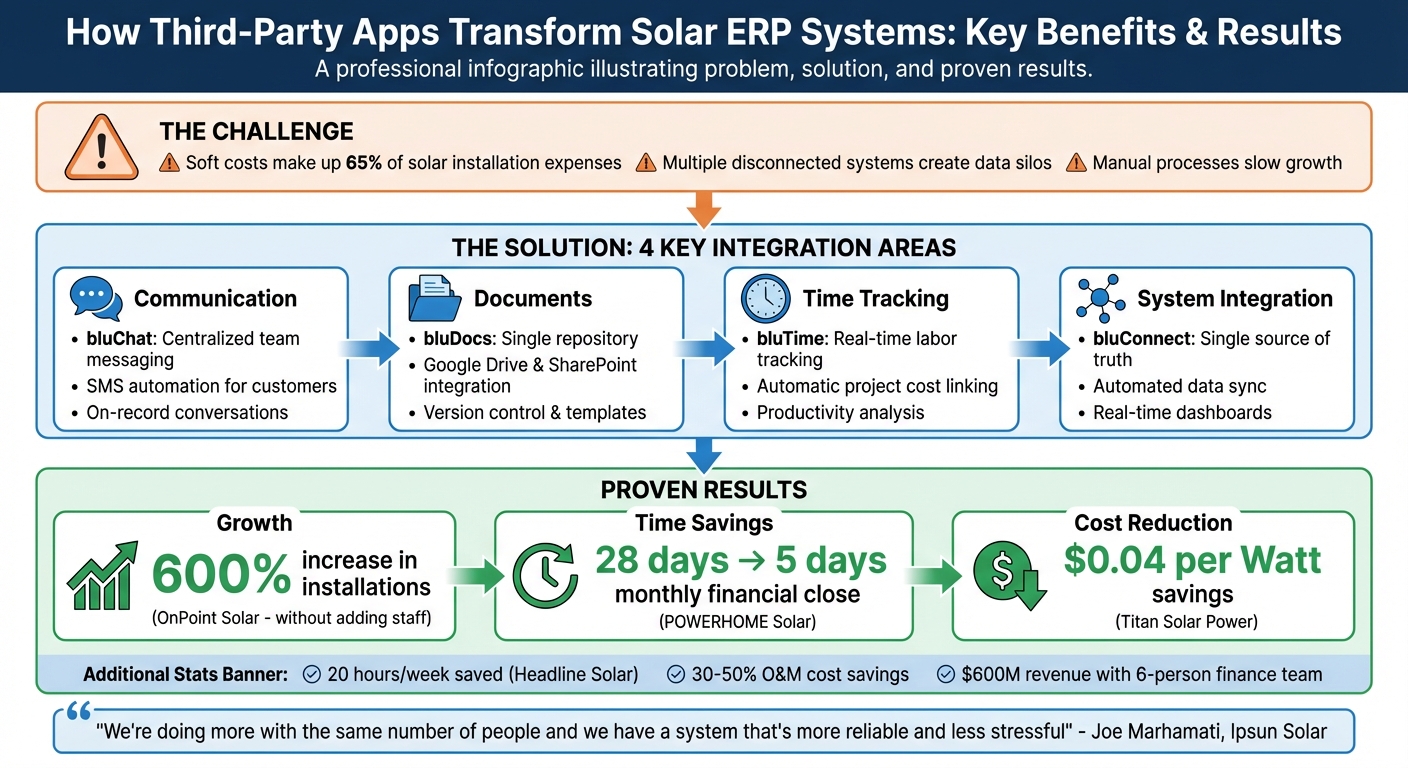
Third-party apps can make Solar ERP systems like SolarSuccess more effective by addressing gaps in functionality. These integrations simplify communication, document management, system integration, and time tracking – key areas where solar companies often face challenges. By automating workflows, reducing manual tasks, and centralizing data, these tools help solar companies lower costs, boost efficiency, and scale operations without needing to expand their workforce.
Key Takeaways:
- Soft Costs Reduction: Soft costs, which can make up 65% of a solar installation’s expense, are minimized through automation and better data management.
- Improved Communication: Apps like bluChat centralize team communication and automate customer updates via SMS.
- Streamlined Document Management: Tools like bluDocs integrate with platforms like Google Drive, providing a single location for contracts, permits, and blueprints.
- Better Time Tracking: bluTime links labor costs directly to projects, offering real-time insights into crew activities.
- System Integration: bluConnect consolidates data from various tools, creating a single source of truth for project updates, financials, and approvals.
- Scalability: Automation enables companies to handle more projects without increasing staff.
Results:
Companies like OnPoint Solar and Ipsun Solar have seen significant growth and efficiency gains by integrating third-party apps. For example, OnPoint Solar increased installations by 600% without adding staff, and Ipsun Solar streamlined invoicing to handle more projects.
To get started, evaluate your current system, identify gaps, and choose apps that align with your needs. Proper training and ongoing optimization are essential to maximize the benefits of these integrations.
Third-Party Apps Impact on Solar ERP Systems: Key Benefits and ROI Statistics
Benefits of Integrating Third-Party Apps with Solar ERP Systems
Integrating third-party apps with SolarSuccess transforms it into a comprehensive operational ecosystem, tackling the unique challenges solar installers face daily. From managing field crews to tracking project milestones and ensuring smooth customer interactions, these integrations do more than add convenience – they enhance efficiency and directly impact profitability. Together, they streamline operations and bring teams closer together.
Better Real-Time Collaboration and Communication
Solar projects often involve multiple teams spread across different locations – sales reps meeting clients, installers on rooftops, permitting specialists handling regulations, and project managers overseeing everything. Third-party apps like bluChat simplify communication by creating a centralized hub within SolarSuccess, replacing scattered email threads. SMS integration further automates customer interactions, while bluConnect Zoom logs meeting notes and tasks directly into SolarSuccess, ensuring key decisions are preserved.
Field service tools like FieldAware keep field technicians and office staff in sync, providing real-time updates that improve resource allocation and overall workflow.
"We’re doing more with the same number of people and we have a system that’s more reliable and less stressful than tracking a million different spreadsheets", said Joe Marhamati, Co-Founder & VP at Ipsun Solar.
Simplified Document Management and Workflows
Solar installations generate a mountain of paperwork – contracts, permits, blueprints, and more. With bluDocs, teams can integrate platforms like Google Drive and SharePoint into SolarSuccess, creating a secure, unified space for file storage with version control. This eliminates the hassle of digging through multiple platforms or endless email chains to find the right document.
Workflow automation takes things a step further by triggering actions based on project milestones. For instance, when a project hits a specific construction phase, the system can automatically generate invoices or initiate e-signature workflows for contracts. Automated data extraction reduces errors and frees up staff to focus on higher-priority tasks.
Better Time and Resource Management
Accurate time tracking is critical for understanding project profitability and allocating resources effectively. Tools like bluTime make timekeeping seamless, ensuring labor costs are recorded accurately and linked to specific projects within SolarSuccess. This real-time data gives managers a clear picture of how crews are spending their time.
With this insight, bottlenecks can be identified, staffing optimized, and resource needs forecasted more precisely. For solar companies looking to grow, this efficiency means scaling operations without simply adding more staff to fix inefficiencies.
Increased Integration and Data Access
Managing separate systems for CRM, field service, and financials can create silos that slow down decision-making. Integration tools like bluConnect solve this by linking these systems to SolarSuccess, creating a single source of truth.
Monitoring integrations with platforms like SolarEdge and AlsoEnergy provide real-time insights into both technical and financial performance, complete with interactive charts and site layouts. Direct connections with distributors like BayWa r.e. streamline supply chain planning by offering instant access to inventory and ordering data. Customizable dashboards pull together key metrics, empowering managers to make informed, data-driven decisions.
"Reconciliation time decreased substantially, and data was much more accurate, giving leadership confidence in making better business decisions", noted Craig Pals, Vice President and Founder at Tick Tock Energy.
Lower Costs and Scalability
By eliminating redundant systems and automating manual processes, third-party apps help solar companies cut operating costs. Instead of juggling multiple standalone tools, businesses can build an integrated ecosystem around SolarSuccess using targeted SuiteApps. This approach is particularly effective at reducing soft costs, which can account for up to 65% of a solar installation’s total expenses.
Scalability also becomes more achievable without needing to expand the workforce proportionally. Automated invoicing, centralized communication, and seamless data sharing allow teams to manage more projects simultaneously. As the business grows, the system adapts, supporting new markets or service lines without requiring a complete technology overhaul. For solar companies operating on tight margins and aiming for ambitious growth, this combination of cost savings and scalability is a game-changer.
Key Third-Party Apps for SolarSuccess
Blu Banyan‘s SuiteApps integrate directly with SolarSuccess, simplifying communication, document management, system integration, and time tracking. These tools eliminate the hassle of switching between platforms, creating a unified workspace where teams can manage their operations efficiently. Each app addresses specific challenges in the solar energy industry while contributing to a more connected workflow. Let’s take a closer look at the key SuiteApps that enhance SolarSuccess.
bluChat: Streamlined Communication for Solar Teams
bluChat brings real-time communication into SolarSuccess, allowing teams to collaborate without leaving the platform. Its on-record communication feature links chat threads to relevant SolarSuccess records, ensuring every conversation is centralized and contextually tied to the project.
External collaborators can also join specific threads, speeding up issue resolution. Automated notifications – both email and on-platform – keep team members updated whenever they’re tagged in a conversation.
"bluChat uniquely supports both On-record and direct communications between staff, partners, vendors and customers." – Blu Banyan
bluChat also integrates with SMS through trusted partners, enabling automated customer updates via text. All chat history is searchable and auditable, and dedicated channels and groups make organizing workflows easier.
bluDocs: Simplified Document Management
bluDocs centralizes contracts, permits, blueprints, and compliance records within SolarSuccess, offering a single, well-organized repository. It integrates seamlessly with Google Drive and SharePoint, so teams can continue using familiar tools while benefiting from enhanced organization and security.
Drag-and-drop functionality makes file uploads effortless, while automatic project-specific organization ties documents directly to relevant solar projects. Revision tracking and version control ensure a complete history of document updates, reducing errors and supporting compliance needs. Solar-specific templates are also available to standardize processes and meet the documentation requirements of various financiers.
In January 2023, Headline Solar adopted SolarSuccess to streamline sales, fulfillment, and installation management. By consolidating project accounting and document management onto a single platform, they eliminated manual journal entries and automated month-end processes. These improvements saved their finance team 20 hours per week and enabled smoother scaling across five contract stages.
"SolarSuccess has helped us with the ease of use of everything from accounting to project management. It is a huge time saver to find information about a project easily. Having a single source stack like this SuiteApp as opposed to segmented apps everywhere, or even Google Drive, has made it much easier and faster to access data." – User Review, SuiteApp.com
When document management ends, system integration picks up with bluConnect.
bluConnect: Centralized System Integration
bluConnect provides seamless connectivity to leading solar software, consolidating data from multiple applications into SolarSuccess. This ensures a single source of truth and automates the synchronization of financials, project updates, and approvals, eliminating redundant data entry.
One standout feature is its ability to link project milestones to accounting events. For example, when a project hits a specific construction phase, bluConnect can automatically generate invoices, initiate payment workflows, or update financial records. This keeps financial data accurate and up-to-date, offering real-time insights into project profitability.
bluConnect also integrates with platforms like SolarEdge and AlsoEnergy, delivering real-time technical and financial performance data through interactive charts and site layouts. Customizable dashboards pull together essential metrics from all connected systems, helping managers make well-informed decisions.
bluTime: Effortless Time Tracking

bluTime simplifies time tracking by allowing employees to log hours directly within SolarSuccess. Labor costs are automatically linked to specific projects, providing managers with real-time insights into crew activities and potential bottlenecks.
The app’s productivity analysis highlights workforce trends, helping inform decisions about staffing and resource allocation. Additionally, time data integrates seamlessly with payroll and project accounting, ensuring labor costs are accurately reflected in project profitability calculations.
How to Integrate Third-Party Apps with Solar ERP Systems
Bringing third-party apps into SolarSuccess involves a step-by-step approach: pinpoint where your current system falls short, select the right tools to fill those gaps, and ensure everything works together smoothly. This method helps you get the most out of SolarSuccess while enhancing its core capabilities.
Review Your Current SolarSuccess Setup
Start by examining how your current setup is performing. Are there bottlenecks in project tracking, financial oversight, or team communication? Use SolarSuccess’s customizable dashboards to identify where data is stuck in silos or where teams are wasting time switching between platforms. For example, if your finance team struggles with reconciliations or project managers lack real-time updates, these are clear signs of areas that need improvement.
This review helps you figure out which third-party apps will make the biggest impact and align with your operational needs.
Choose Compatible SuiteApps
SolarSuccess offers pre-built integrations with many leading solar industry tools, making it easier to find the right fit. Check the SolarSuccess 3rd Party Integrations Showcase to see which apps are already designed to work with your system. Focus on Native NetSuite applications – they help maintain a single source of truth and ensure data syncs automatically. The goal is to select apps that directly address the gaps you’ve identified, whether it’s improving collaboration, managing documents and data, integrating systems, or tracking labor.
Configure and Test Integrations
After choosing your apps, it’s time to set them up. Use NetSuite’s built-in settings to configure seamless data transfers. For more complex needs, rely on standard integration tools to automate workflows between SolarSuccess and the new apps. Train your core teams to use the integrations effectively in live environments, and adjust settings based on their feedback. Testing is crucial – make sure data flows correctly, triggers work as expected, and teams can access everything they need without interruptions.
Ongoing monitoring after the setup ensures these integrations keep delivering value.
Monitor Performance and Optimize
Once the integrations are live, track key metrics to measure their impact. For instance, keep an eye on how reconciliation times improve, whether data accuracy increases, and how quickly teams can access project updates. Tick Tock Energy, for example, saw significant reductions in reconciliation times and improved data accuracy after implementing SolarSuccess integrations. This gave their leadership team more confidence in making informed decisions.
Set up automated milestone tracking so actions like invoicing happen automatically when projects hit specific stages. Regularly audit workflows to eliminate manual data entry, and configure dashboards to give each department real-time access to the metrics that matter most to them. By continuously monitoring and refining these integrations, you ensure they remain effective and deliver consistent results over time.
sbb-itb-2560759
Results from Third-Party App Integrations
The benefits of efficiency, streamlined data, and cost reductions discussed earlier translate into measurable improvements in operations, smarter decision-making, and financial returns.
Better Operational Efficiency
Third-party apps are game-changers for automating manual tasks, speeding up solar operations. For example, Titan Solar Power slashed costs by approximately $0.04 per Watt by adopting transaction automations that reduced office overhead. Tools like bluDocs and bluConnect eliminate the need for manual data entry, cutting down hidden costs and easing team workloads. Additionally, integration with the AHJ Registry simplifies permitting by providing instant access to jurisdiction maps and contact details for any U.S. address.
These operational boosts lay the groundwork for accurate, real-time data that supports better decision-making.
Better Data Visibility and Decision-Making
Centralized data access is transforming how solar companies make decisions. Norwich Solar Technologies, for example, used SolarSuccess to unify data across its subsidiaries, solving a major headache for CFO Spencer Newman:
"Our financial close was incredibly complicated and fraught with errors because we have so many subsidiaries consolidating together. That problem has almost gone away completely. We can look at all of our subsidiaries as standalones or consolidate them into our main financials."
Meanwhile, bluConnect integrates with tools like HubSpot and Salesforce to keep all data in one place. This prevents duplicate entries, reduces errors, and ensures real-time access to critical metrics like project costs, labor allocation, and profitability.
Cost Savings and ROI
When efficiency meets clear data, the financial returns speak for themselves. POWERHOME Solar trimmed its monthly financial close from 28 days to just 5 by implementing NetSuite and SolarSuccess. This automation allowed the company to scale to over $600 million in revenue with a finance team of only six people.
Other integrations, such as Paystand and EBizCharge, automate payment processing to cut soft costs, which can make up as much as 64% of a solar project’s total cost. Milestone-based invoicing automations also boost cash flow by triggering payments as soon as projects hit key construction stages. Companies using advanced monitoring and automated alerts have reported 30% to 50% savings in Operations and Maintenance costs. Additionally, automated calculations for deferred revenue, work in progress, and commissions save significant accounting time.
In early 2025, Big Sun Solar harnessed SolarSuccess and bluActions™ to unify operations, enabling real-time costing and smoother project execution. This achievement earned Blu Banyan the NetSuite Spring 2025 Solution Provider Spotlight Award.
Best Practices for Getting the Most from Third-Party Apps
Review Business Needs Regularly
As your solar company grows and takes on new projects, your needs within the SolarSuccess ecosystem will naturally shift. That’s why it’s crucial to periodically reassess your business objectives before choosing or reevaluating third-party apps. Whether you’re looking to streamline project management, improve resource allocation, or tighten cash management, having clear goals in mind is key.
To ensure your app ecosystem serves everyone effectively, bring together a cross-functional team with representatives from project management, finance, operations, and IT. Their feedback will help you address the unique requirements of each department.
To avoid unnecessary features and functionality, create a detailed requirements document or an RFP (Request for Proposal). It’s also important to confirm that third-party providers are part of an official Independent Software Vendor (ISV) program, which ensures they’ve been vetted and certified to integrate with your ERP system. Additionally, review vendor roadmaps to confirm they’re actively investing in the app’s development and have plans for future enhancements. This step helps ensure that the app remains a sustainable solution for your business in the long run.
Laying this groundwork makes it easier to implement effective training and refine your systems over time.
Use Training and Support Resources
Even the most advanced integrations can fall short without proper training. To get the best results, offer thorough training that covers both the technical aspects of the third-party apps and the broader industry practices they support. Blu Banyan emphasizes this point:
"Invest in Training: Provide comprehensive training to your employees on both the software and industry-specific best practices. Well-trained staff can leverage the software’s capabilities to their fullest extent."
Standardize and document procedures for every stage of app installation to reduce errors and provide a consistent learning framework. Encourage collaboration across teams – such as sales, project management, and customer support – so everyone understands how data flows between systems. Use resources like user manuals, video tutorials, and ongoing training sessions to keep your staff up to date with software updates and improvements.
Once your team is trained, regularly assess how well the system is performing to ensure it continues to meet your evolving business needs.
Monitor and Optimize Continuously
To measure the success of your integrations, establish Key Performance Indicators (KPIs) that track project timelines, resource usage, cost control, and overall efficiency. Use customizable dashboards to monitor real-time metrics and trends across departments. By analyzing this data regularly, you can spot bottlenecks, identify areas for improvement, and make proactive adjustments.
As your business grows, revisit and fine-tune software configurations to align with changing needs and industry trends. Test these updates against your established goals to ensure they continue delivering value. Work closely with software vendors to develop features that boost productivity. As Aaron Casillas, Technology & Infrastructure Director, explains:
"Our strategic partnership with Blu Banyan enables us to identify and prioritize specific features for development that will increase our productivity."
Don’t forget to conduct regular data audits and clean up any inaccuracies to keep the information flowing between your ERP and third-party apps accurate and actionable. Additionally, set automated reminders for maintenance tasks within your O&M module to maintain long-term asset performance.
Conclusion
Third-party apps elevate SolarSuccess from a reliable ERP system to a centralized hub that manages your entire solar operation. With tools like bluChat, bluDocs, bluConnect, and bluTime, you can replace disjointed platforms and manual processes with a unified system. These integrations enable real-time collaboration, smoother document management, automated workflows, and precise time tracking – all working together to create a seamless operational experience.
Take Ipsun Solar as an example: by automating milestone-based invoicing, they’ve managed to handle more projects without increasing their team size. As VP Joe Marhamati put it:
"Our partnership with Blu Banyan allows us to do more with less".
Similarly, Tick Tock Energy saw a noticeable reduction in reconciliation time after adopting SolarSuccess, giving their leadership the confidence to make smarter business decisions. These operational improvements aren’t just about convenience – they translate directly into a competitive edge in the solar industry.
By automating administrative workflows and cutting soft costs, which can account for as much as 65% of installation expenses, these tools allow businesses to scale without adding extra staff. The result? Labor-intensive tasks are transformed into efficient, automated processes, enabling companies to grow project volumes while maintaining operational efficiency.
To get started, review your current SolarSuccess configuration and pinpoint areas where your workflows fall short. Then, choose the SuiteApps that address those gaps. Be sure to configure integrations carefully, test them thoroughly, and monitor performance using real-time dashboards. As your business evolves, refine your setup based on actual performance data to ensure continuous improvement.
These integrations do more than streamline operations – they help build a growth-focused strategy. In a fast-paced solar market, having real-time operational visibility is key to staying competitive. Leveraging third-party apps within SolarSuccess doesn’t just enhance your software; it lays the groundwork for scalable growth, allowing your team to focus on delivering exceptional installations and driving your business forward.
FAQs
How do third-party apps help reduce soft costs in solar ERP systems?
Third-party apps make life easier by automating data synchronization between SolarSuccess and other tools. This eliminates the need for manual data entry and cuts down on duplicate work, saving both time and effort. They also allow for automated milestone invoicing, which helps speed up collections and keeps cash flow steady.
On top of that, these apps provide real-time project visibility, which improves efficiency and helps reduce labor, administrative, and financing costs by minimizing delays. By streamlining collaboration and handling repetitive tasks automatically, they help trim down the hidden costs that often come with managing solar projects.
How can solar companies integrate third-party apps with their ERP system?
To link third-party apps with your solar ERP system, start by pinpointing the tools you’ll need – whether it’s a customer portal, a messaging platform, or a CRM solution. Then, see if your ERP system, like SolarSuccess, provides pre-built connectors for these apps. These built-in integrations can make the process much easier and minimize the need for custom coding.
Next, plan how data will flow by mapping out what needs to sync between the ERP and the app. This could include projects, inventory details, or invoices. Once you’ve mapped it out, set up the integration by installing the connector, authenticating the app, and matching up the data fields. Before making it fully operational, run a test using a small amount of data to make sure everything syncs as expected. Lastly, ensure your team is trained on any updates, and keep a close eye on the integration to maintain accurate data and smooth operations.
How can solar companies successfully adopt and optimize third-party app integrations for their ERP systems?
To successfully adopt third-party app integrations, solar companies should focus on solutions tailored specifically for the solar industry. These tools should integrate effortlessly with existing ERP systems, avoiding the need for extensive customizations. For instance, platforms like SolarSuccess come with pre-built connections to key applications for field service, customer portals, and communication. This ensures data stays synchronized and eliminates the hassle of complex in-house integrations, while also creating a unified view of operations by connecting project management, accounting, and CRM data.
Rolling out these integrations should be approached as a change-management process. Begin with a pilot project and involve key team members, such as field technicians and sales staff, from the start. Providing hands-on training for the new tools is essential. By enabling real-time collaboration and streamlining workflows, companies can make faster decisions and cut down on manual processes. Setting clear performance goals – like reducing inventory costs or boosting operational efficiency – helps measure success and fine-tune the system as needed.
For ongoing success, it’s important to regularly monitor the performance of integrations, schedule periodic reviews, and take advantage of support services to apply updates or incorporate new apps. This proactive strategy ensures the system evolves with the business, keeping operations smooth and data accurate over time.
